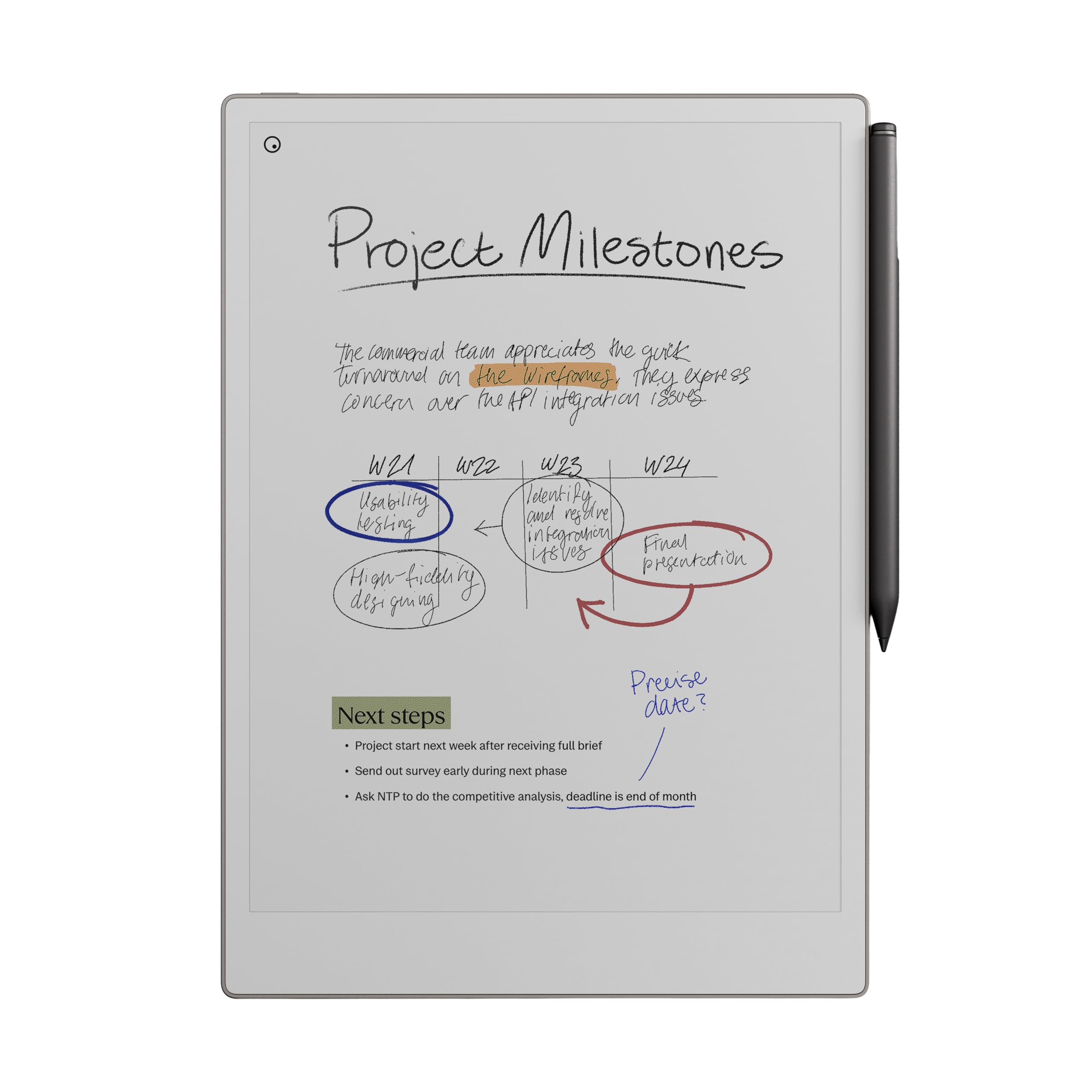
📝 Elevate your ideas with the ultimate digital paper experience — because your notes deserve to be as vibrant as your vision.
The reMarkable Paper Pro is a sleek, ultra-portable digital notebook featuring an 11.8-inch color LCD with 2160x1620 resolution, a low-glare display, and an adjustable front light. It includes the Marker Plus pen with built-in eraser and 6 spare tips, offering a natural, paper-like writing feel. With 16GB storage, 8GB RAM, and up to two weeks of battery life, it supports distraction-free note-taking, PDF annotation, and instant handwriting-to-text conversion. Designed for professionals seeking focused creativity, it syncs seamlessly with desktop and mobile apps via USB-C and Bluetooth.


| ASIN | B0DG9ZXWMK |
| Age Range Description | Adult |
| Aspect Ratio | 16:10 |
| Battery Average Life | 2 weeks |
| Battery Capacity | 5030 |
| Battery Cell Type | Lithium Ion |
| Best Sellers Rank | 1,531 in Computers & Accessories ( See Top 100 in Computers & Accessories ) 4 in eWriters |
| Box Contents | reMarkable Paper Pro, Marker Plus Pen, 6 Replacement Marker Tips, USB-C Cable |
| Brand | remarkable |
| Brand Name | remarkable |
| Colour | Gray |
| Compatible Devices | Desktop, Smartphone, Tablet |
| Country of Origin | Vietnam |
| Customer Reviews | 4.2 out of 5 stars 1,473 Reviews |
| Display Type | LCD colour |
| Display resolution maximum | 2160*1620 Pixels |
| Generation | 3rd Generation |
| Graphics Description | Integrated |
| Hardware Interface | USB Type C |
| Human Interface Types | Touchscreen with Stylus Support |
| Item Dimensions L x W x Thickness | 36L x 22.7W x 2Th centimetres |
| Item Weight | 526 g |
| Item height | 2 centimetres |
| Lithium Battery Energy Content | 19.25 Watt Hours |
| Manufacturer | reMarkable |
| Maximum Display Resolution | 2160*1620 Pixels |
| Memory Slots Available | 1 |
| Memory Storage Capacity | 16 GB |
| Memory storage capacity | 16 GB |
| Model Name | RM81C-1000NW |
| Model Number | RM81C-1000NW |
| Model name | RM81C-1000NW |
| Native Resolution | 1920 x 1080 pixels |
| Network Connectivity Technology | USB |
| Operating Systems | Other |
| Operating system | Other |
| Other Special Features of the Product | Portable |
| Processor Brand | Rockchip |
| Processor Description | Rockchip |
| Product Warranty | 1-year limited warranty |
| RAM Memory Installed | 8 GB |
| Screen Size | 11.8 Inches |
| Screen size | 11.8 Inches |
| Specific Uses For Product | Painting, Drawing, Writing |
| Warranty Type | Limited |
| Wireless Compability | Bluetooth |
| Wireless Technology Type | Wi-Fi |
S**Y
Apple-like hardware build quality with Windows-like dodgy software but recommended
Beautiful hardware with basic software but I absolutely love it. The writing experience is clearly where the development of this device has been focused. The software is basic and there are some annoying quirks and bugs. For example, I have had out of memory errors switching between PDF’s and notebooks (necessitating a restart) and the eraser sometimes does not work when zooming in. This should not happen at this price point. The screen refresh does not bother me but it is clear they have “cheaped out” on choice of processor. Despite all this it excels in what it was designed for. I take copious notes and it has rarely (see above) let me down. The sync is instantaneous and the notebooks created are great. It has a nice tagging system for classifying notes. Battery life is so-so. I have the light switched off and it will get me through a working day but it will need charging regularly. I recommend this (dependent on your use case.) For me it is spot on, but if you want, for example, a Goodnotes feature-laden like or wide app choice experience you won’t get it. It just focuses on handwritten notes. The handwriting feel is top drawer.
D**9
Definitely worth the money
I bought the reMarkable Paper Pro a few months ago, and it has quickly become part of my daily routine. I use it every single day for work and personal notes, and it has completely replaced all of my other notebooks. I used to carry around a stack of different pads and jotters, but now everything is in one place and perfectly organised. The build quality is excellent. It feels solid and well made, with a really premium finish that makes it a pleasure to use. The writing experience is brilliant. The texture of the screen feels very close to real paper, and the pen responds instantly without any delay. It makes handwriting feel natural again, which is something I had really missed since switching to digital devices. What I particularly like is how clean and simple the interface is. There are no distractions, no unnecessary apps or pop-ups, just a calm space to think and write. The connection between the device and the computer app works perfectly too. My notes sync automatically, so I can start writing on the Paper Pro and continue later on my laptop without any fuss. The new features are a nice bonus. The colour and frontlight additions make it more versatile, and the speed improvements are noticeable. I have had no problems with battery life, and the pen still feels great to use every time. I have read a lot of mixed reviews about digital notebooks over the years, but this one has genuinely impressed me. It is not trying to be a tablet or a laptop. It is designed to help you focus, think, and write, and it does that better than anything else I have tried. If you enjoy writing by hand but want the convenience of keeping everything stored and backed up digitally, the reMarkable Paper Pro is worth every penny. It feels professional, reliable, and thoughtfully designed. I would honestly struggle to go back to paper now.
S**.
A very professional device that is what it is designed for without all the bells and whistles.
The reMarkable Paper Pro is a wonderful device and thus far I am loving using it. I love the size of the device, one of the main reasons I opted for the reMarkable Paper Pro and that it is dedicated for note taking and organising into individual folders, tagging pages, etc. Although you need to download and install an individual app on the computer for reMarkable, it's fairly straight forward, and adding PDF files if you have any eBooks in that format or ePub you can easily drag and drop across. For that, it is pretty decent compatibility with eBooks, just not for many of the other formats, unfortunately, but I'm not overly fussed on that as I use my Kindle Paperwhite for reading use. You'll find that if you use the device on full brightness, it's a pretty decent amount of light, you'd see that in person rather than from videos. However, intensive use that I use it for taking down a lot of notes from videos for my language learning, the battery will go down over the course of a day. I've used it just using a normal light and the backlight of it set to zero and it worked great. I had also done research and you can use the device whilst plugged into the laptop whilst it charges, it doesn't have any effect on the life of the battery. So long as you use it from time to time mostly away from charging to allow the battery to recycle, you're fine. The device for functionality is straightforward; learning to draw straight lines you just draw a line and if you hold it, it'll do it automatically, same for circles. Learning the menus are pretty straightforward, and creating a new notebook, don't confuse it as a page, you can create pages within notebooks, check the three dots menu and you'll find it there. I've found the quality of the screen to be fantastic, the device is very professional looking, I haven't had any issue with the light bleeding as some may have complained, I think it looks fantastic, it's a very textured feeling with writing and drawing anything. Whilst it is not going to be exactly like paper, it's good enough and feels great to write with. The refreshing of the screen happens a lot, but you get used to it. As for the weight of the device, I've found it's fairly light, I haven't had any major issues, it fits nicely alongside my Macbook Pro 16" and is nice and thin, I certainly have no issues regarding weight and is very portable, it just requires the right bag for it. All in all, this device is targeted for note taking and is not for all the bells and whistles of other uses like some of the other devices. I love the size and ability to use colour for highlighting which I do a lot and looks very professional. When connected to the computer you can use the app you download and install to export to PDF which I love. I'm very pleased with the device.
A**R
Bricked after first charge
Product was what I expected and quite good. But following my first overnight charge screen got stuck on 'Starting Up' screen and was bricked. Tried all the things advised on the web-site and in forums nothing worked so sending it back. For such an expensive product this is such a poor experience I'm probably not going to replace it and may try the Amazon one hoping the quality is better.
P**N
It's a great idea - well executed, but it's heavy and expensive.
I've been using it for two weeks now and it's growing on me. I'm the type of person that normally buys every gadget and fits it in to my life, but over the years I've tried using various tablets, both with and without a stylus and I've never found one that replaces the faithful notepad and pen. I've tried a Kindle for reading, and that lasted about a fortnight. I'd seen Remarkable doing the rounds and had it in the back of my mind, but nothing more. This was until I was sat in a meeting with a client and she was using one and I saw how useful it may be, she let me have a go at writing on it and I was blown away at how much it didn't feel like writing on a tablet with a stylus.. So I bit the bullet, used a load of saved up Amex points, and treated myself. Upon opening the package, it was obvious that this was a quality device. It was packaged well, and has some serious weight to it - the tablet itself just feels like quality. The online setup process felt easy and was completed in a couple of minutes and I was ready to start using the Remarkable. After two weeks of using it, the biggest frustration I have is the weight - on the one hand, it feels quality, but on the other, it feels chonky compared to the A4 spiral pad that it's there to replace. Holding it in one hand is not ideal for long periods of time - which is a shame. After two weeks, I still haven't gotten used to this bit of it. The size of this tablet, it's slightly too big to fit comfortably. I never used the Remarkable 2, so can't directly compare, but the digital ink type of screen is perfectly bright in most scenarios, although some of the background templates could do with an option to make them darker on a sunny day. The backlight is a nice feature, but I can't imagine I'll rely on it too much. Finally, we come down to the price - aside from my phone, this is the most expensive digital device I've purchased in many years - and it's essentially a notepad. The ability to fill in forms and send them straight through to the office is valuable, and the fact I can store my notes on the cloud is very useful, but it's still over £600 of hardware to get started. If it wasn't for the fact I'd spent years building up points that I would probably never have used, then I probably wouldn't have bought one.
A**R
So worth the investment- getting me organised!
I had been debating for a while about going for it with a Paper Pro, and I am so glad I did! I constantly write copious notes across various notebooks or typing on my phone or computer and had to find a way to consolidate everything into once place. I really prefer writing but was taking ages typing up my written notes to share out for myself or my team. This piece of kit is a game changer for me! Super light, the pen feels like a real one, as does the paper finish to write on, the writing experience is AMAZING and so easy to make neat and digestible with lots of editing short cuts. There are many options to format, and the convert to text and email functionality I have used so much! It’s making my notes and organisation so much better and there is so much more to discover. I love the highlighting, colour and underlining options to make my notes easy to digest and read quickly too. It’s a slim, and very chic piece of kit which is lightweight and fits into my laptop bag easily, and the battery life so far is extensive. Highly recommend for anyone who needs a personal organiser that saves you significant time! I am learning as I go and the quick videos and content made by remarkable on how to get the best out of it are easy to digest and learn from. Love it!!
A**R
Great upgrade to the ReMarkable 2!
I was a ReMarkable 2 user. I upgraded to the ReMarkable Paper Pro (RPP). ReMarkable are the only paper tablets I've used and this upgrade was well worth it. Amazon's own pay in 3 options really helped as it's well documented just how expensive this product is, but as an avid note taker for work on a daily, hourly basis it's a tool that has saved me countless notebooks (although I'm nowhere near having saved the cost of 2x remarkable devices in saved notebook expense). What it has saved me is storage space and time and effort in organising and finding my notes with the help of tags. Start using tags immediately -finding your notes without them once you're several months in can be a pain. Everything that I wanted to be improved from the RM2 has been upgraded for RPP. Colour and backlight are also well documented and both very delicate yet effective. Less well publicised is the slightly larger screen and the improved detail possible with pen styles and widths. Where the RM2 was prone to blurring and flaring the strokes at the screen edges this one maintains tight and improved detail throughout. While heavier and slightly larger, mine is always desk bound and so remains comfortable to use or rather holding it is never an issue for me. The addition of colour is very good. There are many different types of colour from highlighters to R,G,B, magenta, orange, cyan, yellow, grey... plus shaders which give you different depths and strengths of each colour. Don't expect OLED vibrancy of colour however... The colours are pale, (washed out even) on the RPP's own screen, which is fine for note taking - but they're strong and vibrant once you open your document on PC, phone or tablet screens. There was nothing about this purchase that I regret, but it definitely comes down to the balance of price versus need as it's not cheap.
A**E
Bye-bye paper notebooks!
Can not imagine my life without it! it’s writing on real paper and in a real notebook. Adapts to your handwriting , writing style and penmanship. Super light,thin and easy to carry around.Easy to navigate and sync with other devices. No distraction from other apps… bye -bye paper note books !
Trustpilot
1 month ago
1 week ago



