We remain fully operational. Our teams are working around the clock to ensure your deliveries continue safely.

DOWNLOAD THE APP


Customer Services
Copyright © 2025 Desertcart Holdings Limited
DOWNLOAD THE APP

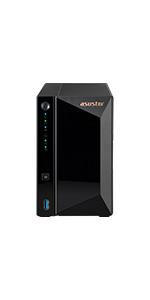
🚀 Elevate your digital domain with Asustor AS5402T — where speed meets style and storage meets future-proofing!
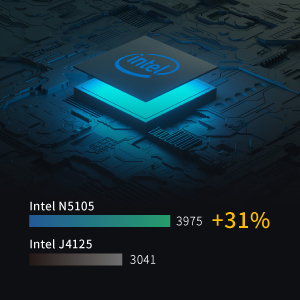
The Asustor AS5402T is a high-performance 2-bay NAS featuring a 10nm Intel Quad-Core 2.0GHz Celeron N5105 CPU, 4GB DDR4 RAM, and four M.2 NVMe SSD slots for blazing-fast storage expansion. Equipped with dual 2.5GbE Ethernet ports and USB 3.2 Gen 2 connectivity, it’s designed for seamless cloud storage, gaming, and live streaming. Its sleek design includes thermal vents for optimal cooling, making it a reliable and future-ready network storage solution for professionals and tech-savvy millennials.






| ASIN | B0C5MB5MTS |
| Best Sellers Rank | #14 in Network Attached Storage (NAS) Enclosures |
| Brand | Asustor |
| Color | AS5402T |
| Customer Reviews | 4.4 4.4 out of 5 stars (248) |
| Date First Available | May 18, 2023 |
| Hard Drive | Solid State Drive |
| Hardware Platform | PC |
| Item Dimensions LxWxH | 9.06 x 4.49 x 6.69 inches |
| Item Weight | 4.4 pounds |
| Item model number | AS5402T |
| Manufacturer | Asustor |
| Product Dimensions | 9.06 x 4.49 x 6.69 inches |
| Series | AS5402T |
S**G
Good NAS at a good price
The unit is easy to set up, Asustor's documentation is good. Performance seems fine so far. The construction is solid, and the disk mounts are easy to use.
T**M
Great replacement for older NAS systems
I've had a D-Link ShareCenter for years but it's not been without issues. Had to downgrade my Windows SMB service to 1.0 to maintain connection and file transfers were on the slow side. What prompted me to finally replace the system was a desire to improve a Plex server I maintained on an old laptop. I wanted something that did not reset itself at unwanted times and an easy mechanism to add more media. My storage needs are not that great but wanted to maintain RAID 1 so the Asustor seemed to fit the bill. Installation was straightforward with good setup apps. As I was reusing disks from my D-Link, I needed to off-load all data and reload onto the Asustor but this was mostly an unattended process. The only issue I had was to disable SMB 1.0 on my PCs to allow the higher security versions to work. The Plex install went smoothly and I soon had a stable server up and running. A nice bonus was the Asustor android apps that allow remote access to files. I have not tested this product as a media center although it has the HDMI port and several media player apps. A word of warning, as this machine has a heart of Linux, several of the apps listed in the app center appear to assume the user has some knowledge of the Linux OS. I suspect there are many that are simple to set up but be prepared to dust off your reference books for others.
K**.
Major upgrade from my old WD
Getting motivated/excited to upgrade your NAS is difficult; your old one seems "good enough" so why bother? This thing is worth the bother! It has the power and expandablity to be a real workhorse. It runs Docker like a champ! It has enough processing power to run Plex with real-time transcoding. Optional SSDs serve as read/write caches to speed things up. I have the NAS in a closet and under heavy access, you can hear the drives, but the NAS itself is very quiet. It rarely needs a reboot and has been rock solid for me.
J**E
Took a gamble on this, and so far it seems to have paid off.
I've only ever owned Synology NAS units. I've owned several over the years. Haven't had a NAS for a couple of years and felt it was time to remedy that. Synology has gone in a weird not-customer-friendly direction lately -- they are engineering it so you are *urged* to purchase their over-priced NAS hard drives and get error or warning messages if you upgrade the memory with non-Synology RAM (Synology's own RAM is also horribly overpriced). And they seem to be falling behind in that they still only offer gigabit ethernet ports on their consumer NAS units. But Synology is tops when it comes to their NAS software, it's easy to use. But their hardware is not top-tier. So I evaluated several of tehir competitors' offerings and came up with Asustor having the best value proposition - superior hardware, but their software is a little unpolished, but their software gets the job done. More importantly is that they include 2.5 gigabit ethernet ports, 4 NVMe SSD ports, and the ability to use any compatible RAM and HDDs without the NAS pestering you with errors or warnings. So far it's been good. As fast as I expected, has been stable. So far it's been a more economical choice over Synology. As long as you are responsible with your settings and how you expose (or DO NOT expose) your NAS to the internet, you should be good to go.
D**.
For its use-case its a great little box, buy ram upgrade
I set 4-2 tb nvme and raid 6 the nvme then raid 1 on 2 10tb deskstar. I have both storages accessible via smb and apfs my pc’s back up to this and my macs. Its slow for the first 2 days while it builds the array but that aside its a solid box 3-5 min boot and so far stable. Take the time plan out its use. Its slower than much larger nas products but its amazing for its cost and performance. My one complaint and its not on the unit but the nextcloud software *think self hosted google drive but better features* the pre built installer is hard to re configure as its designed to self build. Run docker and compose the next cloud instance vs using the stores version in my opinion. Solid unit. I chose this over the all nvme version as i wanted fast and slow storage to provide more storage cheaper. Its permission manager is explicit deny wins over explicit allow so watch permissions when setting share users. Great dashboard great os amazing hw. In 3-5 years with a new stronger cpu i see this competing in enterprise. Medium small company’s
E**S
Enjoying the NAS
So far I like it . Setup was very easy unlike UGreen NAS witch was so complicated for me I sent it back and got the Asustor. Got my plex server set up in 20 min.
R**S
This is an excellent product that delivers fast and reliable performance. I had previously been using a Buffalo NAS, but once the company discontinued its service, the associated software stopped functioning on my iPhone. After switching to this solution, I have been very impressed with its stability, ease of use, and overall value. It is a worthwhile investment for anyone seeking a dependable NAS system.
A**R
Som utlovat
M**E
M.2が利用でき、パソコンからスマホまでバックアップできるツールが揃っている
H**R
Awesome server, it's perfect. I use this as a DLNA server for music. I had previously used the Windows 11 media streaming, which was awful. The Asustor is much better, and works as it should with my HEOS app (Windows did not). The option to use SSDs is great, totally silent operation, and fast. I used an external SSD to migrate my music library on the the drives. At one point it must have had a power outage and lost all the data. I got help from tech support; they guided me to get another drive and upgrade to RAID1 mirroring, which should prevent that from happening again. Tech support was very informative and helpful.
S**O
Hardwer very good, software could be better
Trustpilot
1 day ago
2 weeks ago