
DOWNLOAD THE APP


Customer Services
Copyright © 2025 Desertcart Holdings Limited
DOWNLOAD THE APP
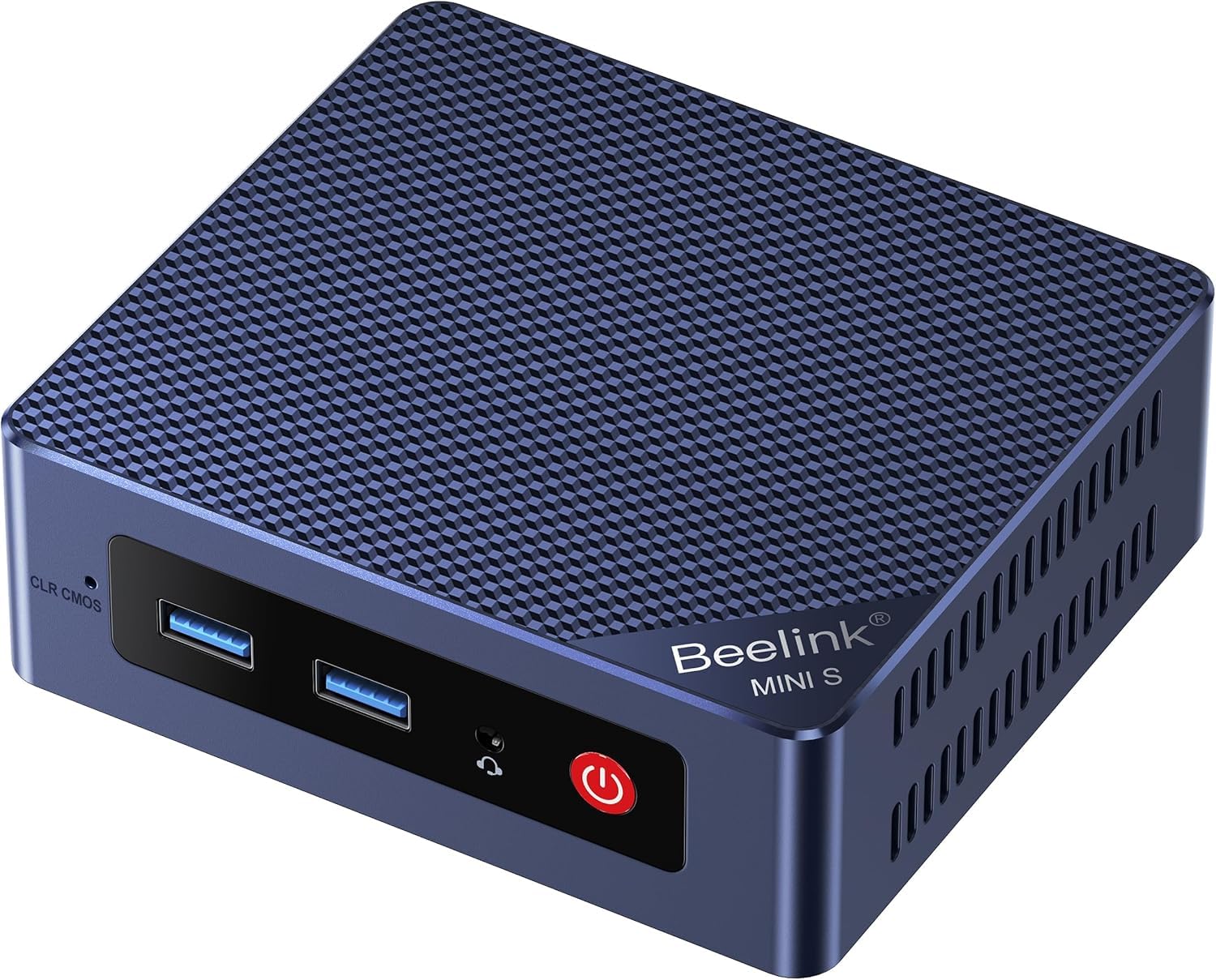
🚀 Mini PC, Mega Power – Work Smarter, Not Harder!
The Beelink EQi13 Pro Mini PC packs a professional-grade Intel Core i5 13500H processor with 12 cores and 16 threads, paired with 32GB DDR4 RAM and a 1TB PCIe 4.0 SSD for blazing-fast performance. Dual HDMI ports support 4K@60Hz displays, while dual Gigabit LAN, WiFi 6, and Bluetooth 5.2 ensure top-tier connectivity. Its built-in 85W PSU and ultra-quiet cooling system deliver a compact, efficient, and distraction-free workstation perfect for business, content creation, and multitasking professionals.


| ASIN | B0FWK62QFS |
| Aspect Ratio | 16:9 |
| Best Sellers Rank | #2,227 in Computers & Accessories ( See Top 100 in Computers & Accessories ) #83 in Mini Computers |
| Brand | Beelink |
| Built-In Media | 1*AC Cable 150cm, 1*EQi13 Mini pc, 1*HDMI 100cm, 1*User Manual |
| CPU Model | Core i5 |
| CPU Model Number | 13500H |
| CPU Model Speed Maximum | 4.7 GHz |
| CPU Speed | 4.7 GHz |
| Cache Memory Installed Size | 18 MB |
| Cache Size | 18 MB |
| Color | White |
| Compatible Devices | Keyboard, Mouse |
| Connectivity Technology | Bluetooth, LAN, USB, Wi-Fi |
| Cooling Method | Fan |
| Customer Reviews | 4.5 out of 5 stars 310 Reviews |
| Display Resolution Maximum | 3840x2160 |
| Display Type | External HDMI |
| Graphics Card Description | Integrated |
| Graphics Card Interface | Integrated |
| Graphics Coprocessor | Intel Iris Xe Graphics |
| Graphics Description | Integrated |
| Graphics Ram Type | Shared |
| Hard Disk Description | SSD |
| Hard Disk Interface | PCIE x 4 |
| Hardware Interface | Ethernet, HDMI, USB |
| Human-Interface Input | Keyboard |
| Keyboard Layout | QWERTY |
| Manufacturer | Shenzhen AZW Technology Co., Ltd. |
| Memory Clock Speed | 3200 MHz |
| Memory Speed | 3200 MHz |
| Memory Storage Capacity | 1 TB |
| Model Name | EQi |
| Model Number | EQi |
| Native Resolution | 4k |
| Number of Component Outputs | 2 |
| Operating System | OS |
| Personal Computer Design Type | Mini PC |
| Power Consumption | 25 Picowatts |
| Processor Brand | Intel |
| Processor Count | 12 |
| Processor Series | Core i5 |
| Processor Socket | NA2 |
| Processor Speed | 4.7 GHz |
| RAM Memory Installed | 32 GB |
| RAM Memory Technology | DDR4 |
| RAM Type | DDR4 SDRAM |
| Ram Memory Maximum Size | 96 GB |
| Resolution | 4K |
| Specific Uses For Product | Business, Education |
| Style Name | Compact |
| Total Expansion Slots Quantity | 4 |
| Total Number of HDMI Ports | 2 |
| Total Usb Ports | 5 |
| UPC | 810180174824 |
| Video Output | HDMI |
| Video Output Interface | HDMI |
| Video Processor | Intel |
| Warranty Description | 1 |
| Wireless Compability | 802.11ac |
| Wireless Technology | Bluetooth, Wi-Fi |
A**E
Great unit for the right applications.
Very happy with my Beelink. I setup a firewall/router with this unit, and it's been running perfectly! It ran decent with Windows 10 (about as well as can be expected with the N150 CPU), but it's absolutely perfect for a Linux build. I would not game on this unit, but for light productivity, or dedicated Linux applications, you can't beat the size, power consumption, or the price.
D**S
2.5G Intel NICs, low power, quality build. EQ14
I'm impressed so far. My greatest fear was that the Beelink EQ14 mini pc would NOT have intel NICs, but in fact it does have a pair of I226 (high quality) intel NICs making it a perfect box for proxmox, opnsense, or pfsense. I'm very happy how cool and quiet the fan is so far. Using this to configure a router firewall has gone well (it's not deployed yet). The memory and ssd appear to be no name so hopefully they will hold up over time.
L**N
Beelink Mini-PC, EQ12 16GB DDR5 500GB SSD, Intel Alder Lake-N100 (up to 3.4GHz)
I activated the Windows 11 Pro NVMe, then pulled that out and put in a Silicon Power 512GB NVMe and installed pfSense on it. Then I pulled that one out and put a Teamforce ver. 4x3 Z440 1TB NVMe in it and installed LMDE 6 (Linux Mint Debian Edition). I had to update the kernel on LMDE 6 to 6.5 so that it would run the AX101 WiFi 6 network card and the 5.2 Bluetooth. I use an Arzopa S1 15.6" 1080p HDR portable monitor with it that is powered and video delivery from the USB C port, and an Anozer model CCT5 stand for the monitor that doesn't sink down like some other stands. I haven't used the magnetic cover as a stand for it. This little machine runs fantastic. I bought it for the pfSense, I'll get another one when the price comes back down to what I paid for this one $209, because two days later it went to $259, then one more day it went to $279. I'm glad I bought this little Mini PC, the EQ12 with the 512GB NVMe (it says 500GB on specs list, but it's a 512GB) and 16GB of RAM is fast and snappy and will run what you want on it. I wouldn't use it for gaming though, but as a general computer it runs great. I may try some video editing with it, but not going to encode any videos with it. I haven't tried the extra SATA port for an SSD, but I will with the LMDE 6 soon and measure transfer speeds with Kdiskmark on Linux. Great little machine. Oh the 2.5GbE port closest to the power plug is the #1 port, other one is the #2 port. Edit: I changed out that weak AX101 WiFi card to an Intel BE200 WiFi 7 card, which made it screaming fast on wireless.
K**O
Buy for PfSense!
Fantastic for PfSense! Works like a charm. Mine has the intel NIC and not the realtek from other reviewers. Totally worth it. I plan on buying a few more soon for other areas. It came with windows 11 home pre-installed. Not bad for the price!
C**E
A basic computer that handles simple tasks quite well
I mounted this mini computer on my TV to handle simple tasks like email, video chatting, and smart home management. Compared to the top-of-the-line, same generation, Intel processor in my laptop, it's much slower and less responsive, but considering its price, functionality and small size, it's a great fit. Key features are good port availability, quiet performance, and value. The SSD can be upgraded, but unfortunately you'll be stuck with 16 Gb of RAM. I set up my own Windows account and one other local Admin account to allow my wife to access Outlook under her own credentials. This turned out to be a good ideal. Like most Windows systems, it requires immediate updating. Its modest speed and memory made updating quite lengthy, requiring about a dozen restarts, many of them manual. It was taking so long and not letting me login between reboots, I almost decided it was defective and needed to go back. My perseverance was eventually rewarded. However it still "stuck" at my login window, probably due to some Windows 11 conflict. Fortunately, that second local Admin account allowed me to get in, delete the first Admin account and create another. I was then able to login to Microsoft for both users and finish setup. I can't blame Beelink for this issue and it might not be a problem for you. That said, play it safe by setting up a second local Admin account before you begin the updating process.
J**F
Tiny Box, Big Bite — This Thing Eats Threats for Breakfast
I’m seriously impressed with this Beelink EQ14 Mini PC. Right now, it’s running my Arista NG / Untangle firewall setup like a champ — IPS, NAT, ACLs, all of it. It chews through traffic without hesitation and stays cool, quiet, and steady the whole time. Before that, it was my OPNsense box, and it handled that job just as effortlessly. It eats threats — nom, nom, nom — without breaking a sweat. Before becoming my edge protection (basically a digital condom with a PhD in security), this little Beelink was my mini office desktop, and it rocked it on the interwebs. Multiple browser tabs, streaming, remote sessions — it didn’t care. Smooth as butter the whole time. The Intel N150 chip and dual 2.5G LAN ports make it perfect for serious networking, and it still sips power like a pro. It’s compact, quiet, and efficient — the kind of setup you forget is even running until you realize how much it’s doing behind the scenes. Just keep expectations realistic — this isn’t a gaming rig. You’re not going to be running the latest AAA titles or cranking out high-end graphics. But for firewall duty, office tasks, streaming, and day-to-day computing, it absolutely shines. If you’re looking for a small, power-efficient beast that can handle both firewall and desktop duty, this little box punches way above its weight class.
A**N
Perfect for an OPNsense firewall
I bought this so I could run OPNsense on it (a simpler version of pfSense). It's free firewall software running on the FreeBSD operating system that has more functionality than just a traditional firewall, like blocking ads and privacy-invading trackers. (The benefits of blocking ads at the firewall are that it works for all connected computers, and it uses less bandwidth than a browser-based ad-blocker, so it actually speeds up web browsing a little bit). I have this mini PC running OPNsense connected to my Xfinity cable modem for Internet access, and connected to a Ubiquiti U6-Mesh WiFi access point on the other LAN port. So any PC/laptop/phone connected to the WiFi access point uses the OPNsense firewall and all its features. The specific Beelink EQ14 that I got uses Intel NICs rather than Realtek ones, which people report having better success & performance with Intel NICs for OPNsense or pfSense. But their product page for the EQ14 doesn't specify the brand of NICs, so I'm not sure if you're guaranteed to get Intel (from what I've read, some people have gotten Realtek NICs). For my purpose, this mini PC is overkill specs-wise. The CPU rarely goes over 15% usage, and RAM usage is also under 10%. But I like this because that means it should have more than enough performance for years to come. And it means I could also use more advanced functionality of OPNsense like VPNs and VLANs, if ever desired. I bought this specific mini PC because of the dual 2.5GB LAN ports, and because it has been reviewed as one of the quietest mini PCs, which I have found to be the case. You have to put your head right next to it in order to hear it at all.
J**E
Avoid These Units
I purchased one of these EQ12 PCs to use as a Plex server when my old server finally gave out. At first this seemed like a really good deal price wise and after installing plex on the EQ12 is was up and running and it had no problem transcoding when it had too. A couple of weeks after the return window closed, I noticed the EQ12 started to have random shut down issues. I was unable to find the cause in the logs and I contacted support. Support answered me promptly and checked the BIOS to see if it was up to date and if a few of the settings were correct. They also wanted me to disassemble the unit and reseat the RAM which I was not really sure how to do on these units. Still being under warranty, they wanted me to reinstall Windows 11 following a tutorial they provided in a link that offered incorrect instructions. I believe that this is some kind of a hardware issue causing the unit to overheat and shut down randomly. I moved my Plex server to a mid-tower PC for now which has been working fine so far while I look for a replacement as these EQ12 or any of these N100 mini-PCs aren't very reliable. This might be good if you need a spare PC around the house or just to use for some non-essential tasks. I would avoid these units as support does not really care and does not stand behind their products. Save your money and put it toward a Mini PC from a reputable manufacturer or consider investing in a low power consuming NAS.
Trustpilot
1 month ago
4 days ago