
DOWNLOAD THE APP


Customer Services
Copyright © 2025 Desertcart Holdings Limited
DOWNLOAD THE APP


🚀 Power your network with the ultimate travel-ready mini router—speed, flexibility, and freedom in your pocket!
The NanoPi R5C is a compact, fanless mini WiFi router powered by a quad-core 2.0GHz ARM Cortex-A55 CPU, 4GB LPDDR4X RAM, and 64GB eMMC storage. Featuring dual PCIe 2.5Gbps Ethernet ports and support for M.2 WiFi/Bluetooth modules, it offers blazing fast wired and wireless connectivity. Open source and highly customizable, it supports OpenWRT, Debian, and Ubuntu, making it ideal for professionals seeking a powerful, portable networking solution with extensive expansion options.


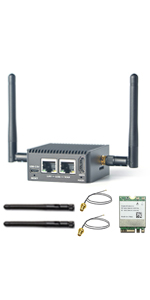

| ASIN | B0BNNNGTND |
| Best Sellers Rank | #182,829 in Electronics ( See Top 100 in Electronics ) #1,208 in Computer Routers |
| Customer Reviews | 4.4 4.4 out of 5 stars (24) |
| Date First Available | November 30, 2022 |
| Item Weight | 6.4 ounces |
| Item model number | Nanopi R5C 4+64GB WiFi Router |
| Manufacturer | WayPonDEV |
| Product Dimensions | 2.48 x 2.48 x 1.18 inches |
J**.
Works great. Just don't try to restore a backup from different hardware like a Raspberry Pi
I was running OpenWRT on a Raspberry Pi 4 for a very long time but it kept crashing on me. I later found out that it was the USB Ethernet adapter but I decided I'd rather have a piece of hardware with 2 ethernet ports baked in. This unit fit the bill. The fact it can do 2.5 Gbps was just icing on the cake. First thing I did was remove FriendlyWRT and install OpenWRT. I made the mistake of trying to restore my config from my Raspberry Pi install and that bricked it. So I was able to flash OpenWRT on a microSD card and boot from that. I wound up making another ext4 filesystem on the card and putting the .img file in there and then running the 'dd' command to get it on the internal 32gb storage. After that, I expanded the ext4 filesystem on the internal storage and then very carefully started copying over everything in /etc/config manually making sure not to copy anything with mentioning eth0 and eth1. Eventually I got it setup just like I had it on my Raspberry Pi and my speedtests look pretty good. I don't know much about FriendlyWRT but I wanted OpenWRT straight from the source. Can't be too careful these days. Ease of Setup: 4/5 Customization: 5/5 Wireless Connectivity: You can add a card and antennas, but I didn't need that. Looks: Pretty good. Would have preferred at least 1 USB port on the rear Power: I'm using the power cord for my Raspberry Pi 4. Everything is peachy so far Thermals: Only a little warm. I'm talking comfortable enough to hold in your hand. Fanless, but the shell acts as a heat sink. Recovery: It does include a button to force it to not boot from the internal storage. This came in handy. Overall, 4.8 / 5 stars. Only thing I'd change is for it to come with OpenWRT and not FriendlyWRT out of the box but I would have still flashed it myself straight from the source just to be safe.
E**C
R5C – Excellent Travel Router
I was searching for a replacement for my old GL.iNet travel router. Something compact, powered by a small 5V phone charger, extremely energy efficient, and fanless. The R5C exceeded my expectations. It is not only smaller but also faster than any of the latest GL.iNet travel routers. I chose Armbian with the minimal Debian Bookworm image as my base operating system. Using my own router configuration, similar to what I have previously used for home and office firewalls, I now have full flexibility with Debian and 32GB of eMMC storage. This means I am no longer restricted to OpenWRT as my base operating system. For wireless connectivity, I use a pair of USB Wi-Fi adapters for WWAN and WLAN. However, the R5C truly excels when connected via Ethernet. With dual 2.5Gb per second Ethernet ports and impressive WireGuard speeds, it offers outstanding performance. Its aluminum case is durable, compact, and well suited for travel.
M**V
Real 2.5Gbps speed
I was looking for a solution to distribute my 2Gbps internet connection through my home wired network. It appears that it is not so easy to find a 2.5 WAN / 2.5 LAN router for a reasonable price. Then I found this R5C and combined it with 2.5Gbps unmanaged switch (WiFi APs installed additionally). The result exceeds my expectations, I’m able reach 2Gbps from my wire-connected PCs. I decided to keep the pre-installed OpenWRT software. At the maximum network speed CPU reaches 80% load and works well. Not bad for a low-end device. One note about the temperature. R5C has a solid metal case that allows it to keep stable temperature at 50 degrees Celsius without any additional cooler. I decided it is a bit too much for a 7/24 device and installed a low-rpm fan. Now temperature dropped down to 37 degrees and I’m happy with the result. Summary: a great option if you’re ready to consider your home network as a DYI project.
T**S
Good hardware and fast ethernet speeds but vendor support and software need improvement
I want to implement a NAS (network attached storage) with multi-Gig ethernet support. I picked this ARM-Linux box because it has two 2.5G ethernet ports. After receiving the shipment from Amazon, I found its case is made of aluminum, which serves as a large heatsink. Thus, no fan is needed for cooling. As a result, it makes no noise and is suitable for home office and entertainment environments. Based on the information provided, I opened its wiki page and downloaded the firmware provided there. Everything worked pretty well. No issue was encountered at this stage. I installed the Debian 11 (bullseye) core as its OS. It booted smoothly after burning the rootfs image to a micro SD card, plugged in and powered on. However, the rootfs image is a little bit weird. As far as I know, most of such image for ARM single board computer (SBC) contains one partition (rootfs) or two partitions with a separate boot partition. However, this image contains many small partitions. Not sure what are those partitions for. I then checked the network speed. By using a 2.5G ethernet switch and an USB3.0 to 2.5G ethernet adapter on my Windows 11 PC, my iperf3 test showed that its speeds on both directions were about 2.35 Gbps. Which is not bad. In order to set up a NAS, I installed OpenMediaVault 6 (OMV6) on the Nanopi R5C with Bullseye Debian Linux. A 2.5" hard disk (hdd) with a USB3 interface was used as the storage. Installation carried out smoothly with no problem. When I used it as the fileserver, I found the read speed (NAS to Windows PC) could reach over 200MB/s, which should be satisfactory. However, the write speed (PC to NAS) was only somewhat over 10MB/s. This is essentially ethernet 100M speed. (Update: I noticed that the vendor just updated the OS firmware provided. In particular, the new firmware includes an OVM6 implementation. I tried their implemented OVM6. Both the write and read speeds were higher than 200 MBytes/s at start, then they reduced to about 100 MB/s and 60 MB/s, respectively. I think the speed reductions were due to the write and read speeds limitation of the hdd used in the NAS. However, when I used their new Bullseye firmware and implemented OMV6 from scratch, the write speed is still about 10 MB/s. I am not sure why. I contacted them but no reply was received.) One warning I want to make is that if you decide to buy this SBC, don't expect community and/or the vendor's supports like you would get for the Raspberry Pi's. However, if you want to take the adventure of utilizing its fast ethernet speed or other features that are not provided by Raspberry Pi's, this unit may not be a bad choice.
Trustpilot
4 days ago
1 month ago