





🎉 Game On: Unleash Nostalgia with Modern Convenience!
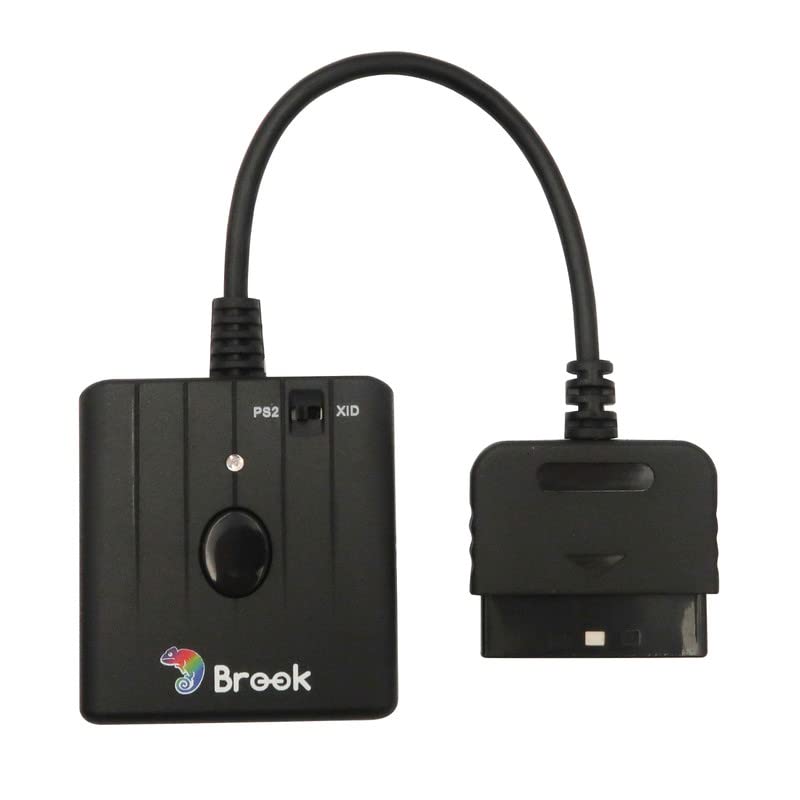
The Mcbazel Brook Switch Pro/PS3/PS4/PS5 to PS Classic/PS2/PS1 Super Converter allows gamers to use their beloved old controllers on new consoles, ensuring compatibility and ease of use. With features like auto-registration, optimal button mapping, and lightweight design, this converter is perfect for both casual and hardcore gamers looking to bridge the gap between generations of gaming.


| ASIN | B075462YRF |
| Best Sellers Rank | 72,669 in PC & Video Games ( See Top 100 in PC & Video Games ) 55 in PlayStation 3 Adapters |
| Customer reviews | 4.8 4.8 out of 5 stars (377) |
| Is discontinued by manufacturer | No |
| Item model number | 781055983899 |
| Package Dimensions | 17.6 x 8.4 x 4.8 cm; 130 g |
| Rated | Ages 12 & Over |
I**.
Even better than expected
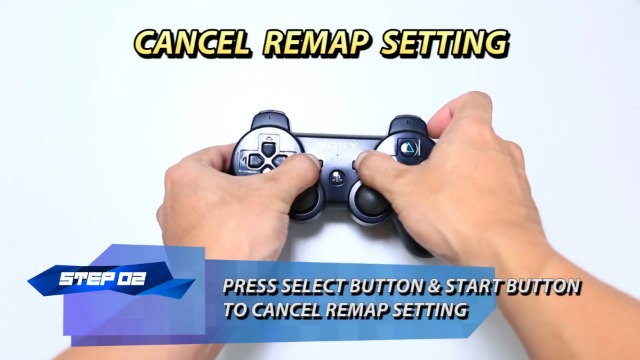
To start with, as you can see in the photos, the product I got is not exactly the one that's in the description. Or at least the one that was in the description when I ordered it in May 2020. It seems that originally this device was supposed to make a DualShock 3/4 controller work on PS2 and PC but at some point down the line they added additional functionality. The box of mine says it supports the Xbox One bluetooth controller and the Switch Pro controller and that it also lets you use all controllers mentioned above with the PS One Classic (that's the mini console Sony released recently and not an actual PS1, mind you). So that was a pleasant surprise right off the bat. The package also includes a splitter USB cable which I'll talk more about at the end. Updating the firmware is fairly simple. There are QR codes on the box which send you to the relevant page where you can download the software for your PC. I think the product was released back in 2017 and they are still adding new functionality and fixes in 2020. The latest update had been released literally days before I received it. I believe people who have the older version of this can get all the extra functionality just by updating the firmware but I can't be 100%. In any case, it's great that they are supporting the device and it's worth checking for updates every now and again. I'll start with what most people who are considering this are probably most interested in. I got this so I could use a DualShock 3 on my PS2. It works perfectly for that. It's easy to set up. You need to plug the adapter into your PS2, then connect the DS3 via USB to the adapter to pair it. Just like you would to a PS3 if the controller needs to be paired. Once it's paired, you can unplug the cable and it will now work wirelessly. No need to go through the pairing process again next time. The two devices will connect automatically once they are both on as long as you haven't paired the controller to something else in the meantime. Note that the switch on the adapter needs to be set to PS2 in order for it to work with the consele. I tired several games that I have lying around and I can confirm that everything works, including the rumble function and the pressure sensitivity of the buttons. The latter is something that most third party pads you can find online don't seem to support at all. While there are many games that don't use it at all and even the ones that do are probably playable without it, it's something that I'd personally notice and miss. It doesn't feel right to me playing a GTA game without being able to control the acceleration of vehicle. I don't own a DualShock 4 but I imagine it will work just as well. However, as far as I know, the DS4 doesn't have pressure sensitive buttons. Again, I don't actually own one so I'm not 100% sure but it might be worth checking if you care about that. As far as calibration is concerned, I didn't notice anything off. All games I tested seemed to play just fine, though, I have to say that it's been years since I've last played PS2 games on a regular basis. I will say that while the DS2 and 3 look pretty much identical at a glance, they feel noticeably different when you play a game. But that's just down to the way the pads themselves are designed on the hardware level. Another thing is that the rumble felt different on the DS3. I'd say a little stronger. But again, I suppose that's just the controller itself and not the adapter. In addition to letting you use the supported controllers on PS2, the adapter also lets you use them wirelessly on PC. I know that they are all bluetooth controllers and there are alternative ways of using them on PC that don't require an adapter. However, for the DS3 at least, the only alternative I know requires the use of some not-so-trustworthy software so for me it's a nice bonus. Again, this feature works fine. The PS3 controller is recognized as an Xbox One pad and works as you would expect. Note that the way you switch the adapter to xinput is not easy to figure out on your own. Check the firmware update notes on the support page for more info. The switch on the adapter has to be set to XID which makes sense but then you also need to hold d-pad down and START to switch to that mode after the controller has been paired. The other mode is for the PS One Classic apparently and if the adapter is in this mode, your controller is just recognized as a generic pad and the right stick doesn't work. Initially, I thought it just didn't work. I also thought I'd try using an Xbox One controller as well since I have one. Note that the adapter only works with the newer bluetooth controllers and not the older ones. Again, the Xbox controller works just fine one PS2. You don't even need a cable to pair it in this case. You can pair it wirelessly. Of course, this pad doesn't have pressure sensitive buttons either. Also, the rumble function worked in some games I tested (Psi-Ops, Second Sight) but not others (GTA3, VC, SA). On the support page on their website it says that rumble should work with a regular XOne controller but not with the Elite controller. Apparently, thought, it's a bit spotty at this stage. It's possible that they'll add more fixes in the future. Another pleasant surprise for me was when I realized I could use the adapter to connect my XOne controller to my PC. Some of you who use this pad on PC via bluetooth may be familiar with the frame rate issues and stuttering it causes. In my case, it caps my fps at around 130 in most games and causes nasty stuttering. It also disconnects randomly on occasion and causes stuttering again or just gets stuck vibrating constantly until you disconnect it. Connecting it through this adapter, however, seems to get around that issue. I certainly don't have the annoying fps cap but I haven't had the device for long enough to be able to tell how reliable the connection is. So far, I haven't had it disconnect on me during my testing overall. As it happened, I ordered the official Microsoft adapter so I could get rid of that issue around the same time I ordered this. If I had known I could use it for the same purpose, I would have held off on that. When playing around with the two gamepads I tested, I noticed that the adapter can have more than one controller memorized. You can, for instance, switch off your XOne controller and turn on your DS3 one and it will connect instantly as long it's been paired already. I think that's what they mean when they say 'hot swapping' on the box. Note, however, that the controllers themselves only remember one device at a time. For the sake of completeness I'll mention that it has a turbo function as well. It's not something that I personally care about but I gave it a try. I found the process of setting it up a bit fiddly. It took me a while to figure it out but it does work and it's nice that they give you that extra as well. Finally regarding the slitter cable, it took me a while to figure out why it needed to be a splitter cable and not just a regular one. I noticed that one end is black and the other one is gray. If you connect a controller to your PC using the gray end, it's not recognized. It works with the black end and also with another random USB cable I have laying around. I couldn't find it explained clearly anywhere but judging by the color, the diagram on the back of the box and what information I could find on the support page, I think the gray cable is for use with he PS One Classic specifically. I don't have one so I can't test that but if you are interested in using this with the PS One Classic, I suggest you hang on to that cable. This may also mean that you need the newer version of the product to use it with that console. In conclusion, if you are looking for a replacement PS2 controller, this may be a great solution. I wasn't able to find any decent third party options and going with a used one is kind of a gamble. I think that using a DualShock 3 is the best option because the layout is almost identical and it has pressure sensitive buttons so you get the full functionality of the original. However, having all these other options is great. I never though I'd be able to play PS2 games on original hardware with an Xbox One controller. That's pretty rad! My only real gripe is that it took me a while to figure out how some things work. I think the info on the manufacturer's website could be put together in a more comprehensible way. Also, the description of this listing needs to be updated to let people know that they'd actually be getting a more feature packed product.
G**A
Works without any issues
I use this to be able to use a DualShock 3 with my original PS1. To be able to use this with a PS1 you need to update the firmware from out of the box. This is easy to do, check out the Brookaccessories website for the firmware file and instructions. I must say I’m amazed by how easy this was to set up. Once I’d updated the firmware, I plugged it into my PS1, with my DualShock 3 plugged into this adapter via the USB socket marked ‘PS3/PS4’. You need to do this on first use so the adapter can sync wirelessly with your DS3. Once done, I unplugged the DS3 and was using it wirelessly to play PS1 games in a matter of less than a minute. The adapter takes its power direct from the PS1 controller port. Note that the PS button on the DS3 acts as the ‘Analog’ button from the original DualShock 1 controller. This means if you’re playing an older PS1 game before the DS1 came out, you have to turn the ‘Analog’ button off for it to work (so press the PS button on your DS3). This works exactly like a DS1 would work. Just in case your DS3 doesn’t appear to work, it’s likely because you need to press the PS button once. I can confirm both analogue sticks and the vibration of the DS3 work when playing compatible PS1 games. I can also confirm this works using a DS3 on a PS2. The pressure sensitive buttons of the DS3 work on compatible PS2 games as well from what I can tell. I haven’t tested a DS4 using this adapter, but the other review mentions this works fine, and videos on YouTube confirm this so I wouldn’t expect any issues going from what I’ve experienced using the DS3. I don’t notice any input lag using this, although I’m not the most sensitive to it. It definitely feels responsive and I couldn’t notice any difference between using this or a wired PS1 controller. In summary, I am amazed how well this works and cannot recommend it highly enough.
J**S
Works great
Bought this to use my PS4 controller on my PS2, it works great and is easy to set up
M**S
Good
Still enjoying the novelty of a PS2 and this was a great addition to the set up. Some connection issues but otherwise great and works well. A little pricey though
M**R
The greatest invention of modern times
If you're anything like me, your Pro Evo 6 Master League team is on its third generation of Zinedine Zidane and the main barrier to Inzaghi reaching 1000 career goals is your final working PS2 controller losing its shoulder buttons. Brian Lara Cricket games are spoiled by the R2 button noise giving away the yorker. You can no longer reverse the Stone Cold Stunner on HCTP. The only game it doesn't spoil is Mashed. Mashed is still awesome. And Tekken Tag Tournament. Brand new PS2 controllers are surprisingly expensive for obsolete technology. This allows me to use a PS3 controller, which had been gathering dust since I finished Gran Turismo 5. Apparently you can use a PS4 controller too. I can neither confirm nor deny this. I don't think it would be an exaggeration to say that this is the greatest invention since the cotton gin. P.S. Buffon; Ramos, Bianchi, Stam, A Cole; C. Ronaldo, Zidane, Pirlo, Messi; Kaká, Henry/F. Inzaghi. Since you asked.
M**Y
Works great with PS1
You'll need to update the firmware to get it to work with a PS1, and it can take a little bit of time to figure out how to get it to work with certain types of pad, but once you're past that it's plain sailing. Tested with both a Hori Fighting Commander in PS3 mode and an 8bitdo Pro 2 in wireless Switch mode - both worked fine with no noticeably bad input lag, and both the analogue sticks and rumble worked on the latter. Very impressive.
J**.
Utilisé pour jouer sur ma PS2 avec une manette sans fil de PS4.... c'est une dinguerie. Passé l'étape d’appairage qui est un peu... compliquée (quand on ne connaît pas les manettes de PS4).. ensuite, c'est que du bonheur, on allume, ça marche !
L**F
Da meine beiden PS2 Controller nicht mehr richtig funktionierten, habe ich mich nach einer Alternative umgesehen. Zufällig bin ich auf dieses Produkt gestossen. Wusste nichtmal das es so etwas gibt. Es ist optimal, da ich keine weiteren Controller kaufen muss und ich einfach meine vorhanden PS3/4 Controller verwenden kann. Zudem hat mich auch das Kabel der PS2 Controller gestört, daher bin ich froh drum. Ich habe mir gleich 2 Stück gekauft, falls wir mal etwas Multiplayer spielen wollen. Zuerst muss man mit einem Kabel die Controller mit dem Gerät verbinden. Danach funktioniert die Verbindung mit sowie auch ohne Kabel. Ich habe das sowohl mit dem PS3 wie auch mit dem PS4 Controller getestet. Wobei ich eher erstere dazu benutzen werde. Bei den PS3 Controllern leuchten bei bestehender Verbindung die Nummern 1 & 4 (siehe Bild). Ich bemerke keinen Unterschied zu den PS2 Controllern im Game. Auch kabellos funktioniert alles prima. Es gibt auch keine Probleme, wenn 2 Geräte angeschlossen sind. Habe zu Testzwecken mal beide verbunden und es ausprobiert. Ich bin sehr zufrieden. Es funktioniert alles wie es soll. Von daher gebe ich dem Brook Converter 5/5 Sterne!
A**T
Funciona muy bien. Los mandos originales no me funcionaban y ahora puedo usar unos de la ps3 que ya no usaba y ademas jugar inalámbrico. Muy contento
O**R
Ho provato questo adattatore con un controller PS4 e funziona splendidamente sia su PS2 che su PS1. Le modalità di funzionamento sono via cavo o via bluetooth, con la quale non ho notato lag. Vibrazione funzionante. Ricordate di aggiornare il firmware per avere le ultime funzioni. In passato ho usato adattatori economici e non c'è paragone, questo è davvero di alta qualità.
T**Z
Produkt działa bez problemu z konsolą PS2 i padem PS4, nie było wymagane aktualizowanie firmware'u ani dodatkowy kabel zasilający. Nie testowałem na innych urzadzeniach.
Trustpilot
4 days ago
1 day ago



