
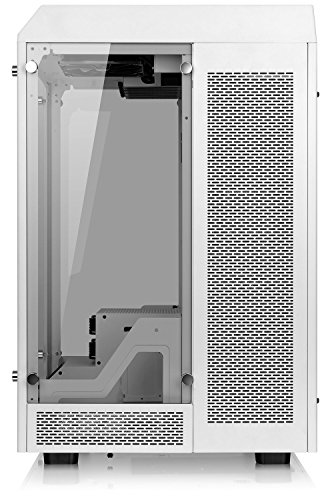


❄️ Elevate your PC game with the Thermaltake Tower 900 Snow – where power meets pristine elegance!
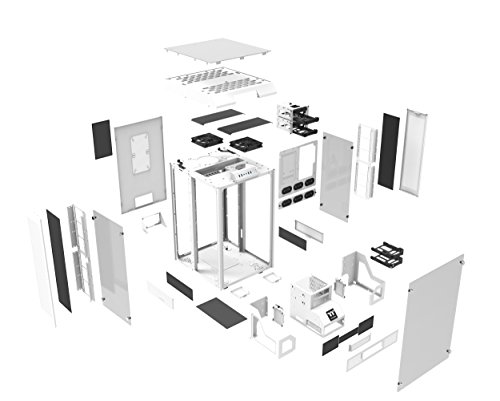
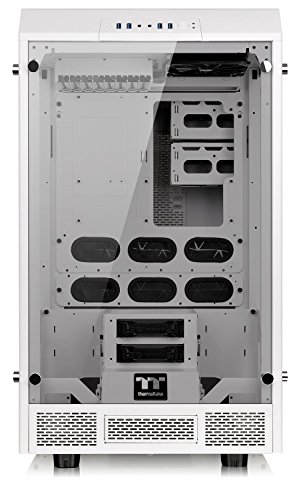
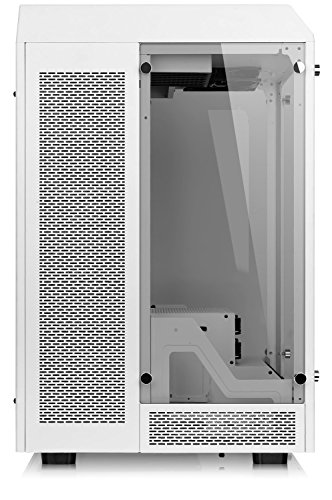
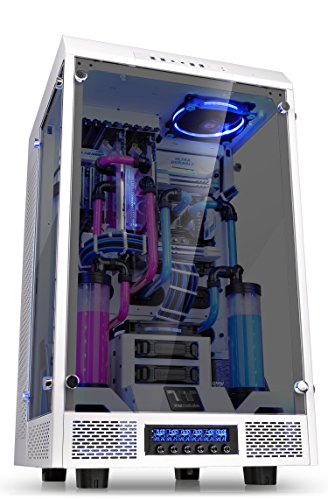
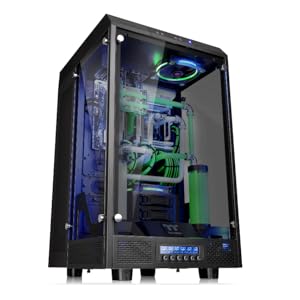
The Thermaltake Tower 900 Snow Edition is a premium, fully modular E-ATX vertical super tower computer chassis featuring a striking white finish and three 5mm thick tempered glass panels. Designed for professionals and enthusiasts, it supports large motherboards and extensive storage options, while offering superior cable management and easy maintenance with magnetic dust filters. Its robust 24.5 kg frame and ergonomic design make it a standout choice for building a clean, high-performance PC that commands attention.



| ASIN | B01MTOVX8D |
| Are Batteries Included | No |
| Brand | Thermaltake |
| Colour | White |
| Customer Reviews | 4.5 4.5 out of 5 stars (143) |
| Date First Available | 21 November 2016 |
| Generic Name | TOWER 900 Snow Edition Tempered Glass Fully Modular E-ATX Full Tower Super Gaming Computer Case |
| Included Components | computer case, parts, tempered glass |
| Item Dimensions LxWxH | 55.1 x 81.3 x 50.8 Centimeters |
| Item Height | 20 Inches |
| Item Weight | 24 kg 500 g |
| Item Width | 32 Inches |
| Item model number | CA-1H1-00F6WN-00 |
| Lithium Battery Weight | 24500 Grams |
| Manufacturer | Thermaltake USA Direct |
| Number of USB 2.0 Ports | 2 |
| Product Dimensions | 55.12 x 81.28 x 50.8 cm; 24.49 kg |
| Series | Tower 900 Snow Edition |
L**O
Personnellement, je suis toujours super ravie de ce boîtier acheté en début d'année 2020. Les + : - Boitier pratique & élégant : En blanc et avec ses panneaux en verre, il a de l'allure et permet d'accéder aisément partout sans le moindre tournevis. L'alimentation et les câbles sont cachés à l'arrière. Pour le montage et pour ranger proprement les fils, il est extrêment pratique ! - Entretien facile : Ses grilles magnétiques stoppent bien la poussière et sont aussi faciles que rapides à nettoyer. Les trois panneaux en verre se retirent vite (avec des vis à main), ce qui simplifie les opérations de maintenance et de nettoyage. - Qualité : Tout est toujours impeccable après quasi 3 ans d'utilisation. Le matériel est solide et de qualité. Depuis le début, j'ai eu à remplacer qu'une pièce : un des ventilateurs. Celui-ci devait avoir un léger défaut de soudure et le nettoyage sans souffleur a fini de l'endommager. Les - : - Sa taille et son poids : Pour l'entretien, je vous conseille vivement de remplacer ses 4 pieds plastiques par 4 roulettes. Je regrette toutefois que les roulettes ne soient pas dans le modèle de base (ou au moins proposées en option) car c'est un peu galère de trouver les bonnes références et tellement plus pratique avec des roulettes ! - Les branchements (ports USB, vidéos, audio etc...) sont en haut et non sur le côté. Ils prennent donc davantage la poussière. Je vous recommande donc des caches anti-poussière ou un souffleur. - Son prix : il était moins cher en 2020 qu'aujourd'hui, en novembre 2022...
S**R
It's the size of a small fridge! My review is just to clarify some other people's comments that, when filling up the case, are hard to relate to. 1. Top Piece: Some of the answers/reviews say to grab a handle to pop the top off. I looked for a handle.... but it's not really a handle, it's the rectangular cutout centered on the back of the top. At first you might give it a couple of gentle yanks and think oh no, I'm going to break something taking it off! Don't worry. It takes some force to remove, and the first few times I was really stressing over it, but it's just an odd design that works. I have taken the top on and off some 20+ times now and no longer pay it any mind. Assuming you have the motherboard in, and the top off, you'll see how everything connects up. It's actually pretty brilliant from a cable management perspective. There are standard connection points exposed at the top of the front, the kind you would typically see on any pc case, for USB, headphones, etc. There is a neatly secured bundle of wires from the front connections through the top of the metal frame and down to the back of the case. You just route the cables through the rubber grommets and onto the motherboard. Having said that, one of the best selling points for this case is the walls of glass, and if you use the front ports, your cables will hang down ion front of the glass and ugly it up. I think they should have put those connections down where most people put a fan controller, and put the fan controller at the top. In any case, I have everything routed through the top and nothing permanently connected to the front for appearance. The motherboard and PCIe device connection points that you typically see in the back of a computer case are exposed through the top of the metal frame (on which the plastic top sits). The back of the top has smaller cutouts to either side of the "handle" for routing to the top connections. The upside is that it makes for a very clean look to the back panel, as well as the ability to neatly mount two fans. The downside is the routing length from your devices to the connections, both because keyboards, mice, speakers and other input/output devices aren't long enough to connect through the back, and when using longer cables, the weight can cause repeated disconnect unless you anchor the cables (for me it was an HDMI cable to my t.v.). To Thermaltake's credit, the case comes with usb extenders for your mouse and keyboard. You might need more. For example, I needed a couple more for devices like a gaming mini-keyboard, etc. 2. The radiator covers (narrow top-to-bottom pieces abutting the glass with black, magnetic filter screens) are removed with the push of a 'button' that is a flat metal portion of a spring loaded, lever type mechanical catch. The mechanism is metal and attached to the top of the metal frame on which the plastic top sits. Just stick your finger through the cutouts on the back of the plastic top nearest the panel, you will find them. Once you see how it works you will absolutely love them. Super easy and quick access. 3. This one is not a clarifying comment, just applauding the fact that the back panel has the type of finger screws that are retained by the panel when you unscrew them. I have a couple of extra fans hidden in the back, as well as all the hardware (screws, etc.), and they never get in the way. Expected cheap materials for the price and size, but this is a well made case. I think just the top and the HDD trays are plastic. Me and PC cases have a love/hate relationship but I wasn't able to break anything during my install. They did a beautiful job matching the paintjob
N**Z
First off, this thing is enormous. Think mini refrigerator rather than any normal computer case, and depending on where you plan to put it, that could be good or bad. Aside from that, it is fairly well made and the parts fit well enough for all but the most neurotic builders. The build: Asus Z170 deluxe I7 6700k MSI GTX 1070 sea hawk EK X 32 GB Corsair vengance DDR4 4 3.5" HDD SSD DVD RW drive Alphacool monsta 360 Alphacool monsta 240 Thermaltake pacific D5 pump and res combo Corsair professional 750W PSU a total of 21 fans Positives: Plenty of space and good secure mounts for whatever drives you may want to run Easy access to the motherboard fan headers and switches Good flexibility for mounting water cooling components Magnetic dust filters are a nice touch Option to use either 120 or 140 mm fans throughout Lots of included hardware Easily enough clearance for even obscenely large graphics cards Negatives: With 80 mm thick radiators, there is not enough clearance to run fans in push pull at the bottom of the case, they interfere with the PSU The pass through hole for the 8 pin atx power cable could be a little bigger, or I could have run it before everything else was in place The two 140 mm fans which are factory mounted in the case are nothing special, and a bit noisy If you choose to mount a fan on the forward drive cage surround, it will be very loud unless you use a spacer ring The case is big enough that some of the cable runs can be problematic, depending on where you decide to put various components If you are running water cooling, (and with this case, you should) the VRM and other on board heat sinks don't see much air flow. I ended up mounting a Noctua 92 x 15 mm fan on one of the PCI expansion slot covers to push some air over the heat sinks The instruction sheet is at best vague Other thoughts: I like the case, over all, it is well made and feature rich. Just don't expect to be moving it often. With everything installed and 2.5 liters of coolant, it weighs around 85 pounds.
M**E
Very customizable, and build quality is great. There were some older reviews mentioning screw holes being misaligned, but mine had none of those issues. Make sure you realize this case is 3 feet tall. It is level with my desk, as you can see in the picture. Assembled, it absolutely requires at least two people to move around. Pros: The case has a lot of room. The front and rear are separated. It’s honestly not necessary if you don’t have a ton of hardlines and reservoirs. Cons: This case is not compatible with all-in-one coolers. Don’t even bother thinking you’ll find a way to make it work. You won’t, and if you do, it’ll be janky, and defeat the purpose of buying a high-end case. Your I/O ports that are normally on the back of a desktop pc will be on the top. These are masked with the top-piece of the case that is kind of a pita to remove. You have to grab and yank it up. It’s not graceful at all, and seems like you’re going to break it. The front panel usb 3.0 ports are acceptable, but not incredibly high-quality. Things to note: but long cables. If you’re using sata, you’ll need minimum 2 foot sata cables, maybe 3 foot if you don’t want to risk straining them. I’m not exaggerating. You will also probably want to grab some sata power extension cables. If you’re going to utilize the 5.25” bay, do realize it is about 3 feet from the motherboard, so go ahead and order the correct length cables at the same time. Again, this case is huge. It dwarfs the 3090 ftw3. We have 2 3.5” hard drives in the front slots, and 12 hdds in the back, using a little bit of custom mounting.
C**J
This is a very large computer case. It is about the size of my 2.7 cubic feet mini fridge. If you are planning on using strictly air cooling, find a different case. This is not meant for strict air cooling, as it only has room for 2 fans in the front compartment of the case. The case itself is well built, with no sharp edges to cut you like you can find on cheap cases. The tempered glass is thick and well made, with a slight tint on it. If you want to be able to see your build in the dark, you will definitely need some LEDs inside the case (but it's 2017 so you should already have RGB) I love the way the case is split into 2 sections, one for the build and then another for cooling and wiring. I had no problem installing 2 480mm rads into the back of the case, and still had room for a 240 on the back panel itself. If you are building with hardline tubing, I recommend using adapters to change to soft tubing for the back section for a couple reasons. One, you might have a hard time finding tubing long enough to go from one part to the back. Two, It would be difficult to bend the tube without putting it through one of the gromets in the case. I wish the left and right side of the case where the motherboard sits had more holes for cable management. There are only one on each side, and it makes the cables look a little awkward when they have to angle themselves towards one of the holes. This is easily fixable with a dremel, but slightly annoying that this wasn't thought of beforehand. One thing you have to think of is that all of your connections will be at the top middle of the case. You will need long cables or extensions if you want to hide your cables and do a good job of cable management. The cables for the front panel connectors (namely the usb 3.0 header) are just barely long enough to reach the connector on my motherboard (x99 sabertooth). All in all this is an excellent case, and if you plan on doing custom water-cooling and have the physical room for it, this should be on your short-list of options.
Trustpilot
2 weeks ago
1 month ago



