We remain fully operational. Our teams are working around the clock to ensure your deliveries continue safely.

DOWNLOAD THE APP


Customer Services
Copyright © 2025 Desertcart Holdings Limited
DOWNLOAD THE APP
Buy anything from 5,000+ international stores. One checkout price. No surprise fees. Join 2M+ shoppers on Desertcart.
Desertcart purchases this item on your behalf and handles shipping, customs, and support to Ecuador.
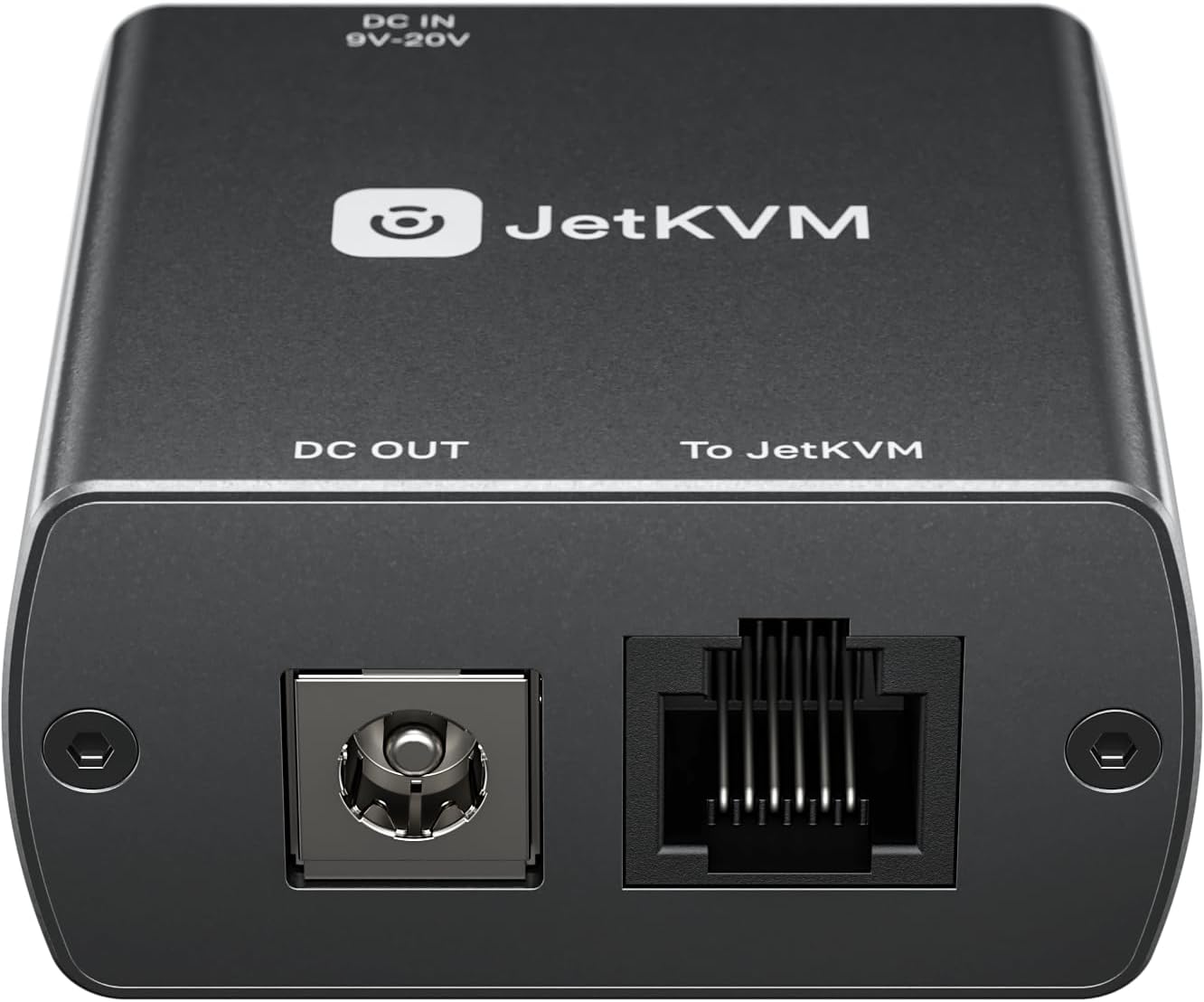
The DC Power Control extension enables power management for connected DC-powered devices, such as mini PCs or NAS units.Remote Power Control for any DC deviceAdd remote power cycling to your JetKVM setup. Plug into the RJ-12 port, route your device's DC power through the module, and control power directly from the browser with the JetKVM.It supports DC input ranging from 12 to 20 volts, and we're including adapters to support 5.5x2.1 mm connections as well.The extension can also power the JetKVM itself through the RJ-12 connection, streamlining setup and reducing the need for additional power sources.Pass-through PowerThe built-in USB-C port provides 5V power directly through the RJ-12 cable, powering your JetKVM without the need for a separate USB connection.This eliminates the need for constant USB power from the host computer or a USB splitter, simplifying your setup with a single-cable solution for both power and control.What's in the BoxDC ExtensionRJ12 cable1x 5.5/2.5 mm male to 5.5/2.5 mm male cable Review: Perfect solution for clean DC power control with JetKVM - If you’re running JetKVM with mini PCs or other DC-powered devices, this is one of those upgrades that just makes everything cleaner and more functional. Installation is quick and straightforward. It’s a simple setup, and if you’re already working with JetKVM gear, this will feel very familiar. Everything connects the way it should without any confusion. Functionality is excellent. Being able to control DC-powered devices in the 12V–20V range is a big plus, especially for mini PCs, routers, and similar hardware. It adds another level of control to your setup without needing external smart plugs or workarounds. The USB-C passthrough is a standout feature. Powering the JetKVM through the RJ-12 connection cable keeps everything internal and tidy. No extra cables hanging out, no clutter, just a clean and proper install. Build quality and design are solid. It feels like a well-thought-out accessory, not an afterthought. Everything fits cleanly and integrates nicely into a rack or compact setup. Value is very good. For what it adds in convenience, control, and cable management, it’s absolutely worth the price. Especially if you’re trying to keep a clean and efficient home lab. If you’re using JetKVM with DC-powered devices, this is a must-have. Easy install, clean setup, and reliable control. It does exactly what it’s supposed to and makes your whole setup better. Review: The perfect jetKVM accessory - Easy to setup and use and wide compatibility. The DC power control box was everything I expected and more. I tested this using a 12v powered mini PC and had no issues. Setup is as easy as placing this box and included cable between your computer and the power supply. The DC power control box then hooks up to your JetKVM using the included RJ12 cable and when the DC power control box is connected to the 12v power source for the computer, it also receives power from this source, reducing the overall need for additional cables. In the JetKVM webUI, all you need to do is enable the module and its that easy to setup. Turning the system on and off via the DC Power Control box does take a few seconds. One important thing to note is that you will want to ensure wake after power loss is enabled in BIOS to get the best use of this box. Overall, this is a great value if you need remove power control for a 12v device.
| ASIN | B0GKFWT7MJ |
| Best Sellers Rank | #193 in KVM Switches |
| Brand | YOTABOX |
| Built-In Media | RGB Lighting |
| CPU Model Number | RockChip RV1106G3 |
| Cache Memory Installed Size | 1 GB |
| Connectivity Technology | Ethernet, LAN |
| Customer Reviews | 4.8 4.8 out of 5 stars (6) |
| Display Type | LCD |
| Graphics Card Interface | Integrated |
| Graphics Card Ram | 0.1 MB |
| Graphics Description | Integrated |
| Graphics Ram Type | DDR3 SDRAM |
| Hard Disk Description | SSD |
| Hard Disk Interface | ATA |
| Hardware Interface | USB Type C |
| Human-Interface Input | Buttons |
| Item Dimensions | 2.36 x 1.77 x 1.38 inches |
| Keyboard Layout | QWERTY |
| Manufacturer | JeKVM |
| Memory Speed | 256 MHz |
| Memory Storage Capacity | 0.1 MB |
| Model Name | JetKVM |
| Model Number | JetKVM Extension Port DC Power Control |
| Number of Component Outputs | 1 |
| Operating System | Linux |
| Optical Storage Device | BD-R |
| Power Plug Type | No Plug |
| Processor Brand | RockChip |
| Processor Series | Rockchip 3188 |
| Processor Socket | DIP |
| Processor Speed | 0.1 Hz |
| RAM Memory Installed | 0.1 MB |
| RAM Memory Technology | DDR3 |
| RAM Type | DDR3L-1600 SDRAM |
| Ram Memory Maximum Size | 0.2 MB |
| Screen Size | 1.69 Inches |
| Specific Uses For Product | Personal |
| Total Number of HDMI Ports | 1 |
| Total Usb Ports | 1 |
| UPC | 798336988641 |
| Unit Count | 1.0 Count |
| Video Output | HDMI, VGA |
| Video Output Interface | HDMI, VGA |
| Warranty Description | 1 Year Warranty On Parts |
A**R
Perfect solution for clean DC power control with JetKVM
If you’re running JetKVM with mini PCs or other DC-powered devices, this is one of those upgrades that just makes everything cleaner and more functional. Installation is quick and straightforward. It’s a simple setup, and if you’re already working with JetKVM gear, this will feel very familiar. Everything connects the way it should without any confusion. Functionality is excellent. Being able to control DC-powered devices in the 12V–20V range is a big plus, especially for mini PCs, routers, and similar hardware. It adds another level of control to your setup without needing external smart plugs or workarounds. The USB-C passthrough is a standout feature. Powering the JetKVM through the RJ-12 connection cable keeps everything internal and tidy. No extra cables hanging out, no clutter, just a clean and proper install. Build quality and design are solid. It feels like a well-thought-out accessory, not an afterthought. Everything fits cleanly and integrates nicely into a rack or compact setup. Value is very good. For what it adds in convenience, control, and cable management, it’s absolutely worth the price. Especially if you’re trying to keep a clean and efficient home lab. If you’re using JetKVM with DC-powered devices, this is a must-have. Easy install, clean setup, and reliable control. It does exactly what it’s supposed to and makes your whole setup better.
C**A
The perfect jetKVM accessory
Easy to setup and use and wide compatibility. The DC power control box was everything I expected and more. I tested this using a 12v powered mini PC and had no issues. Setup is as easy as placing this box and included cable between your computer and the power supply. The DC power control box then hooks up to your JetKVM using the included RJ12 cable and when the DC power control box is connected to the 12v power source for the computer, it also receives power from this source, reducing the overall need for additional cables. In the JetKVM webUI, all you need to do is enable the module and its that easy to setup. Turning the system on and off via the DC Power Control box does take a few seconds. One important thing to note is that you will want to ensure wake after power loss is enabled in BIOS to get the best use of this box. Overall, this is a great value if you need remove power control for a 12v device.
R**.
Not a standalone device — requires JetKVM system
I picked this up thinking it would be a simple way to remotely power cycle a device, but it’s important to understand that this is not a standalone product. This is actually an expansion module designed to work with a JetKVM system, so it requires additional hardware to function. On its own, it doesn’t provide remote power control unless it’s connected to that ecosystem. Once I realized that, the design made more sense. It appears well built and intended for more advanced setups where you already have a KVM-over-IP system in place and want to add power control as part of that environment. For someone running a lab, server rack, or remote system where full control is needed, this could be a useful add-on. For simpler use cases (like just wanting to reboot a single PC remotely), this is probably more than what’s needed and may not be the right tool on its own. Overall, it seems like a solid component for the right setup, but it’s definitely something to research beforehand to make sure it fits your specific use case.
C**S
JetKVM add-on that quietly makes your setup smarter
I’m already a big fan of my JetKVM, and this little module makes the setup even cleaner and more useful. The big win here is power control for DC devices. You route the device’s power through the module and then you can turn it on or off right from the JetKVM browser interface. That’s super handy for things like a mini PC, NAS, or other always-on gadget you may not actually want running 24/7. For me it’s useful in two ways: • Power savings – I can shut things down when I’m away instead of leaving gear humming along all week. • Security peace of mind – if something sketchy ever hit the network (looking at you, ransomware/crypto nonsense), being able to remotely kill power to a device is a nice “break glass” option. Another nice touch is that it powers the JetKVM itself through the RJ-12 connection, which reduces extra cables and wall adapters. The pass-through setup keeps things tidy and the included adapters cover the common DC barrel sizes. Overall it’s one of those accessories that seems simple but adds a lot of practical control to an already great tool. If you’re running a JetKVM and have any DC-powered gear nearby, this is a really handy upgrade.
A**G
Very Handy, Great Build
Has worked great connected to an HP Elitedesk Mini G4 and a Dell Optiplex Micro. It's obvious that one needs an existing JetKVM to use this, so just remember that. Build is great, aluminum gives it that good durability. No issues.
Q**S
This DC power control module is a specialized add-on for the JetKVM that allows for remote power management of mini PCs, NAS units, or other DC-powered hardware. It supports a wide voltage range from 12V to 20V and includes adapters for common 5.5mm barrel connectors. The unit is useful because it lets you toggle power directly from a browser, providing a way to save energy or remotely reboot a stuck device without being physically present. In my home lab, this is a great way to manage secondary nodes that do not have built-in power management. It also helps keep the workspace tidy by powering the JetKVM itself through the RJ12 connection, which removes the need for an extra USB power brick. It should be noted that the included RJ12 cable is quite short. While this limits how far the JetKVM can sit from the DC module, it is manageable since the board can be placed anywhere outside of a case. Overall, this is a useful accessory that adds a lot of control to a remote management setup. It is built well and the pass-through design makes the installation look clean. Even with the short cable length, the ability to remotely kill or restore power to DC gear makes it a strong addition to the JetKVM.
Trustpilot
1 week ago
2 months ago