Desertcart purchases this item on your behalf and handles shipping, customs, and support to Ecuador.
⚡ Master your multi-device workspace with lightning-fast 4K switching!
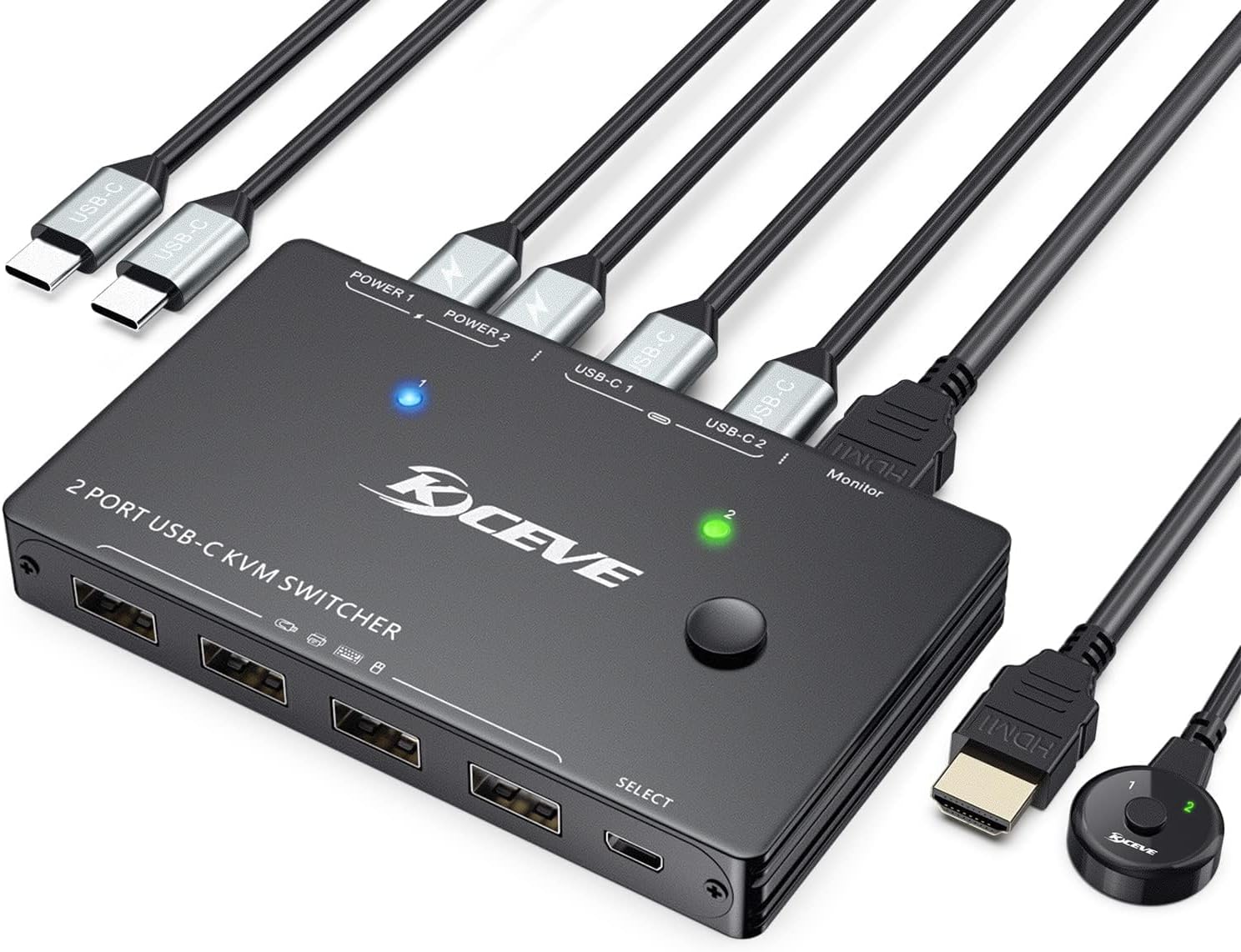
The ANGEET USB C KVM Switch is a sleek, aluminum-built device that lets professionals control two USB-C laptops using a single 4K@60Hz HDMI monitor and four USB peripherals. Supporting up to 80W power delivery, it charges laptops while enabling seamless switching via push button or wired remote. Compatible with Windows, Mac, Linux, and Thunderbolt 3, this plug-and-play switch boosts productivity by consolidating workspace clutter and streamlining multi-device management.


| ASIN | B0GK6RVSLR |
| Best Sellers Rank | #268 in KVM Switches |
| Brand | ANGEET |
| Brand Name | ANGEET |
| Circuit Type | 2-way |
| Color | black |
| Compatible Devices | Laptops with USB-C DP Alt Mode and Thunderbolt 3 support (Windows, Mac OS, Linux) |
| Connector Type | Plug In |
| Contact Material | Aluminum |
| Contact Type | Normally Open |
| Control Method | Push Button, Remote |
| Control Type | Full Control |
| Current Rating | 2 A |
| Customer Reviews | 3.9 out of 5 stars 50 Reviews |
| International Protection Rating | IP54 |
| Item Dimensions | 4.53 x 2.56 x 0.55 inches |
| Item Weight | 108 g |
| Manufacturer | ANGEET |
| Material Type | Aluminum |
| Model | USB C KVM Switch |
| Mounting Type | Surface Mount |
| Number of Items | 1 |
| Number of Positions | 2 |
| Operating Voltage | 5 volts |
| Operation Mode | ON-ON |
| Part Number | USB C KVM Switch |
| Switch Type | Push Button |
| UPC | 760319256153 |
| Unit Count | 1 Count |
| Upper Temperature Rating | 70 °C |
| Warranty Description | 1 years warranty |
| Wattage | 100 watts |
W**O
Works perfectly
I had purchased 3 other similar units with different ports to do the same job and none work. This one worked perfectly I recommend if you are looking to manage several computers with multiple monitors to use this
V**H
Works as expected
Must be a first world problen to have to switch between laptops. When setting up I had to switch inputs for somereason to get everything working correctly. Be sure to give it time when switching to a docking station.
M**G
Flakey
I wish I had never bought this thing. So many issues. It would sometimes work perfectly. Other times, without changing anything, video wouldn't show up for one of my connected computers but it would for the other (both m-based macbooks). Unplugging every cable from the box and plugging them all back in generally made it work again, for a while. Then the power delivery would fluctuate. One morning I woke up to a laptop at 4% power even though it was plugged in all night.
M**M
Handy KVM switch for managing multiple devices
I picked this up mainly for switching between two laptops without constantly unplugging and reconnecting everything, and it's been a genuinely handy little gadget. Setup was straightforward, and it's nice that the necessary cables came included in the box. It does a great job organizing a dual-device workspace — I can share a monitor, keyboard, mouse, and other USB accessories between computers with just the push of a button (or a keyboard shortcut), which keeps the desk much cleaner and more organized. The wired remote button is a nice touch too, since it makes switching quick and convenient without having to reach behind the desk. Build quality feels solid, cable lengths are decent, and it supports monitor resolution without any issues. I should also mention: I didn't expect much given the price, especially compared to premium KVM switches supporting Apple devices and Thunderbolt 4/5, which often run $500-$800. At around $60, this felt like a worthwhile gamble, and for the most part, it's paid off. Performance has been reliable overall, with no major connection issues or lag when switching between devices. The one consistent minor downside is that it's not perfectly seamless when paired with a Mac laptop and a Logitech wireless keyboard/mouse combo — occasionally there's a small lag, or the peripherals need a quick re-pair after switching computers. It's a minor quirk rather than a dealbreaker, and everything else performs well enough that I'm keeping it and working around it. Overall, this is a solid, functional KVM switch if you manage a multi-device setup and want a simpler way to switch between them. It's compact, easy to use, and offers great value for the price, with only small quirks to keep in mind depending on your specific hardware pairing.
3**D
Dual-Host Workspace Velocity: High-Bandwidth 8K Switching Done Right 💡
🛠️When dealing with multi-device technical workbenches, interfaces must be scrutinized at the physical layer to determine whether they meet professional demands. The KCEVE USB C Switch claims support for 8K@60Hz and 4K@120Hz video pipelines, alongside a 10Gbps data transmission rate and up to 100W Power Delivery passing through the circuit. As observed in the attached image library you may see this highlighted better to view in image.png, the package addresses potential signal degradation by supplying two dedicated 1.0-meter USB3.1 Gen2 cables. These thick, shielded lines are critical for maintaining differential signaling integrity at higher frequencies. On the test bench, the hardware chassis presents a solid metal finish with cleanly laser-etched ports along the edge. The input side interfaces with two separate host machines over Type-C, while the output array expands into three USB-A ports (rated for peripherals and 10Gbps drives) and a downstream Type-C link. The inclusion of a dedicated external wired remote, means the main switch box can stay tucked into a cable tray, shielding the delicate high-bandwidth video and data connections from physical stress or accidental movement during operation. THE USER EXPERIENCE & USABILITY 💻 Unboxing the device reveals a straightforward, function-first layout. As shown, the product arrives in compact packaging, securely wrapped to prevent scuffing. For professionals executing validation tasks, hardware assembly, or dual-system development, the user experience hinges on transition speed. The physical reality of using this switcher is elegant and highly intuitive. The onboard toggle button has a distinct tactile feedback, but the real star of the desktop setup is the external wired extension button. This remote controller sits comfortably next to a mouse or keyboard, requiring only a light press to migrate the entire peripheral environment from a primary stationary workstation to a secondary test unit. Status LEDs labeled "1" and "2" illuminate brightly on both the switcher chassis and the remote puck itself, eliminating any guesswork regarding which system currently commands the monitor and input array. ⚠️While the electrical engineering behind this KCEVE matrix is robust, a few architectural considerations require close attention. First, handling a combined load of 8K video displays and 10Gbps data streams over Type-C infrastructure demands significant power overhead; users must ensure their external power bricks provide enough wattage to compensate for line losses if they intend to exploit the full 100W charging ceiling across demanding laptops. Second, because this is a mechanical-digital pass-through switch rather than an active, independent emulating KVM, EDID handshake drops can occur during transitions. When jumping from PC1 to PC2, the operating system on the idle machine may behave as though the monitor was physically unplugged, causing window layouts to shift slightly upon switching back. ⚖️The KCEVE USB C Switcher serves as an exceptional utility driver for technical workbenches, lab environments, and hybrid corporate-home desks. Its ultimate value lies in workflow acceleration. Instead of constantly unplugging and reconnecting finicky Type-C cables to verify a build or jump between platforms, the operator achieves instantaneous environment migration. The kit includes every piece of high-grade copper infrastructure needed to match its advertised performance metrics out of the box. For technicians , engineers a like or multi-system power users looking to maximize desk real estate without sacrificing high-resolution video fidelity or data transmission velocity, this switcher represents a highly capable, balanced, and stable piece of diagnostic and operational hardware. It’s goos useful tool where one can enjoy their core setup across Multiple devices Easily.
A**Y
The display switch (not KVM) didn’t work with Apple display - but what do you expect at this price.
I didn’t expect much at the price but the reviews said it would work with a Mac and Apple display. Turns out it doesn’t which I did not find that surprising. However, be careful with the reviews as when I went back and checked again I found out that all of them were for the KVM switch and none of them were for this product. It’s a borderline scam to put two different switches on the same listing because not only do the reviews end up misleading but the product title suggest it’s a KVM switch which it isn’t. Oh well, I can return it - KVM switches that actually work with Apple products and thunderbolt 4 or 5 are in the range of $500 to $800 … but for $60 what do you expect - it was worth a gamble.
R**E
Great Little Gadget for a Clean and Easy Desk Setup
I picked this USB-C KVM switch up for my son’s desk setup, and it’s been a really handy little gadget to have. It makes switching between two laptops incredibly simple without constantly unplugging and reconnecting everything. The setup was pretty straightforward, and I like that it came with the necessary cables included. He’s able to share his monitor, keyboard, mouse, and other USB accessories between devices with just the push of a button, which keeps his desk setup much cleaner and more organized. The build quality feels solid, and it’s been working reliably so far without connection issues or lag when switching devices. The wired remote button is also a nice touch because it makes changing between computers quick and convenient without needing to reach behind the desk. Overall, this is a great little device if you have a multi-device setup and want an easier way to manage everything. It’s compact, easy to use, and works exactly as expected.
L**E
Works exactly as it should
The test item I received says its a variation of the device in this listing, but specifically for what I received and not for what you may get. I picked this up because I was having problems with my other device switcher. My monitor kept shutting off and I couldn't get it to wake from a screensaver. I thought perhaps it was the switch device, but after utilizing this one and having the same results, I determined it is not. I have absolutely zero issues with this device and it has been holing strong and steady for nearly 4 months now. I use it ALL the time as I swap between my work laptop and my home laptop about 10x per workday, so its getting a lot of use. I no longer have it set up, but my favorite thing about this device when I did have it set up was I could put a finger print scanner via usb into this device, mounted it to my keyboard and used it as a fingerprint unlock for both devices, which is a fantastic lift in consistency of the peripheal setup. I haven't had any problems with video output when switching, its all been very clean, except for the not waking up from standby issue. On that note - its is for certain not related to the switching devices as I have found there's both a defect in my monitor and potentially also the HDMI cable going between this device and my monitor and/or personal laptop. Given the "issue" is consistent between two different switchers of two different brands, I feel confident saying this is a great device, given my time with it so far.
Trustpilot
1 month ago
1 month ago