




iClever キーボード Bluetooth (Silver)
Product ID: 759575128
Details
- キーボードの説明ワイヤレス
- ブランドiClever
- 付属コンポーネント
- 商品の寸法35.5長さ x 12.4幅
- 対応デバイスWindows (BT
- 接続技術Bluetooth
🔇Quiet typing <50dB
🔋45-day battery life
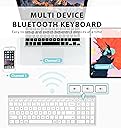
🔗Multi-device Bluetooth 3-pair
Desertcart purchases this item on your behalf and handles shipping, customs, and support to Ecuador.
⌨️ Elevate your workspace with silent, smart, and seamless typing.
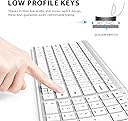
The iClever BK10 Bluetooth Keyboard combines ultra-quiet scissor-switch keys with multi-device Bluetooth connectivity, supporting Mac, Windows, iOS, and Android. Its ergonomic 10° stainless steel design and full numeric keypad enhance comfort and productivity. With a rechargeable battery lasting up to 45 days and smart power-saving features, it’s engineered for professionals demanding efficient, noise-free typing across multiple devices.


| ASIN | B07TS6R1SF |
| おすすめ度 | 4.2 5つ星のうち4.2 (7,942) var |
| カラー | シルバー |
| キーボードの説明 | ワイヤレス |
| キーボードレイアウト | QWERTY |
| シリーズ番号 | 10 |
| スイッチのタイプ | シザーキー機構 |
| セクション数 | 7 |
| テーマ | コンピューターアクセサリー。 |
| ブランド名 | iClever |
| ボタン数 | 104 |
| メカニカルキーボードスイッチモデル | Scissor Switch |
| メーカー名 | iClever |
| メーカー型番 | BK10 |
| ユニット数 | 1 個 |
| 世代 | 1点。 |
| 互換デバイス | Windows 10/11、macOS 10.15+、iPadOS 13.4+、Android 9+、ChromeOS (BT 4.0+)。 |
| 利き手 | 左右共用 |
| 同梱商品 | シリコンキーボードカバー、1年限定ハードウェア保証 |
| 品目寸法(L x W x H) | 35.5長さ x 12.4幅 x 0.4高さ cm |
| 商品の推奨用途 | オフィス、ホームオフィス、勉強会、教室でのメモ取り、コーディング、データ入力、ノートパソコンスタンドのセットアップ、リモート/ズームミーティング。 |
| 商品の追加説明1 | 静音タイピング<50dB、USB-C280mAh充電式(8時間/日で約45日間)、低バッテリーLED、30分オートスリープ、マルチデバイス。 |
| 商品の重量 | 370 グラム |
| 商品外装素材 | パウダーコーティングされたスチールベース + ABSトップフレーム。 |
| 型番 | iClever BK10 Bluetooth Keyboard |
| 言語 | 英語 |
| 通信・接続インターフェース | Bluetooth |
| 鍵盤数 | 3 |
| 電気 | はい |
| 電源のタイプ | USB-C充電式。 |
J**T
Compact, easy and works well
Love this keyboard. Is easy to connect via Bluetooth to my laptop. It’s comfortable to use and is rechargeable. I am very happy with this product
C**A
A Significant Upgrade from My Logitech K480 – Excellent Battery, Connectivity, and Typing Experience
I’ve been using the iClever Bluetooth Keyboard BK10 with my MacBook Air for nearly a month, and it has exceeded expectations in every way. Having previously used the Logitech K480, I constantly struggled with intermittent connectivity and frequent battery drain. Switching to the BK10 has been a game changer. The connectivity on the BK10 is fast, stable, and seamless—my MacBook Air picks it up instantly every time. The battery life is equally impressive; after almost a month of regular use, it still shows 50% remaining, which is a huge improvement over my previous keyboard. Typing is smooth and remarkably quiet, making it ideal for both work and late-night use. Overall, the iClever BK10 is a reliable, well-built, and high-performing keyboard that offers outstanding value. Highly recommended for anyone looking for a dependable Bluetooth keyboard for their MacBook.
T**S
Buen producto
Excelente producto solo que que la configuración del teclado viene de usa y se complica si no esta pars México perp relación calidad precio le. Doy un 10
J**N
Clean and compact
I was looking for a keyboard for work that would allow me to lift my laptop onto a stand for height, but I didn't want to have to lean over and keep using the laptop keyboard. I also have limited desk space, so I wanted something lightweight and smaller in size. I use the numpad a lot when working with numbers, so I needed a keyboard that had that included without all the other gaming frills. I also have a colour theme to my room, which meant I was also trying to find a keyboard in white. I'm just a little particular, but honestly, this keyboard met everything that I was looking for. I was worried as some reviews mentioned that it was too flat, but I'm actually quite happy with it. It would've been nice for it to have clips that could allow it to have a tilt to it, but I do find it comfortable. Overall, this keyboard worked out really well for me, and it being affordable (and not over $100) was a big win for me.
A**L
Budget Pricing With Apple Build Quality
The iClever keyboard looks and feels premium, but more importantly, it functions incredibly well. Recently, while working on a branding design for a client, I was given a late 2018 27” iMac as a gift. It didn’t come with accessories, and syncing my Magic Keyboard between both iMacs wasn’t working well at all. The Apple Magic Keyboard looks nice, but functionally, it isn’t an amazing experience given the price. The iClever Keyboard compares much more favorably to the original battery powered Apple Bluetooth Keyboard which uses traditional batteries, and tends to disconnect itself frequently. The iClever Keyboard not only stays connected to Bluetooth on startup, it can also pair to 3 different Bluetooth sources, then easily switch between the 3 of them. Not only that, it also has a built in battery, which came fully charged, and ran for a total of 9 hours without depleting the battery drastically. It also looks amazing, matching both the iMac, the original battery powered Bluetooth Apple Keyboard, and the Magic Keyboard. Where it also excels is the build quality. It feels sturdy, and it has more of a rubber, non sliding surface than the considerably higher price Magic Keyboard. The front rubber pads prevent my desk from getting scratched, unlike the Magic Keyboard, where the back has nice rubber padding, but the front lip essentially touches my desk, resulting in light scratches on my desk over time. The price is amazing, and the thing that impressed me the most was that none of the quality elements were expected. My initial expectation was tbat it would be a nice looking Apple style keyboard, for a very good price. The only thing I’m not really happy with is the slightly rough texture on the keys, where the Magic Keyboard, as well as the older battery powered Apple Bluetooth Keyboard, both have a much smoother key surface. In my case, that’s not something to dock points for because that’s subjective. With Graphic Design work, outside of frequently used hot keys, the keyboard isn’t really used very often. If someone uses a keyboard more often, I can see how the slightly rough textured keys may be initially offputting. With that being said, the iClever Keyboard is easy to pair. You simply hold down the 1 key with the Bluetooth symbol on it for 5 seconds. It will begin flashing, which allows you to pair it to your Mac or PC. Once you pair it, there’s a menu that opens up on the Mac asking you to hit the key to the right of the shift key on the left, and to the key to the left of the shift key on the right. You’ll then see 3 options, choosing the USA option essentially mimics the traditional Mac keyboard setup. On the keys you’ll clearly see the Windows equavanlant on the top, and the Apple one on the bottom. For example, the “Win” key has the Apple “Alt” key symbol underneath it so that it’s not confusing for Mac or PC users. The only exception to this is the Function key, which doesn’t have the Mac equivalent ‘Opt’ for the Option key underneath the ‘FN’ abbreviation. I’ve found myself pairing the keyboard to both of my iMacs, and just using it instead of the Magic Keyboard, or even the older Apple Bluetooth model at times. The iClever Keyboard is easily a 5 Star product all around. For the price, I didn’t think such a high level of quality would not only be achieved, but vastly exceeded, when all of its additional quality of life features are taken into account. I’m very OCD about presentation, aliviating clutter, and build quality, so that’s not common for me to say about most products. I build PCs as well, and the iClever Keyboard was great as a Windows Keyboard, though in that regard, I generally use the backlit Logitech K830 trackpad Keyboard instead. It’s nice to have the iClever Keyboard as an easy to pair option for when the Logitech is charging though.
Trustpilot
3 weeks ago
2 months ago