We remain fully operational. Our teams are working around the clock to ensure your deliveries continue safely.

DOWNLOAD THE APP


Customer Services
Copyright © 2025 Desertcart Holdings Limited
DOWNLOAD THE APP
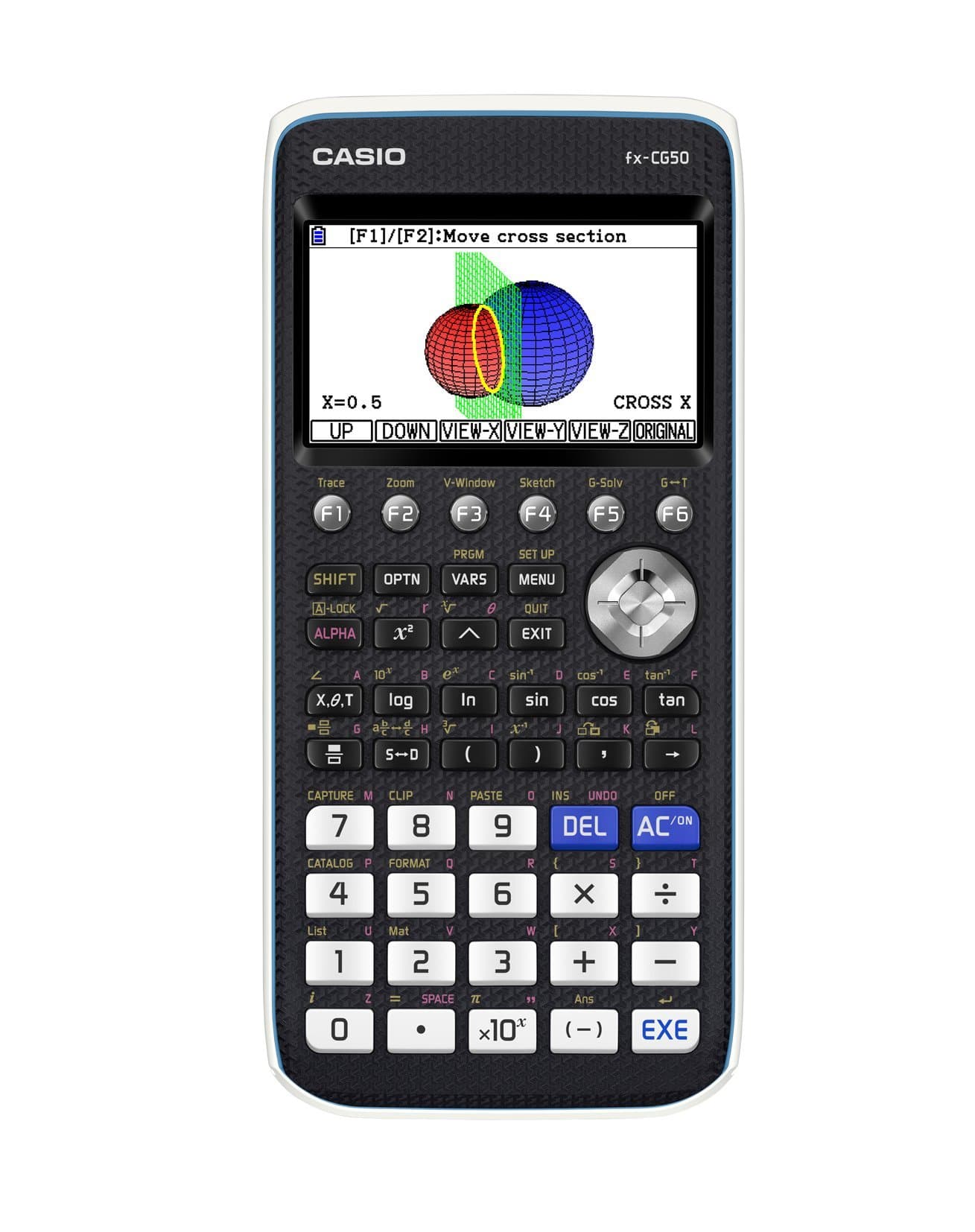
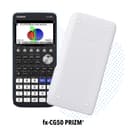



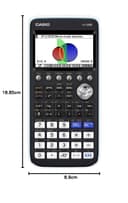
📈 Elevate your math game with color, clarity, and confidence!
The Casio FX-CG-50-L-IH is a professional-grade color graphing calculator featuring a high-resolution LCD with over 65,000 colors, 3D graphing capabilities, and a natural textbook display. Designed for ease of use with an icon-based menu, it supports advanced functions like conical sections and real-life image plotting. Approved for major standardized tests including AP, SAT, and ACT, it comes complete with batteries, a protective case, USB cable, and quick start guide, making it an essential tool for students and professionals aiming to master complex math concepts.


| ASIN | B0711D5RNZ |
| Amazon Bestseller | #323,922 in Office Products ( See Top 100 in Office Products ) #31 in Graphing Office Calculators |
| Batteries Included | Yes |
| Batteries Required | Yes |
| Brand | Casio |
| Color Name | black&white |
| Customer Reviews | 4.8 4.8 out of 5 stars (3,855) |
| Date First Available | August 21, 2017 |
| Display Size | 3.17 |
| Display Type | LCD |
| Included Components | 4 x AAA batteries, Protective Hard Case, Quick Start Guide, USB Cable |
| Item Model Number | FX-CG-50-L-IH |
| Item Weight | 0.8 Pounds |
| Item model number | FX-CG-50-L-IH |
| Manufacturer | CASIO |
| Material | Plastic |
| Model Year | 2017 |
| Product Dimensions | 8.89 x 18.85 x 1.85 cm; 362.87 g |
| Release date | May 3, 2017 |
| Size | 7.21"Wx10.32"Lx2.05"H |
D**4
オフラインでプログラミング出来るのが素晴らしい
B**E
大学生の息子が使っています。生協の物より安かったので購入したのですが、日本語の説明書がついてないことに気付き、とても心配していました。でも文句を言われてないので、何とかなっているようです。
N**A
グラフ機能やプログラム機能などがあり機能は豊富です。しかしCASが標準でありません。xcasという非公式のものはあります。 三角関数や平方根、べき乗など簡単な機能のみ求める人はこの電卓は向きません。いま関数電卓を使っていて不満がある人だけ購入することを勧めます。三角関数等高校から中学レベルの関数だけ使ったりする人はシャープの1600円くらいの教科書表示の電卓を買ったほうが安上がりです。 日本語表示は一切できません。なのにROMにはどうやら日本語の文字が中国語用フォントの中に入っているようです。中国語表示はできるのに日本語はできません。有志が勝手に作成した日本語化ファイルがありますが殆ど日本語になりません。 カタログ機能はコマンドを一覧から入力出来ますがコマンドの説明は1文字たりとも出ません。他の海外の電卓は出ます。 カラー液晶が特徴のようですが、これはいまいちです。視野角が狭く少し角度を変えると色が変わります。そして画面を明るくしても暗くしても目がチカチカします。さらに色が16ビットカラーですが実際は10色程度しか使用されておらず、16ビットカラーは背景の画像の表示程度しか使われません。 カラー液晶ではカッコの関係が色でわかりやすいです。 インターフェイスは賛否両論だと思います。殆どのグラフ電卓が採用しているメニューから十字キーで項目を選んでコマンドを入力する方式ではなく、F1からF6までのファンクションキーを順番に押して選ぶ方式です。コレの良い点は、同じコマンドを何度も連続で入力したり、数字とコマンドを交互に入力するような使い方には向きますが、機能が階層状に並んでいて、例えば、OPTNキーを押すとLIST,MAT,ENG-SYMなどが並びます。そこでEng-Symを押すと、次はメニューがm,μ,n,pなどと並び、ここでキーを押すとそのコマンドが入力されます。6個以上のコマンドがあるときはF6を押せば他のコマンドが選べます。しかし、今どのメニューを開いているのか、何ページ目にいるのかがわかりません。 EXITキーはファンクションメニューでひとつ上の階層に戻ったり、とにかく前の画面に戻るときに使います。ただしメインメニューには戻れない仕様で、戻りすぎるということがありません。 この電卓は全体的に動作がもっさりしています。とはいえCG20よりは遥かにマシになりましたが。特にプログラムやグラフが致命的なほど重いです。グラフは少しスクロールするだけで数秒待たされますし、プログラムは公式に沿って1回だけ計算するなどと言うくらいなら問題はないですが、加算を繰り返したり画面への描画を行うと重くなります。おそらく後述の暴挙によるものだと思います。 方程式機能は便利です。私が以前使っていたシャープの電卓はソルバー機能が遅く不正確でしたが、これは一瞬で正確な答えを出してくれます。しかし解が2つになる場合などは1つしか出てこず、自分で初期値を設定し直さねばなりません。 ここらへんが日本の関数電卓では進歩していません。中途半端です。 この電卓はなんと乾電池駆動です。LR03と書いてありますがこれは単4電池のことです。4本使用します。 電池寿命100時間以上をうたっていますが実際は高い電池を使っても16時間程度しか持ちません。昔のゲームボーイ並みの酷さです。 電池代が馬鹿になりません。しかも乾電池駆動のせいでCPUが弱く(ドリームキャストと同じCPUを半分の速度で動かしている)、動作がもっさりします。何故このような暴挙にOKを出したのでしょうか。このように高機能な電卓はリチウムイオン電池が主流ですが、おそらくカシオは電池が劣化した際の交換や充電の手間などを意識して乾電池にしたのだと思います。しかし、今では筒型のリチウムイオン電池も主流になってきています。このような筒型のリチウムイオン電池を交換できるようにして、USB充電にすればよかったのではないでしょうか。おそらく独自規格の電池にすると火が出たりしてクレームが入るので乾電池にしたというのもありそうです。しかし電池を10440などにして別売りにすれば例えば火が出てもそれは電池の問題であってカシオが抱える問題ではなくなると思います。 驚いたのは乾電池だけしか電源がないことです。充電池は電圧が低く1時間位でなくなります。ACアダプタも使用できません。USBポートはパソコンとの通信専用で、給電は出来ません。 メモリが少ないのも不満です。メインメモリと保存メモリがありますが、プログラムは保存メモリにコピーはできますが実行時はいちいちメインメモリにまたコピーしなければなりません。Dynaグラフ(式の値を変化させて動くグラフを見る)では特にメモリ不足がひどいです。動作が遅いこともあって不愉快です。 科学定数や単位換算するにはパソコンとつなぎ(USBminiBケーブルは付属)アドインをダウンロードして電卓にコピーしなければなりません。これが科学定数を表示するものは容量が大きく電卓のメモリを圧迫します。このアプリの周期表は画像つきになっていますがまさに原因はそれです。単位換算も奥深い階層にメニューがあり表記も英語なので分かりにくいです。 このように改善の余地はありますがカラー表示で、グラフが描けて、データの集計が容易で、CASが不安定だが一応使える(将来に渡って使える保証はない)ことを考えれば乾電池駆動というマイナスポイントを差し引いても悪い買い物ではなかったと思います。
W**S
Fast delivery. Calculator works right out of the box after putting in the provided 4xAAA batteries. Great backlight with 5 levels of brightness. Calculations are fast as well. It is also very lightweight and easy to hold, however I wish it has more weight to it. Well, the packaging was with rather hard plastic as the exterior and I spent a slightly long time using penknife to cut open the plastic. Overall very satisfied with the purchase.
P**E
Toller Taschnrechner mit sehr gut lesbarem, detailreichem Farb-Display. Komplexe Berechnungen lassen sich mit der übersichtlichen Tastatur schnell und übersichtlich eingeben; Änderungen der Formeln oder Werte lassen sich jederzeit durchführen ohne Neueingabe. Hunderte Funktionen sind über Mehrfachbelegung, Menüs und durch das Display beschriftete Funktionstasten abrufbar; sehr hilfreich. (Primfaktorzerlegung wurde unverständlicher Weise vergessen, lässt sich aber leicht durch ein kleines Programm nachrüsten.) Viele Betriebsmodi: Funktionsgraphen, Tabellenkalkulation (echt brauchbar), 3D Plots, Tabellen und Statistik. Finanzmathematik vorhanden, aber unpraktisch implementiert. CAS fehlt völlig (vermutlich absichtlich), auch das Rechnen mit großen Integerzahlen fehlt. Das schreiben einige ewig gestrige Schulen wohl so vor. Wer da mehr möchte, nimmt den nur etwas teureren Casio CP400II. Hätte ich den zuerst gekauft, hätte ich den schicken CG50 wohl nie gekauft.
A**Z
Easily the best graphing calculator for the price. Has way more features than you will ever need, as well as all the basic things. The interface takes a while to get used to but a week or two should be enough to start using this efficiently. Came packaged well with manuals and USB wire for data transfer.
C**I
The fx-CG50 is a fairly high end non-CAS (more on this later) graphing calculator. Marketing-wise, it positions itself as a direct competitor to the TI-84 Plus CE, but that's selling it short. In terms of power, it's more similar to the non-CAS TI-Nspire CX II that it is to the TI-84 Plus CE. Here is how it stacks up compared to the 84 Plus CE: Processor speed: The fx-CG50 has a 116 MHz Hitachi SH7305 32/16-bit processor, which is a variant of the CPU that was used in the Sega Dreamcast game console. Oddly, given that this is a calculator, the SH7305 lacks an FPU. This was probably done to make it consume less power. The 84 Plus CE has a 48 MHz Zilog eZ80 16/8-bit processor (also without an FPU). On paper, the difference is massive. In practice, the Casio runs about 2 to 8 times faster than the TI on most operations. That's still significant and you can see it quite dramatically when plotting a graph. Memory: Memory is laid out somewhat differently between the two calculators. The fx-CG50 splits its memory between 61 kb of main memory and 16 Mb of "storage" memory. The "storage" memory serves both as a flash ROM and as a file system. The 84 Plus CE has 149 kb of RAM and 3 Mb of flash ROM for applications. On paper, the TI seems to have more RAM, but a lot of what the TI needs to keep in RAM, the Casio can offload to its bigger "storage" memory, keeping all of thee 61 kb free for use. Which one wins will depend on how you use it, but overall, the two are on the same order of magnitude when it comes to memory. For my use, the Casio's more flexible memory layout makes it more practical. Functionality: Both are advanced scientific calculators with almost everything you can imagine built-in or offered as an "app". Where the fx-CG50 trounces the 84 Plus CE and leaves it bleeding on the floor is that there is a free CAS system available that's a port of Xcas/Giac (the same CAS system that's the basis for the HP Prime), propelling the fx-CG50 into the CAS category of super calculators. If you don't know what CAS is, it's a software system that lets you do symbolic math and exact arithmetic. It's so powerful, that it's banned in almost every exam and even in some regular classes. Where the TI wins is in the vast ecosystem of downloadable apps for every imaginable purpose. Programming: Until recently, the Casio was a clear winner because it comes with a light version of Python built in. But TI has since added Python to the 84 Plus CE. You may still see the 84 advertised as pre-Python, but receive the Python version, however there are no guarantees that you won't get older, pre-Python stock. It used to be that the 84 Plus CE could be programmed in Z80 machine language, but after someone wrote a Z80 program that could inconspicuously disable "exam mode", TI updated the OS to prevent native code, killing one of its best features. It's possible to jailbreak the newer 84s to allow Z80 machine code, but TI could counter that at any time. The Casio, on the other hand, still allows native programming, AND there are tools available to program it (from a PC) using C++ and other languages, making it again the clear winner for programmability. Both calculators have a built-in BASIC-like language, but Casio's is horrible. If you plan to use the BASIC-like programming language, TI-BASIC is the winner by far, and it's better documented. Batteries: The TI is the winner here. It has a nice, slim cell phone style rechargeable battery. But the Casio has a feature that I haven't seen since my old HP 200LX: it can use either disposable alkaline batteries OR Ni-MH rechargeable batteries (which are not recommended for calculators that don't expressly support them). The Casio, however, doesn't recharge the Ni-MH batteries itself. They need to be recharged externally. But it's aware of them (if you tell it) and is able to report the correct charge. Price: Both the Casio and the TI are priced within $20 or $30, the Casio usually being the cheaper of the two, despite being a lot more powerful. Alternatives: Just as the TI-84 Plus CE is an upgrade of the TI-83 Plus, which is now fairly outdated, the Casio fx-CG50 is an upgrade of the Casio fx-9750GIII. However, the 9750GIII is NOT outdated. In fact, some benchmarks show it to be faster than the CG50. It has a lower resolution black-and-white screen, but in all other respects, except for a smaller 3 Mb storage space, it's practically identical to the CG50, right down to the keyboard layout. But it costs peanuts compare to the fx-CG50 or the TI-84. It will cost between a third and half of the price of the color models. I got mine on sale for $30. If you don't mind b&w graphics, it's a phenomenal value. Size: The Casio is thicker, wider, and heavier than the TI. If you're shopping for a case, you'll need one that supports oversized calculators like the Nspire CX II. The Casio won't fit in cases that are made for the TI-84. Some will not like the bulkiness of the Casio. Politics aside, if your choice is between a Casio fx-CG50 and a TI 84 Plus CE Python, the Casio would be your best option by a wide margin. But politics exist. Your school or teacher or standard exam may require the TI and bar the Casio, leaving you little choice. The course material is much more likely to be tailored to the TI. The TI is overwhelmingly the most popular calculator, so you may be surrounded by others who have the 84. This makes it easier to share information, tips, and tricks, or to seek help when you need it.
E**S
Muitos recursos interessantes. Ótima qualidade dos materiais. Precisa e relativamente fácil de usar. Minha única crítica são os manuais, que são muito superficiais em alguns detalhes.
Trustpilot
2 months ago
1 month ago