Desertcart purchases this item on your behalf and handles shipping, customs, and support to Ecuador.
๐ถ Elevate your space with wireless sound that moves with you
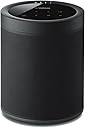
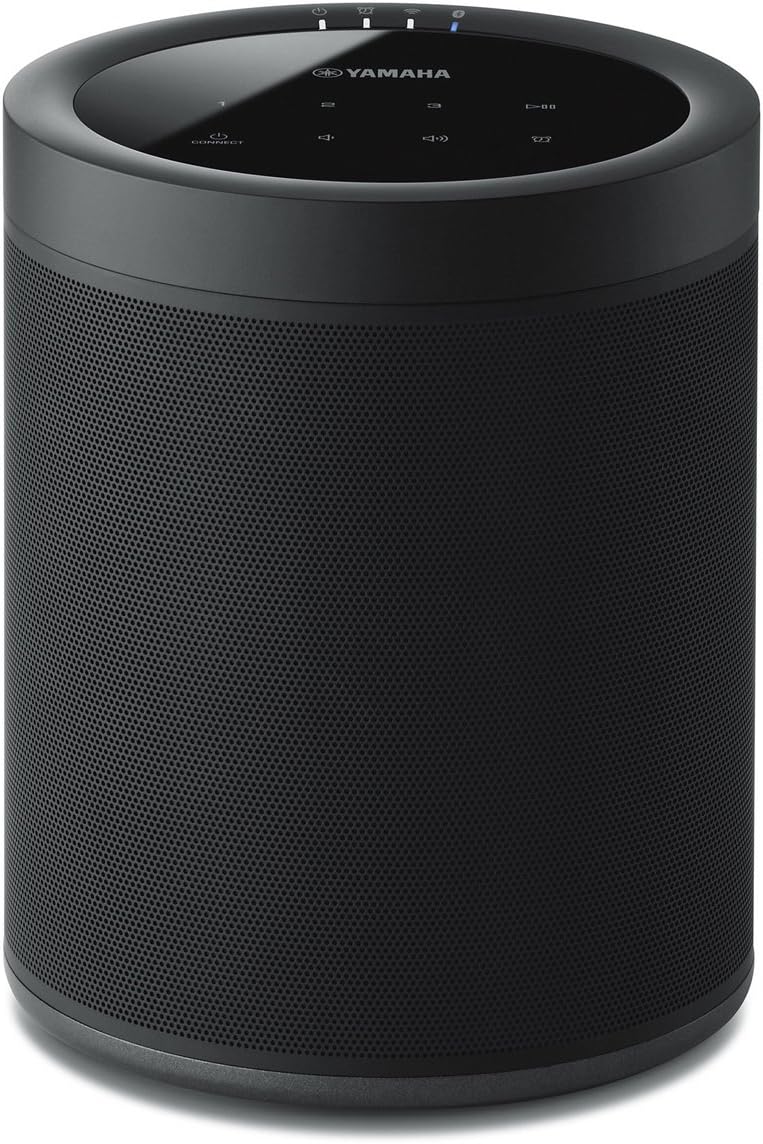
The Yamaha MusicCast 20 Wireless Speaker delivers rich 5.1 channel surround sound with flexible multi-room streaming via Wi-Fi, Bluetooth 4.2, AirPlay, and Spotify Connect. Its compact, wall-mountable design fits any decor, while the MusicCast app and Alexa voice control offer seamless, hands-free management of your home audio experience.


| ASIN | B07CK93ZZF |
| Additional Features | Stereo pairing;Radio |
| Age Range Description | Adult |
| Antenna Location | Music,Home Theater |
| Audio Driver Size | 20.07 centimeters |
| Audio Driver Type | Dynamic Driver |
| Audio Output Mode | Stereo |
| Battery Average Life | 10 hours |
| Best Sellers Rank | #54,960 in Electronics ( See Top 100 in Electronics ) #63 in Surround Sound Systems #4,425 in Earbud & In-Ear Headphones |
| Bluetooth Range | 32 feet |
| Brand | YAMAHA |
| Built-In Media | Speaker, manual |
| Color | Black |
| Compatible Devices | Home Theater |
| Connectivity Protocol | Bluetooth, Wi-Fi |
| Connectivity Technology | Bluetooth |
| Control Method | App |
| Controller Type | Amazon Alexa |
| Customer Package Type | Standard Packaging |
| Customer Reviews | 4.0 out of 5 stars 289 Reviews |
| Enclosure Material | Metal, Plastic |
| Frequency Response | 40 hertz |
| Global Trade Identification Number | 00027108957302 |
| Is Waterproof | FALSE |
| Item Dimensions D x W x H | 5.2"D x 5.9"W x 7.9"H |
| Item Type Name | โข Yamaha MusicCast 20 Wireless speaker for Streaming Music. Black. Works with Alexa. |
| Item Weight | 4.8 pounds |
| Manufacturer | Yamaha |
| Maximum Range | 32 feet |
| Model Name | WX-021BL |
| Model Number | WX-021BL |
| Mounting Type | Wall Mount |
| Number of Audio Channels | 5.1 |
| Number of Items | 1 |
| Number of Power Levels | 1 |
| Power Source | AC |
| Series Number | 21 |
| Speaker Maximum Output Power | 4 watts |
| Speaker Size | 20.07 centimeters |
| Speaker Type | Multi Room |
| Specific Uses For Product | Music, Home Theater, Wireless Surround |
| Subwoofer Connectivity Technology | Wireless |
| Tweeter Diameter | 1 inches |
| UPC | 027108957302 |
| Unit Count | 1 Count |
| Warranty Description | 2 Year Manufacturer |
| Warranty Type | Manufacturer Warranty |
| Water Resistance Level | Not Water Resistant |
| Wireless Technology | Bluetooth, Wi-Fi |
| Woofer Diameter | 8.89 centimeters |
S**N
Steps to add Speakers to 5.1.2 Surround Sound
Great speakers once you get them connected, the problem is that was a huge headache for me (at first). So much so, that I spent 3 days tinkering with these and my wireless network settings to no avail, only to box everything up in frustration with the intent on sending it all back. Fortunately, once I cooled off and waited for the holiday weekday to pass I called Yamaha, and thankfully they got me working. Initially, I could only get one speaker to add to my wireless network, but the second speaker simply would not add. I thought maybe it was a bad speaker, so I exchanged it at the store, but sure enough the new speaker also would not connect. After 3 days of trying, I finally called Yamaha, and they said it was common, and that a better method was available (though not in any manuals or guides). SO, if you are pulling your hair out trying to get your receiver and two speakers to connect for rear surround sound, here is the EASY way (using a receiver and two speakers): 1) HARD WIRE the receiver over ethernet and add it to the Yamaha Music Cast app. 2) Temporarily HARD WIRE the first speaker via ethernet as well, then add the device in the music cast app (give it a specific name like โSurround Leftโ) 3) Click on the SPEAKER in the music cast app, and go to information > network settings (then notate the IP address) 4) Open a browser on your PC, and go directly to the IP address of the speaker 5) Click on network settings 6) Click on "wired" and it should let you change it to "wireless" 7) Enter the SSID, security type, and password of your wireless network, then click OK 8) Disconnect the ethernet cable, & reboot the speaker (it should connect on its own over wireless now) 9) Now REMOVE the speaker from the music cast app altogether 10) Since the speaker is still connected to your wireless network, you should be able to reconnect it back into the music cast app by holding down โconnectโ on the top of the speaker for 5 seconds. 11) Repeat steps 2-10 with the second speaker 12) Once the receiver and two speakers are showing up in the app, CLOSE the music cast app completely (swipe up on an iOS device) 13) Re-open the app, click on the receiver, choose "music cast surround speakers" and now add the two speakers. 14) Once you see the โsuccessfulโ message you should be set with wireless surround. Why these speakers have so much trouble being added wirelessly, or why Yamaha does not add the above steps in their manual is beyond me, but now that everything is connected properly they work great! ALSO: While the advertisement of the Yamaha Receiver and these speakers say they only work in 5.1 setups, the receiver DOES allow adding two extra "front presence" (i.e. height) speakers, making it 5.1.2 ....... (which is basically like 7.1), FYI ****** 8/6/19 UPDATE ***** I noticed after a while the speakers began going "in and out" occasionally. To fix this (which may have been overkill, but it worked for me) I moved everything wireless in my house to my 2.4Ghz "N" network, and reserved my 5Ghz "AC" network for nothing but these speakers. I also put a network extender in the room where these speakers are, so that the signal was uninterrupted through walls. Once I did those two things they've never once sounded choppy. Hope this helps others =)
N**W
Love these speakers!
The Yamaha Music Cast system is fantastic! These small speakers sound great and are soooo easy to set up. I now have a few in various rooms and have whole-house wireless music without drilling and running wires through attics and under the home. Did I mention they are soooo easy to set up? No, these are not massive, large speakers that will fill a huge room with driving bass by using just one speaker. They are what they are -- excellent smaller speakers well under $500 that sound great and are perfect for a typical-sized room in a house. They are good looking, discrete, and are easily tucked away within room decor. I put two on opposite corners of rooms and the rooms sound wonderful. I added a subwoofer in the larger living room next to my entertainment center. It's like I now live inside a big speaker shaped like a house, and the music comes from everywhere when I walk from room to room. It is exactly what I wanted and am very pleased. I have always found Yamaha audio equipment to be top notch. I also found the Music Cast app so easy to install on my phone and use. Don't know why some other people have said it is difficult to use. They must work for the competition and are planting negative reviews. I can easily use the app to control the volume speaker-by-speaker, use EQ settings speaker-by-speaker, set up presets with all speakers and levels already set up and accessible by choosing the correct preset number, or I can use presets to have certain speakers off when I want to listen in only one room downstairs and not bother other people upstairs, I can turn on and off the AV receiver and all speakers with the press of one button, can access Pandora and Spotify (those are the ones I use) without turning on my Smart TV or Blu-ray, can skip songs, make playlists, give thumbs up and down to songs, etc., etc, all from the app on my phone. I also have had no problems at all with music cutting in and out like some people have commented. That must be due to them having a poor wifi signal problem. I have a Netgear Orbi wifi system with satellites in two places throughout my two-story home. My wifi signal is fine and the speakers have not cut in and out or lost signal at all. Ever. Not even once. Remember, if you start adding six or more speakers, plus a wireless AV receiver, and have your cell phone set on wifi to control the app and the speakers, you have just added eight or more devices onto your wifi system, in addition to all the other devices that were already using your wifi. So, make sure you have a good wifi signal and all will be fine. So far, I am VERY happy with these Yamaha speakers and their Music Cast system.
B**M
As wireless surround speakers for a 5.1 setup
UPDATE 11/7: Yamaha recently released a firmware update that appears to have corrected the issues I was experiencing with lipsync. I now give this 4.5 stars as wireless surround speakers. If you want a receiver-based surround system, rather than a soundbar, this is really your only real option and frankly I now notice very little difference with these wireless speakers than with my previously fully-wired setup. I did not see a review yet regarding these speakers when used for wireless surround speakers for a 5.1 setup, so here are my views. The speakers do a good job but initially I was having some lip-sync problems with the audio for movies and TV, which I did not have when I had wired surround speakers. There is an option on the phone app to adjust the speakers for lip-sync that on the whole does a good job but I notice with some sources that the problem can sometimes persist, though it is a close call (i.e., within a couple of milliseconds off). Why these speakers cause any problems whatsoever with lip-sync -- which implicates the center speaker (which is wired) of a surround setup -- to begin with with is beyond me. Setup was initially a problem and I did have to re-set them up again when I did not use them for a few days, as for some reason they can became dissociated with the receiver. Price is obviously a lot to pay for the privilege of wireless surround speakers that are for a receiver, but it is very hard to find this feature elsewhere without going the soundbar route.
M**B
WiFi/Ethernet Speakers for Rear Surround Speakers or multi-room audio
These speakers worked exactly as I expected/wanted them to. I purchased a pair of these speakers a bit more than one year ago to use a rear speakers for a 5.1 setup with my Yamaha (RX-V685) receiver. I used them for a few months via WiFi and then for the rest of the time via wired Ethernet. (I switched to wired Ethernet because it's my general preference to use a wired connection for devices that are intended to remain in place.) Audio sync is very reliable over wired Ethernet. It worked well enough over WiFi, but there were a few hiccups from time to time. There have been a few firmware updates in the past year--and at this point, the reliability has been pretty stable. I find the negative reviews about difficult setup a bit surprising. I admit the process could've been better--but basically just follow the instructions. It would be nice if it didn't require the MusicCast App for setup, but considering that my phone is essentially an extension of my body these days--it's not really a problem to need my phone. I actually came to find that I don't mind the MusicCast App for streaming music and am considering adding some additional speakers in more rooms. (The biggest hesitation is the price per speaker, but I'm satisfied enough with the product to be considering buying more despite that.) Overall I'd recommend these speaker--especially for those who've already invested in a MusicCast-ready Yamaha receiver and are looking for an easy solution for wireless rear surround speakers.
A**.
Proprietary wireless REQUIRES CONSTANT WI-FI.
Almost not worth the setup hassle. This could be simplified without the app. When I bought the sound bar from a home theater store they were not in a hurry to recommend the speakers for the rear channels. I NOW UNDERSTAND WHY! They do not have the implied ease of connectivity via proprietary wireless or just blue tooth!!! They require WiFi or simply will not work. The sound bar works fine and sounds fine. The Bluetooth alone will drive you nuts because every time you connect the app WITHOUT using the WiFi support it will want to pull a Bluetooth signal from a more pure source, like your phone! Yamaha skip the app! Use a simple onboard pairing button and your own proprietary remote control supplied with the sound bar! Why create conflicting controllers that fight with each other???!!! As others have said, once you get past the hours of frustration the โroom-filling surround sound โ does sound like what you want. The difficult process should be streamlined without the app. The app took its time delivering firmware to the speakers before they were functional. The setup literature makes no mention of requiring both Bluetooth connectivity and WIFi. This is why the Audio on this product is better, but the overall satisfaction mediocre. The design needs work.
J**A
Massive regret
I bought 2 of these and a new Yamaha receiver solely for the idea of having wireless rear speakers. It was a waste of money and time. They do work ok, and sound ok, but lost configuration data constantly with no indication other than the lack of sound. The fix for that if you have already made the mistake of buying: Power off, Hold volume up and volume down for 5 seconds, Hold power off connect for 3 seconds, Reset up in app. After the 20th time you start asking if this movie is worth the hassle - shortly after that you stop asking and just have some expensive clutter.
M**N
Great Wireless Speaker for Yamaha MusicCast Systems
Integrates well with my Yamaha RXโA2080 receiver. I didnโt want to run wired speakers to my walkโin closet and restroom, and the MusicCast 20 wireless speaker solved that perfectly. The sound is great, and it connects easily to my iPhone. I only purchased one, but I can see how these would work well as rear or presence speakers. It definitely saved me money by avoiding ceiling speakers. The price is fair for the quality โ you get what you pay for.
A**D
It's an okay speaker, but not highly functional.
Yamaha really really really needs to work out how those volume synch and lip synch function. I am unable to adjust the "master" volume properly with my TV, which doesn't make any sense given they're synched to be in the same room on the same system. The sound itself is fine. Honestly for as much as you spend on the soundbar and music cast, I'd go for something better. EDIT: Also, MusicCast as an app/capability is very very klunky and buggy. The room linking does not work well, and even when I configured something that came an approximation to functionality, their Tier 2 support LITERALLY said not to configure it that way because it was not stable. EDIT: I have processed a return for this speaker, and am processing a return for the Yamaha Soundbar. It is not possible to accomplish my requirements (a speaker set in a different location to extend the TV sound (not as a "rear speaker") and have something sound decent/synch to the TV). There is a chance that the MusicCast 50 might be useful to do this, but it appears only to be a single "rear/center" speaker, not more of a "mono" configuration. Even if it does, we're talking about $1k for this, and you can find better speakers that meets more requirements out there. The sound was never "room filling" regardless, either way. I was hoping for better from Yamaha, and they were an epic fail.
P**S
Quality Product
The Best one from Yamaha
B**.
Subtle surround speaker
Surround speaker, unobtrusive!
R**A
Expensive but worth it
I bought the soundbar yas 408, a month back and was very impressed with the sound quality. However I was missing the wow factor. Now added the two music cast speakers and I am pleasantly surprised with the amazing surround sound experience. The only downside is that these are very expensive. I suggest all owners of the music cast sound bars to invest in the surround speakers to enjoy the high quality immersive experience
Trustpilot
3 weeks ago
2 weeks ago