🚀 Power Meets Precision — Elevate Your Workspace Game
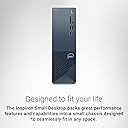
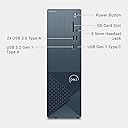
The Dell Inspiron 3030s Small Desktop combines cutting-edge 14th Gen Intel Core i5 processing with 16GB of high-speed DDR5 RAM and a 512GB SSD, delivering robust performance for business, education, and everyday use. Its compact 14.7L chassis supports multiple monitor setups including 4K, enhanced by Wi-Fi 6 connectivity and integrated Intel UHD 730 graphics. Backed by Dell’s 1 Year Onsite Service and 6 Months Dell Migrate, this desktop ensures seamless productivity and effortless data migration, making it the smart choice for professionals seeking power and reliability in a stylish Mist Blue design.


| ASIN | B0BW4TDKYW |
| Additional Features | Memory Card Reader |
| Best Sellers Rank | #4,163 in Computers & Accessories ( See Top 100 in Computers & Accessories ) #104 in Tower Computers |
| Brand | Dell |
| Built-In Media | 180-Watt Power Supply Unit, Dell Multimedia Keyboard-KB216 Black (English), Dell Optical Mouse - MS116 (Black), Documentation, Inspiron 3030s Small Desktop, Power Cord |
| CPU Model | Core i5 |
| CPU Model Number | 14400 |
| CPU Model Speed Maximum | 4.7 GHz |
| CPU Speed | 2.5 GHz |
| Cache Memory Installed Size | 20 |
| Cache Size | 20 |
| Color | Mist Blue |
| Compatible Devices | External Storage Drive, Keyboard, Monitor, Mouse, Printer, Speaker, Wireless Devices |
| Connectivity Technology | Bluetooth, Wi-Fi |
| Cooling Method | Air |
| Customer Reviews | 4.4 out of 5 stars 514 Reviews |
| Display Type | No Display |
| Graphics Card Description | Integrated |
| Graphics Card Interface | Integrated |
| Graphics Coprocessor | Intel® UHD Graphics 730 |
| Graphics Description | Integrated |
| Graphics Ram Type | Shared |
| Hard Disk Description | SSD |
| Hard Disk Interface | Solid State |
| Hardware Interface | Bluetooth, DisplayPort, Ethernet, HDMI, Solid State Drive, USB 2.0, USB 3.2 Gen 1 |
| Human-Interface Input | Keyboard, Mouse |
| Item Dimensions | 11.52 x 3.64 x 11.41 inches |
| Item Height | 11.41 inches |
| Item Weight | 8.86 Pounds |
| Keyboard Description | Wired, Full-size, Multimedia Keys |
| Keyboard Layout | QWERTY |
| Language | English |
| Manufacturer | Dell |
| Memory Clock Speed | 4400 MHz |
| Memory Slots Available | 1 |
| Memory Speed | 4400 MHz |
| Memory Storage Capacity | 16 GB |
| Model Name | Dell Inspiron Small 3030S Desktop |
| Model Number | i3030S-5199BLU-PUS |
| Model Year | 2024 |
| Number of Component Outputs | 2 |
| Operating System | Windows 11 Home |
| Personal Computer Design Type | Computer Tower |
| Power Consumption | 180 Watts |
| Power Plug Type | Type A - 2 pin (North American) |
| Processor Brand | Intel |
| Processor Count | 10 |
| Processor Series | Core i5 |
| Processor Socket | LGA 1700 |
| Processor Speed | 2.5 GHz |
| RAM Memory Installed | 16 GB |
| RAM Memory Technology | DDR5 |
| RAM Type | DDR5 RAM |
| Ram Memory Maximum Size | 64 GB |
| Security Features | Basic security features (Windows Defender, Windows Hello, SSD) |
| Speaker Description | Cirrus Logic High Definition Audio |
| Specific Uses For Product | Business, Education, Everyday Use |
| Specification Met | Energy Star |
| Style Name | 512GB SSD |
| Total Number of HDMI Ports | 1 |
| Total Usb Ports | 8 |
| UPC | 884116470199 |
| Video Output | HDMI, DisplayPort |
| Video Output Interface | HDMI |
| Video Processor | Intel |
| Warranty Description | 1 Year Hardware Service with Onsite/In-Home Service After Remote Diagnosis, 6 Months Dell Migrate |
| Wireless Compability | 802.11ax |
| Wireless Network Technology | Wi-Fi |
| Wireless Technology | Bluetooth, Wi-Fi |
M**N
Easy to set up, easy to add components. Leave RAID setting alone.
This is my second Dell Inspiron. My first has an i7-7700 processor which is not supported by Windows 11. Plus, I've had it for 7 years, so it was getting long in the tooth anyway. I upgraded to this Inspiron 3030 with an i7-14700 processor and Win 11 Pro. I intentionally decided to go with the single, 1TB SSD because I wanted to move the 250 GB SSD and 1TB HD from my older machine to this newer one. The Inspiron started well and, after the normal Dell/Windows initialization routine, it ran properly; no muss, no fuss. I then began to move components over from my old Inspiron to this new one. Before I started, I read the user's manual to familiarize myself with the contents of the case. Opening the case is actually quite simple; two thumbscrews and you're in. (No screwdriver required.) Adding a 7-port USB 3.0 PCIe card was as simple as pulling on a tab, inserting the card, and closing the tab. (Again, no screws involved.) As for adding my older hard drives, inside the 3030's case is a power harness for three additional SATA drives/cards, and a spare SATA data cable. Moving my 250GB SSD and 1TB HD (both AHCI) from my old machine to the new machine was easy; just unscrew the drive caddy from the old machine and screw it onto the case of the new machine, plug in the power cables and the SATA cables, close the case, and reboot. Bingo! The drives were present and accounted for. (The old drives needed different drive letters assigned (per my desires), and the old SSD (which was the old OS disk with Win 10 Home installed) had to be reconfigured and reformatted to a Data disk, but that was easily done via Disk Management.) Now, many people have said that you have to change the Inspiron 3030's BIOS setting from the default "RAID" to "AHCI" when installing AHCI drives. However, this is not the case; at least for this particular model. After much review and research (read the owners manual!), I realized that there was no need to change the new Dell's BIOS storage setting to "AHCI" from the default "RAID" setting. (The Inspiron 3030's "RAID" setting actually does NOT have a true RAID function and thus does not have to reformat the drives when an additional drive is added.) In the event, I just plugged in the new drives, rebooted, and they were recognized without any problem. Of course, I had backed up everything and had a Recovery Disk handy if anything went sideways. So, long story short, I am satisfied with this machine (I'm writing this review using it). It is already much faster than my old machine, which saves me lots of time when processing and moving large files. Good product, good price. 5 stars.
M**E
Excellent Desktop Computer
I purchased this to replace a 7 year old Dell Desktop that worked well for me. But with Microsoft withdrawing support of Windows 10, I decided to purchase a new one. It is fast operating and has a remarkably large memory. It was a challenge to transfer apps/files to it but once they were transferred they worked properly. It works quietly and sits nicely under my desk. After getting used to Windows 11, I find it easier to use than my previous Dell.
S**D
Performance and Price
Dell has always been the brand I've used. It's always been reliable and has lasted for almost 10 years with no problems. I'm still working on getting all my info transferred from my old computer. Dell Migrate didn't work as expected - it only transferred some of my information, no documents and no photos. I was worried about the color "mist blue" - 99% of the it is black with just the front cover being "mist blue" - more gray than blue. And it is advertised as the small desktop, it is regular size. I can live with those discrepencies, so not a problem. I feel positive that it will perform as well if not better than all my previous Dell computers. Price was very reasonable.
M**.
Very good PC for the price
I'm liking this computer. I needed a new one because my other one was basically obsolete & it was running pretty slowly. I got most of my software installed easily on this computer. I just had a few issues with setting up the log in screen so I can skip that when turning on the PC. I had to install a couple of programs twice and one program won't work with it anymore but that's not the pc's fault. I've had this computer about a month or so and I'm enjoying how fast it loads up and turns off and also how quickly it updates. All in all, I'm happy with the computer; hopefully it remains that way. I can open over 10 Chrome browser tabs without slowing the PC down at all which, my previous dell couldn't even have 4 or 5 open at once without it getting sluggish. I do wish it had a DVD drive; I mean it has the slot for it, just nothing is installed in there so that's rather pointless. It runs quietly and like I said, the memory seems to be quite good for what I need. For reference, I'm an artist so I do a lot of artwork on my PC, graphic designing and some web designing so it's great for that. I can't speak on how it is for gaming because I don't play video games.
S**L
Great Machine
I use this computer for work. I work remotely. It is fast enough for large and involved Excel work and Photoshop. I am very happy with it.
A**R
Works great
Works great and quick shipment.
D**N
New, fast, Windows 11
Replaces an ancient HP desktop that was hot stuff back in the day. This Dell loads about 20 times faster, what with the SSD instead of an HD. It has a DVD drive, which is increasingly rare, and I have a lot of old pictures and whatnot on discs that I'm only slowly getting around to. Price is reasonable, it has a full slate of ports, runs quietly, doesn't take up much space. Dell's OEM keyboard is about standard for this sort of thing; I prefer a mechanical board and will replace that. Everything else is fine. I'm not a heavy-duty gamer and I don't do a lot of photoshop, so this machine fills all my needs just fine. I'd recommend it as being a good, basic desktop. Longevity? We'll see. Aside from having some icons rearranged, I don't see a lot of difference between Windows 10 and 11. Either does everything I need. Actually, XP did everything I needed, and generally faster. You can't stop "progress", I guess, but I wouldn't at all mind a stripped-down Windows that omitted all the A.I. copilot stuff and a ton of other never-used features. That's what I like about my tablet's Chrome system. Sleek, fast, lightweight. You're looking for a medium fast desktop with 16 GB memory, a 1 TB drive and a DVD tray, this Dell should suit you well enough.
G**N
Worst technical support happened at Dell.
BEWARE of Dell Warranty and Tech Support. Rec'd new Dell 3020s small tower. Got it up and running April 17. Fast - it looked Good. But in 3rd week kept losing connection to the internet. Got thru to Dell Tech Support (Its in India) and thought we had solved problem. 2 days later got message: "Cannot connect to Internet". Eliminated the modem/router and cable to PC. Back to Tech Support (India). Two hours later we had downloaded on my older PC (It could connect to the internet) 2 Realtech drivers for the WIFI and the latest BIOS. Copied to memory stick, then copied files from stick into new Dell 3030s. Then executed these files to install new Realtech drivers and then the updated BIOS. Phew, that took 2 hours. ALAS the problem still existed.: NO access to the internet. Then was told by rep that I would have to post $ 99 us dollars to get access to Advanced Tech Support. I was livid!!! A new Dell PC and I had to pay $99. to solve the problem in the new Dell PC. Called Amazon. They assured me they would get Dell to respond. Hours later I contacted Dell Tech Support again. Yes 3 times, 3 people, I had to identify myself, the PC, the problem! And the techie said "You have to pay the $99 before we can proceed:. I blew my stack, explained that would never happen on "my new Dell PC". Next day I returned the Dell 3030s PC to Amazon and bought an HP PC. Its got to go better than my Dell experience. My old pc is a Dell 7050 tower Win10.
Trustpilot
1 day ago
1 week ago