Desertcart purchases this item on your behalf and handles shipping, customs, and support to Ecuador.
💤 Monitor your nights, master your health—wake up empowered!
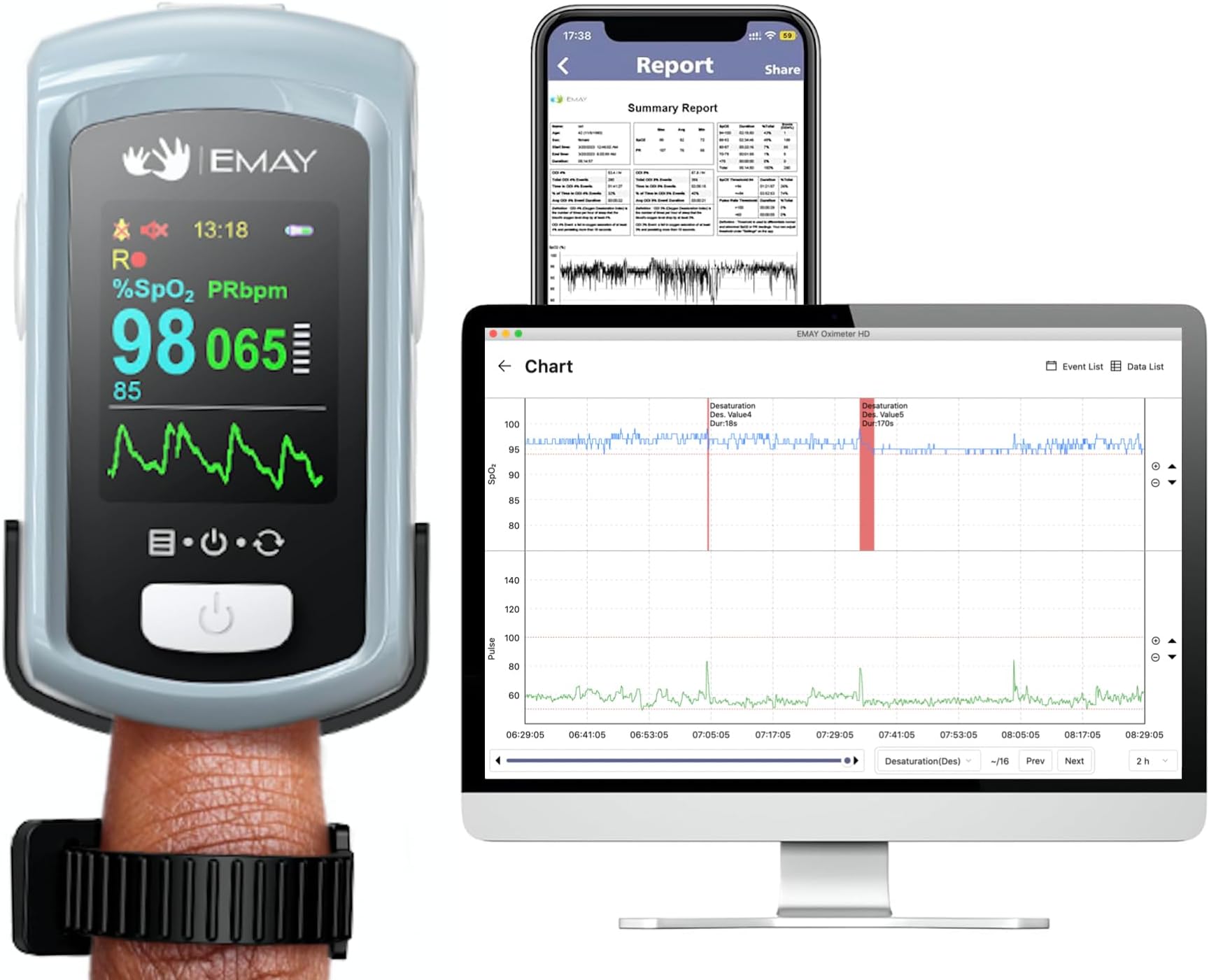
The EMAY EMO-90 Sleep Oxygen Monitor is a rechargeable, Bluetooth-enabled pulse oximeter designed for continuous overnight SpO2 and heart rate tracking. Featuring 72 hours of built-in memory, dual operation modes, customizable audio alarms, and free PC/iOS/Android apps for detailed data analysis and report generation, it offers professional-grade accuracy and user-friendly comfort for proactive health management.


| ASIN | B09L4SHGXW |
| Battery Life | 72 hours |
| Best Sellers Rank | #93,947 in Health & Household ( See Top 100 in Health & Household ) #75 in Athletic & Aviation Pulse Oximeters |
| Brand | EMAY |
| Brand Name | EMAY |
| Color | Blue |
| Customer Reviews | 4.4 out of 5 stars 499 Reviews |
| Included Components | Device |
| Manufacturer | EMAY |
| Measuring Range | 70% to 100% |
| Model Name | EMO-90 Sleep Oxygen Monitor |
| Number of Batteries | 1 Lithium Ion batteries required. |
| Number of Items | 1 |
| Part Number | EMO-90 |
F**S
EMO 90
It is important for my health to monitor my heart rate, and have a constant record of my pulse values, and values of my oxygen saturation. And the values have to be accurate. First, I tested them against other brands and found that the other brands fell short of accuracy and consistency. The other brands were also difficult to read. The EMO 90 has an easy to read, friendly display! Then I tested the EMO 90 against the hospital blood pressure sphygmomanometer and pulse oximeter, and repeatedly had exact, matching values for pulse and oxygenation. That was impressive! To be in sync with a $5000 piece of medical equipment is good enough for me! Looking at my finger gives me a spot check. It lets me know my oxygenation and pulse at any moment. And the display is set so I may look at my finger from just about any angle or show it to my physical therapist, again from almost any angle. No arm contortions needed for a device read. What the EMO 90 gives me is a second by second recording of my pulse and oxygen saturation on my smart phone. I know exactly at what time my oxygen dips down and when my heart rate is too high or in the lower range. I may require medicine intervention as an intervention. I can copy that information and email it to my cardiologist and pulmonologist. The battery lasts for days and is USB rechargeable. I plug it in, unplug, and I am good to go for hours of pulse and oxygenation recording. I never worry about it losing battery power. This is a very feature rich device. And from little questions to big questions the tech support staff is friendly and welcoming. If they don’t have an immediate answer, they escalate and give me a time range of when someone will reach back to me. They answered some of my questions on a weekend. I didn’t expect to hear anything until Monday. This is THE pulse oximeter I am going to recommend to my family and friends that need to keep accurate records of what’s going on with them. There is an easy to connect lanyard, and a rubber friction device to hold it on my finger overnight without it slipping off. I wake up with the EMO 90 just where I left it recording every second of my pulse and oxygen saturation. Pairing the EMO 90 to my phone was a cinch and I can’t think of a better device. I don’t want a different device. The EMO 90 is IT! If the company comes up with a more feature rich device then the EMO 90, I would consider it, but I wouldn’t trade for another company’s offering. The EMO 90 is mine! Special thanks to your telephone support folks, their escalation links, and the engineers that came up with such a user-friendly comfortable product. I am an EMO 90 Fan!
I**H
Rechargeable Oxygen Monitor
Arrived promptly and I began the start up. The instructions were easy to follow. I’m older and not tech savvy, but was able to hook up to my iPad Bluetooth. The oximeter easily stays on my finger overnight. I did not want to tape around my finger so I used a soft ankle sock over my hand for overnight recording to insure the monitor did not slide off. In the mornings I simply turn on my oximeter and open my iPad. I click on my downloaded EMAY App. The App screen is easy to understand and prominently gives the option to Edit or Connect. The graphs are very easy to understand. There is even a place to make remarks on recorded readings of the SaO2 and pulse rate. The recording is continuous minute by minute. This monitor gives a great picture of what happens with SaO2 and Pulse rate anytime of the day, but especially overnight. Plus, no batteries are needed. Simply plug in to recharge. I am very pleased with my purchase. In addition EMAY customer service reached out to me to insure everything was working as expected and to ask if I had any problems.
A**E
Real-time monitoring is GREAT
PROS: * Visual display while monitoring is very nice. * Display is crisp and clear. Easy to read. * Device setup is straightforward and easy to do. * Uploading to the PC / phone is easy. * It is very easy to start the recording, to upload data to your phone or to the PC. * I charged the device every day so no problems running out of battery overnight. * The real-time display is GREAT. * I had the opportunity to compare, simultaneously, the SleepO2 and the EMO-90 and they both recorded similar results. * I have tried both the SleepO2 and EMO-90. The EMO-90 is great for watching in real-time, while the SleepO2 is more comfortable for nighttime wear. CONS: * not as comfortable as the SleepO2. Hard case vs. silicon finger sensor. * has a tendency to fall off the finger during the night, this would produce two (or more) files that would need to be uploaded. The files could not be merged. * I was afraid of the monitor falling off my finger when getting up in the middle of the night. The SleepO2 was gently tethered to my wrist. * file management on the PC is a bit tricky. File names require some concentration to determine what was recorded and what was not. * It is possible to upload the same file multiple times, which confused me when I was trying to look at trends. This could be avoided by printing the summary reports. *Some data management tools (Excel spreadsheets, for example) would be nice for viewing the data. It can be done, but it is not for the average user. Maybe EMay could offer some templates or if there is a user group, users could contribute. SUMMARY: * Very nice device, especially handy for real-time monitoring of pulse rate and oxygen level. * Very good quality. * Not as comfortable for nighttime wear as the SleepO2. * To check its accuracy, I will be asking my doctor to do an office measurement, or even better, schedule a home sleep study with a professional machine. I will try to amend my review after that test.
R**7
Trustworthy with detailed reporting capability
I’m impressed with this pulse oximeter (EMAY EMO-90). It provides many reporting options, is comfortable even for overnight use, has long lasting battery, is colorful and attractive, and – most importantly – appears to be accurate. Below are some of my initial impressions after trying it out. Pros • Appears to be accurate. Many less expensive oximeters produce readings that vary a lot within a short period of time. It is difficult to have much confidence in such readings. In contrast, the EMO-90 provides SpO2 readings that were steadier and more believable. The manual says, “Calculate the average value in every 4 measure value. The deviation between average value and true value does not exceed 1%.” I trust the SpO2 reading on this unit. (Pulse rate is also accurate, but that has not been a problem with less expensive units.) • Aesthetically, the EMO-90 is attractive with blue trim on front and a solid blue back. • The battery charge indicator always shows how full the battery is. • When I received the unit, it was already fully charged. A nice touch! • The EMO-90 is rechargeable. Unit comes with USB-A cable. • No power adapter is provided, but you can plug it into your computer or charge with one of your phone adapters rated at 5V DC and 1A. • Easy to install EMAY Pulse Oximeter app on smart phone and to use the Bluetooth connection. Within app, you can produce comprehensive report to read and/or send. • The software for the PC has many options and much detail is available. It is easy to connect to PC via the included USB-A cable. • It was relatively comfortable to wear overnight. It’s fascinating to see how SpO2 and pulse rate change while we sleep. It records up to 72 hours of data. • The display is bright, colorful, and easy to read. When in record mode, the display automatically goes to sleep so you won’t be disrupted by its brightness while you sleep. • Just like a smart phone, the display automatically orients itself to whatever way the screen is being held. • Menu is easy to use once you learn that you open a menu item by holding the button for a couple seconds. • The unit turns itself off automatically when the finger is removed for a short period (i.e., less than a minute). You can also turn off the unit through the menu. • Instruction manual is colorful, easy to read, and easy to follow Minor observations • Wish that it had a 12-hour clock (AM/PM) option instead of locked into 24 hour format. • The provided cable is USB-A (male) to USB-B (male). Be aware of this if you only have USB-C connections on your PC or power adapter. • When attempting to download the software to my PC, I received a warning from my antivirus/antimalware software. This sometimes happens with software delivered in this manner. Because I trust EMAY, I ignored the message and continued the download. The EMAY software installed smoothly without any further issues.
B**N
Reliable Oxygen Monitor with Audible Alarm & Long Battery Life—Ideal for Hands-Free Patient Care
This oxygen monitor is a top choice for professional use. I rely on it for patient monitoring, and the audible alarm is a game-changer—you can set it to trigger at your preferred SpO2 level, ensuring you’re immediately alerted. The alarm is clear, even through a baby monitor, and the battery consistently lasts around 12 hours, perfect for long shifts. I was so impressed that I bought a second unit for 24/7 monitoring. One of the most convenient features is its simplicity—no app or Bluetooth required, which is a huge improvement over the wrist version I previously used. With no need for constant checking or toggling settings, it frees up time for other tasks, almost like having an extra set of hands. Navigating the settings is intuitive, and the company’s proactive customer support shows a genuine commitment to quality. One minor downside is that, with extended use, it can leave a red mark, so I occasionally switch fingers to prevent pressure marks, especially for overnight monitoring. While the reports are detailed and professional, I’ve moved away from using them as this device’s real-time tracking has become my go-to. Overall, the audible alarm, battery life, and ease of use make this monitor an invaluable tool for reliable, hands-free patient care.
A**Y
AMAZING PULSE OXIMETER
Having had a sleep study conducted by a top medical provider, I was amazed with the feed back and results from my sleep study. I searched for a product similar to the device that the medical provider loaned to me for the sleep study. Having searched for Pulse Oximeters, read the reviews the EMAY EMO-90 was my choice, especially when is was in Amazon's Big Spring Sale. The product box was really nice and well packaged and felt top notch. First look at the unit was amazing, so professionally made, compact, and very sturdy. The screen is really colorful, sharp with the data display easy to read. The Pulse Oximeter was easy to set up and operate. I like how the display screen will adjust to read the data, changing to portrait, landscape, and upside down as you turn your hand. Wearing the Pulse Oximeter is so very comfortable. The Pulse Oximeter comes with a rubber strap. The first time I used the oximeter I did not use the rubber finger strap. The Pulse Oximeter stayed on my finger with no issues. The second night I used the rubber strap, and found that the Pulse Oximeter was more secure, and added more stability. The data read out is very impressive and detailed, great that you can print the data sheet. You can use the Pulse Oximeter while not connected to your phone/tablet. When you open the app the recorded data automatically downloads/uploads to your device in seconds. There is an option to receive a discount code for the Pulse Oximeter case. You have to email your order number to EMAY the customer service is sublime, and help helpful. The user manual is very detailed and easy to read and understand, the screen shot images are very helpful. The data from this Pulse Oximeter EMO-90 virtually matched my sleep study results. The Emay case is just as well made, a hard shell case that fits the Pulse Oximeter perfectly, with a nice net compartment for the USB cable. Also is a nice flap that covers the screen of the Pulse Oximeter, Pritecting the sceen whilst in the case. This is truly a great and very well made product, and case and super happy with my purchases. Thank you so much EMAY!
M**.
hghly recommend
had my Emay pulse oximeter for 1 week, delivery was within 24hrs; So far the monitor is exactly what I needed to monitor my HR and O2 levels at night in conjunction with my atrial fib. Was easy to set up and connect to my phone and computer to track data, daily download very easy.....information very specific......monitor irtself is easy to read, set up monitoring process and ability to set individual parameters, with alarm availability......Wearing the devise is quite unobtrusive, just slide on mid finger left hand (am rt handed) and secure with the band provided.....stays in place and after first night not even aware its there......this indeed has been helpful in tracting my potential sleep concerns and I would indeed recommend to anyone for the price.
V**R
Works, but poor software. Edit: I give up.
Edit: I've worked with this thing almost every night for a year and I hate it. I want a meter I can rely on and this is not it. I kept trying as I want a meter with an alarm. But this meters alarm is garbage. (See comments below). I quit. Off to find something else. Emay: fix your stupid alarm so it's useful. Emay: fix your stupid meter so it doesn't produce bad data. It just said my pulse was 34 for TWO minutes, with the alarm going off. Finally it figured out my pulse was twice that. Junk. Fix it. This error ruins all your recorded data by putting bogus lows into every session Summary: Hardware works, badly thought out software. I bought several O2 meters from this company, as they were cheaper than Viatom stuff. They are about as accurate, but the software's not as good. In fact, it's terrible. The big problem with the device is the software, which makes it a pain to use. Basically, their mobile app seems like a bad port of desktop software that no one has updated for a decade. There is an o2 graph screen, but it's completely useless as you can only show four minutes of data. No, pinch to zoom is not supported, it's a desktop app. Landscape mode? Doesn't auto detect screen orientation like every other mobile app does, it's a desktop app. Push a button. In landscape you get ten minutes. Useless. I need to see the whole night. There's another screen. It produces an 8.5 x 11 pdf because, say it with me, "it's a desktop app". You can't read anything. This page does support zooming, and it does show the whole night. Of course, you can't zoom one region of the that graph, because it's a PDF. All this could be avoided by having a graph with pinch zoom like any other mobile app. THE ALARM The alarm is a nice feature, but it has a lot of issues, and non-obvious behaviors. The alarm goes off if anything is "wrong", including if you don't have your finger in it. This is a huge annoyance, because this means that every time you want to take off the device, you have to first disable the alarm, then re-enable it when you put it back on. And it's a long, awkward process, due to the "user interface" of short and long presses. And you HAVE TO take your finger out to download the data. To turn it off, when it wakens you in the middle of the night, you have to: long push, long push, short push, short push, short push, short push, short push, long push. get anything wrong, and the alarm keeps sounding. And you get to start over. Hope you don't have roommates. Bear in mind, you are trying to do this while being awakened from a deep sleep, with an alarm sounding. Don't hurry, or your long pushes turn into short ones, and you get lost in the menu tree!! Suggested fix: alarm off should be the first item on the top menu. *** Not having a finger in it should be a separate setting*** which I would never turn on. I've left the alarm off so often, because, at 3 in the morning, I didn't remember to turn it back on after a bathroom run. Please fix this. It's terrible!! It will also alarm right away if your battery is low, or if the memory is full. (it will also do a memory full alarm in the middle of the night!!) Unfortunately, the device also does a lot of false alarms, when you first turn it on. The heart rate numbers are not reliable for about the first thirty seconds, and may be way too high or too low. It then gets synced up and it fine, but the alarm goes off until it gets the numbers right. This is also a problem for your data. Last night, I got a 75%! I looked, and it was only the first sample, obviously an error, since the second sample was 95. But now, in the health app, it shows that days minimum as 75. In the health app, you can't tell it was an error. So it gives the wrong impression. So this device does give bad results, some times. I woke last night with the device beeping. It wasn't the alarm, I was sleeping on the button! The button is right on top, with no guard, so it's easy to do! It's a "long press" to see the data while you are recording. A "short press" just gets the word "recording". Not sure what good that is. The battery indicator is pale green on white. Very pale. Pretty much white. Unreadable. If you want to export data, and have an iPhone, the device does record to the apple health app, and there are apps to export from there. Minor Issues: * Weirdly, Bluetooth doesn't work when the device is plugged in. Why!? * There's no way to cancel if you accidentally hit "device data". You just have to wait for it to time out. * When the memory is full, it tells you by failing in the middle of the night. Not at the beginning, when you could clear the memory for more space. You should clear your memory after every download! It also makes the transfer much faster. * Last night, it turned off after 22 minutes, even though it was plugged in. No idea why. * once again, it turned off spontaneously. Not full, no idea why. I woke groggy, so I really wanted o2 numbers, but I'm not getting them from this buggy piece of junk. Pro: * It does allow you to take notes and tag a session. It took me a while to find, it's on the graph screen, click "Remarks". * You can charge this while using it! If you have a long usb cable, it's not a big deal to be plugged in, even while sleeping. * It seems like it would fall off a lot, but that hasn't been my experience, it actually stays on fairly well. I did see one suggestion to just put a sock on your hand, if you have problems with it falling off. Feature Requests: * "merge sessions". I tend to check my o2 levels when I wake during the night. This makes for 2-4 sessions a night. It would be nice to be able to put them back together into one single session. * Have a Pre-alarm, a quieter alarm that lets you know the louder alarm is coming. That way you can roll into a better position, before the alarm blares. This can get you in the habit of sleeping in a good position. After several months of using this, I feel like I have it figured out, and it works for me. But it's always going to be a bit annoying because of bad design. Many hardware companies make terrible software, because they are run by hardware guys. Software matters. I would recommend you not buy their hardware, as the software is terrible.
Trustpilot
2 months ago
1 month ago