Desertcart purchases this item on your behalf and handles shipping, customs, and support to Ecuador.
๐ Extend your control, not your wait timeโ4K clarity, zero lag, total command.
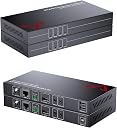
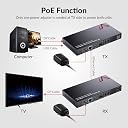
The AV Access DisplayPort KVM Extender delivers ultra-long 330ft transmission of 4K@30Hz video with zero latency via HDBaseT technology. Designed for professional environments like server and control rooms, it integrates USB 2.0 keyboard/mouse control, PoE power for simplified installation, and supports bi-directional audio plus RS232 for seamless AV and automation integration. Its compact design and EDID management ensure stable, high-quality remote control over critical systems.


| ASIN | B0819D2936 |
| Best Sellers Rank | #85,636 in Electronics ( See Top 100 in Electronics ) #104 in Remote Control Extenders |
| Brand | v AV Access |
| Brand Name | v AV Access |
| Circuit Type | 2-way |
| Color | Black |
| Connectivity Protocol | HDBaseT, USB 2.0 |
| Connector Type | Cat5e Or Above, Displayport |
| Contact Material | Metal |
| Contact Type | Normally Open |
| Control Method | Remote |
| Current Rating | 2 Amps |
| Customer Reviews | 3.5 out of 5 stars 27 Reviews |
| Included Components | Tranmistter and Receiver |
| International Protection Rating | IP00 |
| Item Dimensions | 7.9 x 1 x 3.9 inches |
| Item Weight | 0.7 Kilograms |
| Manufacturer | AV Access |
| Material Type | Metal |
| Model | 4KEX100-DP-KVM-US |
| Mounting Type | Panel Mount |
| Number of Items | 1 |
| Number of Positions | 1 |
| Operating Voltage | 12 Volts (DC) |
| Operation Mode | ON-OFF-ON |
| Specification Met | CE |
| Switch Type | DIP Switch |
| Terminal | Screw |
| UPC | 300715189732 |
| Unit Count | 1.0 Count |
| Upper Temperature Rating | 158 Degrees Fahrenheit |
| Wattage | 14.2 watts |
P**X
Works well, headset with mic only works for audio output
It seems to have a strange software limitation, not allowing bidirectional USB (audio). Other than that, very solid device, works as advertised.
N**E
Don't buy.
Another edit: Soon after I posted the edit for some reason there was another post that said it worked perfectly for them and gave it a 5 star review. Which I find extremely suspicious. The reason being that there was another post that gave it a 1 star(its gone now) and not soon after that there was someone that said that it worked great out of the box. Now they did it to me. So yeah don't trust them or buy this especially with them manipulating the rating of their product. I could be wrong but I really doubt it with a product like this. Waste of 200-300$. I need to keep using it but I will have to look into a replacement option soon. Also it keeps messing up on me and it just keeps getting worse even just scrolling on the internet is messing with it. I wish I could just return it but they took a literal month to ship it to me(the whole return window). If I do get a refund or replacement I will update this post saying so but I really doubt I will get either. I'm deleting my original post. I don't want to give any credit where it is not earned. Edit: They were great when they worked. They now frequently flash weird lines like the graphics card is messing up(its not). I am also having a problem where it keeps going to a black screen every few minuets. It happens when I am gaming or even just watching a video it just flashes to a black screen for a few seconds then goes back the content then a few minuets later it will do it again. At first I thought it was the heat messing with something so I bought a fan for each extender part but that did not fix it. I will have to look into other aspects to figure out if its something that is happening on my end but I'm pretty sure its not. I am afraid when I really need them they will just black screen. Like when I am taking an exam for school or playing games(I died a lot of times because of it already). I am going to have to look into another solution. I would rather take reliability over looks when it comes to things like this. I thought this was reliable and cheap but I guess I was wrong. Its only cheap.
H**E
Worked Perfectly!
Easy setup. Worked as described.
S**S
Clean Dual-Monitor Switching with Strong Performance
Setup is straightforward for a dual-monitor, dual-PC environment. Once connected, both systems are recognized properly, and switching between them is quick using either the front button or keyboard hotkeys. It helps streamline a desk setup by consolidating peripherals and displays into a single control point. Display performance is solid, supporting up to 4K at 60Hz with smooth visuals and no noticeable degradation. It handles mixed cable setups well, including adapters where needed, and maintains stable output across both monitors . The built-in USB 3.0 hub is a useful addition, allowing multiple peripherals like keyboards, mice, and external devices to be shared seamlessly between systems. Data transfer speeds are fast, and devices are generally detected without additional configuration. Switching speed is generally quick, though there can be a brief delay of a few seconds when toggling between systems depending on the setup. Wake functionality works reliably, bringing inactive systems online without extra input. Build quality is sturdy and well-designed, with a compact form factor that fits cleanly into most desk setups. The added USB mode provides flexibility for users who want to view both systems simultaneously rather than switching fully between them. There are a few considerations. Ensuring the correct video port compatibility (HDMI vs DisplayPort) is important before purchase, and some setups may experience minor quirks with hotkey switching or USB behavior depending on peripherals . Overall, this KVM switch delivers reliable dual-monitor control, strong video performance, and useful peripheral sharing, making it a practical solution for multi-computer workstations. :)
B**.
Didnt work
I bought a few and none worked. I will never buy again.
D**.
Works as designed, sadly does not include any Display Port connections on it.
I looked at my video cards and thought they were 3 HDMI and 1 Display Port - it's hard to tell with plugs in them (my fool mistake)... Instead it has 3 Display ports and just one HDMI on each. So I was able to switch just one screen/keyboard/mouse combination at a time which I could do with my original 1 video port per device KVM. I will have to look into getting either a different unit or adapters for Display Port to HDMI - which is not ideal. Well neither that nor replacing my video cards is an ideal situation so I think I will attempt to buy the adapters to get both screen running for both machines. Or if I can find a similar unit that has 2 Display Ports per side and use it natively with what I have. Again cost-wise not ideal, but something need be done. As a programmer and enthusiast I will always miss dual display functionality. I am use to it on my primary workstation... Sorry if this isn't too much of assistance to anyone, accept to be 100% sure what your video card outputs! Pull the plugs if it has them! Be CERTAIN it has at least two HDMI ports and not just a stack of Display Ports like mine.
R**N
Seamless incorporation with a mix of HDMI and DVI-D, using old and new cables.
First impressions of the AV Access HDMI KVM are excellent, it easily handled every configuration I tested. I started with two monitors that both have a single native HDMI input, using two new, modern HDMI cables. I used two Windows PCs, one with a RX480 GPU, and one with a GTX1070 GPU. The RX480 has two HDMI ports, so those both connected directly to the switch with old cables, one of which is so old that it sometimes doesn't even work with newer equipment. No problems there, both screens showed up fine. The GTX1070 only has one HDMI port, so for the second output I used a passive DVI-D to HDMI adapter, with two modern HDMI cables from that computer to the switch. That also worked without a hitch. After that I swapped one of the HDMI monitors for an older DVI model, with another passive adapter attached directly to it, and using the same HDMI cable from the previous monitor. Again, everything just worked. Getting the audio and keyboard/mouse switching running didn't require any manual software installation as Windows auto-detected the peripherals and the USB Audio Device, only needing a Windows reboot or two on each system to get everything settled. A modern mechanical backlit compact TKL keyboard was able to activate the switching hotkey (default was Tab+1 or 2, or Tab+Left or Right Arrow) when it was plugged into the dedicated "keyboard" USB port. The included USB cables should be long enough to keep the switch on the desk with the computers on the floor for most arrangements, but if not, they are standard 3.0 Type-B cables so can be easily changed.
S**G
Hot swap not working out so well
not really happy with this device. I have been using this for a few weeks now and not happy. I can not reprogram the HOT SWAP key (used to switch devices using a keyboard sequence), currently stuck on CAPS LOCK key. When I do swap devices, the keyboard and mouse go crazy with the new device. I keep hearing "USB plug in" notifications. The keyboard will output one character looping forever. I have to unplug the keyboard to get the repeating character to stop. This really messes up a document you are currently working on. The mouse cursor jumps all over the screen. Frustrating!!!! For example, I switch between 2 Windows computers (a laptop and desktop), when I switched over to the laptop, my cursor was in an EXCEL document, it repeated the W characters in a cell until I unplugged the keyboard. This did not happen on my previous KVM switch, I used that switch for years with none of these issues.
Trustpilot
2 days ago
3 weeks ago