
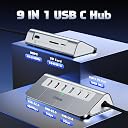


intpw USB C Hub, 9-IN-1 USB C TO HDMI Multiport Adapter with HDMI, PD 100W, 2 x USB A 2.0, 2 x USB A 3.0, 1 x USB C 3.0, SD/TF Card Reader for MacBook Air/Pro iPad Dell/Hp Laptop and More
Description
- Ergonomic
USB C Hub, 9-IN-1 USB C TO HDMI Multiport Adapter with HDMI, PD 100W, 2 x USB A 2.0, 2 x USB A 3.0, 1 x USB C 3.0, SD/TF Card Reader for MacBook Air/Pro iPad Dell/Hp Laptop and More
Specifications
| Additional Features | Ergonomic |
| Asin | B0C65C46B9 |
| Brand | intpw |
| Color | 9-IN-1 |
| Compatible Devices | Card Readers, Desktops, Keyboards, Laptops, Monitors, Mouse, Projectors |
| Customer Reviews | 4.2 4.2 out of 5 stars (174) 4.2 out of 5 stars |
| Data Transfer Rate | 5000 Megabits Per Second |
| Enclosure Material | Aluminum |
| Hardware Interface | HDMI, Thunderbolt, USB 2.0, USB 3.0, USB Type C |
| Manufacturer | intpw |
| Number Of Items | 1 |
| Number Of Ports | 9 |
| Total Usb Ports | 9 |
Reviews
User
A Thunderbolt Dongle Made With The User In Mind!
Mac users that have relied on dongles since Thunderbolt changed the world can expect a pleasant replacement to those pesky and temperamental rectangular USB-dongles.Practically, this is a plug-and-play type of interface; it features a light up LED let users know when it's "switched on", per se. The base version of this USB dongle comes equipped with just about enough USB ports for the typical user. The dongle itself has a good weight to it and feels like you have paid for a sturdy piece of equipment. In layman's terms, yes - I think you get value for money.You won't need to move and adjust the dongle in weird ways to get any USB cables slotted in and out. As a mac mini user, this dongle sits just under my monitor, at the centre of my setup, and all USB ports are always facing me. I also adore the 45 degree layout. Ergonomically speaking, it just make sense.
User
quick n easy works fine
nice little unit does what its suposed too
User
Did not work properly! I would not recommend this device.
When this first arrived, I connected the hub to a known, working USB-C port in the back of my iMac. That port works fine for data transfer and charging either my iPhone or iPad or other devices.Once I'd connected the hub, I used my normal charge cable into the data USB-C on the hub.OK it worked to my iPhone, transferring data and charging the device, but a very slow charge rate for USB-C.It did not work with the iPad. No charging, no data transfer. I then tried some other USB-C devices. It wouldn't charge my headphones, it did charge my AppleTV remote; it would not transfer data to/from my radio.Overall I conclude that the port on the hub is not a fully valid USB-C port.When it arrived I had gone online to get the improved warranty advertised within the packaging. Failure -- the website does not exist; the QR code in the manual leads to the same non-existent web site. All the web page says is that I could buy that web address and create my own site if I wanted to (and paid their fees).So the suggestion to contact their support department is a failure too.Overall, very disappointing.
User
Excellent
At last found the answer to my issues - all the ports I use in one neat product. Lead is good size for me but I think a little longer for people who have more products would be good. Having said that I wouldnt want a long lead all over the desk. Really pleased with this.
User
Great hub for office setup, less so for travelling
This docking station has a great range of ports. The triangular shape means that it actually sits on my desk much better than other hubs I have tried, no more slipping around. And all the ports that you need to plug into are easily accessible on the same side of the device so you don't have to turn it to find a spare slot or have cables going in multiple directions. Much more office friendly than my old hub.I have moved my old flat hub to my travelling kit. While this new one has a better set of ports, the shape and size mean that you probably don't want to use it as a portable device. It's not heavy or extremely bulky, but if your main purpose is travel, you would be better off with a smaller device.
Common Questions
Trustpilot