🚗 Cut the cords, not the vibe—drive smarter with wireless Android Auto!
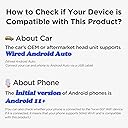
The MSXTTLY Android Auto Wireless Adapter effortlessly converts wired Android Auto systems (2017+ cars) into wireless setups for Android 11+ phones. Featuring ultra-fast 5-10 second auto-connect, premium copper and gold-plated USB ports for enhanced durability and heat management, it maintains original audio and display quality while charging your phone. With easy plug-and-play installation and ongoing OTA firmware updates, it’s the ultimate upgrade for a clutter-free, connected driving experience.


| ASIN | B0CX59Y1LJ |
| Best Sellers Rank | #63,233 in Electronics ( See Top 100 in Electronics ) #337 in Car Audio & Video Input Adapters |
| Manufacturer | MSXTTLY |
| Manufacturer reference | U2A-L9-US-35 |
| Package Dimensions | 13.49 x 9.09 x 2.01 cm; 41 g |
E**O
I recently purchased the Android Auto Wireless Adapter, and I must say, it has transformed my driving experience in ways I didn’t think possible. As someone who has always relied on the wired connection for Android Auto, I was excited yet a bit skeptical about making the switch to wireless. But after using this adapter in my car, I can confidently say that it was one of the best decisions I've made. #### Setup and Compatibility Setting up the adapter was a breeze. I simply plugged it into the USB port of my car, connected my Android phone running Android 11, and, within moments, I was connected. The compatibility with cars from 2017 and above is a significant plus; it means that a wide range of drivers can enjoy this upgrade without the hassle of complex installations. Many users have reported similar seamless setups, reinforcing the adapter's user-friendly design. #### Performance In terms of performance, this adapter delivers on its promises. The transition from wired to wireless was smooth, with minimal lag or connectivity issues. I was particularly impressed by how quickly it establishes a connection every time I get into my car. Several reviews highlighted this aspect, noting that the adapter consistently connects within seconds, allowing for a stress-free start to the drive. #### Sound and Display Quality Sound quality remained intact, which was a concern I had before purchasing. The audio streamed through my car's speakers was crystal clear, maintaining the same high quality I experienced with a wired connection. Moreover, the display on my car’s infotainment system mirrored my phone seamlessly, making navigation and music control effortless. #### Battery Life One of the most significant advantages of using this wireless adapter is the impact on battery life. While I initially worried that using wireless would drain my phone faster, I found that the adapter charges my phone while connected, alleviating any concerns. This feature was mentioned in various online reviews and has proven to be incredibly beneficial for long drives. #### Final Thoughts In summary, the Android Auto Wireless Adapter is an absolute game changer for anyone looking to upgrade their driving experience. It combines convenience, reliability, and exceptional performance. Whether you’re a tech enthusiast or just someone who wants to enjoy a more comfortable ride, this adapter is worth every penny. I wholeheartedly recommend it to anyone with a compatible vehicle and Android phone. If you're on the fence about making the switch, I encourage you to take the plunge. You won’t regret it!
C**N
Después de 10 días de usarlo simplemente dejó de funcionar, el segundo que compré funcionó por más tiempo pero también dejó de funcionar como al mes de usarlo
S**.
Tired of plugging your phone into the cord and then the car USB socket. Having your phone use the wireless Android Auto adapter is a life changer. Phone connects automatically when car is started, and brings up my maps and music before backing out of the garage. Love the ease of use.
S**I
As of the time I write this review I have not yet tested it inside my vehicle. I have however attempted to update the firmware on the device, and found myself having issues performing the upgrade. In part 2 of the upgrade instructions - variously referred to as "Start Configuration" or "Start the Upgrade" - it mentions connecting to the adapter's Wi-Fi. Every time I attempted to update the firmware after connecting to the adapter's Wi-Fi normally and then enabling the adapter's Wi-Fi Direct connection I would receive an immediate failure. The only way I was able to successfully update the firmware was to connect to my house Wi-Fi rather than the adapter's, and then making sure the adapter's Wi-Fi Direct connection was enabled. The firmware then updated correctly. Again, I have not tested the connection itself, but as this adapter makes its connection through Bluetooth it's as easy to use as a set of Bluetooth headphones. I am hoping however that the connection will function despite using my device's VPN function for ad blocking. The instructions recommend disabling the VPN, and I refuse to do that because ads are the absolute bane of the Internet. UPDATE: Connected without a problem and worked perfectly even with adblocking through the VPN active. For the $24 I paid it's worth not having to run a USB cable across the top of my steering column to my phone on the driver side vent.
R**E
I bought this because there is no wire so its not dangling from my usb port in my car (2020 Toyota Corolla Hatchback). This is definitely faster than my previous wireless Android Auto adapter. I did have to "update" it for it work. The update process didn't actually go all the way through like the instructions say. I get to switching to "P2P" and then the "update" button just fails, BUT this seems to make it recognizable to my phone and it works. I had to disconnect my car battery for some modifications, and it stopped working. I went through the "update" process again and switched it to "P2P" again and it's working now. I didn't really know what I was doing so I thought I'd mention it here in case someone else has the same sort of issues. Sometimes the music will blip for a split second and then it continues; it doesn't stop, it's just like a hiccup in the connection (I think). I read in another review that it will disconnect periodically at start-up, about a minute or so into starting; I also experienced this twice so far in the past 1.5 weeks. It's not bad, it just reconnects and you're off and running again. It works. It connects fairly fast. I like it. I'm happy with my purchase.
Trustpilot
1 week ago
4 days ago