


Desertcart purchases this item on your behalf and handles shipping, customs, and support to Ecuador.
🔐 Unlock your future—passwords are so last decade!
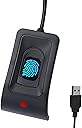
The JIANBOLAND USB Fingerprint Reader offers a cutting-edge biometric login solution fully compatible with Windows 10 and 11. Featuring ultra-fast recognition speeds under 0.5 seconds and an industry-best false acceptance rate of 0.001%, it supports up to 10 fingerprints for multiple users. Its plug-and-play design includes a 5ft USB extension cable for versatile desktop placement, eliminating the hassle of passwords and enhancing security with Microsoft-certified Windows Hello integration.
| ASIN | B0CGCYVGYW |
| Best Sellers Rank | #288,711 in Home Improvement ( See Top 100 in Home Improvement ) #1,316 in Home Security & Surveillance Biometrics |
| Brand | JIAN BOLAND |
| Brand Name | JIAN BOLAND |
| Colour | Black |
| Connectivity Technology | USB |
| Country of Origin | China |
| Customer Reviews | 3.6 out of 5 stars 303 Reviews |
| Data Transfer Rate | 5000 Megabits Per Second |
| Global Trade Identification Number | 00717664826555 |
| Hardware Interface | USB |
| Manufacturer | JIANBOLAND |
| Manufacturer Part Number | WA28 |
| Model Number | WA28 |
| Network Connectivity Technology | USB |
| Operating System | Windows 10 |
| Slot Count | 10 |
| UPC | 717664826555 717664826586 |
J**E
Muy correcto
Cumple perfectamente. Sencillo y adecudo.
S**T
Fingerprint reader
Still works to this day. Very happy with purchase.
M**N
Erfüllt seinen Zweck ist meiner Meinung zu teuer für die gebotene Qualtiät
Funktioniert fehlerfrei. Jedoch billigstes Plastik in der Verarbeitung. Bei den Preis hätte ich eine bessere, hochwertigere Qualität erwartet. Herstellungkosten unter 5,- würde ich mal schätzen. Aber was solls, wurde von Windows 11 sofort erkannt (ohne Treiberinstallation) und funktioniert einwandfrei.
T**R
Works ok
It was a little fussy setting it up
M**Y
Cheap but functional
Wanted to try out Windows Hello on my Windows 11 for Workstation and it was just to go into the computer configuration and choose the reader and get the driver. After that just follow the instruction for Windows Hello. Now I’m thinking of getting a Windows Hello camera since the one I got isn’t IR and that’s what Windows Hello wants. O boy, I wish I knew about this fingerprint reader when I had a 12 character password that I had to change every month… Everything is so much easier with “gadgets” that simplify the everyday usage. There are probably much better readers out there, but this one was enough for me.
Trustpilot
5 days ago
3 weeks ago