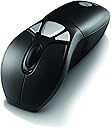


Gyration GYM1100EU Air Go Plus Computer Mice Mouse - Black
Product ID: 62139605
Details
- BrandSMK Link
- ColourBlack
- Connectivity technologyRadio
- Movement detection technologyOptical
- Special featureErgonomic
Product Description With the Gyration Air Mouse GO Plus featuring Motion Sense, the world just got easier to navigate. No strings, no wires, no tricks, no gimmicks - just better technology that allows you a more comfortable and versatile mouse to operate in the air or on the desk. Take control of your presentations, entertainment and Internet browsing with natural hand movements. You'll wonder how you ever did it any other way. Experience the patented Motion Sense technology inside the Air Mouse GO Plus that delivers precise in-air cursor control and convenience. Ideal for any desktop computer user, the Air Mouse GO Plus features an ergonomic ambidextrous design that is easy to use. Use natural and comfortable wrist movements to take in-air control of your computer. Trigger activated Motion Sense technology translates your hand movements into on-screen cursor motion for in-air operation. Unleash yourself from the desktop. Interference free 2.4 GHz RF technology allows you to take mouse control from up to 100 feet 30m away with no line of sight restrictions. Take total control with simple hand motions allowing you to skip music tracks or control volume in multimedia applications, highlight important points in presentations and much more. The Gyration Air Mouse GO Plus features software with a wide range of programmable actions including freehand drawing, highlighter, zoom, Internet and Windows shortcuts, plus PowerPoint and presentation tools. Box Contains 1 x Air Mouse GO Plus 1 x Desktop Charging Cradle with USB Cable 1 x USB Receiver 1 x CD-ROM 1 x Remote Instruction Booklet 1 x Quick Start Guide 1 x Rechargeable NiMH Battery Pack 1 x Card Review: One of the best gyroscopic mouses. Customisable. - Great mouse if you can get it at the right price. Software is not quality enough to justify the exorbitant full retail price. Annoying that you can't disable the double-click on trigger to activate always-on gyroscopic tracking. Review: Mostly great, a bit buggy. - The concept is good and when it works properly it's great. However it's a bit flaky. The last one I had caused the mouser pointer to jump whenever you pulled the trigger, and on my current one the trigger 'freezes' so that you can't stop moving the pointer around, unless you disconnect then reconnect the battery. Sooner or later it's going to die and then I'll replace it with another, like I've done repeatedly over the last 15 years because for an HTPC it's brilliant, worts and all.
| ASIN | B004I5RZ24 |
| Antenna Location | General Computer Use |
| Are Batteries Included? | Yes |
| Are Batteries Required | Yes |
| Battery Average Life | 730 days |
| Brand | Gyration |
| Brand Name | Gyration |
| Button Quantity | 5 |
| Colour | Black |
| Compatible Devices | Personal Computer |
| Connectivity technology | Radio Frequency |
| Customer Reviews | 3.5 out of 5 stars 14 Reviews |
| Hand Orientation | Ambidextrous |
| Hardware Platform | PC / Mac |
| Included Components | USB |
| Item Type Name | Air Mouse Go Plus Computer Mice Mouse |
| Item Weight | 0.37 Kilograms |
| Manufacturer | Gyration |
| Manufacturer Part Number | GYM1100EU |
| Model Name | Air Mouse GO Plus |
| Model Number | GYM1100EU |
| Movement Detection | Optical |
| Movement detection technology | Optical |
| Network Connectivity Technology | Radio Frequency |
| Number of Batteries | 1 Lithium Polymer batteries required. (included) |
| Number of buttons | 5 |
| Operating System | Linux, Windows 7, Windows XP |
| Power Source | Battery Powered |
| Product Features | Ergonomic Design |
| Product Warranty | Manufacturer warranty for 2 years from date of purchase. |
| Range | up to 100 feet (30m) |
| Special feature | Ergonomic Design |
| Style Name | Modern |
| UPC | 744390950131 |
| Unit Count | 1.0 count |
D**G
One of the best gyroscopic mouses. Customisable.
Great mouse if you can get it at the right price. Software is not quality enough to justify the exorbitant full retail price. Annoying that you can't disable the double-click on trigger to activate always-on gyroscopic tracking.
G**S
Mostly great, a bit buggy.
The concept is good and when it works properly it's great. However it's a bit flaky. The last one I had caused the mouser pointer to jump whenever you pulled the trigger, and on my current one the trigger 'freezes' so that you can't stop moving the pointer around, unless you disconnect then reconnect the battery. Sooner or later it's going to die and then I'll replace it with another, like I've done repeatedly over the last 15 years because for an HTPC it's brilliant, worts and all.
N**H
Not a replacement for a Logitech MX Air
My first review ever. Is it me or is this crap? I bought it to replace my Logitech MX Air mouse which has given me sterling service over quite a few years. Absolutely no problem with setting it up and downloading the tools (although the web site did seem a little ropey.) The range of settings you can apply is vast, and I've yet to fully explore what's on offer. Now, I only use it as an air mouse for browsing the web and playing a few web-based games, but it's appalling: the trigger to activate the air functionality is where my forefinger naturally rests, so is in just the right place to select that function. You can 'fix' the air function by pumping the trigger twice - which works as it should - but because my forefinger is resting there I keep hitting it again, which disables the function. Very bad design. Then, the accuracy of placement of the pointer is very bad, so it often takes me a few goes to land on small check-boxes. But the worst of all is that the pointer drifts down the screen, so I have to keep re-centering (which is the one good thing - it's really easy to set up that function against one of the three assignable buttons). I haven't done any research to see if I can fix these problems, but if I can't then I think there's a way to replace the rechargeable battery on my MX Air, which will make me calm again. I've not tested it as an ordinary laser mouse, although the grip doesn't seem particularly ergonomic. I'd really recommend trying before you buy.
A**E
Nicht nur für die Presentation geeignet
Es funktioniert alles einwandfrei, hab sie mir eigentlich für die Arbeit geholt jedoch kann man auch wunderbar von der Couch aus den PC bedienen!! :)
A**O
Me ha defraudado.
El ratón en si va bien, un ratón más. Pero el problema es la función Air del ratón, no es nada fluida. Puede que la culpa sea de estar acostumbrado al magic control de LG, pero no es nada cómoda su utilización.
F**O
EMBALAJE
El producto no venía protegido, solo metido en una bolsa y ya sabemos cómo tratan las cosas por las empresas de transporte. Ahora me arrepiento de haber comprado el producto de segunda mano ya que no funciona demasiado bien, y el precio es excesivo. No recomiendo este vendedor.
M**S
Funktioniert wie sie soll, Laserpointer nur mittels Zusatzsoftware.
Ich arbeite ganztägig als auch zu Hause mit dem Computer. Negative Begleiterscheinungen sind schmerzhafte Handgelenke durch das Benutzen der Computermaus. In der Vergangenheit konnte ich mir Abhilfe schaffen, indem ich mir angewöhnte, die Maus auch mit jener Hand zu bedienen, die ich nicht zum Schreiben benutze. Aber auch das ging nur eine Weile gut. Dann schmerzte auch dieses Handgelenk. Ich habe daraufhin mit sogenannten ergonomischen Mäusen versucht, aber die sind wohl ein reiner Marketinggag, da die Handstellung damit noch schlechter war. Nun bin ich bei diesem Produkt gelandet in der Hoffnung, schmerzfrei arbeiten zu können. Das war auch die Intention meines Kaufs. Das Produkt selbst kommt mit wiederaufladbarem Akku. Es entspricht von der Optik her genau der Beschreibung. Das Gerät kann auf unterschiedliche Weise bedient werden. 1.) Wie eine normale Computermaus auf dem Tisch. Bei dieser Bedienung fühlt sie sich sogar etwas besser als eine normale Maus an, vermutlich deshalb, weil sie etwas höher ist. 2.) In der Luft, wobei es hier zwei Modi gibt. Auf der Unterseite der Maus unterhalb der Funktionstasten befindet sich eine weitere Taste, die durch Doppelklick den Mauszeiger in den dauerhaften Bewegungsmodus versetzt. Hierbei kann der Mauszeiger frei bewegt werden. Die Schwierigkeit bei diesem Modus ist, dass das Anklicken etwas schwer fällt, da man bei Klick die Maus wiederum hinreichend stark bewegt und die angepeilte Position verfehlt. Deshalb eignet sich der zweite Modus meiner Meinung nach besser. Hierbei bewegt sich der Mauszeiger nur dann, wenn gleichzeitig die untere Taste gedrückt wird (zB mit dem Mittelfinger). Dadurch kann man den Zeiger auf das Ziel bewegen und verfehlt das Ziel nicht mehr. Mit etwas Übung kann man schon nach 2 Stunden relativ normal arbeiten. Den Mauszeiger bewegt man aus dem Handgelenk heraus während man den Ellbogen am Tisch abstützt und mit der Maus auf den Bildschirm zeigt. Man kann aber die Bewegung auch mit dem ganzen Unterarm vollziehen, während man die Maus nahezu senkrecht nach oben hält. Wie sich die dauerhafte Bedienung auf meine Handgelenke auswirkt, kann ich jetzt noch nicht sagen. Bisher ist es allemal besser, als mit einer gewöhnlichen Maus. Um die Handgelenke noch besser zu schonen, kann die Maus auch wie eine Fernbedienung gehalten und erstaunlich gut bedient werden, d.h. der Zeigefinger betätigt den unteren Funktionsknopf zum Bewegen des Mauszeigers, während der Daumen die linke Maustaste und das Mausrad betätigt. Diesen Griff empfinde ich sogar als ergonomisch besser, da ich das Handgelenk nicht mehr nach unten beugen und den Zeigefinger nicht mehr krümmen muss um die linke Maustaste zu bedienen (was wiederum zu einer ungünstigen Handgelenksstellung führen kann). Es sollte auch angemerkt werden, dass bei diesem Gerät der Laserpointer anscheinend nur über die Zusatzsoftware des Herstellers aktiviert werden kann. Da ich die Maus auf einem vom Hersteller nicht unterstützem System verwende (Linux), kann ich diesen nicht aktivieren. Ansonsten funktioniert das Gerät ohne Probleme mit (Ubuntu) Linux. [UPDATE] Nach bereits 2 Wochen reagierte die linke Maustaste ab und zu schon nicht mehr. Habe das Gerät zurückgeschickt. Ich hoffe, andere haben mehr Glück damit.
H**I
Yikes
Bad mouse
Trustpilot
1 month ago
1 month ago