Buy anything from 5,000+ international stores. One checkout price. No surprise fees. Join 2M+ shoppers on Desertcart.
Desertcart purchases this item on your behalf and handles shipping, customs, and support to Ecuador.
โจ๏ธ Elevate your desk game with the sleek, smart, and silent Satechi SM1!
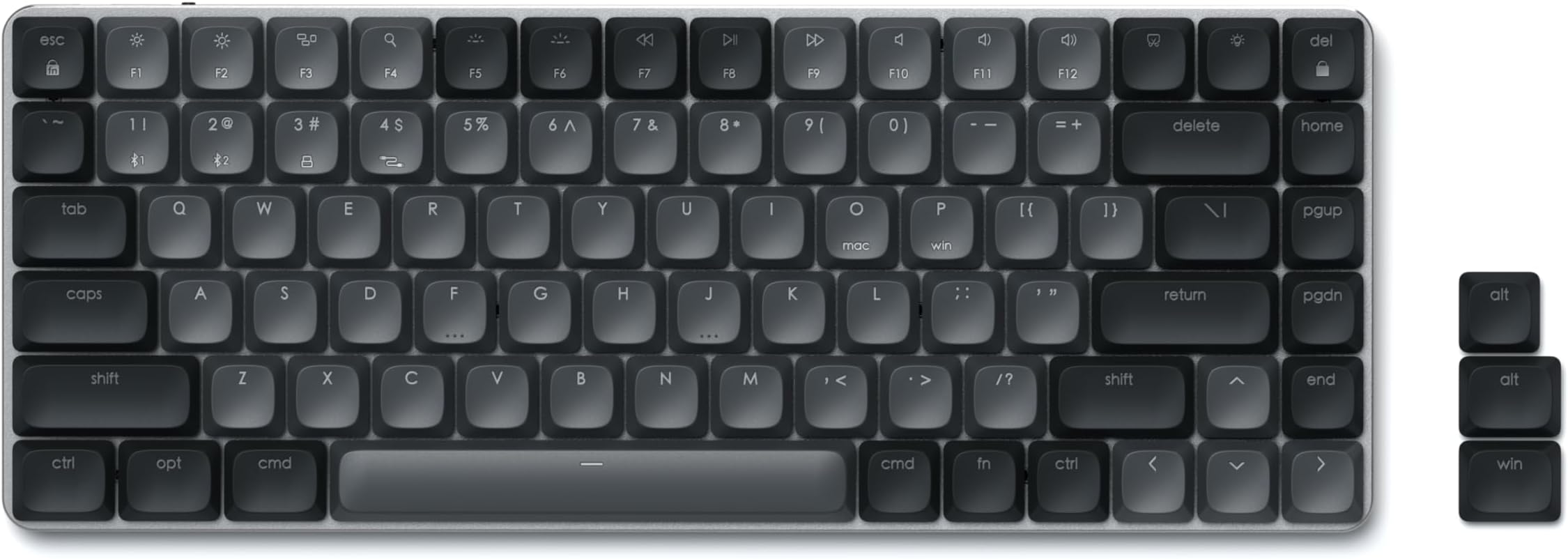
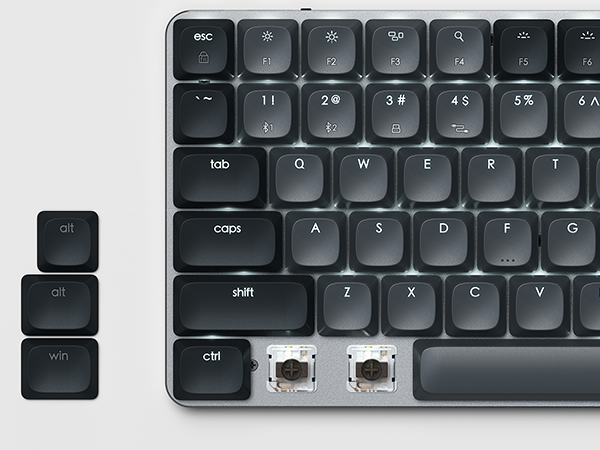
The Satechi SM1 is a premium 75% mechanical keyboard featuring 84 keys with low-profile brown switches, multi-device Bluetooth and wired connectivity, and 14 customizable LED backlight modes. Engineered for Mac and Windows users, it offers ergonomic design, quiet yet tactile typing, and broad compatibility with Mac, Windows, iPad, and Chromebook devices. Its durable aluminum build, rechargeable battery, and smart features like low-battery alerts make it a top-tier choice for professionals and gamers seeking a compact, stylish, and versatile keyboard.


| Best Sellers Rank | #329 in Computer Keyboards |
| Customer Reviews | 4.4 out of 5 stars 482 Reviews |
D**O
Top-notch typing experience! Elegant, quiet, and reliable.
Top-notch typing experience! Elegant, quiet, and reliable. I am absolutely thrilled with this keyboard! The Satechi SM3 is the perfect blend of a professional aesthetic and the satisfying feel of a mechanical keyboard. Hereโs why I love it: โข Amazing Key Travel: The tactile feedback is spot on. The keys have a great travel distance that makes typing for long hours a breeze and very satisfying. โข Non-Invasive Sound: If youโre worried about loud, clicky noises, donโt be. The sound is premium and subtleโitโs not invasive at all, making it perfect for an office environment or a shared home space. โข Excellent Battery Life: Iโm impressed by how long the battery lasts. The wireless Bluetooth connectivity is rock solid, and I don't find myself reaching for the charging cable often. โข Cool Backlighting: The backlit keys are a great touch. It comes with several lighting sequences that look fantastic and help you work in low-light conditions without looking too "gamer-centric." Overall: Itโs a solid, full-size keyboard that feels premium and durable. If you want a mechanical feel without the obnoxious noise, this is the one to get!
B**U
Solid construction, mechanical keys, not too noisy
This keyboard has nice mechanical keys but is not too "clicky". I find I can type faster and with less errors on this keyboard than on a standard non-mechanical keyboard. I have been reluctant to try a mechanical keyboard due to the noise but this keyboard is a good compromise between noise and ease of typing. Good construction, the case is aluminum with a solid feel. The keyboard is intended mainly to be used on Macs (no print screen button, standard caps show CMD and Opt keys), but alternate key caps are provided for Windows as well.
S**D
About as ideal as you can get - JUST RIGHT!
This keyboard is not fancy; not a lot of bells and whistles, but it is also not basic. Just an amazingly functional and comfortable everyday driver. It is attractive in a minimalistic sort of way, including excellent WHITE backlighting that rivals the keyboard on my MacBook Pro's built-in keyboard. I never have trouble seeing the key legends in the dark - not too bright, not too dark. The feel is a nice compromise between a linear smooth-action switch and a brown switch with a very slight "bump" at about half way through the travel. It isn't quite silent, but it is not loud either. A comforting "thock thock" sound coupled with the tactile bump makes this the most accurate keyboard I've ever used. And build quality is good - it isn't a tank, but it doesn't feel cheap either. Again, the whole package is "just right". A highly recommended, handsome workhorse.
M**O
Amazing Keyboard, Great Price, Can't Recommend Enough
As a lot of the other reviews have noted, this keyboard doesn't have the bells and whistles of some other keyboards, but it is by far the best feeling keyboard I have ever used in my life. In fact it is so good that I bought it only for work on my MacBook, but it ended up replacing my Corsair K95 RGB PLATINUM gaming keyboard on my gaming PC as well with the multi-device connectivity. The only thing I'll note is that when connected to my gaming PC via Bluetooth there was a pretty noticeable input lag, but connecting it over the wire or via the USB dongle fixes that issue entirely. Couldn't recommend more!! tl;dr - Amazing keyboard with wonderfully creamy feeling switches, better than anything I've personally used before, and it even works well as a wireless gaming keyboard
J**C
Suitable replacement for the K800
So for those of you looking for a K800 replacement, I wrote this review for you. The Satechi SM3 is a suitable K800 replacement with some very bold asterisks. It has backlit keys with shine thru lettering, a decent quality chassis, tilt, and comes in the standardized layout like the K800, however the keycaps and the switches have more to be desired. The keycaps are chalky in feel, not smooth like the K800, I really dislike them. The switches are fairly loud and easy to press, though they have a nice feel to them and don't cause typing errors. Here are other keyboards I've tried so far: Scissors Logitech MX Mechanical Logitech K650 Logitech K950 Cherry Stream Wireless Mechanical (Low Profile) Keychron K5 Max Nuphy Air96 v2 Flow 100 Flow 2 100 Satechi SM3 None of these feel like the K800. Most of the switches used in keyboards these days have a lighter feel to them. The K800 as you know has that medium to hard key action that let's you know you activated the key, so to speak. So is there a true replacement? Unfortunately no, at least from what I've tried so far, but there is one keyboard that stood out among the rest. Keyboard Recommendation I promised that if I did find a keyboard out there that I thought was a suitable replacement I would post it on every review of the keyboards I've tried. Now it's very different from the K800, but hear me out. The keyboard is the LOFREE Flow 2 100 with Pulse Switches (Black). I was fixed on the idea that the perfect keyboard had to match the K800 in feel and design. After trying this keyboard I had to rethink that mindset. This is a special keyboard. It's one of those products you know is good as soon as you use it. The keys are easy to press, but your typing remains precise. You can type fast on this keyboard without making mistakes. It sounds thocky, but never annoying or loud, it's quiet. This sounds corny but it gave me my first magical typing experience. I'm not a gifted enough writer to describe it, you have to try it to understand. Like the K800, it has shine thru lettering, which is truly a rarity these days. It has tilt and it's low profile. The chassis is top notch, you won't find a better quality chassis. The only thing that is missing is the standardized layout, so this may be a deal breaker for most and if you don't mind the metal protruding at the right, which I've read is to help dampen the sound. It's expensive, but the quality and performance justifies the cost. Rest in peace K800.
S**C
Wireless/wired keyboard
Nice keyboard with a crisp click to each button. Cool, backlit lights and patterns. pairs well with my 2022 iMac.
D**J
Great mechanical keyboard
I'm giving this keyboard 5 stars because it deserves it! The only slight issue I found was the backlit keyboard's lighting setup... it's not intuitive, and I cannot find an interface or GUI to make changes on the keyboard. They only offer white light. Other than that small thing, this keyboard is amazing! I love everything about it. The mechanical action is great, and the sound we all love from a mechanical keyboard is loud, clicky, and clear... I love it! If you need a keyboard you really should consider this option.
L**E
Good until amazon return period expired. Junk, buy any other keyboard...
Unboxing was straight forward. Removed the keyboard, pulled it out of the plastic bag it ships in, and began charging. Charged quickly, and once I turned it on, my Surface Pro 11 ARM system found it and popped up a window to pair. Paired immediately, all set. At first I was ready to return it since I use Windows, and I knew I could swap the keys out for the MAC keys - but the ALT key was not where I'd want it. Digging more into the instructions, I see that when you set it to Windows mode it swaps those two keys so the alt key is where it should be, and the windows key to the left. So suddenly it saved itself. keys have a good feel, but (and this is my own issue, not a keyboard issue) I'm going to have to learn to do something different with my thumbs. Habitually I rest them in front of the space bar. This keyboard has NO surface in front of the space bar. That space bar is the very front edge. Which throws off my default placement and so far has me hitting the space bar when I don't want to. Again, this is my own issue, not a keyboard issue. Backlights are good - I get more than enough light on the dim setting, so that should help a bit with battery life. There are I think 14 different options for how the backlight works, some are unique to me, like the one that lights the key as you hit it. But for me they're all pretty useless - I have the backlight on to find home keys in the dark although I can still find them with the raised tactile identifiers on the F and J keys. So all the other things, I'd never even SEE since I've been touch typing for more than 40 years now so never look at the keyboard 99% of the time. I can't attest to the range, since I have this on my dining table where I have my Surface Pro on a stand, with an ASUS ROG gaming monitor next to it for an extended desktop. I'm typing maybe two feet away so range never comes into play. Keys have a nice tactile response to pushing, and I like the low, subtle sounds of the mechanical keyboard. Not obtrusive like some are. And other than my issue with the space bar being in my way due to how I am used to resting thumbs, I have no problems with the keys. I wish there was a bit more texture to them though - for me it's almost TOO smooth. Another annoyance for me is the blinking escape key - that's what happens when you engage function lock. And it is definitely annoying. Not found any way to turn it off short of disabling FN lock, but since I rely on keyboard shortcuts and use Alt+F4 all the time, that's not an option. I like the feet to elevate the angle. The one I was using for the last 6 weeks or so lacked that feature. I liked that keyboard fine but the battery life was subpar, and I got tired of having to charge it every two or three days even though this is only used evenings after work at home randomly through the time before bed. Hopefully this one does better. Also has some pads that help keep it in place so it's not moving as I type and move my hands around on it. I also love the little things, like the lock key (although now that my kid graduated and moved out I don't need to lock it at home anymore), screen brightness keys that work fine on my Surface Pro, a dedicated key for the lighting effects. But I wish they had included a small tool to make it easier to swap out the keys if you are setting it up for Windows. The other keyboards I've had with this option include the small tool to get under the key and lift it easily from both sides so it comes off straight. No such tool here, so you are stuck using a knife or screwdriver or something that can easily damage the surface of the keyboard. While this isn't a hugely expensive keyboard, for this price, it should have been included. I had to ding another device I reviewed recently, a mini keyboard that's used for my media center PC, because they claimed it slept after 2 minutes of inactivity to save battery, but it actually didn't sleep until past 5 minutes. THIS one claims the LED's turn off after a minute of activity, and it's just about spot on exact for that. Keyboard is solid, very little flex to it when you grab the ends and twist slightly. I hope the battery holds up to the claims, so I can have this last longer than the one it is replacing. If that's the case, it has earned a solid 4 stars. The one it is replacing that is only a month or so old, that one with the same use lasted maybe 3 to 4 days. This one I've already used a day, part of a second, and the battery is still sitting at 100% with backlight on low. And after a full week of actually more than normal use since I had several work from from home days so it was in use all day, not just evenings, I'm still at 65% after a week. So it definitely is living up to the battery claim. This was written mid Feb 2026 so you'll know if it hasn't been updated after a week or two, it lived up to its battery life claim. Beginning of May - battery lasts less than 6 hours with very little use. Charged twice today already, just watching someone new doing music things on youtube - so basically the keyboard sits here while I use the mouse. And already after charging it fully after work about 4 PM, at 10 it's already not turning on backlight and blinking the space bar at me which means low battery. PIECE OF JUNK. GET ANYTHING ELSE.
A**ใผ
ไผ็คพใงไฝฟใใใใ
ใฟใคใ้ณใฏๆใฃใใใๅฐใ้ซใใงใไผ็คพใง้ ๅธใใใใญใผใใผใใไฝใ้ณใชใฎใงๆๅใฏๅฐใๆฅใใใใใฃใใฎใงใใใ่ฆใ็ฎใใณใณใใฏใใง็ฎ็ซใกใใใชใใใถใคใณใชใฎใงใไผ็คพใงใใใใชๆนใซใๅฏๆใใญใผใใผใใงใใญใใจ่คใใใใพใใใ
O**O
exelente calidad y materiales.
Exelente teclado, la calidad de materiales se siente de muy alto nivel.
A**A
Nice feeling keyboard
Now this is a niiiiiiice keyboard. Very good feel. Very nice form factor. Perfect for work
E**A
First time mechanical keyboard buyer, would 100% purchase this again
I'm obsessed with this keyboard! It's my first time purchasing a mechanical keyboard, and I did a lot of research to make sure I got a product that was not too pricey but still decent. I'm so glad I ended up getting this SATECHI keyboard because it is simply exactly what I was looking for. I love the sound effects as I'm typing and also the light options that you get and can use to display your keys. I think it's amazing, and also if you are a first-time mechanical keyboard buyer, I think that this is a really great keyboard to start with. Good quality, and I think you do get your value for your money.
B**N
good keyboard
nice typing feeling
Trustpilot
1 week ago
3 weeks ago