Desertcart purchases this item on your behalf and handles shipping, customs, and support to Ecuador.
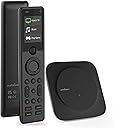
🎮 Master your media kingdom with SofaBaton X1S—control redefined.
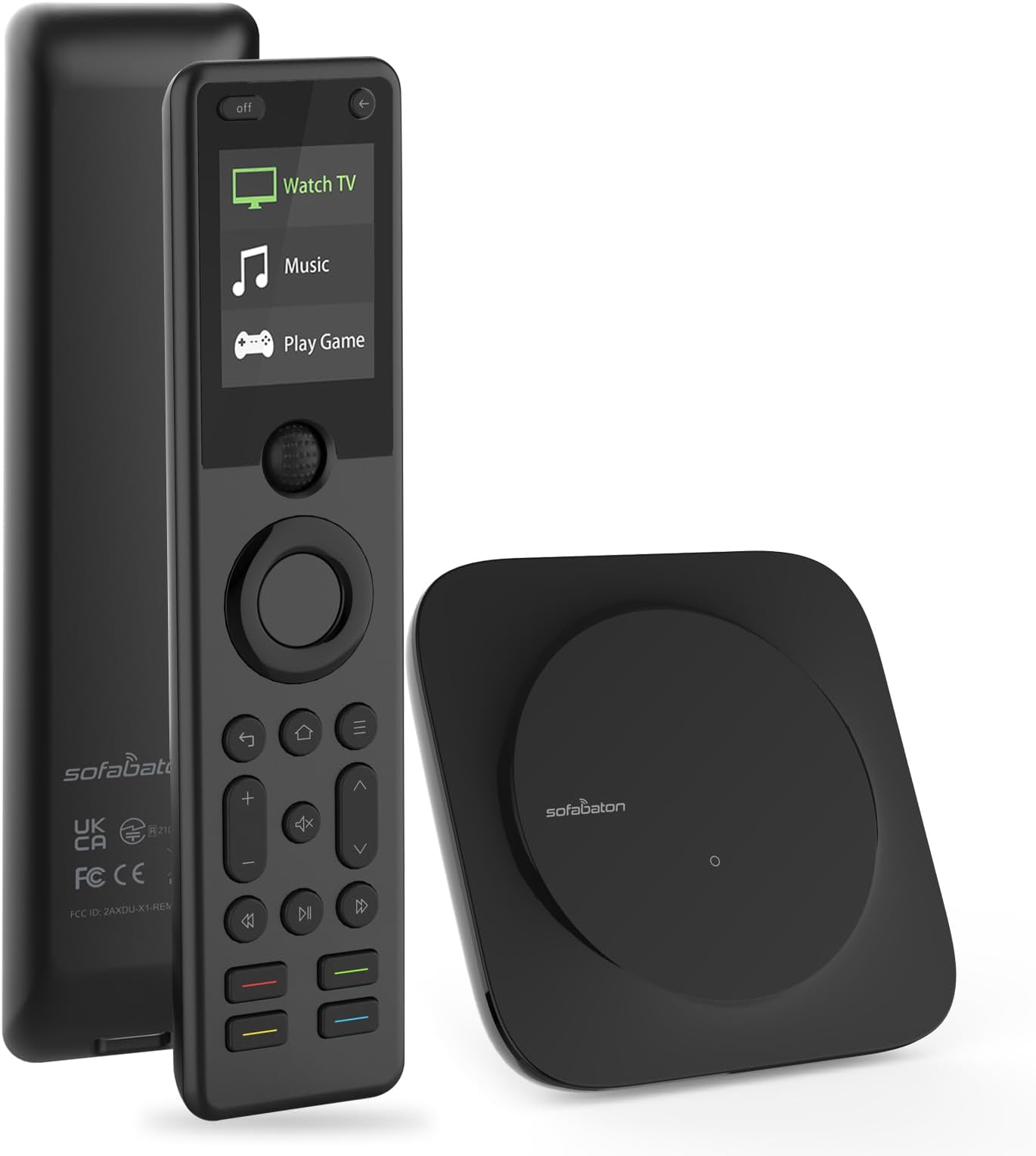
The SofaBaton X1S Universal Remote Control with Hub is a cutting-edge smart remote supporting over 500,000 devices across IR, Bluetooth, and WiFi. Featuring a 40-foot IR range with dual blasters, customizable one-touch activities, voice control via Alexa and Google Assistant, and a rechargeable battery lasting up to 45 days, it offers seamless, all-in-one entertainment management. Its ergonomic design includes raise-to-wake functionality, backlit buttons, and a thumb scroll wheel, making it the ultimate tool for a clutter-free, smart home experience.


| ASIN | B0CTH2DWZJ |
| Additional Features | Backlit, Digital Display, Ergonomic, Rechargeable, Voice Search |
| Battery Type | Lithium-Ion Polymer |
| Best Sellers Rank | #42,862 in Electronics ( See Top 100 in Electronics ) #2,199 in Remote Controls (Electronics) |
| Brand | SofaBaton |
| Button Quantity | 50 |
| Compatible Devices | DVD/Blu-ray Player, Set Top Box, Stereo System, Television, VCR |
| Connectivity Technology | Bluetooth, Infrared , Wi-Fi |
| Controller Type | Android App, iOS App |
| Customer Reviews | 3.5 out of 5 stars 378 Reviews |
| Manufacturer | SofaBaton |
| Max Number of Supported Devices | 500000 |
| Maximum Number of Supported Devices | 500000 |
| Maximum Range | 40 feet |
| Mfr Part Number | X1S |
| Model Name | X1S |
| Model Number | X1S |
| Number of Batteries | 1 Lithium Polymer batteries required. |
| Number of Buttons | 50 |
| Number of Packs | 1 |
| Special Feature | Backlit, Digital Display, Ergonomic, Rechargeable, Voice Search |
| UPC | 741421609341 |
| Unit Count | 1 Count |
| Warranty Description | 1 year warranty |
D**N
Sofabaton keeps getting better
Before purchasing this Sofabaton X1S, I was a satisfied customer of their earlier U1 universal remote. Part of the reason for my satisfaction was the excellent support they provided. Some of my equipment was old, and it wasn't in the Sofabaton database. When I asked for help, they responded right away and entered the data, and it worked. They were a pleasure to work with. I was able to set my U1 control for my Samsung TV, Nakamichi receiver, and Oppo Blu-ray player. I set "activities" for playing a CD, using the Bluray and the receiver, and for watching TV with AppleTV, with the audio piped through the receiver. The one thing I couldn't do is connect to my Sonos Port. I hoped that the next version would be able to control the Sonos as well. When Sofabaton offered me a rebate on the X1S if I agreed to review it, I jumped at the chance. So far, I have had a couple small problems configuring my devices, but was able to work through them with the help built into the Sofabaton app. You do the configuring -- and also testing -- directly through the app, and then that syncs with the remote. Currently, my Sofabaton X1s has absorbed the controls for my TV, AppleTV, Nakamichi receiver, Oppo Bluray, Sangean HD radio, and (sort of) Sonos Port. The X1S works for me a little better than the U1. When I was setting it up, the default menu picks seemed to lead me straight to good settings. With the earlier U1 model, I recall having to do more customization to get things set the way I wanted, adding or changing commands for individual keys. That capability is still present, though, if I need it. I like the new version of the physical remote control better than the U1, because the more rectangular X1S seems more stable in my hand. It feels well-built, and the screen is easy to read. The only thing I would change is that the two little buttons at the very top ("off" and "<-") are slightly awkward for me to reach without shifting the remote in my hand; it would work better for me if these were on either side of the roller ball in the middle of the remote. It's really nice to be able to control several devices with one remote. This time my "Big Screen" activity just came together better than on the U1, and pressing "off" on the remote reliably turns off both TV and receiver. This time, I didn't need to configure a pause between powering the receiver and selecting the input, and it seems to just work. When I start the activity, it turns on the TV, receiver and the AppleTV, and sets the receiver's input to Video. The remote basically controls the TV (and the AppleTV through the TV), except for the volume and muting, which control the Nakamichi receiver. Then I edited the mute button to control the TV -- so I can easily swap between the TV audio and receiver audio, which is handy when I have the receiver going through my headphones. It's easy to edit the buttons in the Sofabaton app. For the Oppo Bluray, somehow I didn't get a working disc eject button, but I was able to select a button and explore a couple settings and quickly found one that works. With my TV, there were two database entries, and I wasn't sure which was correct. The first one worked great except for powering off. The Sofabaton app allowed me to troubleshoot that button, and the first or second suggestion for a change turned out to be the right one. (There are several versions of my LG TV). I found the menus mostly easy to understand. There were a couple places where I wasn't sure which way to go, but I tried a couple things and quickly worked it out. It's not perfect, but it's good, especially when considering the complexity of all the different devices and configurations available. I know that if I ever do get stuck, I can ask Sofabaton for help again, and they will quickly and cheerfully get me unstuck. My hope was to have a physical remote control for my Sonos Port, allowing me to cycle through my saved stations in the Port's app. I couldn't get that to work, but that would be a pretty tall order. The Sofabaton app lets you configure the inputs for a device in several different ways. You can work with devices that have physical buttons (like 1, 2, 3... as with my HD radio) or an "Input" button and then "Next". But the Sonos has no physical controls, and it doesn't seem to have any "hooks" into the app for selecting my stations. What I could do, though, was set the Sofabaton to control my Sonos Port (via bluetooth), and by default, the "next" button triggers the next selection in whatever channel I currently have in the Sonos app. Not bad. I think the X1S is well-designed and well-thought-out and well-executed. I would recommend it to my friends who are into tech. Looking over my comments, I would say that the X1S is not perfection, but it seems about as close as I'll find in any remote that can accommodate all the different devices and use cases that are out there -- with built-in features for fixing and customizing device profiles. I have not mentioned some of the advanced features that I don't yet use, such as integration with Alexa and Google Assistant. I just discovered the "Find my remote" feature (in the app, under Settings): I pushed the button upstairs, and followed the loud beeps to locate the remote, downstairs. I just noticed a feature in the app called "API interface". So there's more to explore, when I have time.
R**R
Great remote control that's almost as good as Harmony. UPDATE: roller ball stopped working.
UPDATE: After a year and 1 month, the roller ball stopped working in the same way as my original X1 remote did. Unfortunately, as I was a month outside of the warranty, I was unable to get it replaced. As such, I've dropped the rating to one star. When the remote works, it works pretty well, albeit with plenty of quirks. It's sad, you'd think something with this high of a price tag would have better build quality. I believe I'm done with the Sofabaton brand now. This is my third Sofabaton remote and, so far, the best. While there are a few things holding it back from being perfect it's well on it's way to replacing the Harmony line. The X1S is a hub based remote, meaning that the remote communicates with the hub and the hub sends out the commands. First, the good: - high quality construction that feels good in the hands. - relatively intuitive setup for those that have used the Harmony line before - quick, responsive screen and buttons - backlit keys and improved font on the screen - long lasting battery and and "pickup to wake" feature (new for the X1S) Now, the not-so good: - Google assistant functionality is spotty at best - setup is only intuitive if you're familiar with setting up remotes. It can be daunting if you've never done it before. - I'm not a huge fan of the roller wheel, but it grows on you. - Philips Hue functionality is only so-so All in all, Sofabaton has been doing a really good job of making something that could take the place of the now discontinued Harmony line. There are some complaints, but overall, I really appreciate what they're trying to do and I feel they've been successful in most areas.
E**E
The only remote that can replace my Harmony Elite
I’m a long time user of the Harmony remote line, which ended for me with the Harmony Elite. The remote is getting long in the tooth and I’ve been researching replacement options for the last couple of years. I was extremely hesitant to try this out due to the reviews of the X1, but it’s time that I finally retire the Harmony. TLDR: If you’re a Harmony remote user and need a replacement, give this remote a try. It’s more responsive and more capable than the aged Harmony. No it doesn’t have a touch screen (which is a bonus from my perspective) and there are a couple of minor issues, but it works well when it’s all setup. Positives: 1.) The hub and baton feel well made. The remote is narrower than the older Harmony, and it sits better in my hand IMHO. 2.) Long battery life! I dislike having to manage charging multiple devices every night (looking at you Apple). The Elite got to the point that I had to charge it every night, or it would die on me the next day. It’s nice to not have to worry about the battery and to be able to get rid of yet another permanent dock/charger sitting around the family room. 3.) No touch screen. I have a family of four that all use the remote. I know being happy about not having a touch screen seems odd, but it saves aggravation around the house. With the Harmony, family would invariably touch the screen accidentally when passing the remote around, or setting it down, placing it on the dock, etc. etc. The most common case being accidentally starting an activity when getting up to leave. Not an issue with the baton. It also keeps the screen cleaner and I’m not having to wipe it down as often due to heavy use. 4.) The hub has 2 IR extender ports that are always on, same as the Harmony (though you could disable them with the Harmony) . This made the swap out fairly easy for me, except for a few issues I’ll get to in the negatives section. The extenders work well, as well as the blaster from the hub itself. I have quite a few devices tucked away and I’ve been able to keep it that way. 5.) The remote is very responsive! I’m not sure if it’s age, but my Harmony was getting very sluggish with sending IR commands to my devices. To the point that there was an obvious ~1.5 second delay between pressing a button and the desired action being performed. This issue does not exist with the Sofabaton and it performs as expected. 6.) The whole remote interface is faster on the Sofabaton than the Harmony. If I launch an activity, but need to swap to a specific “device” configuration because something came up that is not in my current activity layout, it’s just a few quick button presses and it’s done. Swapping between activities and devices on the Harmony was much slower. 7.) I have been able to completely replace the functionality of my older Harmony remote. There is not an activity or device I could not replicate support for. 8.) Specific “Device” and “Activity” setup is similar to the Harmony. Some of the descriptions were not 100% clear while configuring my setup; however, it was easy enough to test choices and figure things out. There was a bit more heavy lifting for a few of my devices due to missing, or slightly incorrect, IR signal information in their database; however, it wasn’t insurmountable. The good thing is, it’s done once and you never look back again. 9.) The raise to work feature works well. My Harmony had this feature, but it never worked well. Items to note: These are not positives or negatives. Just things to note. 1.) If you have an existing IR emitter cable setup from a Harmony installation, you may need to replace the cables. The Harmony supported 1.5mm mono jack cables. The sofa baton requires 3.5mm. Also, the Sofabaton would not drive the older emitter cables. I put a 1.5mm-to-3.5mm adapter on them and at first I thought the hub was broken. Nothing worked. I put my multimeter on the IR emitter ports on the back of both devices. The Harmony would send a .75v signal to the emitters, but the Sofabaton sends a .65v signal. I bought a newer 3 node emitter cable and everything works fine. 2.) Training command signals from an existing remote requires a pretty dark room. If you find a specific command is missing from their command database, you can add it yourself. Harmony users will be familiar with this workflow. For the Sofabaton, the IR sensor for training is on the top of the hub. You position your original remote a few inches above at a 90 degree angle, and press the button corresponding to the command you want to program. The problem is, ambient light will inhibit this functionality. Pick a fairly dark room if you need to manually add commands, and you should be good to go. 3.) You really need to understand your AV hardware, especially when setting up commands on the remote. A more specific example would be power toggle commands. Some TVs ship with just one power button on the remote that sends a “power toggle” command, while the TV still accepts “power on” and “power off” specific commands. The problem: the “power on” and “power off” commands may really map to a different “sleep” function than the “power toggle” command. This can lead to inconsistent power states, which will break device wakeup workflows when switching activities, etc. Negatives: 1.) The Sofabaton comes with 2 IR extender cables; however, one only has one emitter and the other cable has two emitters. My main AV setup has 2 racks, with multiple devices in each. One rack needs 3 emitters, and a “blaster” just doesn’t cut it. Good news is that I was able to purchase a separate 3.5mm emitter cable with three nodes for just a few dollars, so it work out okay. It would be nice to have more flexibility out of the box. 2.) Many of my devices didn’t work 100% with the commands stored in the Sofabaton code database. Not a big deal if I had the original remote. I just remapped the command by manually programming them in, and was done in a few minutes (once I figured out the ambient light issue with the IR learning sensor). There were a couple of devices that I did not have the original remote. The good news is there were up to dozens of potential codes to pick from for each command. The bad news: You’re pretty much stuck iterating up-to-80 commands and trial and error your way through. This can be very frustrating to some. Once you do this, it’s saved and you never have to do it again. Cleaning up the server side database for specific devices can help this issue as the product matures. Harmony wasn’t polished here when they started either. Conclusion: I’ve been using the X1S for weeks now and am pretty happy with it. I wish the remote had a few more dedicated buttons (example: add stop, and an additional button to fully support home/menu/guide options), and that Sofabaton changed the packaged single node emitter cable to a three node cable. All-in-all though, it’s a solid replacement for my Harmony and has allowed me to continue with my simplified remote lifestyle. I recommend it to friends who were Harmony users as well.
D**N
Handles Advanced Setups With Ease — Perfect for Multi-Device Systems
⭐️⭐️⭐️⭐️⭐️ - Handles Advanced Setups With Ease — Perfect for Multi-Device Systems I put the SofaBaton X1S to the ultimate test, and it passed with flying colors. My setup wasn’t simple — I had to control a Dell interactive touch display (non-ARC), a Sonos Arc Ultra soundbar, a Roku, a PC, and a CORSAHD HDMI switcher — all from one remote. This wasn’t a basic "plug-and-play" setup. It involved complex issues like ARC extraction, HDMI CEC, IR learning, volume control workarounds, and multi-device sync. Here’s why I think this remote is a game-changer for anyone with an advanced AV setup: What Worked Well ✅ Custom Activities (Game Changer) I created an activity called "Game Room" that controls 5 devices at once. I programmed the yellow button to instantly switch to Roku and the red button to switch to the PC. No need to scroll through multiple inputs. One button — done. This is the type of control that makes you feel like you’re running a professional AV system. ✅ IR Learning Mode My HDMI switcher’s remote wasn’t listed in the app, but thanks to the "learn IR" feature, I was able to copy the switcher’s input buttons directly into the SofaBaton. It worked perfectly. I wish more remotes had this feature. ✅ Custom Macros for Volume/Mute If you have a Sonos Arc, you know the frustration of trying to unmute it with a universal remote. Normally, "mute" works, but unmute doesn’t. I worked around it by creating a macro that adjusts the volume AND unmutes at the same time. This isn’t something a typical user would figure out, but it worked. ✅ Handles Advanced Devices (Not Just TVs) Most remotes are designed to control a TV + soundbar + streaming box, but I needed it to control a PC, server rack, Dell display, and a non-ARC soundbar. The fact that it handled this setup tells me it can handle almost anything. Room for Improvement: Sonos Arc Unmute Issue: The remote can mute the Sonos, but unmuting doesn’t work unless I press the Roku remote or manually tap the soundbar. My workaround was to create a macro that unmutes when you press volume up or down, but it would be great if SofaBaton added a feature to "unmute on volume up/down" or let the mute button work as a toggle. Pro Tip for SofaBaton: Add a feature that detects if the mute button is pressed twice (like most TV remotes do) and toggle it from mute to unmute. Power-Off Sequences (Needs a Better UI): Right now, when you turn off an activity, you have to manually program the shutdown logic for each device. For example, I had to tell the remote to turn off my switcher, then turn off the display, then shut down the PC. Pro Tip for SofaBaton: Add a "power-off sequence" feature where you can set the power-down order for each device. This would be a huge quality-of-life improvement. Final Verdict If you’re just looking for a simple "TV + soundbar" remote, this might be overkill. But if you have a complex setup like me (Dell display, Sonos Arc, Roku, PC, and switcher), this remote is a beast. It replaces up to 5 remotes and actually works the way you’d expect. It’s not a Logitech Harmony, but it’s close — and it’s half the price. If SofaBaton adds a "toggle mute" feature and a "power-off sequence" option, this could easily become the best universal remote on the market. ⭐️⭐️⭐️⭐️⭐️ - 5/5 — Advanced Setup Approved
E**T
Not ready for prime time
I really wanted to like this product since Logitech discontinued the Harmony but I could not get over the limitations in my case, so I returned it. Pro’s Nice looking handheld with nice controls The “Activities” portion worked great once you have it configured correctly Con’s Instructions and guides are very lacking. It is not super intuitive but with persistence, I got it all configured in about 2.5 hrs ( should have taken half that) The iOS app kept losing connection with the hub which is problematic since that is how you get everything configured. Reestablishing connection would take between 30sec to 3-4mins each time which was about 15 times! The handheld continued to work fine but you need the app to work to configure everything. One big issue for me was that I needed this to work with my Xfinity DVR XG2V2-P which communicates via RF (it does support IR but not well). The Harmony supported RF with my DVR but the X1S does not. I contacted Sofabaton support and they contacted me back within a day (which was awesome) but their solution was to use the included IR blasters within a few feet of the DVR. This solution does not work for my arrangement, I needed RF functionality. Sofabaton made a good start with the X1S but it still needs some improvements to be considered a viable replacement for the Harmony. Maybe in another year or so when my Harmony completely dies, they’ll have a better solution and I’ll give them another shot. I am shocked though that Sofabaton is the only company going after this market…
I**R
Overall, happy with it - could use some improvements though
Like many others, I bought this to replace my Logitech harmony hub. I loved the Logitech option but they’re no longer supported and this is the only solid alternative. I mostly have a simple setup, Apple TV box, LG tv, and pioneer amp. However, I also use Philips hue lights and I like my tv’s bias light to turn on with my tv activities. With the Logitech harmony, you could specify color and brightness of all hue lights on each activity. With the sofa baton, it seems you can only set them to turn on and off. I used to enjoy switching my “activity” from Apple TV to PlayStation and automatically change my accent lighting based on my activity. It doesn’t appear that can be done with sofa baton. Also, the setup isn’t bad but it’s really not all that intuitive. I figured it out as I’m someone who practices with many smart home devices but some steps aren’t clear. For example, at one point during the process it asks you to define the power state of your devices, on or off. What it doesn’t clearly indicate is that it wants to know what the CURRENT state of them is so that it can adjust accordingly. Now, obviously that makes sense, but this is one of a handful of examples that leaves it up to the user to interpret the exact meaning, not exactly a 10/10 user experience. Once it’s all set up, it seems to work great. It’s common to trial and error a bit with activity delays and button hold times to get it all right, but once it’s dialed in, it works great. The one area I’d love to see improvement is the app. It doesn’t seem like you can edit an activity without starting it first. Also, the digital version of the remote is a but underwhelming. It could use more functionality and a cleaner UI. All that said, these are minor gripes and for what this product costs and how well it performs, I’m happy to say that I’ve finally found a replacement for my harmony hub!
Y**O
Trash
Doesn’t really work. Must be within 8 feet. Won’t reliably control the Xfinity Arris XG1v4 box. Programming initially seemed easy until there was need to make changes due to functions not working. Then after much frustration I found some of the activity function didn’t work the further the remote was from the hub. I’m only 12 ft or under 4 meters yet this is out of range. Never completely threw something relatively new away.
E**H
Not perfect - but the best option ever put out there, possibly the ONLY one right now.
SofaBaton's X1S is the updated replacement to the X1, which was plagued by some hardware issues (bad scroll wheel, inexplicable losses of connectivity), marring an otherwise excellent product launch. Once setup, the X1S is an attractive, convenient, and dependable alternative to the oddball collection of often misshapen remotes that plague the recliner of every home theater aficionado. It is also an excellent replacement for the Logitech Harmony flagship model - the universal remote by which all others are judged. It's probably a touch pricey for a TV remote, but if you've already spent a fortune on the right 4K TV, premium AV Receiver, premium 4K disc player, and premium streaming box, it's not all that bad. Yeah, you need to JUSTIFY the cost, but at least you CAN. The unit itself is installed and configured entirely through the phone app, which can also be used as a remote on the rare occasions the actual remote is off charging somewhere (USB-C charging connectivity). The remote is comfortable and well-balanced, with a nice matte feel to the plastic that glides in the hand but isn't slippery. The scroll wheel is almost entirely for selecting items on the bright, clear display - either entire activities, the individual devices, commands within those devices, or the settings/functionality of the remote itself. The wheel is up/down only, and has detentes for click-scrolling. It's also a push-button for selecting the highlighted item. The remainder of the buttons are for the usage as a remote, and offer 80/20 functionality - 80% of the things you use a remote for - ever - are usable here. These are the selections you definitely use every day, plus a few you might only use occasionally. All are configurable for press or long press once setup is complete. Setup is... Challenging. That's one of the biggest issues with trying to be everything for everyone - all the configuration options can be daunting. Of particular issue for me is that it prompts you for the TYPE of remote (IR, Bluetooth, etc) first - before getting into identifying and choosing your actual product. This is especially aggravating for Apple TV, which is not exactly a niche product. The Apple is typically setup up with Bluetooth, but WHY WOULD YOU KNOW THAT? You wouldn't. So you go with IR, as the setup recommends, and then try to choose one of the myriad Apple TV offerings. It's only when it doesn't really work perfectly that you dig around online and find a thread on the SofaBaton site or Reddit reminding you that AppleTV uses Bluetooth. Again, this is pointless. After all your devices are loaded and configured for startup, shutdown, buttons, etc, you create your ACTIVITIES. This is where you tell it you want to "Watch Apple TV" or "Watch a BluRay Movie," and configure it to turn each piece of hardware on, choose the proper input/output, and decided which parts of the remote are used by which item. Conveniently, it's very easy to tell it to use my receiver for volume and muting, while controlling the AppleTV with all the other buttons. Once you've got it all configured, there are usually still a few fine-tuning items to get to in order to make it all work seamlessly. But once it does, it's OUTSTANDING. Aside from the hardware issues the X1 had from the beginning, mine performed well and continued to look clean and new for nearly two years - it's well made and durable. In addition to other uses, the app is where the firmware for the hub and remote are downloaded and pushed to the hardware. Pros: Easy to use (once configured), attractive, long battery life with easy recharging, comfortable in the hand, and handles all everyday and most occasional uses for almost any remote. Massive library of compatible products, with user-uploadable section for even more compatibility. Cons: Setup is less intuitive than it should be, a bit pricey (but justifiable) Pics: 1. Remote with display on 2. Hub with one IR extender attached 3. IR extender for better broadcast to my receiver 4. Firmware update from phone 5. Remote use from phone VERDICT: You painstakingly assembled your home theater. This is what you need to pull it all together and make it easy. Worth it.
Trustpilot
2 months ago
3 weeks ago