Buy anything from 5,000+ international stores. One checkout price. No surprise fees. Join 2M+ shoppers on Desertcart.
Desertcart purchases this item on your behalf and handles shipping, customs, and support to Ecuador.
๐ Supercharge your desktop with 8 blazing USB portsโbecause your gear deserves the fastest lane!
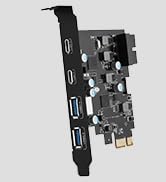
The YEELIYA PCIe USB 3.2 Gen 2 Card adds 8 USB ports (4 Type-A and 4 Type-C) to your desktop via a PCIe x4 slot, delivering ultra-fast 10Gbps data transfer speeds. Compatible with Windows, Mac Pro, and Linux, it draws power directly from the PCIe slot, eliminating extra cables and ensuring stable connections. Ideal for professionals needing reliable, high-speed USB expansion for data-heavy tasks like video editing and backups.


| ASIN | B0CM5L6X4K |
| Best Sellers Rank | #31 in Internal USB Port Cards |
| Brand | YEELIYA |
| Compatible Devices | Personal Computer |
| Customer Reviews | 4.1 out of 5 stars 183 Reviews |
| Hardware Interface | PCIE x 16, PCIE x 4, PCIE x 8 |
| Item Dimensions L x W x H | 4.76"L x 4.76"W x 4.76"H |
| Item Weight | 0.06 Kilograms |
| Manufacturer | YEELIYA |
| Model Number | YEETTI-8P-PCIe-USB3.2-Gen2 |
| Operating System | Linux, Ubuntu 20.04, Windows XP/7/8/10 |
| Product Dimensions | 4.76"L x 4.76"W x 4.76"H |
| Style | Classic |
| Style Name | Classic |
| Warranty Description | 365 days |
S**C
FITMENT HELP FOR THOSE HAVING PROBLEMS!
Excellent card! I really like the PCB choice and the black painted bracket is a nice touch. Build quality overall is excellent. It even has a little LED that lights up on the card when powered on. An absolutely simple and effective way to add the connectivity that I needed. Windows 11 detected the card and the device manager never had an issue. Performance is what I would expect for a card like this and for what I will be using it for it is more than enough. Being able to get 8 ports on a single card is great and was one of the main reasons I went with this model as opposed to others. I have seen many complaints about fitment with this card so instead of berating other users who clearly have no idea what they are doing, instead let me tell you how it is done. First you obviously want to make sure that the card is well seated in the PCIe slot, but before you lock it down, there are a couple of things that you want to do first. #1 : Be sure to plug in and populate every input on the card before locking it into place. You will have to wiggle the card up and down to do this but it is one of the most important steps! #2 : Once you are ready to lock the card down it is important that you use as little torque as possible on the securing screw to keep the card in place. The more rotational torque you add, the more the card will twist and make port access in the future much more difficult. #3 : The securing screw should be a non smooth bottom (the part right where the thread meets the underside of the screw head) but instead you want one with the ridges. The ridges on the bottom of the screw head grip the metal once you start to tighten and use both friction and pressure to lock down, whereas the smooth bottom screws rely only on pressure. Using the ridged bottom screws reduces the amount of torque needed to get a secure fit while reducing the twisting of the card once mounted. It is really the twisting under high load that causes fitment problems. The screws included with this card are not this type unfortunately so you will have to find your own. If anything, this is the only knock that I have against this card aside from the fact that the type A ports are blue (IMO all gen2 10gbs type-A ports should be red but that is really just a me problem) but even so I still give it 5 stars because of the great job done on the card itself and for the price I paid for it. Hope that this info helps!
B**S
Super easy to install l, works perfectly, pop it in and go.
Works just like it supposed to. No drivers to install, just popped it in and it worked. May have had to switch on that pcie slot in bios but otherwise totally easy and totally worth the price.
N**E
Note to others... USB-C is NOT Thunderbolt.
As a USB port multiplier it works pretty well. Easy install in a 2019 MacPro.. and fully compatible. Others should note this is a USB-C card, it does NOT have any Thunderbolt ports. It ONLY has USB-C ports, in two different shapes. The small round ports may LOOK like Thunderbolt ports, but they are not. This PCIe card will NOT drive any Thunderbolt devices. It doesn't have the power necessary. While USB-C and Thunderbolt use the *exact* same port and are the *exact* same shape they are NOT the same thing. Thunderbolt has additional bidirectional power capabilities, USB-C does not.
L**K
Adds 8 USB ports, and both the four USB-C and the four USB-A are Super Speed
Nice build quality & port placement enables 8 ports from top to bottom. Likely you will have to cut the slats to the adjacent ports. What really sucks is that the USB Cโs support slow data transfers from over a decade ago. USB Aโs can transfer up to 300 Mbps in my system. Cable types are critical. Update: The vendor Yeeliya responded to my initial 2-star review and provided full support, thereby resulting in full SuperSpeeds at up to 550 MBps (SuperSpeedPlus) on my computer. Their response and support is excellent and I now completely recommend the card, which is so far unique in providing so many ports at full speed. Superb card and I am fully satisfied. Attached are screen captures from "h2testw" and "USBTreeView" showing the card working at USB SupeSpeedPlus.
J**E
Not compatible with MacPro 4.1/5.1
Not compatible with MacPro 4.1/5.1. USB-C ports are not centered and are blocked, preventing full cabe insert. Seems like a solid card if this change is implemented.
N**E
Works great, doesnโt fit
Slotted it in, got it lined up in my fractal mesh-c case. The USB-A ports are too big to to have anything fit through the gap and plug in. USB-C works and fits fine, which is great because thatโs what I needed it for. But having extra ports is always handed.
T**S
Excellent budget upgrade
Plug in play worked excellent. Very easy install. Fit , perfectly in my small dell desk top. My transfer speed is now much better. Decent quality for the price.
G**?
Slow, but great customer service
Not USB 3 speeds, but I changed my review. The seller proactively reached out to me because I was unhappy. While I did not take the offer up to make this right and replace or refund the item, I was genuinely impressed with the customer service. This device does work to the extent that you can access disk drives and other things with the USB-C form factor. So, in the very least, you are getting additional USB sockets and an USB socket with an adapter built in. You could never expect high speed or use this for something like a docking station, but for the price and the footprint inside the box, this was a not a bad deal.
V**I
Not useful
Not useful
S**E
USB-C Does PD Power and Data
This little card is a fantastic upgrade. In my Mac Pro 2008, it adds two USB 3.0 ports and a USB-C PD port that can do 18 watts, which is enough to charge my MacBook Air. The USB-C port also does data and it works well with every device I have thrown at it. I use it to connect an NVMe drive in a USB-C external housing to play video and do occasional backup. The USB-C port is not extremely fast, probably limited by its x1 PCIe architecture, but it can easily keep up with full HD video. The card is tiny and it fits in the smallest PCIe slot available. It comes with a half-height bracket in case you need to put in in something low such as a server. It worked instantly without drivers. MacOS Monterey had absolutely no trouble recognizing the card and taking full advantage of its capabilities. This card breathes new life into PCs that do not have USB 3.0 or USB-C. The simplicity of installation and seeing it work instantly with no fussing around was a sincerely joyous experience.
J**J
Nice quality
Was bought to pass the device to a virtual machine. Everything works. Compatible with Linux! I recommend!
L**D
Excellent
Great price - worked great - win 11 auto updated the Driver then update failed - returned within 30 days
S**N
Orientation of USB C port not good
Purchased this card for the USB C port but due to the fact that the port is horizontal on the card, no USB C Cable will fully insert into the port. If the port was mounted vertically, there would be no problem. The USB 3.0 ports are mounted vertical, so there is no problem inserting those cables. Disappointed consumer!
Trustpilot
1 month ago
1 month ago