


Buy anything from 5,000+ international stores. One checkout price. No surprise fees. Join 2M+ shoppers on Desertcart.
Desertcart purchases this item on your behalf and handles shipping, customs, and support to Ecuador.
⚡ Elevate your workspace with the Echo 11 — where power meets precision.
The Sonnet Echo 11 Thunderbolt 4 HDMI Dock is a premium docking station featuring 11 ports including three Thunderbolt 4, four USB 3.2 Gen 2 Type A, 2.5 Gigabit Ethernet, HDMI, and SD card slot. It supports up to dual 5K or single 8K displays at 60Hz, delivers 100W laptop charging, and offers broad compatibility with Intel Macs, Apple M1/M2 devices, Windows Thunderbolt 4 laptops, and iPad Pro, making it an essential hub for professionals seeking streamlined connectivity and high-performance display support.
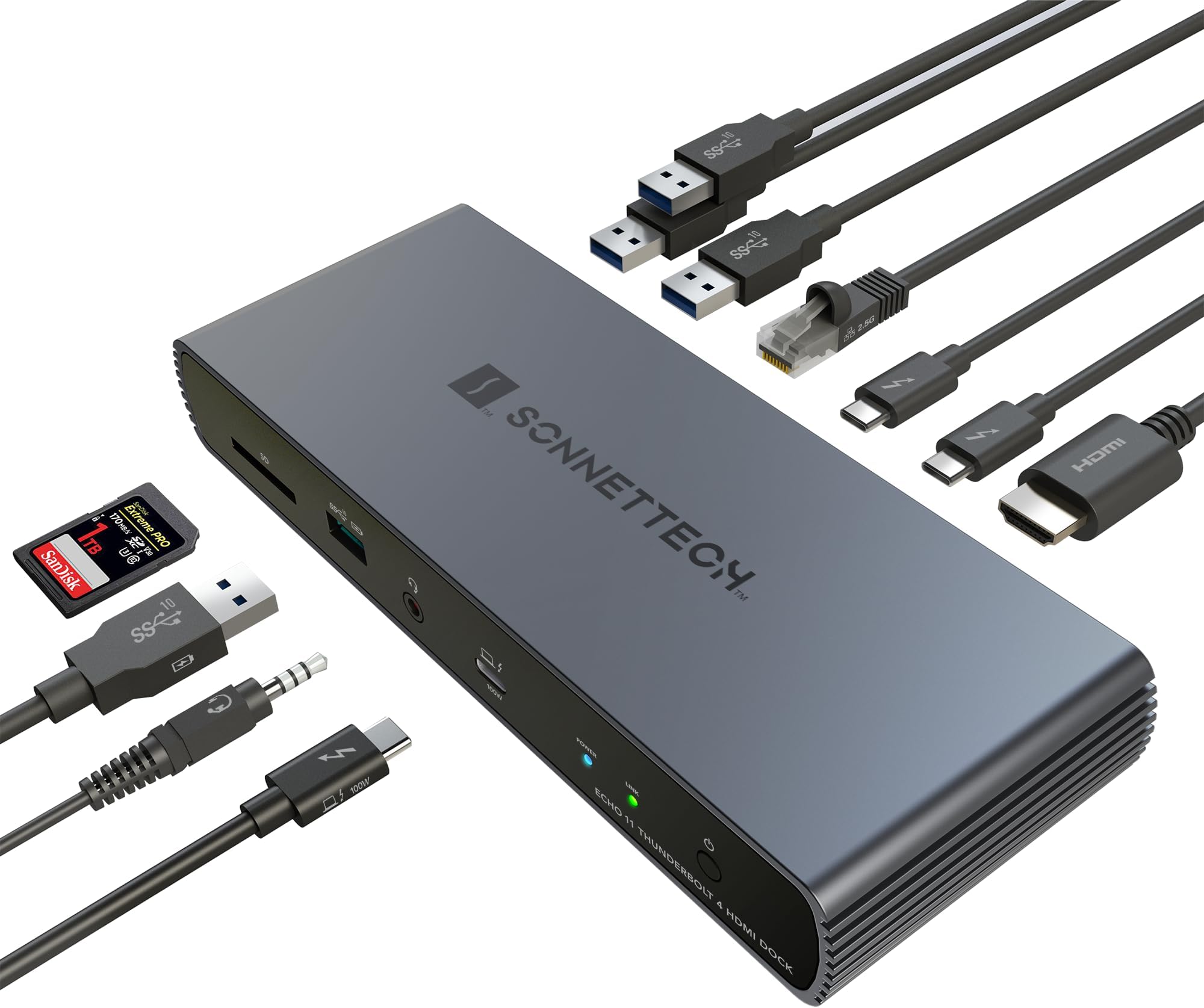


| ASIN | B0C6QD83FV |
| Best Sellers Rank | #105,091 in Electronics ( See Top 100 in Electronics ) #1,083 in Laptop Docking Stations |
| Brand | Sonnet |
| Compatible Devices | Intel Mac, M1 Series and M2 Series Macs, MacBook Pro, Windows with Thunderbolt 4 Ports, iPad Pro |
| Customer Reviews | 4.1 out of 5 stars 32 Reviews |
| Hardware Interface | Ethernet, HDMI , Thunderbolt |
| Item Weight | 1 Pounds |
| Manufacturer | Sonnet Technologies |
| Mfr Part Number | ECHO-DK11H-T4 |
| Model Number | ECHO-DK11H-T4 |
| Number of Ports | 11 |
| Total Number of HDMI Ports | 1 |
| Total USB Ports | 7 |
| Total Usb Ports | 7 |
| UPC | 732311013638 |
| Warranty Description | 2 Year Limited Warranty |
| Wattage | 100 watts |
A**R
Stable and reliable dock
Excellent dock that even supports pass through monitors even when macbook doesnt.
B**E
Good for music/pro audio
Sonnet makes great docks and this is no exception. I use mine for music/pro audio with an M3 Pro Mac laptop and overall it works very well, feeding Apogee audio hardware and two SSD drives as well as a standard USB "A" hub. However, there are minor compatibility issues with some outboard gear - a desktop display to the dock rather than the Mac itself is sometimes not recognized - and the unit runs a little warm.
A**K
works nicely to connect M1 to 2 Dell 27" 4K monitors and stays cool
I'm using it this dock to connect two DELL U2723QE 4K monitors to my M1 Pro MacBook. After trying several other options I'm finally in peace with this setup and I run both monitors at 2560x1440 HiDPI resolution . One advice: don't bother with Dell DDPM display manager (what a piece of crap!) and use BetterDisplay (free version works fine).
J**N
Great dock but the network connection keeps dropping
I use this dock with my 16" 2024 MacBook Pro M4 Max. Everything about this dock works perfectly fine (except for see below)- I use it with a LG ultra wide 1440p monitor, 2.5g ethernet, a handful of USB devices, etc. I use my laptop docked almost permanently and pretty much daily the ethernet connection drops. I see the link active but no data passes and I cannot reach the computer on the network. I need to restart the dock for the connection to start working again. I remote into this computer a lot so this has been a serious issue for me.
T**K
good
feels solid, does what it says, and as a bonus it fixed standby power issues with my Dell U3818DW when connected to my M1 Pro Macbook Pro via USB-C.
J**.
So far, so good
Thus far, I am very pleased with this dock. Using it with a 2024 Macbook Air M3 and a 32" curved Dell monitor. Setup is rather intuitive. Ports are clearly marked and well spaced, physical layout is clean. typically using 6-7 ports. Unit gets warm but not hot. Overall, very pleased with this purchase.
D**N
Quality and well constructed
This is one of the well constructed device. I wish it has more usb-c options.
E**O
Excellent
Great little dock. Solved my flickering monitor issues. Ha. Needs more USB ports. But otherwise it's pretty on point for the price. Adding an update from a little bit over a year. This thing has been okay. It does need a reboot once in a while to the point where my screens and my internet go off, which is kind of disruptive. It also gets very hot. And sometimes if you simply And sometimes if you simply bump the cable or unplug something, it resets the USB on it and everything disconnects and reconnects. Edit: Disconnects are more frequent, and support wants me to pay for shipping to send in for repairs, plus no instant swap. Just not worth it.
M**R
Dock guzel calisiyor ancak
Dockun islevlerinde bir problem goremedim. Bir problem olarak USB 3.0 portlarina 2.0 cogaltici taktigimda algilamama durumlari yasadim. Bunu da kaliteli bir 3.0 cogaltici ile duzelttim. Cihaza yalnizca MX Mechanical ve MX Master 3 bagli, disk baglamiyorum. Surekli yasadigim bir sorun su, laptop (MacBook Pro 13" M2, clamshell modunda) yeniden basladiginda hicbir sekilde ekrana goruntu getiremiyorum. Ya TB4 host kablosunu cikar tak yapmam gerekiyor, ya da docku kapatip acmam gerekiyor. O durumda "link" isigi da yanmiyor. Baska bir markada boyle bir sorun yasamamistim. Aslinda Thunderbolt 4 spesifikasyonu geregi laptopu uyandirabilmem gerekiyor. Eger bu tip sikayetlerim artarsa garantiye gonderebilirim. Ancak su an cok bir problem yaratmiyor. Diyeceksiniz ki sen USB 3.0 cogaltici kullaniyorsun ondan oluyor. Hayir, dongle'lari direkt taktigim zaman da ayni problem yasaniyor. Not: Arastirmak isteyenler icin, referans tasarim Good Way DBD1330'a ait. Sonnet'in kendine has olusturdugu bazi farkliliklar vardir mutlaka. Piyasadaki Thunderbolt 4 docking station ureticilerinin cogu bu tip onaylanmis referans PCB'ler uzerinden kendi docklarini olusturuyor zaten. Sadece bilgi olarak paylasmak istedim.
Y**S
Insipre la robustesse, et pourtant...
Dès le déballage on remarque un montage propre, avec des matériaux de bonne qualité et visiblement robustes... ...Sauf qu'après moins d'un mois d'utilisation, le bouton power ne fonctionne plus... plus moyen d'éteindre et donc d’allumer le boitier autrement qu'en le débranchant sauvagement. Dans cette gamme de prix c'est extrêmement regrettable
H**H
Top Qualität!
Das ist mein zweites Sonnet Echo. Ich hatte hier zunächst ein anderes Gerät eines anderen Herstellers erworben, das Port-technisch besser ausgestattet war. Leider zeigten sich im Gebrauch Probleme mit der Audioqualität sowie zufällige Auswürfe der angeschlossenen Peripherie wie Festplatten oder USB Kameras. Also ging es zurück. Als "Ersatz" dann doch ein bisschen mehr ausgegeben und dieses Dock erworben. Es leistet seit Wochen zuverlässig seine Dienste, ohne Murren oder auch zu heiß zu werden. Will gar nicht groß rumreden: Das Ding funktioniert an meinem MacBook Pro 2017 einwandfrei - ich bin höchst zufrieden. Schick aussehen tut es zudem auch noch. Was will man mehr?! Ah, klar, man kann immer mehr Ports haben. Ich bin mit den 2 TB und 4 USB Ports aber mehr als zufrieden. Wichtig für mich war, dass ich eine externe TB NvME Platte, mein Mikro und eine USB Kamera anschließen konnte. Jetzt ist immer noch Platz für die externe GPU (auch von Sonnet) und weitere Festplatten. Happy Camper, 5 Sterne!
J**S
Excellent high qualiyy hub
An excellent hub. It has more video capabilities than what is on the webpage.
H**R
Super Gerät - bekannter Hersteller - preiswert
Ich habe mich für dieses Thunderbolt 4 Dock entschieden, weil: - 2.5 Gbit/Sekunde Ethernet - zwei 5K Display mit Thunderbolt 4 betrieben werden können - weitere gute Merkmale auf der Hersteller Website Nach längerem Gebrauch: habe ich folgende Defizite festgestellt: - anstelle des HDMI hätte ich gerne mindestens einen USB-C / Thunderbolt 4 Port zusätzlich gehabt - Nach vorne einen USB-3.2 Anschluß - eine Software zum störungsfreien Auswurf aller externen Festplatten Auch die Suche danach war vergeblich oder die Preise zu hoch. 4 von 5 Sterne wegen der Kombination der Ports und der fehlenden Software. OWC hat eine Software
Trustpilot
2 weeks ago
2 weeks ago