![Ex-Pro USB 2.0 Video/Audio Grabber Editor for capture video. [Windows 8 [32 & 64Bit], 7, XP, Vista.]](https://m.media-amazon.com/images/I/31mw7g-PpGL._AC_SL3840_.jpg)
Buy anything from 5,000+ international stores. One checkout price. No surprise fees. Join 2M+ shoppers on Desertcart.
Desertcart purchases this item on your behalf and handles shipping, customs, and support to Ecuador.
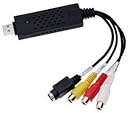
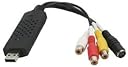
Ex-Pro USB 2.0 Video / Audio Grabber Editor for capture video. Great for older VHS, V8 and Hi8 Camcorders. Copy movies and footage (edit) then save from your PC DVD, VCD and SVCD. (Includes Video Editing Software) Ex-Pro NEW 64Bit Generation USB2.0 Audio/Video editor is the best ideal companion for your portable audio/video application. This USB2.0 video/audio editor is the bridge between your computer and analog camera, VCR, camcorder or other video source. The editor is small enough to fit in the palm of your hand and is ideal for both notebook and desktop computers. For operation just connect it to the USB port, no external power is needed. Ex-Pro Capture USB 2.0 Video and Audio Capture Card for PC - S Video / RGB to USB Transfer Cable - External Grabber Lead for Window 8 [32 & 64Bit], 7, XP, Vista. Mac OS X v10.5 or above. Converts and analog video source to a digital version on your PC utilising the included, easy to learn, HD software. Using the RCA composite and S-Video (S-VHS) connections. Supports MPEG-1 MPEG-2 VCD SVCD DVD WITH NTSC, PAL and Secam support. Recording onto:- DVD+/-R/RW, DVD+/-VR. Including still images in JPG, PNG, GIF and BMP. Popular USB 2.0 interface and not need external power, capture order directly to your computers hard drive. Supports high quality video resolution NTSC: 720 x 480 @ 30fps, PAL:720x576@ 25fps, Control the Brightness, Contrast, Hue, and Saturation of color. (Standard and widescreen.) Compatible with - Windows 10, 8 [32 & 64Bit], 7, XP, Vista.Gold plated connections for optimum connectivity.Package content. USB video capture device (Latest Chipset) Mini Disk with software/drivers. [Windows 10 Install in Admin mode] Review: Converting my sisters VHS Tapes - My sister was taken ill when she had her first baby and for a long time she had no contact with him or very little. The only memories she had were stored on the old VHS Camcorder tapes that her husband had done while looking after the baby and to hope maybe one day they could share the memories together. I was asked if there was any way I could convert them and transfer on DVD for them. As I do a lot of digital video editing I was not sure how to go about it but after doing some reading and purchasing this item it was a piece of cake. Transferred to mpeg so they could watch them on their TV/PC/Windows Media Player. Twelve tapes in all which had to be run through the Audio Grabber Editor Via Camcorder. Some tapes were an hour long and it took time over a period of evenings. It was well worth the money to see my sister and husbands tears of joy to see unseen footage that had been put away for 7 years. I have since done some more for her next door neighbour and have been paid for it so I have got my money back. Well recommended and easy to use. Mr J Lucas Review: Four Stars - Works well & has ArcSoft s/w.
| ASIN | B001HB9C1O |
| AV Output | MPEG-1, MPEG-2 |
| Antenna Location | Video Capture, Video Editing, Archiving, Backup |
| Best Sellers Rank | 268,547 in Computers & Accessories ( See Top 100 in Computers & Accessories ) 23,229 in USB Cables |
| Box Contents | AV Adapter, TF Card Reader |
| Brand Name | Ex-Pro |
| Compatible Devices | DVD Player, Laptop, Personal Computer |
| Country of Origin | China |
| Customer Reviews | 3.8 3.8 out of 5 stars (57) |
| Global Trade Identification Number | 05055256946218 |
| Hardware Interface | USB, USB 2.0 |
| Item Weight | 100 Grams |
| Manufacturer | Ex-Pro |
| Manufacturer Part Number | 4875 |
| Model Number | 4875 |
| Operating System | Windows 7, Windows 8, Windows XP |
| Other Special Features of the Product | Portable |
| Platform | Windows 7, Windows 8, Windows XP |
| Unit Count | 1.0 count |
| Video Capture Resolution | 720p |
J**S
Converting my sisters VHS Tapes
My sister was taken ill when she had her first baby and for a long time she had no contact with him or very little. The only memories she had were stored on the old VHS Camcorder tapes that her husband had done while looking after the baby and to hope maybe one day they could share the memories together. I was asked if there was any way I could convert them and transfer on DVD for them. As I do a lot of digital video editing I was not sure how to go about it but after doing some reading and purchasing this item it was a piece of cake. Transferred to mpeg so they could watch them on their TV/PC/Windows Media Player. Twelve tapes in all which had to be run through the Audio Grabber Editor Via Camcorder. Some tapes were an hour long and it took time over a period of evenings. It was well worth the money to see my sister and husbands tears of joy to see unseen footage that had been put away for 7 years. I have since done some more for her next door neighbour and have been paid for it so I have got my money back. Well recommended and easy to use. Mr J Lucas
H**T
Four Stars
Works well & has ArcSoft s/w.
J**A
Unable to get it to work on windows 10.
I am transferring my old hi8 tapes from the original sony camcorder to Windows 10 PC. Despite all the tips, I have given up. I have since managed to install it on an old windows 8 laptop (not ideal as I mothballed it years ago) but it has now loaded and images are coming through (but not sound even though it says both drivers are working). I will persevere.
D**B
brilliant little gadget
I bought this item because I do a lot of Night vision, videoing and the only cameras that have built in infrared are the older Sony camera's which only have drivers up to windows xp or vista, For some reason Sony stopped making drivers after that for all their Hi8 camera's. I connected the the camera and run the setup cd with it not, really expecting it to do anything but to my surprise it worked brilliantly. Easy to upload your video, perfect picture and perfect sound. I am more than pleased with this item which came two days before the estimated delivery date, well packaged for security and safety. I give this company a well deserved five out of five and recommend it for anyone wanting to move hi8 and older video to computer.
P**S
Del Boy, I got some cushty video capture devices, going cheap...
Couple of things you might want to bear in mind: 1. On the one I received, the instructions talked of a website for support. However, I found no actual web address anywhere in the instructions, on the CD label, in the contents of the CD, the packaging, or on the device itself! 2. Similarly, there are no details anywhere of the company who actually made this. The packaging says 'EasyCap', the device itself has 'EzCap' printed on it. That's it! I found a website [...] that does make and sell video capture hardware, but their products don't look like what I received. I also found easycap.co.uk, which does have pictures of products similar to what I received, but bizarrely the 'about' page of this website says it's an 'unofficial site and support forum', and goes on to say 'We are enthusiasts of the EasyCAP Video capture adapters'! Their forum also talks of problems with cloned versions of the device being made. So clear as mud. So, even if you get it working (I had no luck), you might be on your own in terms of ongoing support, driver updates, etc. Then again, maybe I was a bit of a plonker to expect more at this price...
W**5
Works, and works well
I have a very old VHS camcorder, with some vhs-c cassettes. Have been meaning to copy for years, so finally got this. It worked a treat with its own software. Once I had the video on my pc, I could edit it with other software i have. Brilliant piece of kit at the price. Software works well for copying to pc, but not good for editing. Used With Windows 10.
T**A
Poor device can only be used for very basic primitive things like transferring old VHS to DVD
I just tried the device, It took me a lot of time to install the software the instructions are so poor and not descriptive. the activation code is written in a place where you cant see, took me time to figure that its on a sticker on the CD pack. I also had to write the code manually you code installed the code in a file and leave it on the CD so you make it easier for the customer to copy and paste it. Finally it works but the software is so poor. you don't get much options at all, I can barely full screen the video and its not even centred on the screen. I also couldn't download any other software for the device.
M**K
Relatively straightforward to use.
I'm using it to transfer my old family vhs to pc, I had a vcr and the associated leads to connect to this product. The supplied software is basic but ample for my needs. I'm not editing as such just controlling the size with the vcr stop capture button. there are effects I could add if I wanted. The only thing I found a little confusing was the device LED doesn't illuminate until the software is running, initially I thought it wasn't working. Otherwise it's all good
Trustpilot
2 days ago
2 weeks ago