Buy anything from 5,000+ international stores. One checkout price. No surprise fees. Join 2M+ shoppers on Desertcart.
Desertcart purchases this item on your behalf and handles shipping, customs, and support to Ecuador.
Viewing angle: >170ยฐ Review: The best display for an easy life - Worked straight out of the box for my viking project Review: Didnโt come with documentation - Description says comes with dev resources. But received screen and the cable connections. Nothing with specs, driver links. Or anything to help get it up and running. Got it working for my project in the end. But a little piece of paper with a link would have helped to even be able to test it.


| ASIN | B0BFQGN6X4 |
| Best Sellers Rank | 60,981 in Computers & Accessories ( See Top 100 in Computers & Accessories ) 149 in Barebone PCs |
| Brand Name | Waveshare |
| CPU Model | Cortex A9 |
| Compatible Devices | Jetson Nano, Raspberry Pi 4B, Raspberry Pi 3B+, Raspberry Pi 3A+, Raspberry Pi 3B, Raspberry Pi 2B, Raspberry Pi 1B+, Raspberry Pi 1A+, Raspberry Pi Zero 2 W, Raspberry Pi Zero W, Raspberry Pi Zero |
| Compatible Processors | ARM Cortex-A72 (Jetson Nano), Cortex-A53, Cortex-A7, Cortex-A57 (Raspberry Pi) |
| Customer Reviews | 4.6 4.6 out of 5 stars (64) |
| Main Power Connector Type | 24-Pin |
| Manufacturer | Waveshare |
| Manufacturer Part Number | WS-2.13inch e-Paper HAT (A) |
| Model Name | Waveshare 2.13inch E-Paper Display HAT |
| Model Number | Waveshare 2.13inch E-Paper Display HAT |
| Platform | Linux |
| Processor Socket | LGA 1151 |
| RAM Memory Technology | LPDDR2, LPDDR3, or LPDDR4 |
| System Bus Standard Supported | PCIe |
| Total PCIe Ports | 1 |
| USB 2.0 | 2 |
M**G
The best display for an easy life
Worked straight out of the box for my viking project
S**Y
Didnโt come with documentation
Description says comes with dev resources. But received screen and the cable connections. Nothing with specs, driver links. Or anything to help get it up and running. Got it working for my project in the end. But a little piece of paper with a link would have helped to even be able to test it.
P**D
Does what it says on the tin
Excellent service , on time and well packaged Does what it says on the tin - used to build a pwnagotchi
M**B
Good low power display.
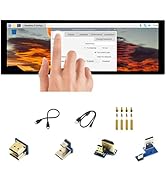
Great little display where you need to conserve power and don't have fast changing graphics. The display comes with jump leads and proprietary connector for attaching to circuit board pins, plus four mounting pillars. Unfortunately there isn't any documentation. Took a while to set up on my Arduino, using the SPI interface. Libraries are a bit hit and miss but I managed to get one that worked. Display isn't quick (the SPI and e-Ink means it takes 2-3 seconds to show a full screen from start of send) but you can update small areas quicker, such as flashing a battery icon. No illumination but I suppose you could supply that yourself with LEDs near the edge. Not overly expensive and runs on 3.3V / 5V so quite versatile too.
S**E
V3!
Honestly thought this was broken when it arrived, but this is the new V3 screen. Customer service nudged me to test it more, and tweaking my pwnagotchi got it working brilliantly! Thanks Yvonne!
A**R
Waveshare dev stuff is always a treat to use and this is no exception! Great E-ink display.
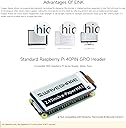
I can 100% confirm that the boards being provided now are the version 3 boards, despite the silkscreen confusingly saying revision 2.1, I guess it's V3R2.1. This is based on what I received two weeks ago, as it's clearly identified by the foil sticker on the bottom of the PCB that shows V3. Thankfully, this means that screen has the voltage shifting circuit that allows it to work flawlessly with both a 5V and also 3.3V logic voltages. Making it trivial to connect up to practically any microcontroller that has enough IO and supports the Arduino IDE if youโd like to use the provided examples, though brief C & Python based examples/demos are also given. The concept of being able to just drop these onto a PIโs GPIO pins to update the screen, and then use it as an unpowered label/information device is super appealing and fun. Though if you want to develop battery powered devices that could potentially last in the realm of years between battery charges or changes, these e-ink style displays are probably already known to you. The power draw is miniscule and in combination with a low powered microcontroller board you can do a lot of fascinating things with it. If you don't intend to use the screen as a PI hat, waveshare has also provided a premade connector wire terminated with Dupont connectors for other boards. The biggest reason to consider using, learning and developing with waveshare products for me is that the documentation and support is top-notch. If you have an issue, the documentation or the support team can help you out and point you in the right direction to get you going again. This device has a lot of usage considerations you need to keep in mind when working with it, so giving the documentation a proper read-through will ensure you don't damage anything irreparably by mistake or ignorance. The primary concern is that you need to put the screen into sleep mode between each refresh of the screen to prevent it burning an image permanently onto the display. So between each screen update you need to put it into sleep mode and then reinitialise it to wake it up, clear it and then refresh it to the latest info and the loop is repeated as needed. This cycle process is one of the main reasons making these screens very energy efficient as they don't need active power to maintain the current displayed image. Iโm really looking forward to getting the time to sit down and develop a little ESP32 based 3D printer monitor for klipper that can give me frequent status updates on the progress of my printer that's in another room without physically checking it. The waveshare documentation has a guide on setting it up with their specific e-ink esp drivers. Though it still helps with a normal ESP32 or ESP8266 and all I'll have to figure out is the moonraker connection between the ESP and the printerโs Raspberry Pi. No complaints from me, this is an easy product to recommend if youโre after an e-paper style display that is easy to work with. Of course the price is a bit higher than generic screens but youโre paying for a product that has plenty of documentation and is constructed to a high-standard.
A**E
Hat super funktioniert und voll kompatibel.
L**H
Great hst.
K**E
Works great for my raspberry pi zero. Easy to setup
G**O
Ho comprato questo display per testare un paio di progetti Bjorn CyberViking e Pwnagotchi, testato su Rasbperry Pi4 e funziona perfettamente nonostante solitamente si abbini al Pi Zero che รจ della stessa misura.
C**G
You need to use the 1.55 fix operating system on your SD card. Keep the configuration toml set as a waveshare v3 and it works fantastic ! ๐
Trustpilot
1 month ago
2 weeks ago