We remain fully operational. Our teams are working around the clock to ensure your deliveries continue safely.

DOWNLOAD THE APP


Customer Services
Copyright © 2025 Desertcart Holdings Limited
DOWNLOAD THE APP
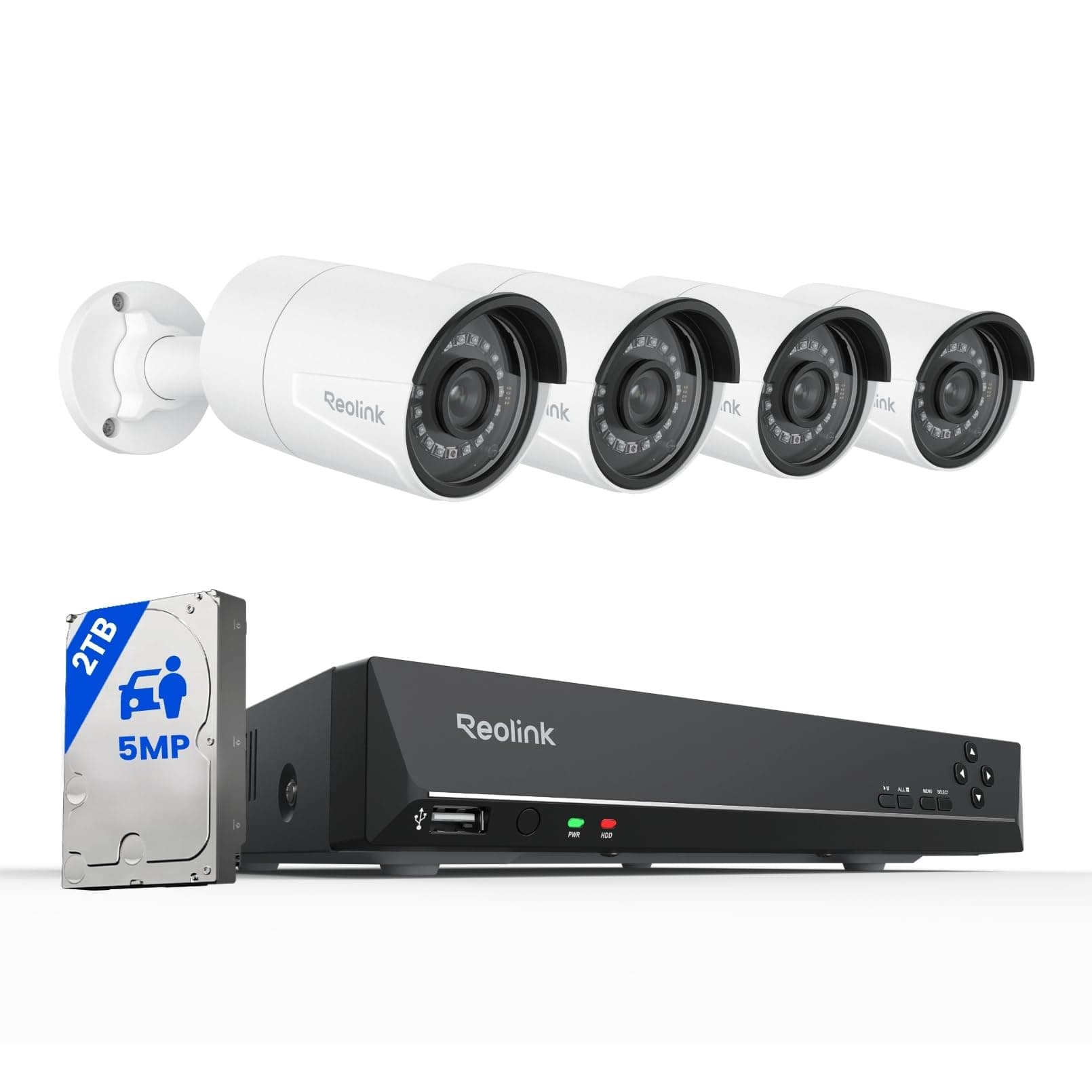
🔒 Elevate your security game with crystal-clear, AI-smart surveillance that never sleeps.
The Reolink 4K 8CH NVR CCTV Camera System delivers professional-grade security with 4 outdoor 5MP PoE IP cameras featuring 100ft night vision and AI person/vehicle detection. It includes a pre-installed 2TB HDD for continuous 24/7 recording, easy plug-and-play setup, and remote access via a user-friendly app. Designed for scalability and reliability, this system offers robust image quality, smart alerts, and expandable channels to protect your home or business with confidence.


| ASIN | B01C5JE3DS |
| Antenna Location | Outdoor |
| Antenna Type | Internal |
| Best Sellers Rank | 82,667 in DIY & Tools ( See Top 100 in DIY & Tools ) 13 in Surveillance NVR Kits |
| Brand | Reolink |
| Camera Description | 5MP Wired PoE IP Cameras with 30m Night Vision and Audio |
| Colour | White |
| Compatible Devices | Laptops, Personal Computers, Smartphones, Tablets |
| Connectivity technology | Wired |
| Country of Origin | China |
| Customer Reviews | 4.3 out of 5 stars 1,119 Reviews |
| Focal Length Description | f=4.0mm F=2.0 |
| Frame Rate | 6fps-30fps |
| Global Trade Identification Number | 00749110051907 |
| Hardware Interface | Ethernet |
| Included Components | Instruction Manual |
| Item Dimensions | 37.5 x 29 x 20.5 centimetres |
| Item Type Name | Security Camera |
| Item Weight | 6.35 Kilograms |
| Lens Type | Fixed |
| Manufacturer | Reolink |
| Manufacturer Warranty Description | 2-year limited warranty. |
| Memory Storage Capacity | 2 TB |
| Memory storage capacity | 2 TB |
| Model Number | RLK8-410B4-5MP |
| Network Connectivity Technology | Wired |
| Night Vision | Night Color |
| Night Vision Range | 30 Metres |
| Number of Channels | 8 |
| Number of channels | 8 |
| Operating System | Android, Windows, iOS |
| Optical Sensor Technology | CMOS |
| Other Special Features of the Product | 100ft Night Vision, Person Vehicle Detection, 24x7 Continuous Record, PoE Simple Configuration, 5MP Super HD, Local and Remote Access, IP67 Waterproof, Audio |
| Power source | PoE |
| Recording Mode | Continuous 24/7, motion detection |
| Signal Format | Digital |
| Special feature | 100ft Night Vision, Person Vehicle Detection, 24x7 Continuous Record, PoE Simple Configuration, 5MP Super HD, Local and Remote Access, IP67 Waterproof, Audio Special feature 100ft Night Vision, Person Vehicle Detection, 24x7 Continuous Record, PoE Simple Configuration, 5MP Super HD, Local and Remote Access, IP67 Waterproof, Audio See more |
| Total USB Ports | 2 |
| UPC | 749110051907 |
| Unit Count | 1.0 Count |
| Video Capture Resolution | 1920p |
| Video Input | RJ45 |
| Video capture resolution | 1920p |
| Viewing Angle | 80 Degrees |
S**M
Good system impressed
So I purchased these am I am impressed so far however I am going straight to the negatives Negatives: 1. Video is recorded in 4:3 aspect ratio and no way to change it, as confirmed by Reolink themselves as its down to the hardware on the cameras. 2. IR (Infra-Red), lights are very bright and invite lots of bugs, my solution is a telescopic fishing pole with a clean rag to wipe away any spider webs (happening every week but this is unavoidable with these type of cameras). See update from 29/09/22 issue fixed from latest update 3. Motion detection is software activated so it measures the change in pixels and not heat which results in many false alarms e.g. moving trees, plants, cans, wrappers, spiderwebs, insects, rain, clouds and security lights on a night etc… 4. Night mode is very clear however only when static objects when moving its difficult as the image ghosts and blurs but still good enough. 5. Unable to block/mask more then 3 areas (used for stopping motion by tress/plants by cancelling them out or removing neighbours windows that are caught in the system CCTV). 6. Unable to upgrade the HDD more then 4gb internally (see note 9 on good point) 7. Very hard to get hold of a eSATA caddy to take a HDD for external use (unable to add link of the seller as it may violate rules but found one for £17). 8. NVR is not wireless and needs a hard wired ethernet connection to your router (not sure if this is a bad point really but I have overcome this by using a TPLINK wifi extender that has a ethernet port and connected the NVR to this and works like a dream). 9. IR sometimes reflects of number plates/reflective material , making them unreadable (normal with these type of cameras). See update from 29/09/22 issue fixed from latest update Positives: 1. Super easy to install just one cable required (ethernet cable supplied). 2. Good support from Reolink with prompt replies. I had a faulty camera and had to return this at my own cost, so I am out of pocket by £5 due to their faulty camera. 3. Microphone is good on the cameras and picks up good audio. 4. App is super easy (easy for me anyway). 5. Time and date auto sync which is ideal. 6. Very clear image during the day. 7. Nice image on night mode compared to other cameras on the market (see bad point 4 on the image ghosting). 8. Setup alerts during naughty hours of the night on the NVR or App (both NVR and App alert you but do so at your own loss of sleep as the system motion is annoying see bad point 3). 9. Able to add an external eSATA HDD (maximum 4gb external and 4gb internal, 8gb combined in total) see bad point 6 and 7. 10. Can access my cameras anywhere in the world and change the settings I want. Can also view and download them directly to my phone and I can add other additional users who can also view on the APP (view only for additional users). 11. Can use PC monitor connection and a HDMI simultaneously (my HDMI cable is 10meters and works fine). 12. Can be used as standalone without internet connection. 13. Has the ability to add internal indoor Reolink IP camera automatically so they are recording 24/7 (selected cameras not tested this myself yet, but I have ordered one camera). 14. IR are super bright and can be seen with the naked eye and are a good deterrent. See update from 29/09/22 15. IR can also be turned off (day/colour mode), this is useful if you have a night PIR security light and want to capture the footage in colour (need a good security light within a small confined area not facing the camera to be useful in colour). See vid. Hope this helps you folks make an informed decision to buy or not, personally the biggest negative is, the app and monitor video is stretched to imitate a 16:1 but it is actually aspect ratio of 4:3 and for an expensive system this should be 16:1 as a default. Overall I am very impressed and giving this 4 star due to aspect ratio which has really let me down and the faulty camera which was blurry that had to be returned at my cost… Reolink this would have been a 5 star, such a shame! Unable to attach a Vid or Pic :( **update 05/11/2019** Amazon have refunded the delivery costs for returning the faulty camera back to the manufacturer (receipts were required as evidence). I have also purchased a Reolink E1 Pro camera to use indoors which is now a 5th camera on the system this now records 24/7 to the NVR (did have issues setting up on the NVR but this was resolved by the support from Reolink). Must say I am impressed with the support from Reolink and will leave a review for the E1 Pro too Given this a 5 star from original 4 star Update 29/09/22: Software update where u can change the intensity of the IR resulting in better night vision as it was too bright causing over exposure on some cameras. This shuts the intensity and camera don't show red lights on them and number plates can also be read on a night as no IR reflects from the plates.
N**T
Great Camera System
This review Depicts my own views on the ease of fitting, commissioning, adjusting and using the Reolink model RLK8-410B4. I purchased this Reolink 8Ch 4MP NVR with 4 Cameras, model RLK8-410B4 While it was on an Amazon Offer. I have been looking for a good system at a reasonable price that had a good quality image from the cameras. The 4MP cameras look good, they have a metal case that feel strong and secure, and capture a good quality image, I can see car number plates with them without any problems, I fitted three out of the four that came with the system at this point. They were easy for me to fit, only 3 screws holes needed drilling and plugging, then screwing in place. I did however fit an IP66 Black Weatherproof Outdoor Junction Box next to each camera for feed and connection of the cables as they were being fitted on a second story of my house and I didn’t want to have the camera leads going into my loft space, so now it makes it easy for maintenance if there is ever any needs, also there is a reset switch as part of the connection that I can now get to easier than climbing through the loft space. I plugged one camera at a time into the NVR as I was fitting them and the NVR found the camera as they were plugged in, then I used the Reolink app on my mobile to align the camera and then moving on to the next camera. The NVR is password protected so there is no problem with security, it is accessed via the onscreen keyboard. Each camera can be set up with individual specifications to meet the environment it’s protecting, Brightness, contrast, sharpness etc. as well naming them, actions, schedule and motion detection. Motion detection is very simple to set up, it’s just masking out the parts of the view that the camera image shows that you don’t want covering, such as bushes etc. that move in the wind, thus stopping false triggered of the motion detection. Since fitting the three cameras I have purchased a vandal resistant 5MP dome camera to go over my garage door. I have already used a patch lead cable to check the coverage and quality of the image and I am very pleased with it and I will be fitting it in a few days time. I am in the process of ordering a further dome camera to be fitted inside my hallway near the front door, this will give further cover of that area from the inside this time, this will allow me to view anyone who visits me after I have opened the door and will give a good clear image of them. I will set the audio to record from the camera closest to the door and this internal camera allowing me to have a recording of anything that is said. All in all I am very pleased with this Reolink system as I found it easy to install and it virtually sets its self up, with a few minor tweaks to suit your own personal requirements. Thank you Reolink ***** 5 Stars
R**Y
Solid durable unit(s) and a quality product.
Very good sound and picture. Good playback and video download when you get the hang of it - could use a newbies start to finish guide that includes physical installation hints and tips. Could not get email to work yet, but it is a config issue for me.** Keyboard USB socket would have been useful for the menu as it takes a while to set up with mouse. Difficult to fit if you are not used to drilling holes in your house and installing cables. You do not need to have any power leads, just the Ethernet cable. You will need an RJ45 crimping and cutting tool to use the provided waterproof covers - you'll want to cut the ends off the Ethernet cables provided (or drill a pretty big hole!) I don't get the power switch and power cable as they seem redundant. As a result I had to put everything in a junction box. Took me two weekends to drill everything and make it look good. (I am partially disabled and no DIY guy so that's ok). The system it's self is very simple to install. Nice having 4 cameras protecting all 4 sides and I must admit I'm already taking it for granted, and I'm glad I have it. Edit - added some day/night pictures (I have 4 cams at moment) - excuse the mess, we are rebuilding the house! To be fair, the Night Vision is not normally so bright, the screenshot came seconds after the NV (auto) kicked in on all 4 cameras so there was still a little latent daylight. Typically if you keep it away from light sources and boiler flus it's fairly good on showing up faces. r.e. Network wiring, I've included the Ethernet wiring diagram - I use B568B (bottom left of diagram) - so long as you use the same standard (B568A or B) on both ends it's fine. The RJ45 jacks supplied with the kit were not very good; 3 out of 4 failed to make a good connection. I used a network testing kit (cost about £8 on Amzn) to check the connection. I bought new jacks for £7 and they eventually worked fine. ** Edit - got email to work fine, it was Google blocking the feature unless you enable the "less secure apps" setting online when signed in to Google. Works really well - I caught the dreaded "Ilkeston Life" fiend who had been terrorising the neighbourhood with his local news and weird head. OK, maybe not - but the image is what my phone gets seconds after he walks in front of the camera. Just remember to only monitor areas where there is usually no movement, away from plants/steam, etc, and turn the sensitivity down to around 30 per camera.
K**Y
Perfect - does what is says on the tin, and so much more!
Excellent CCTV system, very easy to install and all cameras worked perfectly. The one slight downside that may be relevant is the fan noise but this is to expected with PoE equipment. I would not recommend installing it in a quiet area. After unboxing I setup the system on a table to confirm all was working. Following this I mounted the cameras outdoors and fed the cables back to the house and confirmed all worked ok. Although Internet access is optional, it is certainly a major requirement if you wish to view the cameras on a phone or tablet. The cupboard I installed in did not have wired Internet so I purchased a cheap Access Point to do the job. Note that this device does not have WiFi built in so you need to supply it with a wired connection although this can be from an AP or extender. The camera performance can be misleading because when you view the cameras on a mobile device you will see them in low resolution, this by default. This is to reduce the bandwidth, but the main point is that the recording system always records in HD no matter what resolution the handheld/laptop is set to. If you want HD monitoring on your mobile device then this can easily be set, but beware that the extra bandwidth can rack up your mobile phone charge and if the alternative WiF isn't up to the job then the cameras will stutter and buffer. The night vision performance is perfect although you need to make sure you position the cameras correctly. If you place a camera close to a nearby wall (side of the house say) then the red illumination diodes will illuminate this wall brightly and reduce the exposure of the overall picture. So you see a perfect image close by, but further afield is too dark. The advantage with this system is that you can climb a ladder with your phone in hand and actually adjust the cameras in real time, so getting the perfect angle is simple. The camera mountings ensure that all angles can be catered for. The screws and plugs are provided and each camera has an Allen Key to make the adjustment. To clarify a point made in other reviews, these cameras are PoE (Power over Ethernet) and although there are power connectors on the cameras they do not need to be connected. Just a single CAT5 is required for each camera to work with the PoE NVR. I folded the redundant power leads back and wrapped them up with self amalgamating tape to keep the weather out. I found that the CAT5 leads supplied were too long but a nice touch is that the REOLINK kit includes RJ45 connectors so you can cut the leads to the correct length and pop the new connectors on. Before you do this please ensure that you have the correct termination tool (and skills) available to do the job. If in doubt, keep the lead in tact and coil up the surplus amount. Am I happy with this kit, yes absolutely. The NVR takes up to 9 cameras so I'm considering expanding the system with some indoor cameras. The price of this kit may seem a little excessive, but you're buying quality equipment and for the HD quality and trouble free ease of installation it is certainly worth it.
G**B
Superb cctv at a reasonable price
Camera system arrived yesterday and I installed it today, installation was relatively easy but then we live in a bungalow. The hardest part was running the cable through the loft and cable conduit but its done. First impressions were a little disappointing but once I'd altered the camera settings via the app things became instantly fantastic and I am now seriously impressed. The picture clarity is superb as is the night vision and I can now read car number plates day and night and when someone walks down the path I can see the White's of their eyes. There was a comment on one review that I read that the camera system was seriously impacting their WiFi speed but on doing a speed test my WiFi has remained the same and I did 2 tests on different apps to make sure and both came back with the same results so no issue there. I really don't think that you can go wrong buying this camera system, I spent 4 days looking into cctv systems and am pretty chuffed that I settled for this one, I was however looking at buying a full 4k system but I couldn't justify the price so I settled for this one and I'm not at all disappointed and in my opinion 5mp camera's are more than up to the job for my needs anyway. So basically if you want a reasonably priced cctv system you won't go wrong buying this one.
C**K
Expensive and Not Perfect. This Reolink CCTV Has Some Issues - UPDATED
I have had this CCTV from Reolink installed for around 4 weeks now, and initially I was very impressed, because during the 'DAY TIME' the 5MP picture really is fantastic. But, think about it, most of the time you are only genuinely going to need CCTV is when it gets dark, and those nasties start coming out looking for their bounty. I have added a video to this review (which hopefully Amazon show), which will highlight the following issues in real time (watch the video): 1) The picture is great during the day. 2) The picture when detecting a person at night, is not so great - poor in fact, and no way would you be able to use the footage for facial recognition, which, let's face it, is why we are all buying CCTV in this day and age of lawless Britain. 3) The detection settings are not working well at all, and do not always trigger exactly when they should, no matter what sensitivity you set. Most of the time it only starts recording on detection when somebody is nearly at the end of the detection area - not good. 4) Rain, sunlight and bugs will have your CCTV dancing on activation all night long, and there is not a single thing you can do about it. If it is raining, or you have sunlight, then your motion detection is useless, and you may as well have the cameras on constant recording. You can NOT turn off the infra red lights which attract the bugs. 5) The Reolink desktop app constantly crashes, it just does, no way of getting away from that. 6) We have two cameras at the opposite end of our drive, both pointing at the car and front door area. Now if they are both set to motion detect, then they should BOTH activate at the same time, surely? No, the activations are not mirrored at all, and just sporadic in their operation, which is a flaw I feel, so what we have to do, is have one camera on motion detect, and one continuously recording. That way, if one picked up the motion, we could check the timestamp, and check the other camera too. We shouldn't have to do that. 7) Just a little thing here, but the screws enclosed that fix the cameras to the wall, are very poor quality, so if you have to remove them for whatever reason, then expect the head of the screw to be mangled quickly, because there is just zero strength in those screws. They are cheap steel screws (almost like plastic). These are fairly expensive cameras, albeit they are 5MP, which was the decising factor for my purchase, but at almost £500, I wouldn't expect these obvious flaws to be present. I am not 'totally' dissappointed with the product, I just feel that for the price, all of these issues that I have pointed out above should not be there. I have also sent around 15+ emails to Reolink support, which although they do respond (you will get one email reply a day from them) they have kind of sent me around in circles trying to offer support. They seem nice enough, but seriously, there should be a live chat or something, because if I send an email, and then you ask me a question, that is then 2 days that has passed. Not great really. Yes, I have tried adjusting all the settings on the CCTV cameras, but nothing has made for a better picture, or bettered the issues mentioned above. I'll update this review as and when, because after all, this is a fairly expensive purchase, and with it being a security product, people need to know and have the answers before deciding to invest. **UPDATE 2 MONTHS AFTER PURCHASE** I just wanted to update this review for the Reolink POE CCTV system. I have over the last month or so noticed something that is quite annoying, in that the internet speed for everything in the house has drastically reduced, almost to the point that if you are watching a film, everything starts buffering, and the kids start moaning, and complaining that their Xbox games are also 'lagging'. Now, we have very fast internet, with an average of 76mbs download speed, and around 19mbs upload, so the internet we have is not the issue; it is the cameras draining/sucking all the bandwidth. I know this because if I unplug the NVR box everything goes back to normal, and normal speeds for everything is restored. I only have two CCTV cameras on, so I dread to think what would happen to the speed if I had all 4 installed. So just also be aware, that your internet speed WILL reduce with POE CCTv cameras installed, so much so that if myself and the wife are streaming a film, Netflix, or Amazon Prime, we have to unplug the NVR box for a couple of hours, which obviously is not ideal. It is getting to the stage where I am considering unplugging the NVR box between the hours of 6pm and 12 midnight just so that we can have our internet back to normal. Not good.
M**S
Great kit super easy to install
Ordered on Friday evening and it arrived on Saturday morning. As per advice by other purchasers I set up on a table and tested it all out before installing. Took 10 mins to unpack ( it is very well packaged) 5 mins to connect together and as I had already downloaded the apps on phone , iPad and laptop. Once I had scanned the code it was up and running. The picture quality was a nice surprise, very clear and crisp. Later tested the night vision and it’s like instant daylight with the infra red. So installed on Sunday, easy to do as it is power over Ethernet, so no power cables, just ran the supplied Ethernet cables round the loft space. It operates as expected and has a ton of features , like zone alerts, sensitivity settings( I need to work this out as it is reacting to rain and insects at the moment) but apart from that all good. The equipment is very solid, it feels like a quality item, cameras are aluminium construction and are compact in situ. The NVR is small and again the look and feel is one of quality, the software is great it would be helpful if there was more information than the quick start guide, as I had to download the user guide from the reolink site- there is so much you can configure like email or text alerts and you need the information contained in the guide to do this I think. Only two areas where I was a bit underwhelmed, one was the supplied screwdriver..... it was like a toy and had an incomplete pressing at the end so could not have been used to screw anything in , that went in the bin. The other thing that was a problem was the end caps supplied for waterproofing the Ethernet connectors, the problem is that the supplied cables were slightly bigger than the connectors. Not a big issue, as shaving the corners of the cable end connectors down allowed the caps to be fitted, to be honest I fitted them as they were supplied but in a dry install like mine they were not really needed, however, if you need to fit them you will be required to pare down the soft plastic/rubber round the rj45 connectors, it’s just a mm on each corner. It would have got 5 stars across the board but for the, connectors, user manual(absence of) and toy screwdriver. But in the final analysis, the kit is superb in use, easy to install and just works.
Z**Y
Amazing kit
I've been putting off installing a Swann CCTV kit that I bought a few months ago, mainly because I didn't want to start taking up carpets to run wires from my office to the kitchen downstairs where I wanted the cameras. I recently also bought a £50 PTZ 1080p camera from Amazon, which is actually not too bad at all for the price - just not what I wanted. I researched the Reolink kit for a good few hours, and took the punt mainly for the following reasons: - 5MP video resolution - PoE powered - Mobile/Windows/Mac apps available - Supported by my Synology NAS - DVR is extendable to 8 cameras I just installed the entire system today, and although it wasn't as easy as WiFi IP cams, I'm actually glad I hardwired these in. The image quality is insane, I can see everything crystal clear with neglible lag. I've found normal 1080p CCTV cams tend to blur faces a bit with movement, so unless you somewhat recognise the people in view, you won't always have a clear enough image. I love that the cameras are PoE, so all I have to run is a network cable to each camera and it powers and connects to the DVR and my network all in one cable. Yes wifi is easier, but I don't like the lag you sometimes get on wifi cams (or any wifi devices really) - I almost always prefer hardwiring. Also, when I'm coming to move house, I can just unplug each camera and take it with me, I don't care to remove all the network cables as I'll just get new ones. Much easier to relocate these cams than with BNC run cables that are more expensive to buy again. Also you can run ethernet cables much further than BNC without image loss. The DVR itself is a good quality box, takes 8 camera inputs, has HDMI out, USB mouse input, and a bunch of buttons on the front that I haven't looked at. I simply plugged it all in, plugged it into my network and then set it up from the Reolink Mac app. However, I do think you need to set up the initial admin password on the DVR box itself, so I had it plugged directly into one of my monitors just to run the first minute of setup. The setup is actually really easy, no confusing config options or anything, pretty much just an admin password. The box automatically picks up all the cameras. There are good enough options to play around with Motion Detection recording, or schedule recording etc, so you can set these up as you please. Oh, and there's a bunch of different camera layout views in the Reolink app; 1-up, 4-up, rotating between all cameras, 8-up, 9-up and a couple others. Lastly, the Reolink mobile app is amazing, MILES better than any CCTV remote viewing app I've used to date - it's actually better than the Mac app as well. I could set up the motion detection and recording schedules easier from the mobile app. You can set up push notifications for motion detected alarms (although this kept going off as my wife was walking around the kitchen), but you can set up push notifications only within certain scheduled hours, just haven't bothered to do this yet. All in all, brilliant system, great build quality and software too. Worth writing this long review for! The 5th star would have been awarded had the cameras had both Wifi and hardwired options for connectivity, PTZ features, and/or a bleeding edge software interface.
Trustpilot
5 days ago
3 weeks ago