

RAZER Mamba Tournament Edition
Product ID: 47867705
Details
- BrandRazer
- ColourWired
- Connectivity technologyUSB
- Movement detection technologyLaser
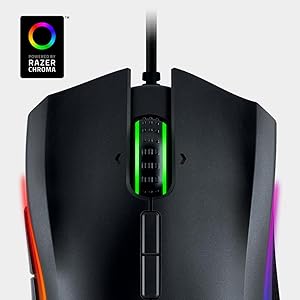
🌈16.8M customizable Chroma colors
🎯16,000 DPI ultra-precise sensor
🖐️Ergonomic right-hand design
🎮 Dominate the game with precision, comfort, and style — the Mamba way.
The Razer Mamba Tournament Edition is a wired esports gaming mouse featuring a cutting-edge 5G sensor with up to 16,000 DPI adjustable sensitivity, an ergonomic right-handed design with textured rubber grips for comfort, and fully customizable Chroma RGB lighting with 16.8 million colors. It includes nine programmable buttons and a durable 2.1-meter braided USB cable, optimized for high-speed, lag-free gaming performance.


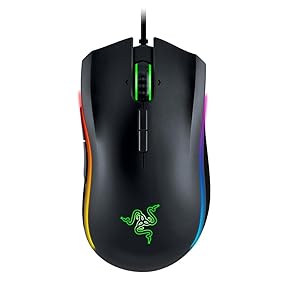


| ASIN | B00ZU1Z7DE |
| Antenna Location | Gaming |
| Are Batteries Included? | No |
| Are Batteries Required | No |
| Brand | Razer |
| Brand Name | Razer |
| Button Quantity | 9 |
| Colour | Wired |
| Compatible Devices | Gaming |
| Connectivity technology | USB |
| Customer Reviews | 4.0 out of 5 stars 1,410 Reviews |
| Enclosure Material | Rubber |
| Global Trade Identification Number | 08886419330905 |
| Hand Orientation | Right |
| Item Weight | 0.1 Kilograms |
| Manufacturer | Razer |
| Manufacturer Part Number | 8886419330905 |
| Model Name | Mamba Tournament Edition |
| Model Number | RZ01-01370100-R3G1 |
| Mouse Maximum Sensitivity | 16000 Dots per Inch |
| Movement Detection | Laser |
| Movement detection technology | Laser |
| Network Connectivity Technology | USB |
| Number of Batteries | 1 Lithium Ion batteries required. |
| Number of buttons | 9 |
| Operating System | Linux, Windows 7, Windows XP |
| Power Source | Cable |
| Product Features | Movement Resolution:16000 DPI^Movement detection technology:Laser^Programmable mouse buttons^Rubber grips^Scroll |
| Special feature | Movement Resolution:16000 DPI^Movement detection technology:Laser^Programmable mouse buttons^Rubber grips^Scroll Special feature Movement Resolution:16000 DPI^Movement detection technology:Laser^Programmable mouse buttons^Rubber grips^Scroll See more |
| Style Name | Ergonomic Wired |
B**2
IT DOESN'T GET BETTER THAN THIS
This is my first dedicated gaming mouse. There are others that are more expensive and have an immense list of extras, however Razer have a reputable gaming name and this one didn't appear to be too far out. I'm using it with a top spec Alienware 17 and a Razer Goliathus gaming mouse mat. Connection via USB is simple and the cable has a top quality feel and look, it is also longer than any human will have problems with. To appreciate all it can do you need to register it and use the Razer Synapse software, here you can tweek away to your hearts content and set up specific gaming profiles and choose from what they call 5 basic lighting effects. Basically these open into a multitude of further choices and effects, which can seem a bit daunting but given a bit of time you can achieve some great results. I will be honest in that if you put all the magic aside this is the most comfortable mouse i have ever used. Everything you can possibly want is where you want it, there are no awkward finger stretching moves to perform and it is not littered with a mass of buttons and switches. And the 'geek' factor is that this little mouse has a 16000 DPI 5G laser sensor. Being mortal I'll just say it is unbelievable fast and with the mat i'm using it is slick and responsive, i've never had better. Okay it has a wonderful light show, but if you do focus on that your gaming will be over pretty quick. But the lighting is not the only thing this little mouse is about. It's about quality, ease of use, very quick response and no finger strain whatsoever. In a nutshell: PROS: CONS: Outstanding quality. Haven't found one yet. Unbeatable specs. Built for comfort and ease of use. Beautiful design. Dazzling lighting effects. Awesome software. Additional Razer benefits, too many to list. This does more than what I expected and is without doubt the best gaming asset you can buy.
A**R
Mouse Heaven, with Caveats
I feel I need to write a review of this mouse - my first ever amazon review - because it is so good! I got the wired version (waaaay cheaper). I'm a musician and have slight tendonitis in my right arm, so have been scouring the internet for a comfortable mouse that also has enough features - sideways scrolling in particular - works with Mac OSX and is wired. I've tried Logitech G500s, G502, G900, G600, Mionix Naos 8200, Razer Deathadder, and Kensington "Expert" Mouse Trackball (awful!!). This mouse is the best I have found. Some points worth noting: - This is the only Razer mouse with a side-scrolling scroll wheel, however, the side-scrolling is not continuous. I.e. you click the scroll wheel once, it moves to the right once. Hold it, nothing happens. You can work around this (on a Mac) by assigning one of the thumb buttons to shift, which when held makes the regular direction scroll wheel scroll left-right. - The ergonomics are significantly different between the Deathadder and this mouse. I tried the Deathadder but couldn't get along with the shape - it had a longer slope under the palm giving no support and a more pronounced bump, which raises up your fingers... It was also a bit wider than the Mamba at the clicking end, which was a bit uncomfortable for me. The Mamba, by contrast, is supposedly shaped from exhaustive testing of different hands. It pays - it just feels really natural in the hand and doesn't aggravate my wrist or hand. - There is a firmware issue that's been well documented where the tracking cuts out periodically. However, it's worth noting that the fix, which is accessed via the link below, is a .exe file and thus not usable on a Mac! I had to use my brother's PC to install the update. I emailed Razer asking for a Mac-friendly firmware update but they have yet to give me one. Good luck! (...) - There is a documented "issue" with the sensor which is that if you lift the mouse up, when you put it down it registers a movement diagonally down and right. I use this mouse at between 3500-4500dpi and it's just not an issue. I'm not a gamer though, so maybe if you have really high dpi, are playing a FPS like CS:GO and liftoff a lot then you might have a problem. If you lower the liftoff range to 1 or 2 then it all but goes away. - You can see dim spots on the colour lines between the LEDs. That might be an issue for some people. I really don't care. (The mouse actually looks very pretty, especially on spectrum cycle) - The clicks are very "light", especially the right click (maybe just the one I was sent). If I rest my middle and ring finger on the right click button at the same time, applying no pressure, it will click. It's very easy to find a comfortable position that doesn't trigger this though, and in fact the way I naturally hold it doesn't trigger it at all. I'm given to understand that the wireless version has a pressure adjustment screw on the bottom of each button, so maybe get that one if you need heavier clicks. That's about it! After all the mice I've tried, this is the best one I have come across and it's a wonderful mouse. All the aforementioned issues are, in my opinion, overshadowed by the important things which have been done superbly.
A**R
Great at first, now I'd say a waste of money and a gamble for faults..
Initially, I loved this mouse for its precision and amazing lighting. However this suddenly changed as soon as my razer warranty ran out, my mouse inconveniently had a lot of faults including this overly annoying and aggravating fault in the mouse that renders it useless. Every time i moved the mouse left or right the mouse would shut off and then come back a few seconds later.
F**R
Probably the best mouse I've ever bought...
Bought this along with a Deathstalker keyboard (both Chroma edition) to replace a similar Dell Alienware setup. The Mamba is a very light mouse, easy to move with your fingertips, as is the scroll wheel. Great smooth, precise movement and sensitivity - though this can be adjusted to suit individual tastes, using the Razer Synapse software (this doesn't come included - you need to visit the Razer website to download it). Sits very comfortably in the hand - though I generally just grip the sides and top with my fingers. I find the 3-way scroll wheel and 4 buttons are quite adequate for my needs. Those who play more complex games may want to go for the ones with the 6-12 buttons on the side. Works an absolute dream on the Sphex gaming "surface" I bought with it (it really is more of a surface than a mat). The Synapse software allows you to calibrate the mouse movement, depending on the type of mat you have and it also allows you to configure the buttons and lighting effects. So far working fantastically well - no problems whatsoever. Not cheap but also not the most expensive you can buy. I would definitely recommend it.
N**R
The Razer Mamba is one of the best mice on the market!
There is no doubting that the Razer Mamba is one of the best mice on the market. Being comfortable in the hand and looking good with its chroma RGB lighting, this mouse will perform fantastic for gaming and other activities and has the added bonus of looking very good on your desk. The functionality of the Razer Synapse app with this mouse enables the user to add macros and change lighting, working great with a PC. However, after recently moving over to the new MacBook Pro and sticking with Razer peripherals (because I love them too much) I have ran into some problems with the functionality and connectivity with the Razer Synapse app, and the devices themselves. This is obviously a software glitch, but having used the Razer Blackwidow and Mamba in my PC set up I have found it hard to want to change! Great mouse, recommend to anyone!
R**L
A very colourful mouse which unfortunately ran into well known issues 10 months down the line :(
Well if your buying Razer you know your just paying a butt tonne more money for the flashy lights. Yes you get that fast response time and what not but to the average user it's not that deep. It's just a mouse. Does what it's supposed to do.. which is to click things. Good sensor, not had any issues so far. Did initially have some of the issues i heard about online, one being the mouse suddenly not working but this issue seems to have been fixed. The lights do look really nice, there are plenty of options when it comes to customisation. The colours of the light are beautiful, you have to see it for yourself to understand. Still doesn't justify the price but I bought this mouse knowing what i'm getting for the price i paid. Happy with the purchase. EDIT: As of december 2016 the mouse suddently started suffering from jittering and lag in games. I had already heard about these issues before buying the mouse but bought it anyway thinking these issues would have been fixed already. Games were completely unplayable. I contacted razer (who were very helpful and provided a lot of possible solutions to try) but could not get the issue fixed. I just think that it is pretty bad that this mouse still has such issues considering how well known the issues are. If the mouse cannot do the basics, the mouse is pointless. I don't really know if this is a software or hardware issue but it really does suck that it has this issue. The mouse was fine for the last 10 months and it is pretty strange that this occured. Keep in mind that this actually happened to me within the first month of owning the mouse but the issue just dissapeared on its own. I ended up buying a logitech g900 which is working great but the lighting is just not as nice as on this mouse. I didn't want to go for another mamba as I feel that these issue will eventually show up. These issues are known on multiple razer mice so just be aware of this. Just read the bad reviews and look at how many people have this same problem. For the time being, I would not recommend buying a razer mouse at all, purely because the issue is well known and is still occuring. If you are paying a price like this for a mouse, save up some more money and go for the logitech g900. It is wireless and I cannot tell the difference between this and a wired mouse. Of course less customisabilty and doesn't look as great, but it is a great wireless mouse for games that require fast response times and still has rgb lighting.
Y**ツ
Not what I expected... (MUST READ)
When I first bought this mouse, I initially used it for both gaming and productivity and it was pretty good without any problem, AT THAT TIME. Fast forward a couple of months and on the weekend I spent around 4 hours gaming and when I started playing the mouse was ok but it would start glitch unexpectedly when I moved it quite fast after around 2 hours or so. About a month and a half later the mouse started to stop working while I’m playing games, which then would require me to unplug my mouse and plug it in again and after about 5 seconds it would work again which I found very annoying, it just did not make sense. And for your information, this was continuous! It’s a shame because I loved the way how the mouse looked and especially the rgb, I would pair it with my blackwidow chroma tournament edition keyboard and the Razer firefly mousepad with the hue light strips and it would work fantastically. In conclusion I now think this mouse is not suitable for gaming, the rgb is perfect and the comfort is ok but for its main purpose, I experienced sensor issues when I lifted it about 5cm of my mouse pad and the mouse would disconnect unexpectedly and it does not deliver what I expected. For me this mouse should’ve lasted me at least a year, not from October 2018 to January 2019 (3 months) which is when I switched it out for the Logitech G403...
A**R
An Amazing mouse!!
Absolutely worth it. I have recently moved from a Razer Naga 2012 after I had it since its initial release and decided it was time for a change. Straight away I noticed a huge difference with my aim, granted it took time to get used to as my previous mouse of nearly 4 years had 12 Macro buttons on the left hand side where my thumb rested but after using it for a week now i am totally satisfied with this product. Its great for FPS games such as CSGO and battlefield etc. My brother has the Deathadder and it is a great mouse aswell but i feel that this one has a much better feel to it, especially on the sides with the rubber strips but i guess it down to preference. The lights are extremely bright aswell, much brighter than my 2013 Blackwidow ultimate! Synapse Software also runs well with plenty of customization choices available. 10/10 from me.
C**N
Muy buen periférico
Adquirí este razer a través de una oferta temporal de Amazon con un descuento interesante. Llevo usándolo más de un mes de manera intensiva y puedo afirmar que se trata de un gran ratón para gaming. (Ni es un ratón para trabajar con él ni es recomendable usarlo para esto). Muy cómodo al tacto, acabados de calidad y un software de configuración simple, intuitivo y con posibilidades. En mi caso es muy probable que nunca llegue a usar la configuración de 16000 dpi, pero siempre es un plus el tenerla disponible. En cuanto a la iluminación, trae una serie de opciones cromáticas muy interesantes,y bien aunque algunas son excesivamente estridentes en mi opinión, lo cierto es que son santo y seña de la marca. En cuanto a los puntos negativos: el "recorrido" del botón izquierdo y derecho del ratón es quizás demasiado corto para algunos juegos (principalmente títulos de estrategia) y puede hacerse algo incómodo en estos casos. Está claro por otro lado que este ratón no está pensado para ese tipo de juegos, y por tanto no lo considero un gran inconveniente. Por otro lado, uno de los botones laterales trae configurado de serie el cambio de los dpi del ratón cuando lo pulsas, lo que puede ser un incordio si lo pulsas accidentalmente, sin embargo, si se usa conscientemente da mucha flexibilidad para su uso en shooters donde cada tipo de arma requiera una sensibilidad distinta en el ratón. El único punto negativo adicional es, quizás, la falta de pesos que permitan adaptar el peso del ratón al gusto del usuario (venía de un ratón algo más pesado y el cambio fue algo complejo al principio), sin embargo, en cuanto te acostumbras a su peso y tacto, no es nada perjudicial, únicamente estaría bien que se incluyera esta opción. PROS: Calidad del producto. Gran rendimiento general. Software simple e intuitivo. CONTRAS: Precio excesivo sin oferta.
A**A
Top!!!
Il Razer Mamba Tournament è il mouse da gioco top di gamma di tutta la linea dell’azienda americana, per questo i progettisti e gli ingegneri che sono dietro al suo sviluppo hanno deciso di nascondere sotto la scossa delle specifiche tecniche da vero fuoriclasse. Difatti questo specifico modello è dotato del sensore definito il più veloce al mondo grazie al laser 5G con una sensibilità massima di 16.000 DPI, con l’aggiunta di permettere ai videgiocatori più esperti di impostare manualmente i valori del DPI con segmenti incrementali di una sola unità, per ottenere un livello di personalizzazione e di precisione davvero maniacali. L’utente può settare fino a 5 livelli differenti e velocemente utilizzabili di DPI grazie ai due tasti fisici posti vicino alla rotellina, oltre ai quattro pulsanti programmabili posti rispettivamente sul lato destro e sul lato sinistro. Oltre ad un sensore dalle prestazioni ineguagliabili, il Razer Mamba Tournament è dotato di tecnologia Ultrapolling che si traduce in una frequenza di aggiornamento pari a 1.000 Hz con 1ms di tempo di risposta. Nello specifico il modello Tournament ha in dotazione un cavo intrecciato di fibra lungo poco più di due metri, mentre il modello base del Mamba funziona solamente con la connettività wireless. Razer ha messo a disposizione degli appassionati due modelli pressochè identici ma con due diverse configurazioni per venire incontro sia ai gamers più esigenti con il modello dotato di cavo fisico con il quale è difficile avere problemi di connessione o sincronizzazione, e uno con connettività wireless per i meno esigenti. La scocca superiore è in plastica rigida in colorazione nero opaco mentre le rientranze laterali sono in gomma con trama esagonale, grazie alla quale migliore decisamente l’aderenza della mano e la comodità generale dell’utilizzo anche se si sta giocando da diverse ore. La vera particolarità del Razer Mamba Tournament in fatto di design ed estetica è però riservata alle due fasce led poste lateralmente e al logo della stessa azienda posto sul dorso superiore, che si illuminano grazie alla tecnologia Chroma che permette all’utente di disporre di ben 16,8 milioni di colorazioni differenti e di impostare tramite il software proprietario diversi effetti grafici fra cui l’effetto Onda per simulare il movimento delle onde con la possibilità di impostare velocità e colori a propria scelta, l’effetto variazione di spettro per scorrere fra i tanti colori messi a disposizione, il caratteristico effetto Respirazione utilizzabile con il rosso o con il viola ed i classici effetti Statico e Reattivo a seconda del movimento del mouse e della velocità con il quale lo si sta utilizzando. Grazie a Chroma l’esperienza utente mentre si sta giocando a qualsiasi sparatutto diventa emozionate e altamente personalizzabile, sia dal punto di vista tecnico che dal punto di vista estetico, con l’utilizzo ovviamente del software e del servizio Razer Synapse tramite il quale è possibile anche programmare i quattro tasti laterali e quelli superiori per livelli di sensibilità impostati dall’utente. Rapporto qualità/prezzo eccezionale razer mamba tournament edition immagineCon delle specifiche tecniche di altissimo livello e degli effetti ottici e visivi particolari e pressoché inediti sui modelli di mouse da gaming della concorrenza, ci si aspetterebbe un prezzo esorbitante e fuori dalla portata di una buona parte dei videgiocatori. In realtà il punto di forza decisivo e finale del Razer Mamba Tournament è proprio il prezzo, in media con i modelli di fascia media sia della Razer sia delle altre aziende produttrici di mouse da gioco.
L**H
Sehr gute Maus
Ich hatte davor schon die aller erste Razer Mamba und war mit ihr sehr zufrieden. Nach 6 Jahren intensiven Einsatz hat die rechte Maustaste etwas schlapp gemacht, weshalb ich mir eine neue Maus besorgen musste. Da ich sehr zufrieden mit meiner alten Mamba war, war die Entscheidung relativ schnell klar, wieder eine Razer Mamba zu kaufen. Ich habe mich jedoch für die Tournament Edition entschieden, weil ich meine alten Maus meistens auch mit Kabel benutzt habe. Und fast 100 € mehr zu bezahlen war es mir dann nicht wert, nur um ab und zu mal ohne Kabel zu spielen. Ergonomie: Die Mamba ist im Vergleich zu meiner alten Mamba etwas höher, was ich aber als angenehm empfinde. An den Seiten (wo alle anderen Finger liegen außer Zeigefinder und Mittelfinger) sind kleine Löcher im Material, wodurch der Grip verbessert wird. Das Mausrad hat ebenfalls eine Art "Profil" sodass man ebenfalls mehr Grip hat. Die 2 Tasten an der Seite sind bequem mit dem Daumen zu erreichen. Das einzige was mich etwas stört, sind die Tasten zum Ändern der Dpi. Diese liegen unter dem Mausrad, sodass man sie immer leicht mit dem Finger merkt. Das finde ich nicht so angenehm. Außerdem kann man durch die gewählte Position schlecht die Dpi während des Spielens ändern. Das war bei der alten Mamba besser gelöst. NACHTRAG: Nach rund 2 Wochen Eingewöhnungszeit stören die Tasten zum verändern der Dpi mich nun nicht mehr. Software: Zum Konfigurieren der Mamba benötigt man die Software Synapse 2.0. Als erstes muss man sich ein Razer Profil anlegen da die Einstellungen in der Cloud gespeichert werden. In Synapse hat man die Möglichkeit die Tasten der Maus frei zu konfigurieren, die Leistung einzustellen (also die Hertzzahl zu ändern, 5 verschiedene Dpi zu speichern und sogar die Empfindlichkeit unterschiedlich von x und y-Achse zu wählen), die Beleuchtung auszuwählen und die Maus zu kalibrieren (man kann das Mauspad auswählen welches man hat (wenn es von Razer ist) oder die Maus auf jedem anderen Mauspad zu kalibrieren). Außerdem kann man noch Makros erstellen, dazu kann ich aber nix sagen da ich dies nicht brauche. Ein Vorteil ist meiner Meinung nach, dass wenn man mehrere Razer Geräte hat alle mit der gleichen Software konfigurieren kann. Die Bedienung ist meiner Meinung nach echt intuitiv, außer bei der Beleuchtung muss man etwas rumprobieren, aber das hält sich in Grenzen. Im Spiel: Die Druckpunkte der Maus sind eindeutig, sodass man immer genau weiß wenn man eine Taste drückt. Auch nach mehreren Stunden spielen ohne Pause liegt die Maus immer noch angenehm in der Hand. Verarbeitung: Bei der Verarbeitung sind mir keine Mängel aufgefallen. Das Kabel ist lang genug und hat diese besondere Ummantelung, sodass sich das Kabel nicht verdrehen kann und somit Kabelbruch vermiden wird. Fazit: Ich bin mit der Maus super zufrieden und das einzige was mich etwas stört sind die etwas fehlplatzierten Tasten zum einstellen der Dpi. Ich hoffe das die neue Mamba mir genauso lange Freude bereite wie meine alte Mamba. Ich hoffe das meine Eindrücke Euch bei der Entscheidung helfen.
E**N
Exactement comme je l'attendais
Principalement joueur de FPS, il me fallait une souris simple n'ayant que l'essentiel. Utilisant du Razer depuis 2008 (première Mamba et Mamba 2012) J'ai décidé de continuer avec Razer (bien que connaissant les petits défauts de finition de leurs produits en général). Je n'ai pas acheté la nouvelle Mamba (avec/sans fil) pour plusieurs raisons: Elle est trop chère, le réglage de la force du clique est un gadget qui pourrais intéresser certaines personnes, mais qui ne justifie pas une tel différence de prix. Les anciennes Mamba coûtaient 120€, pas 180€. Ensuite (et c'est une des principales raisons qui m'ont poussé à changer de souris) elle est beaucoup trop lourde pour jouer à des FPS. Sans parler du fait que le mode sans fil n'a pas un temps de réponse de 1ms comme le prétend Razer, il s'agit d'un simple argument commercial. C'est pas gênant si vous jouez occasionnellement à tout type de jeux (vous ne le verrez même pas d'ailleurs), mais ça l'est pour les FPS (compétitifs comme Counter-Strike) où un simple ms de retard peut être significatif. Elle reste la meilleure souris sans fil à ce jour, mais n'est pas un choix judicieux pour les joueurs de FPS. J'ai donc opté pour la Tournament Edition, qui reprends les qualités de la Mamba, sans le gadget. Comme lors tout changement de souris, certaines craintes: Les pointillés (au lieu des rainures comme sur les ancien modèles) sur la molette donne l'impression d'être plus haute, mais finalement ce n'est pas gênant. Même chose pour la molette multi-directionnelle, je pensais que ça gênerait beaucoup (comme avec la Roccat Kone, chaque fois que j'appuyais dessus, ça m'appuyait aussi sur un coté) mais ce n'est pas le cas non plus. La molette est suffisamment cranté pour éviter un changement d'arme quand vous appuyez dessus (surtout si comme moi vous utilisez la molette et non la barre d'espace pour sauter). Bien que ce soit une souris laser, la hauteur de décrochage est réglable de sorte à ce que la souris ne réagisse pas tant qu'elle n'est pas collé au tapis. Après plusieurs parties, voici donc les pour les les contres (qui présentent le plus d'intérêts pour moi): (+) Ergonomie légendaire, convient particulièrement au gens qui lèvent beaucoup la souris du tapis (+) Précision (bien que je ne comprenne toujours pas l'intérêt des 16 000 dpi...) (+) Chroma magnifique (+) Boutons pour changer de DPI (+) Glisse parfaite (suffisante et pas trop glissante non plus, avec un tapis Goliathus speed) (+) Très légère (+) Utilise des réglages d'adaptation aux surfaces dédiés (tout les tapis Razer entre autres, mais s'adapte aussi à n'importe quel autre surface) (-) Câble tressé en fibre de verre, très raide et prends des mauvais plis.. Il devrait s'assouplir (un peu) avec le temps. Pensez à utiliser un "bungee" pour bloquer le fil, sinon la friction continue contre le bureau (au fond) va finir par le faire effilocher (en plus c'est plus confortable). (-) Les patins téflon d'origine sont tellement fin qu'on dirait qu'ils ont été fait exprès pour qu'on les change rapidement, c'est quand même une bonne quinzaine d'euros pour deux sets de patins (qui dureront deux ans en moyenne, un an par set). (-) Le prix, ça reste chère pour une souris basique, l'une des meilleur certes, mais quand même... Cependant 80€ reste correcte. Ils devraient baisser un peu plus le prix de la Death Adder Chroma et laisser la Mamba à 80€. (-) Les caoutchouc sur les cotés prévu pour éviter aux doigts de glisser ne sont pas aussi efficace que ça (que ce soit chez Razer ou ses concurrents de toute façon), mes doigts glissent quand même et pourtant je ne transpire jamais des mains. Je pense que je vais décoller le caoutchouc de droite, la souris sera plus facile à attraper et à tenir pour la soulever du tapis. Conclusion: à tout les fans de Razer qui jouent principalement au FPS et qui cherchent la souis (presque) parfaite, ne cherchez plus, elle est là. Couplé a un Goliathus large speed edition, c'est le top. Je n'ai à ce jour rencontré aucun problème lié au software (déconnexions ou décrochages, jitter etc).
S**Ç
Alışana kadar biraz zorluyor
İlk kullanımdan itibaren daha önce kullanmış olduğunuz mouse ilede alaklıdır tabi ama beni zorladı biraz alışmak zaman aldı , şimdi eski mouse rahatlığında kullanıyorum.
Trustpilot
3 weeks ago
1 month ago