📄 Scan smart, scan fast, and never miss a moment!
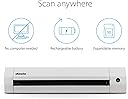
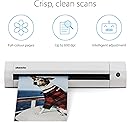
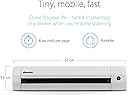
The Doxie Go SE is a sleek, portable document scanner designed for professionals on the move. It delivers high-quality 600 dpi full-color scans in just 8 seconds without needing a computer. Powered by a rechargeable battery, it can scan up to 400 pages per charge and store up to 8,000 pages on its included memory. With award-winning ABBYY OCR technology and seamless cloud integration, it transforms paper clutter into searchable, shareable digital files—perfect for home, office, or remote work.


| ASIN | B073H7V4DM |
| Best Sellers Rank | #101,403 in Office Products ( See Top 100 in Office Products ) #90 in Document Scanners |
| Brand | Doxie |
| Color Depth | 24 bits |
| Connection Type | USB |
| Connectivity Technology | USB |
| Customer Reviews | 4.5 out of 5 stars 1,475 Reviews |
| Item Dimensions D x W x H | 12.2"D x 2.25"W x 1.75"H |
| Item Type Name | Scanner |
| Item Weight | 1.2 pounds |
| Manufacturer | Doxie & Co. |
| Media Type | USB |
| Minimum System Requirements | macOS 10.10.5 or later, Windows 7 or later |
| Model Name | Go SE |
| Optical Sensor Technology | CCD |
| Product Dimensions | 12.2"D x 2.25"W x 1.75"H |
| Resolution | 600 |
| Scanner Type | Receipt |
| Standard Sheet Capacity | 400 |
| UPC | 662425080717 |
| Unit Count | 1 Count |
K**B
I love this thing
I was initially skeptical about buying a portable scanner for $178, but I've been trying to clean up the clutter in my life and paper is one of them. I also scan all my receipts from every purchase I make and keep track of my spending in a tracker so that I have a clearer understanding of where my money is going each month. I was originally scanning everything with my HP printer, but it was getting to be a real chore. I'd have to sit at my desk and put each paper through the scanner (which was LOUD and slow), then crop it, name it, and save it. It was mind-numbingly boring. I decided to take a chance and purchase the Doxie Go SE and I'm so happy I did! Now I can sit comfortably at my couch with Hulu or Netflix on and scan away. The scans go through the Doxie quickly and quietly and get sent to an SD card (like the ones we used to put inside digital cameras before smartphones took over), which is included in the package. Perhaps my favorite thing about the Doxie is that it auto-detects the size of what is being scanned. I'm able to go from scanning 8.5x11 papers to the small receipts from gas pumps to a standard sized receipt from Wegmans without having to crop ANY of it. It's one of those things you don't appreciate till you don't have to do it anymore! Then when I am done scanning, I pop the SD card out, put it in my laptop, and the Doxie software imports the scans. Another one of my favorite things about the Doxie software is that after each image is imported to your computer, it is automatically deleted from the SD card! So I don't have to worry about clearing the SD card myself or having the same files imported the next time I use the scanner. The Doxie software is pretty easy to use, although I'm pretty good with computers so I'm not able to speak to its ease of use for those who aren't as comfortable with PCs. I use the software to name all the files, crop them if I need to, rotate them if necessary, and "staple" pages together. I have noticed that when stapling a lot of pages together (such as the product manual for my expensive electronic toothbrush) the software can freeze sometimes, but it always unfreezes eventually. It's a very small hiccup in an otherwise incredible product. You can then choose to save files to your computer as a JPEG or PDF, or upload to a cloud storage service. I've been saving to my PC since I upload my receipts to my tracking software so I can't comment on the process of uploading to the cloud. Another great feature about the Doxie software is that when you save a scan to your computer, a green checkmark shows up on the scan so you know it has been saved and that you can delete it from the Doxie software. (Doing so just deletes it from Doxie, not from your computer.) This is nice so you avoid wasting time on trying to save scans that you've already saved to your PC but forgot about (helpful when I was scanning an entire month's receipts the other night). If you haven't already saved the scan, there's no checkmark and Doxie will warn you that it isn't scanned before you delete it. Charging time was quick. Doxie comes with a USB cable but no outlet adapter to plug it in to. You can charge it by plugging it into a USB port on your computer, or if you have owned a smartphone at any time, odds are you have a few outlet adapters lying around anyway. You can plug the USB cable into one of those and charge Doxie through a standard outlet. I would have liked to see the Doxie available in a few colors other than white. Most of my office accessories are black, and it would have been nice to have some fun color options like blue, purple, etc. I can't believe the longest and most passionate review I've ever written on Amazon is about a portable scanner. That should speak to A) how much I am type A and like organization, and B) how easy to use and high quality this scanner is. I'm so happy I bought this scanner and believe I will be using it for years to come. And when this one dies or becomes totally outdated, I'll keep buying Doxie scanners as long as the company is making them!
T**N
Scanner was a Godsend in a moments notice!
A few days before travelling out of state to attend my father's Military Salute service after he passed away, I realized that my stepmum would be offering many old family photos to my uncle and I. I am our family genealogist and realized I could not handle missing out on old family pictures! I needed a scanner quick and one that would be easy to pack. I did purchase a different brand, but the pictures came out skewed and the glossy picture I tested with came out too dark. I returned it and then found this one! The Doxie portable scanner was a Godsend! It is soooo easy to use. Having the pictures and documents save directly to an SD card made things so easy. I could easily pop the SD card out, put it in my computer and view everything I just scanned. Oh, and since I wanted to travel with it, I found there is a protective case for the scanner also on Amazon. I immediately ordered it and it arrived the day before my flight. I could easily put it in my carry-on. I saw there was software included in the package, along with an SD card and charging cable, but I was so busy with packing and testing the unit, I have not yet installed it to see what it can do for me. But, that said, the scanner has been perfect right out of the box! A month later I am still loving it. I wanted to come back to the scanner on Amazon to post a review because it is totally worth every penny I spent on it. This is definitely one purchase on Amazon I bought for me that I am thrilled with. My stepmum and uncle were very impressed with the quality of the pictures and documents. I was able to immediately email the pictures or documents to them. The pictures and documents scanned beautifully. Being able to do this, allowed me to be given original pictures and family documents, which I love! Anyway, this is my opinion of the product. Everyone has their own take on things. You will have to see for yourself. Thank you Doxie for helping me save memories of my Father and ancestors!!!!! Forever grateful!
A**.
One of the most useful scanners, ever. Great scans. Super-portable and easy to use!
This scanner is SOooooo useful! This is the second Doxie I've purchased, and there aren't words for how much time it saves me, especially as an artist and designer. The scans are clear and crisp, and the two resolution settings work with ease. The battery seems to last a very long time, and it's a breeze to move the USB card from the Doxie to my laptop, to work with the scans. Highly recommended!
G**L
I’m impressed!
It really took me so long to get this scanner when I could’ve bought it a while ago to scan some of my important documents and family pics that was taking up space. The scanner was pretty easy to use. You can connect it to your computer or just use it on its own. The only thing I have to complain about is that the scanned images come out a bit darker than the photos. Images are sharp, but just heavily contrasted.
A**J
photo scanning & linux use case
Quality control from Doxie needs some work. First scanner arrived DOA. And you'll see that appears to have happened to many other users, if you peruse reviews. Thankfully Amazon accepted the return and had a new unit out to me in under 24hrs, which is jaw-droppingly fast. Anyway here's the review for what I would ultimately call "a nice piece of kit." DISCLAIMER: My use case is scanning photos ONLY. Old photos from the 1960s - 2010's, including damaged photos and polaroids. I am not using this to scan documents. *hardware quality* - Minimal packaging, all parts included AND an sd-card (wow)! I wish it was a micro-sd card, but its not a show-stopper. Micro-usb cable runs from scanner to full usb-a computer-side input. Seriously, guys. It's 2021. This should be usb-c to usb-c, and give me a usb-a dongle and a wall wart, please. Scanner seems sturdy enough, and super-light. Power-On light is not built for the color-blind. At all. Pale red, to pale green, to pale amber. Ugh. ***three stars *ease of use & documentation* - the quick-start guide is awesome. Remove the stickers, slap in the sd-card, plug in the scanner, and start scanning! And it's really as easy as that. Photos are stored on the sd-card in jpeg format. So, you just turn the thing on and start feeding it photos. I scanned almost 100 photos in an hour with no trouble. Plugged the scanner into my linux laptop, and the sd-card mounted and popped up with all the photos. I copied them into my photo management app, and got ready for round 2. No issues with drivers, software, or any of the complaints that Windows users report on that front. *****five stars *stamina* - My only complaint here is that I wish I could feed photos FASTER, but I'm not sure if that's possible. It scanned every size, shape and thickness of photo with no squawking. Continuously. For an hour. Seriously that's awesome. I got tired before the scanner did. *****five stars *overall experience* - quibbles here and there, but this scanner is great for the price if you're planning to scan photos. As a bonus, it's dead easy to use with linux. Plug-in, copy photos. Not sure about any wifi features or anything like that. I can either plug the scanner into my laptop or plug the sd-card into my laptop. Not sure what wifi would even be used for. Overall experience is solid. ****four stars
M**R
Ready to work right out of the box.
My main goal for this thing is to digitize boxes of old photos that I've accumulated. I have two flatbed scanners, but they take too long. I have many hundreds of photos to deal with. I read the included quick setup guide, enabled the battery, and put the Doxie on a regular USB phone charger cable. It took about 2 hours to charge, then it was ready to rock. This thing comes with an 8GB SD card, and that the one I used. It's already formatted--just plug it into the Doxie. Everything you need to get started is in the box. You don't need to buy anything extra. But DO fully charge it first and DO read the quick setup card before you do anything. The instructions are brief & simple, but important. There's no software in the box. From the Doxie website I downloaded the Windows10 .exe file for it and it works fine on my ancient HP desktop computer. The software is a combination file importer / photo editor / organizer. It is simple to use and doesn't require any explanation. It is also optional. The Doxie saves everythng as a JPG image file so you really don't need any special software. If you scan in a document and wish to save it as a PDF file, the Doxie software will convert it for you. There are many ways to save a JPG as a PDF, so again--the Doxie software is optional. The software is for Windows10 or mac only. If you are a Linux user, it's not a problem. Just transfer the scanned JPG images from the Doxie SD card to your computer. I used a universal card reader with a USB-A plug on one end. LibreOffice Draw can convert a JPG into a PDF for you even quicker than the Doxie software. Photo quality seems on-par with my Kodak and HP all-in-one desktop scanners, only the scan rate is MUCH faster. At 600dpi resolution, a photo only takes about 3 seconds to scan. I have a fat box of old photos that's been gathering dust for years. I fed them all through the Doxie in about 10 minutes! So 50 pictures down, and a few hundred more to go. So far I'm very satisfied with the Doxie. I'm making really good progress on my photo rescue project. I have noticed when the Doxie needs cleaning, I start seeing a line or two vertically across the image. It's not a big problem though. There's a cleaning cloth included in the box. I scanned the same old 35mm photo on 3 different devices for comparison. The Kodak and HP scanners are flatbed types included with an all-in-one printer/scanner/copier. All images are un-retouched JPG using the default settings at 600 dots-per-inch. The scans are of comparable quality. The difference is the Doxie will fit in my glovebox, requires no computer or cable, and scans a photo in about 3 seconds. Fun, useful, and very portable gadget. I'm glad I bought it.
W**S
Wish I knew about this unit years ago!
I can pretty much echo what so many others have said about this scanner. It's lights out! I scan vintage matchbook covers - thousands of covers a week. I used to use a flat bed scanner. I'd have to put 10 on the glass at a time, then scan them. Easy. BUT, it'd then have to crop EACH MATCHBOOK COVER. Auto cropping was a crap shoot. Most of the time, it didn't work. The process took HOURS AND HOURS of time. I was searching a scanner that would actually get the job dome for me and cut my time down. I stumbled upon Doxie. Figured that it wouldn't work in my case because many of the pieces I"m dealing with are really fragile. But for south of $200, I figured I had to give it a shot. All I can say is WOW!! This unit has been just what I needed! NO DAMAGE at all! This means no more cropping. 2.5 seconds to scan each matchbook cover. Download to my computer. And with a second card that I picked up, I can continue to scan while the download completes. WHAHOO!! So far, I've scanned nearly 9,000 matchbook covers with it and it's still going strong. I wipe the scanning device off with the provided cloth ever hour or so and the images continue to come out fantastic. The only issue I've had with it is when I scan something yellow, the auto crop feature goes nuts. But, as the incredible customer support folks told me, all I need to do in that situation is to use one of the provided sleeves. They actually sent me more gratis! Their support is second to none. Two days after delivery, they sent me an email asking how I like the unit and if there was one feature I could add, to let them know. I figured it was a form letter than one one ever looked at. Nay, nay! 30 minutes after completing it, they replied and told me the feature I would like to see added was already included. Top flight folks running that department. Not sure how many scans I'll be able to get out of this unit, but I know this. As long as I am scanning matchbook covers, I'll be buying Doxie equipment. I couldn't be happier.
M**Y
Must have scanner
Works perfectly! I had hundreds of photos, art work, cards from my kids school years and the scanner scanned all of them w/o any issues. Highly recommend n customer service is awesome! A must have if you have bins and bins of photos etc sitting around.
R**N
Lovely little scanner
I bought this scanner to scan documents to the cloud and my mac and it hasn't disappointed. I don't have an office but its compact enough to keep in a drawer until needed. It rapidly boots, scans quickly and gives good quality images. You can use it as a standalone item, saving scans to the SD card, or connect directly to your computer. The Doxie software is simple but effective and intuitive. From here you can save to your computer or upload directly to your cloud account. You can scan at lower and higher definition. I've been using it a month now on the high definition scan setting, to scan well over 100 pages, and haven't had to recharge it yet. Overall I'm very pleased with my purchase. I looked at a number of scanners but I'm glad I chose the Doxie.
D**E
Great Product - Better Customer Service !
Update : it's August 2023 and went to use the Doxie again. I bought it originally in 2019 and last used it maybe 6 months ago. I tired a few days ago and the battery would not charge. I tired several other mini usb cables no luck. Was going to buy a battery but it was out of stock. I emailed customer service (maybe they had a tick) - they said they would ship me a new battery (no charge) and they replied within hours. Then another email from support saying they cannot ship just a battery so they would send me a new unit ! It arrived a few days ago and it works as great as it did the first time. Even sent me a shipping labels for a no cost return. Now that is above and beyond customer service. We have scanned several thousands photos so far and I love the 600 dpi setting. I use the jpg's for electronic slide shows so resolution is important. I love the fact that it is portable and will scan to a SD card. Simple to use and it will scan up to a 8x10 photo. I can lend it out to others for pictures I need for a slide show for me or others. I have only used it for photo's so far and it works as expected. Very fast at 300dpi a little slower at 600 but a much better jpg file . Sometimes pictures don't go in straight , that is use error. The more time you spend doing scans the better you become and a level insert. Only dislike to toggle the power switch the light goes from green to red. As a color challenged male it's difficult for me to confirm the slight change. I dedicated switch would be great. Battery seems to last quite a while, used it for a few hours in a one setting and it lasted. A little bit more than I wanted to spend but now I am glad I did.
B**6
Excellent petit scanner facile à emporter partout
Il scanne silencieusement, rapidement et la résolution est de très bonne qualité. Le mode haute résolution est très bien pour les photos papier que l'on veut numériser pour sauvegarde ou/et correction. Le résultat est très bon. L'application qui gère le scanner est très simple à utiliser et offre de multiples choix de format en sortie (jpg, png, pdf, etc.). Le support en ligne du produit est très pratique, on y trouve toutes les informations sur le scanner. Ayant eu l'occasion de l'utiliser, je peux dire que le SAV est sérieux et très réactif. Ce petit scanner qui ne prend pas de place et est très léger peut être emporté partout. Je suis totalement satisfaite de ce produit que je peux recommander sans hésiter.
H**Y
Warranty Denied
This product was supplied with a dud battery so could not function..On contact with Doxie they denied warranty and refused to replace the battery. I managed to obtain a replacement battery from an another battery supplier at addition cost to get the scanner operating..Appears that Doxie chooses to ignore consumer rights so please be aware if considering their products.
I**Y
Ich bin sehr zufrieden mit dem neuen Design...
...der 2. Generation des Doxie. Der Papiereinzug und die Handhabung mit den Blättern wurde stark verbessert, auch etwas gewelltes Papier kann man nun gut einführen. Weiterhin gefällt mir sehr gut, dass man nun auch bei am Mac angeschlossenem Doxie scannen kann. Die bekannte Doxie Software und die OCR Funktion sind ein Traum zum bearbeiten und exportieren der Scans - ich hatte noch nie so eine einfache und intuitive Software... Auch habe ich noch nie so einen herausragenden Kundenservice erlebt wie hier - man wird per Mail angeschrieben und gefragt, ob alles in Ordnung sei und wie die Erfahrungen mit dem Scanner sind, aber ohne dass der Kundenservice aufdringlich wirkt. Man hat als Kunde hier das Gefühl, dass man gehört wird, wenn es mal Probleme gibt und Verbesserungsvorschläge fließen in die Entwicklung mit ein. Bei der ersten Generation, kam es ab und an vor, dass der Scanner Seiten verschluckt (nicht gescannt) hat, wenn man schnell nacheinander mehrseitige Dokumente gescannt hat. Das war ärgerlich, da es keine Vorschau gibt und man das erst beim Einlesen der Scans in die Doxie Software gemerkt hat. Als ich das dem Service mitgeteilt habe, bot dieser mir sofort von sich aus an, den Scanner kostenlos umzutauschen und man hat mir sogar als Entschädigung ein Transport-Etui zum Tauschgerät dazu gegeben. Dieses Problem wurde hier bei der 2. Generation vollständig gelöst, denn mit Doxie Go SE hatte ich nie wieder verschluckte Seiten, die nicht gescannt wurden...
Trustpilot
4 days ago
1 month ago