Desertcart purchases this item on your behalf and handles shipping, customs, and support to Ecuador.
๐ฏ Master your multi-computer setup with one sleek switch!
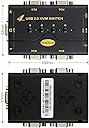
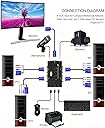
The JideTech 2 Port USB 2.0 VGA KVM Switch is a compact, plug-and-play device that lets professionals seamlessly control two computers using a single keyboard, mouse, and VGA monitor. Supporting high-definition resolutions up to 2048x1536 and integrated audio/mic switching, it enhances productivity while reducing desktop clutter. Compatible with a wide range of operating systems, itโs the perfect tool for multitasking managers seeking streamlined efficiency.


| ASIN | B06ZYL4QYS |
| Actuator Type | Push Button |
| Best Sellers Rank | #630 in KVM Switches |
| Brand | JideTech |
| Brand Name | JideTech |
| Circuit Type | 2-way |
| Color | 21UA |
| Compatible Devices | Computers with VGA ports and compatible operating systems |
| Connectivity Protocol | Usb |
| Connector Type | Usb 2.0 |
| Contact Material | Metal |
| Contact Type | Normally Open |
| Control Method | Push Button |
| Control Type | Manual Push Button |
| Current Rating | 0.98 A |
| Customer Reviews | 4.4 out of 5 stars 419 Reviews |
| International Protection Rating | IP67 |
| Item Dimensions | 1.96 x 3.15 x 3.15 inches |
| Item Weight | 9.6 ounces |
| Manufacturer | JideTech |
| Material Type | Polycarbonate |
| Model | 1 |
| Mounting Type | Plug-In Mount |
| Number of Items | 1 |
| Number of Positions | 2 |
| Operating Voltage | 5 volts |
| Operation Mode | Manual |
| Part Number | JD-21UA |
| Switch Type | Push Button |
| Terminal | Solder |
| UPC | 716045183232 |
| Unit Count | 1 Count |
N**E
works pefect, easy set up, great price
Plug and play says it all. Hook up was so easy I thought I must have done something wrong...as is the case with so many tech gadgets...not this one. One of my 2 monitors fizzled and I was shopping for a new one when I found this gem. Quality built with very good cables included. I am able to use 1 monitor, 1 keyboard, 1 mouse and 1 printer for 2 different towers at the flick of a switch (push button). I've eliminated a computer stand from my office and I'm using my "better" monitor for both computers as well. Very happy with my purchase...buy with confidence...
M**E
USB drops out constantly (Updated)
Update... Even though I bought the switch almost a year ago "JideTech" saw my 2 star review and sent out a replacement device. I installed it on the same two computers and have not had the issue mentioned in the review. It is fully functional at this point. The only thing I would have issue with is the aesthetic nature of the installation in order for the switch button to be reached easily the switch and all of the cables need to be in plain sight. A remote switch option or key combination switch scheme would make it a more aesthetic product. Old review below........................ I bought this less than a year ago and used it for a short period on two computers my wife had, and it seemed OK but she didn't need to switch much and wasn't accustomed to using KVM switches. I ended up reducing her rig to one computer. Several months later I thought I'd try it with two computers at my desk. Within the first day of use, the USB connection started dropping out every few minutes and rediscovering immediately, but that hesitation leaves a couple of seconds of non functionality (meaning keyboard and mouse are gone). This made it impossible to perform the sort of work I do. Maybe I just got a bad one but it was too late to return it. Otherwise it has the features one would want in a budget KVM switch.
P**Y
Excellent KVM for the money
I have owned this for over 2 months now, and have not had any issues with it at all. Screen resolution is great, switching is easy and no issues at all. Some units tend to get stuck in between switching from 1 to 2. This one does not miss at all. When I want computer 1, I get it. When I want computer 2. I get it. FAST! Will buy this KVM if my older units go out for my other machines. Update, I dropped a star due to an issue which started on machine two. When both of my computers are on and I need to switch from one to the other, I get USB Device Not Recognized" error message continuously. After removing the USB cable then attaching it to a cell phone charger for power, the error message stopped. I think the hub built into the KVM is the issue here. My controls work, but the error flag gets to be too much. Return window closed, so I am pretty well stuck with it.
S**I
Good Value for money - Great Customer support
The product works great for the set-up I have at home. It's pretty basic but does the job quite well. I searched for a lot of devices before purchasing this, some were quite expensive. This one fits my particular requirements and I am glad I got it. One more thing, this doesn't need any external power supply adaptor. It leverages the PC connection to power itself - this was also something I liked. Customer service is Great. After purchasing it, I ran into an issue that one of my showed blurred image while using this KVM but didn't otherwise. The customer service rep "Amy" from the company (used the Gmail address provided at the back of the product brochure) - patiently helped me out with asking questions and trying to figure out the problem and offered to replace the device should that have been the problem. Eventually, through series of back and forth realized, it may have been something to do with my own GPU card which rendered the screen blurred. So all in all, patiently the customer service helped and it was great.
L**N
Works as advertised
I am a type that I research all my purchases in depth and read all feedback good and bad before pulling the trigger. I looked at almost all the KVM switches listed on Amazon and Ebay, this one sounded very interesting, and the price was a bonus. I am always willing to spend the money for performance and quality. It arrived, hooked up and works like a charm. I do not have any of the problems/difficulties some people have listed. I am working from home like most people, it is just so marvelous to change the display from my Business laptop to my personal desk top on a push of a button and being able to use both without constantly changing monitor cables to use my large screen. I should have done this 4 months ago. In addition being able to use the one key board and the mouse for both PC's is added bonus. I highly recommend this product
J**.
Devise worked great first time with no adjustments needed.
The device worked great the first time. The device allowed to independent computers to work off of the same monitor, keyboard, mouse and printer. The monitor picture was perfect off of both computers with no adjustment, which was not the case with a previous device I purchased. I should have paid attention when Amazon said there were a lot of returns with the previous device, despite the good reviews they were showing
M**Y
Not great
This switch causes my keyboard to do funky things. It makes it *almost* impossible to type things. It takes about 10 times longer to type on it. It will either skip letters or repeat letters 10 or 20 times, then when you backspace it will likely erase more than you want and then you have to type it again. It took me about 15 minutes to type this short paragraph because I have to type VERY slowly then backspace the repeated letters again and again. I will be returning it soon.
M**N
Sweet!
Works with Linux Ubuntu, old Mac Mini (El Capitan) and Windows 10 on a Dell desktop, all at once if you have the 4 port version, which I don't, d'oh, more on that later. Plug and play. I didn't even open the excellent little user manual until I ran into a glitch with Linux only partially displaying on my monitor. Documentation said to try key combo Windows-P and that worked! Wowwie! Oh, and it also said turn everything off while making the physical connections, which I did not do, my bad, but it worked anyway. Now I wish I bought the 4 port model instead of the 2-port, because I still have to physically swap between my Linux and Mac Mini, but it's easy to swap at the KVM instead of moving all three plugs for each peripheral. I only use my old Mini as network storage anyway, so I didn't think about adding it to a kvm switch until I saw how easy it would be. And I haven't tried playing Path of Exile on the Dell yet, so I can't say if there's a video slow-down or not. Nothing noticeable for other use cases. Pros: Easy to hook up, nice user manual, smooth swapping with the button on the kvm, works with multiple OS's. Con: Some static in the audio, not sure what's up with that.
Trustpilot
2 weeks ago
1 week ago