🚀 Drive Smarter, Not Harder!
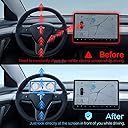
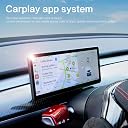
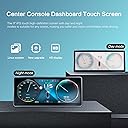
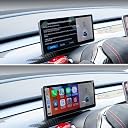
The HANSSHOW Tesla Head Up Display is a cutting-edge accessory designed for Tesla Model 3 and Y, featuring a 9-inch IPS touch screen that supports both wired and wireless Carplay and Android Auto. With multiple connectivity options and a user-friendly interface, it enhances your driving experience by providing essential information and smart control capabilities, all backed by a 365-day warranty.
| Asin | B09WR18JLS |
| Brand | HANSSHOW |
| Built In Media | Bluetooth |
| Color | Grey |
| Compatible Devices | Mobile Phone |
| Connectivity Technology | Bluetooth, USB, Wi-Fi |
| Connector Type | USB |
| Controller Type | Android |
| Customer Reviews | 3.9 3.9 out of 5 stars (49) 3.9 out of 5 stars |
| Manufacturer | Hansshow |
| Mfr Part Number | HANSSHOW-ca |
| Model Number | HUD Screen-9" |
| Number Of Channels | 9 |
| Number Of Items | 1 |
| Other Special Features Of The Product | Android Auto, Apple CarPlay, Built-In Bluetooth, Built-In Wi-Fi, Touchscreen |
| Software Update Supported To Date | unknown |
| Wireless Technology | Wi-Fi |
User
Love this display and the extra options now. I will never go back to just one display and option.
Very easy installation besides connecting the one adapter in the passenger foot well(Intel). I tried a few different ways from being upside down and trying to grab it with my left and right, using two iPhone spudgers, the only way that worked was for me to move the passenger seat all the way back, sit in front of the seat, reach blindly with my left hand, push the tab, and pull hard to get it out. After that it was very smooth. I wrapped my connections under the dash in electric tape to make sure they aren’t making any noise. I’ve been using it for over two weeks now and love it, I have Waze and all my information right in front of me. Everything from the Apple car play, sound to the instrument panel are perfectly synced. My only complaint is the speedometer for mph looks a little lazy/sloppy since the max speed says 260. Looks good for kmh but looks stupid when in mph mode. I also thought the default brightness for day and night was too bright, but not a problem anymore after figuring out how to switch the brightness to manual and setting it to my liking. You can also turn the brightness all the way down which will shut off the display completely to if you don’t want it on or want to save power, not that it uses much anyway, you might save 1-5 miles turning it off. I’ve did a few trips and haven’t noticed a difference in range. Was also charging cells phones too and the battery telling me how many miles I had left was still spot on. I noticed a lot of people complain and say it blocks the vents. It doesn’t block the vents at all. It does affect the flow of air though. You can’t get the air to blow directly into your face is the only problem. If you like that you probably wouldn’t want this. I can still feel the air fine, and that isn’t a problem for me. I can still even feel it on my face and body when I split my air and point it up. So unless you want the air blowing directly into your face, don’t listen to the people saying it blocks the vents. I still haven’t even had to switch my fan speed. For me I like 4-5 and that’s still the way it is. I wanted one when they were $800, but thought that was too much, and now I’m happy with this at $400. Only thing I needed help with after install was the brightness, and asked for help with the brightness and got help fast. Couldn’t believe I didn’t see that I could just switch the brightness to manual in the settings. I also love how I can easily control everything with the buttons on the steering wheel. Music, phone, messages, goggle maps, all the car play apps, and Waze I can even report stuff, all using the buttons on the wheel and not having to touch the screen at all! Really great and smooth, I’ve read in the past about Hansshow coming out with new displays and people updating or even have to replace their pcb boards to stay up to date with the new technology. Which is great if this becomes outdated and that will be a quick and easy fix. So I’m not worried about this display becoming obsolete anytime soon. I’m very happy with it and now will probably always have to install one in my Tesla if I get a new one. Unless I can afford an S or X in the future, and don’t have too install a display in front of me. I also like the look of this more than the S or X, yeah they look more OEM, but this looks more modern and I wouldn’t be surprised if the new S and X dashes look like this display in the future. Since my only complaint is the speedometer which could easily be fixed with an update, I give this display 5-Stars!
User
New Wiring Harness and Phone Interface Setup
To start off, I did a ton of research on this product for installation and found that the current YouTube videos must be of older versions of both the Hansshow wiring harness and the Tesla. I have the new Model Y with the AMD computer. Hansshow seems to have fixed the additional power requirement of going into the frunk. Their cable now taps directly off the aux power (blue plug) and accessory jack (white plug) right in the passenger foot-well. This made it exponentially easier to install than the original videos. You technically dont have to remove the underside glovebox panel to access the car plugs but I did so I could pull back the carpet to make it easier to access the plugs. One downside I found was that the Hansshow white female plug had these guide tabs that blocked the tesla male plug. I had to shave down the Tesla plug tabs to get it to insert. Not a big deal but that slowed the install quite a bit. Once installed, I closed everything back up and it turned on just fine.Now for the review of the unit itself.Very sturdy but does block the vents quite a bit even with the newer slim model. Not a huge deal, just turn up the air a bit more. Wireless Android Auto (AA) and Wireless Apple Carplay work well but it is very clunky to get them to pair the first time. There is a setting in the menu that you have to choose AA or Carplay before it will connect. It wont just auto connect to both. That one threw me off since the main screen doesnt mention that you have to select which one you want. If you change it, the screen will reboot. You then have to connect to Bluetooth first and it will reconfigure the phone to pair to WiFi after.Carplay seems to work much better than AA when it comes to audio. I cant get the Hansshow unit to pair with the car to pass the audio natively but with Carplay, you can just pause the music and have the car play it no problem. AA cant seem to audio bypass the Hansshow unit. It always seems to redirect to the awful speaker in the screen. This is probably the worst design aspect of this unit. There is no reason there needs to be that speaker on the screen. You cant volume control it and it is so loud and blaring that I will probably just cut the speaker wire as it auto-plays the last thing and startles me every time. I want the car's audio to be the main output or everything. If this would get fixed, it would be a five star product for sure. I am hoping with a future software update, this audio problem will get fixed to allow for all routing to the Tesla.
User
Outstanding product! Painful installation (2022 AMD)
Firstly, the product is excellent! After the frustrating installation experience, I was stunned at how well it worked in practice.PROS:- Screen quality is equally as good as Tesla's main display. The bezels look similar and so does the overall finish on the outside. Looks OEM.- Responsive touch screen and start-up time.- Display mirrors exactly what's on the main display without errors or lag.- Carplay works well with no bugs.- Screen sizing and positioning is perfect.CONS:- Installation was a giant pain in the ass. The included instructions are useless. More on this below.- Carplay start-up time is a little slower than I'd hope for (between 5-10 seconds). I will end up having to wait for it to load in 25% of my rides.- Air vents directly blowing into your face are partially blocked.Installation experience:I have the new Model 3 (2022) with the AMD chip. Tesla moved around wiring in this refresh and the installation process got significantly harder.I could not find any videos online doing the install for my version of the car. I reached out to customer support and they kept sending my video links to the Intel version of the car. There are plenty of videos for that and the installation is significantly easier. There was definitely some language barrier getting in the way. But it was clear that they did not test the install on a car like mine.The tricky part of the AMD install is that you have to connect the display directly to the 12V battery in the frunk. This means taking apart some of the trim from the frunk, popping open a rubber grommet in between the frunk area and passenger side seat and feeding the power cables through that hole. To feed the power cables through that hole, you will definitely need some electrical tape and a fishing wire (I bought both on Amazon). The required tools for the install were not included. I went back and forth for 1-2 hours with their WhatsApp customer support to resolve these issues.
User
Failure to communicate, no airflow, no firmware updates, AWOL customer support.
I thought hard and long about this accessory, had watched all the install videos and decided to go ahead with this as I really wanted CarPlay for my Apple iPhone. The install is extremely hard with having to be a John Hopkins surgeon to remove and install the 3 way harness into the main computer. Well, I did that after 30 minutes and many cuts on my hand, and all went well. However, the cons to this device are many, so beware; 1) Air flow to driver is gone, but cabin temperature appears to be unaffected as long as you decrease the A/C setting 2-3 degrees to offset the fact you get no direct air flow; 2) routing of your phone calls is random and general goes to the Hansshow device even with the accessibility settings set as they recommend; and 3) NO COMMUNICATIONS or FIRMWARE provided from Hansshow customer support joke on "Whatsapp" app, which is all they say they support. If you purchase this accessory, no that you will ultimately have to live with the way it is on shipment. I would avoid for now until they fix/reroute airflow using some sort of baffle diverter and update firmware so device does not intercept phone calls. Ugh!
User
Works great, looks OEM with minor issues
Overall - this is a great product. The build and quality is excellent, looks almost OEM, as if it had come with the vehicle itself from Tesla. The screen is bright and has great resolution.Is it worth $400? That depends on how much you want CarPlay or a second display - for me, it was totally worth it.There are a couple of minor quibbles - I used to have my Model Y unlocked when parked at home. For some reason this kept my phone connected in CarPlay mode even while I was inside my home. Very annoying. Ultimately I solved it by turning off the 'leave unlocked when parked at home' setting on my Tesla.Second, while on the highway, if you engage cruise control, you lose the ability to control the scree with the right scroll wheel. It's a pain and a little dangerous to have to reach through the steering wheel at 75mph. Perhaps Hansshow should come up with a small steering mounted remote control that provide always-on control of the display.Lastly - there are a ton of installation videos and everyone will tell you that the hardest part is getting the connector under the passenger side dash out. It is tough, I had to lay upside down and use both hands to get it out - and cut a deep gash on my right thumb on some sharp edge while doing so... so be careful.However, the toughest part for me was getting the dash panel to snap perfectly back into place. It seems to fall back into place easily, but all the latches do not engage because the cable that stretches from the display to the passenger side has a couple of bulgy parts and the dash panel does not have enough clearance to allow for that. After multiple trial and error attempts, I finally figured out the correct routing to use. I'm attaching the pictures of how I routed the cable. (I used sticky tape to hold the cable in the right position before snapping the panel back into place for a perfect closure.
Trustpilot
2 weeks ago
2 weeks ago