Buy anything from 5,000+ international stores. One checkout price. No surprise fees. Join 2M+ shoppers on Desertcart.
Desertcart purchases this item on your behalf and handles shipping, customs, and support to Ecuador.
⚡ Elevate your workspace with speed, power, and stunning visuals — don’t get left behind!
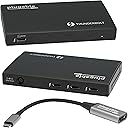
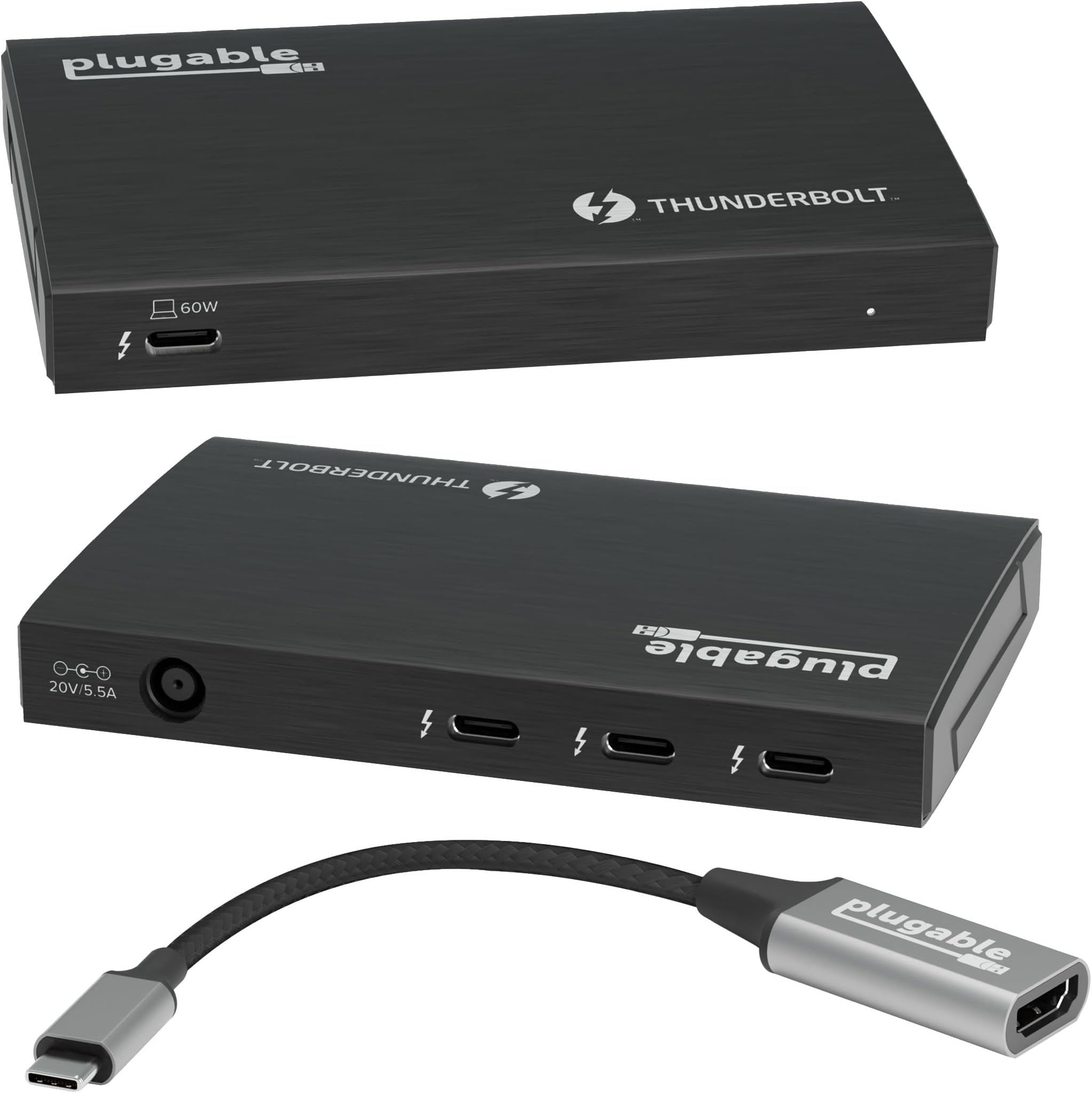
The Plugable Thunderbolt 4 Hub is a premium USB-C hub featuring 3 Thunderbolt 4 ports with 40Gbps data transfer, 60W laptop charging, and support for dual 4K or single 8K displays. Built on Intel’s Goshen Ridge chipset, it ensures certified reliability and broad compatibility with Windows and macOS Thunderbolt 4/USB4 systems. Ideal for professionals seeking to expand connectivity, enhance productivity, and future-proof their setup with daisy-chaining and high-res video output.


| ASIN | B09DTFQMXC |
| Best Sellers Rank | #719 in USB Hubs |
| Brand | Plugable |
| Color | Black |
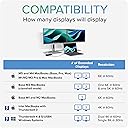
| Compatible Devices | Windows 11 Thunderbolt 4 hosts and Thunderbolt 4 Macs with macOS 11+ including, M5 / M4 MacBook Pro and MacBook Air, M1 Pro/Max, M2 Pro/Max, M3 Pro/Max, or base M3 (with clamshell mode required for dual displays), HP Omnibook / EliteBook / DragonFly / ProBook / Spectre x360 series, Dell Pro Max / Plus / XPS / Latitude / Inspiron, Lenovo ThinkPad / IdeaPad / Yoga , Framework (Intel Processors), Microsoft Surface Pro 11 & 10 for Business, Surface Pro 9,8 / Surface Laptop Studio / Surface Laptop 6 / 5, Acer Swift, Predator, Aspire Vero, ASUS ZenBook, ExpertBook, ROG Zephyrus, ProArt Compatible Devices Windows 11 Thunderbolt 4 hosts and Thunderbolt 4 Macs with macOS 11+ including, M5 / M4 MacBook Pro and MacBook Air, M1 Pro/Max, M2 Pro/Max, M3 Pro/Max, or base M3 (with clamshell mode required for dual displays), HP Omnibook / EliteBook / DragonFly / ProBook / Spectre x360 series, Dell Pro Max / Plus / XPS / Latitude / Inspiron, Lenovo ThinkPad / IdeaPad / Yoga , Framework (Intel Processors), Microsoft Surface Pro 11 & 10 for Business, Surface Pro 9,8 / Surface Laptop Studio / Surface Laptop 6 / 5, Acer Swift, Predator, Aspire Vero, ASUS ZenBook, ExpertBook, ROG Zephyrus, ProArt See more |
| Customer Reviews | 4.2 out of 5 stars 300 Reviews |
| Hardware Interface | Thunderbolt |
| Item Dimensions L x W x H | 4.7"L x 2.9"W x 0.7"H |
| Item Weight | 2.2 Pounds |
| Manufacturer | Plugable |
| Number of Ports | 4 |
| Product Dimensions | 4.7"L x 2.9"W x 0.7"H |
| Total USB Ports | 4 |
| Total Usb Ports | 4 |
| UPC | 819927012498 |
| Unit Count | 1.0 Count |
| Warranty Description | 2 Year Limited Parts and Labor |
| Wattage | 60 watts |
B**P
Spectacular USB hub for my IPad Pro!!
This upgrade hub gives my iPad Pro 11” gen 3 instant access to top performance from my peripherals. For the last 3 years I’ve been using an Anker hub with the short host cable built in. With this new hub the detachable high speed host cable gives me flexibility of where I can put things on my desk. The Anker, which has too short a cable to lay flat on the desk when my iPad is sitting upright, worried me that it was putting unnecessary weight stress on the USB input to my iPad. Not a problem now! The HDMI adapter is top quality and heavily built. I’m getting a better data stream out of the ipad now and the results were immediately obvious. The sharpness of picture is better defined, and the colors just better. I’m hearing an extra layer of audio resolution from my Schiit Multibit2 DAC. It runs a bit warm to the touch, but not hot. I’m also pleased I no longer need to worry about an external power source. One less headache. This small USB hub is dynamite! It does it’s job perfectly with all the speed and instant compatibility I was hoping for. . I was glad to find this usb hub here, it’s exactly the upgrade I wanted but couldn’t find before. I think Plugable is a top notch company and I will definitely buy their products again.
P**S
The two monitor solution for your MacBook Air!
I love my 2025 MacBook Air. It has just one problem. It only has two USB-C connections. So how do you support multiple monitors and still have the ability to plug in anything else? That’s where this comes in quite handy. It easily supports two thunderbolt displays using USB-C at reasonably high refresh rates. And it frees up your other USB-C port for a hub or any other peripheral you want to connect. This has been a really good solution to addressing the one failing of the MacBook Air. Nd the build quality is top rate!
M**N
Works with Apple Thunderbolt Display and M1 Macbook Air
This is a nifty little dock, but I'm probably using it a bit differently than intended. I achieved my goal of connecting my M1 Macbook Air to my older Apple Thunderbolt display using ONE CABLE that both charges my laptop and outputs to the external display. I love how clean the setup is. Basically its connected like this: M1 Macbook AIr --> Thunderbolt 4 cable --> Pluggable Thunderbolt Dock --> Apple Thunderbolt 3 (USB-C) to Thunderbolt 2 Adapter --> Apple Thunderbolt Display. With some cable management and zip ties, the desk looks super clean, and now I have a single cable going to my laptop that activates the external display (and everything connected to it) and also charges the laptop. Great product and much more affordable than other options out there.
R**G
Docking unit is very good -- company's customer service is great
I really like this device, though it seems to run very warm. I wanted several high speed USB-C ports for connecting legacy external drives I still use every day and this does that. They even provide an HDMI dongle, which I also use for an external monitor. The charging capacity is adequate for my needs -- a Macbook Pro m4. This unit allows me to open my Macbook at home and plug in one cord to have power, drives, and external monitor connected. Very convenient. Bought one in July, 2025 and it failed in Jan, 2026. When I emailed the company, Plugable, they were very responsive and offered immediately to replace the unit. Which they did without question. I'm very impressed with this company and their customer service and I'm likely to buy from them again. Can't beat their customer service. One star off for unit failure. I still use it every day.
F**T
Works great.
Using with a MacBook Pro. I was able to tether a single Thunderbolt cable from my laptop to the hub, and then connect an external monitor (using a Thunderbolt to DisplayPort cable) and an SSD. Be careful to follow the connection instructions. When I first unboxed the hub I connected the cables incorrectly, which allowed the SSD to be recognized but my external monitor didn't work. I was disappointed, thinking the hub didn't work as advertised, but after some troubleshooting I realized the problem was on my end, and once the cables were changed around everything worked great.
S**E
Functional with a design that makes zero sense,
As far as function this works absolutely fine. What came with the bundle is basically useless. That's one reason for 1 star was removed. The reason for the second one being gone is the design. All access to the ports are on the front, but that is also where the power cable needs plugged into. The port that you connect the cable from your computer to the dock is in the back with nothing else there. I don't understand why and see no reason power input could not have also been placed on the back. There was a time in my life that I ran a printed circuit board shop, so I'm not really a lightweight when it comes to that type of design and I can see some hurdles that with more thought could have been easily overcome. I have a decent cable management system if that were so this could have been so much better that I could have easily overlooked the inefficiencies of what else is included in the bundle. The only reason I initially chose this over others was because I have other products made by this company that I have and consider very useful, well designed and built. I had a fairly rushed need for this and if I could have got something else at the time, this would have been returned. Like I said, it works absolutely fine, but is the only thing that is in my way of a having easy access and a much more neat desk.
J**E
Fantastic Thunderbolt 4 hub, works great with 2 displays and another hub
I wanted a fast Thunderbolt 4 hub that allowed for two USB-C displays and other USB-A/C ports. But I didn't want to spend over $100 for one. Most of the Thunderbolt 4 hubs are indeed much more than this one. Since I had other hubs already that I really didn't need Thunderbolt 4 on for additional USB-A ports, I decided to get this Plugable hub and plug my two mini monitors into it and one of my other USB 3.2 hubs into the remaining USB-C port. Everything works flawlessly, and I didn't have to break the bank. This is a well-made aluminum hub with its own power supply. It solved my problems well.
T**R
This is the true solution for Mac dock sleep issues!
If you are like me, you have been battling Apple's maddening issues with wake-from-sleep problems when using a Macbook Pro in clamshell mode, connected to an external monitor through a Thunderbolt 3 or 4 dock. These issues have been widespread since the Intel models and sadly, Apple Silicone did not bring a solution. I have tried more than 10 Thunderbolt and USB 4 docks from Caldigit, Targus, WAVLINK, NewQ and more and all have the same ultimate issue - when the computer goes to sleep in certain situations, you cannot wake the external display without unplugging and re-plugging the Thunderbolt cable. Through maddening trial and error, I eventually came to the compromise solution of a two-cable solution - everything connected to the dock except the external display, which i connected via a USB-C to HDMI cable into a second port on my computer. Apple sucks for taking away the ports on 2020 era laptops without a viable one port solution for professionals who primarily use their device in clamshell mode, and it always bugged me that my $3000 computer couldn't do something so basic. Enter this Plugable hub - given the pure USB 4 design and my previous success using docks + external monitor via direct connection, I figured what the hell. Sure enough, this is the solution. I can now wake my external monitor reliably using the keyboard connected to my TB3 dock, which I've connected as a downstream device to the Plugable hub, with the USB-C to HDMI cable is connected to the Plugable hub as well. Paired with a magnetic USB 4 adapter on the computer side, I finally have a hot-swap capable, single cable solution and all it took was years and hundreds of dollars. Thanks Plugable!
Trustpilot
5 days ago
2 months ago