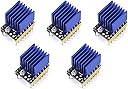
Teyleten Robot TMC2209 V2.0 Stepper Motor Driver StepStick 2.5A UART Ultra Silent for Nano SKR V1.3/1.4 Ender 3 Control Board 3D Printer Parts Replace A4988 5pcs
Product ID: 359797194
Details
- BrandTeyleten Robot
- MaterialMetal
- Model Nametmc2209
- Speed50000 rpm
- Voltage5.5 volts
⚡2.5A max current for powerful torque
🤫Ultra silent operation with TMC2209 chip
❄️Large heat sink ensures optimal cooling
$74.41
1
Sold byAmazon EcuadorDelivered byDesertcartCustomer service byDesertcartReturns14 days · 30 with PRO
Buyer Protection · Full refund if your order doesn't arrive as described.
Desertcart purchases this item on your behalf and handles shipping, customs, and support to Ecuador.
Secure transaction
Details
- BrandTeyleten Robot
- MaterialMetal
- Model Nametmc2209
Description
🤖 Silent power for next-level 3D printing mastery
- COOL UNDER PRESSURE - Equipped with a large heat sink for superior heat dissipation, keeping your stepper drivers running reliably during marathon print sessions.
- POWER MEETS EFFICIENCY - Delivers up to 2.5A current with a wide 5.5V-28V input range, ensuring smooth, high-torque motor control for demanding 3D prints.
- WHISPER QUIET PRECISION - Experience ultra silent printing with the latest German TMC2209-TA chip, eliminating distracting noise for a focused workspace.
- PLUG PLAY UART CONTROL - Easily configure via UART with jumper cap—no soldering needed—compatible with Nano SKR V1.3/1.4 and Ender 3 boards for seamless upgrades.
- SENSORLESS FEEDBACK READY - Supports advanced sensorless homing for smarter, more precise motor positioning, future-proofing your 3D printer setup.
The Teyleten Robot TMC2209 V2.0 Stepper Motor Driver StepStick is a high-performance 3D printer accessory featuring the original German TMC2209-TA chip for ultra silent operation. It supports up to 2.5A current with a broad 5.5V-28V input voltage range and includes a large heat sink for effective cooling. Compatible with popular control boards like Nano SKR V1.3/1.4 and Ender 3, it offers easy UART configuration and sensorless feedback functionality, making it an essential upgrade for professional-grade 3D printing.
Specifications
| ASIN | B09BK57KNY |
| Best Sellers Rank | #43,626 in Industrial & Scientific ( See Top 100 in Industrial & Scientific ) #662 in 3D Printer Accessories |
| Brand Name | Teyleten Robot |
| Customer Reviews | 4.3 4.3 out of 5 stars (107) |
| Item Weight | 0.03 kg |
| Manufacturer | Teyleten Robot |
| Material Type | Metal |
| Model | G78-1 |
| Model Name | tmc2209 |
| Number of Items | 5 |
| Part Number | G78-1 |
| Speed | 50000 rpm |
| UPC | 755454774471 |
| Voltage | 5.5 volts |
Common Questions
Yes, all products are sourced directly from authorized retailers in the US, UK, UAE and India. We maintain strict quality control processes and verify each product before shipping. All items come with applicable manufacturer warranties and are covered by our standard return policy.
Delivery times vary by destination country, typically ranging from 3-9 business days. Each order is fully trackable through our system. We handle all customs clearance and use reliable courier partners for last-mile delivery. You'll receive regular updates about your order status via email and our app.
Desertcart is an international e-commerce platform operating since 2014. We securely process thousands of orders globally each day. Every product goes through our quality verification process before delivery, and we provide end-to-end order tracking, 24/7 customer support, and a comprehensive returns policy to ensure a safe shopping experience.
Our prices include the product cost, international shipping, import duties, customs clearance, and local delivery charges. We handle all customs and import procedures, ensuring there are no hidden fees upon delivery. PRO members receive additional benefits including free shipping.
Trustpilot
TrustScore 4.5 | 7,300+ reviews
Shop Global, Save with Desertcart
Value for Money
Competitive prices on a vast range of products
Shop Globally
Serving millions of shoppers across more than 100 countries
Enhanced Protection
Trusted payment options loved by worldwide shoppers
Customer Assurance
Trusted payment options loved by worldwide shoppers.
Desertcart App
Shop on the go, anytime, anywhere.