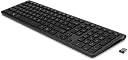
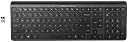
โจ๏ธ Elevate your workspace with wireless precision and effortless style
The HP K3500 Wireless Keyboard combines a sleek, full-size design with 2.4 GHz wireless connectivity and HPโs exclusive Link-5 technology, enabling connection of up to 5 devices simultaneously. Featuring dedicated hotkeys for quick access to common functions and pre-installed batteries, it offers a comfortable, quiet typing experience compatible with Windows XP through Windows 8. Ideal for professionals seeking a reliable, clutter-free keyboard that boosts productivity and fits seamlessly into any modern workspace.


| ASIN | B00FARSAVY |
| Additional Features | Backlit |
| Best Sellers Rank | #8,256 in Computer Keyboards |
| Brand | HP |
| Built-In Media | Keyboard, USB Cable, User Guide |
| Button Quantity | 3 |
| Color | Black |
| Compatible Devices | Laptop |
| Compatible Operating System Family | Windows |
| Connectivity Technology | Wireless |
| Customer Reviews | 4.2 out of 5 stars 691 Reviews |
| Global Trade Identification Number | 00887758489291 |
| Hand Orientation | Ambidextrous |
| Item Weight | 14.56 ounces |
| Keyboard Description | Wireless |
| Keyboard Layout | QWERTY |
| Manufacturer | HP |
| Mfr Part Number | H6R56AA#ABA |
| Model Number | H6R56AA#ABA |
| Number of Keys | 52 |
| Power Source | Battery Powered |
| Special Feature | Backlit |
| Style Name | K3500 |
| Switch Type | Mechanical |
| UPC | 044111216905 012300403016 088022182881 053786068436 887758489291 021112688986 734911086098 353541549959 617407453782 |
| Warranty Description | 1 year limited warranty |
J**N
Best keyboard period
I have always loved the fell of laptop type keyboards, and my current office desk is not conducive for wired keyboard use, so I have been hinting for this product for a long time. Sure, there are several out there to choose from, if money is no object, but this one works exactly as you need for a very low price. Plug the USB dongle in and you're all set. Nothing to turn on, no having to constantly pair it, it just works. There is a little button that says connect next to it, but I have never had to use it. I have heard and read that the battery cover is a pain, but I had no problem removing it. It just slides right off, but since it comes with Duracell batteries already installed, there is no need to do so right away. The look is exactly that of a regular full size keyboard, but the keys are not so close together as to constantly cause typing errors (my biggest complaint in regular keyboards). I have also read where people don't like that there is no indicator lights for caps or num lock, but I use Windows 10 (and previously on Windows 7) and you can set it to beep when you turn them on or off. There are two distinctive beeps so its a higher pitched for when it is turned on, and a lower pitch when turned off, so who needs battery draining lights anyway? As for the feel, I love it. I can type better and more comfortably than ever. The tactile feedback is great and the responsiveness is superb. There is no lag in type to screen, and I type about 65 WPM with no issues. Seriously, if you like the feel of a laptop keyboard in a desktop keyboard layout with the ease and convenience of a wireless connection, look no further.
J**E
This keyboard is a steal at under $25.
I am not a hardcore gamer. I'm also not a hardcore "typing 100,000 words a day" person. Im a college student and need a keyboard for obvious reasons. The keyboard on my laptop is nice and backlit, but when writing papers, I don't like feeling the warmth under my hand, and it is just a bit cramped because its a laptop. So I needed a wireless option. I looked through many different models and brands until settling on this one. I am totally in love with this keyboard. It is extremely slim, lightweight, and has a sleek looking profile. The multifunction buttons are very useful (volume/windows 8 additions/etc) becuase I have a windows 8 laptop. I often use the windows button so having it on here was really nice. Just like the other reviews say, this keyboard is extremely quiet! I read about 10-15 reviews and there was only one guy who actually complained that it was too loud. I used to own a Dell "QuietKey" and this thing is miles quieter than that one. I love the heaviness of the keys. This is completely subjective and you may hate it or not care at all about it. But previous keyboards I used were really "bouncy" and light feeling. I like the thin keys coupled with the heavy "bounce". I play some games on my laptop and this one is great for it. I actually dont know the different between a gaming keyboard and a normal keyboard other than the feeling of the keys. The placement is gonna be the same but the colors and design will be different. I couldve spent more for an ergonomic keyboard but lets face it....Im a college student. I dont mind the flat traditional style and I didnt have the funds to spend more for one. No lag at all in writing or in games. Less than $25? This keyboard is a steal. BONUS POINTS: THEY INCLUDE BATTERIES FOR YOU. Whenever a company is nice enough to give you batteries, you know thats something to smile about. Good job HP.
A**R
Honestly I like the logo
Giving 4 stars because it doesn't have the "HEWLETT-PACKARD" logo on the keyboard. Honestly I like the logo, and it's essentially the only reason I chose this one. Don't know why it doesn't match the pic, probably most people like the HP logo better. Everything else is good, feels great, types smooth, and wireless works perfectly. This is for my girlfriend, and she loves the feel of the keys.
Z**E
Very good and comfortable
This keyboard is very portable. At roughly 18 in across and 6 in wide, this keyboard can fit anywhere and function perfectly. In a laptop cubby or right on top of the desk. It is very comfortable as it sits up just high enough to take pressure off of your wrists. The keys feel perfect: they are not too loud and pressing them in requires no effort. The only qualm I have is that the smart connect device only works with other smart connect devices. I had an hp mouse that I purchased about 1 year ago and I needed to keep that wireless mouse's USB connect in the CPU because it could not connect to the keyboard's USB connect. Otherwise, a very, very well made keyboard and quite affordable. The durability and quality are obvious.
M**E
Great keyboard
I'm old school and have been skeptical of wireless peripherals until I finally broke down and bought a wireless mouse last year. Since my keyboard was all but dead, keys missing, letters worn off, etc., I decided it was time to invest in a wireless model there as well. Not wanting to spend a lot of money, I looked at several inexpensive models and decided on the HPK3500 and have been very happy with it so far. There is no setup at all, simply plug the dongle into a USB port on your computer, pull out the tab in the back of the keyboard so that batteries connect, and you're up and running immediately. I have had no issues with connectivity or lagging at all. I'm very particular about the touch on a keyboard and the keys on this one are a little more flat than what is my normal preference, but that's a personal thing and one I need to just get used to as that seems to be the way most keyboards are today, especially on laptops. The keyboard layout is the same as any standard keyboard. The only difference I see is that the 'delete' key is longer, and there is no light showing when you have 'caps lock' or 'num lock' engaged, but that's a very minor issue as well. This keyboard is also just a little smaller than my old keyboard, so with that and the lack of wires in the way, it takes up a little less desk space, which makes me happy. Overall, I really like this keyboard and kick myself for not upgrading to wireless sooner.
T**N
HP Technical Support is a Maelstrom
In January 2017 I purchased an HP wireless keyboard from Amazon. At the beginning of March 2017 it failed. I accessed the HP technical support website and performed all the suggested actions but the keyboard did not work. This took several hours. I accessed the โContact HPโ from the technical support page and typed out my concerns. It would not let me submit the form because I did not have a serial number. There is not a serial number on the documentation or on the keyboard itself. I cannot remember how I finally sent in my complaint but I did get a canned reply on March 3rd from HP that my warranty needed to be verified first. Hello Terri, Thank you for contacting HP Customer Support We are not able to register your product as we do not have sufficient information. In order to register the product and confirm the warranty status, please send us a copy of the Original Hardware Purchase Receipt (Scanned) and a copy of the extended warranty receipt (if applicable). Also please send the image of the label which is at the back of the keyboard. Please reply to this email with a copy of the original hardware purchase receipt and extended warranty receipt (if applicable) or the original receipt you may have received from the store. We accept the following formats as email attachments: .bmp, .jpg, .pdf, .gif and the attachments cannot exceed 9.5 MB. Please include the following information: โข Case number (for example, 8000012345) โข Product Number (for example, C1234A) โข Serial Number (for example, CNF1234567) I sent the attached photo of my keyboard and explained that I have no idea how to find these numbers on my keyboard. Check out my photo โ I challenge you to try. This resulted in a series of emails in which the missing serial number was paramount. I had to resend the photos because I donโt think they believed that there was not a serial number on the product. On March 17th I finally said I was going to write a scathing Amazon review and my warranty was verified. They provided me with the following information about my keyboard - Product: H6R56AA Serial Number: H6R56AA I challenge you to find either of these numbers in the photo of my keyboard label. Several weeks passed with no contact from HP about my keyboard. On April 4th I emailed, asking about progress on my keyboard issues. In another series of emails I was told to contact HP technical support. I mentioned that this was where I started 3 weeks prior. Finally they emailed back that a Technical Support person would contact me within 2 business days. That was 5 business days ago. Today (April 12th) I accessed the HP Technical Support page and used the form to ask for an update. In the serial number field I put the one that HP provided to me. It gave me an error message of โnot a valid serial numberโ. So I put in the example one that HP shows in the field and put mine (that HP gave me) in the โDescription of Problemโ box, along with a summary of the issues so far. This workaround was the only way I could actually send the form to HP. The response I received was that my warranty could not be verified and that I needed to contact the Warranty Department. This made me angry. I decided to contact HP and talk with a human. I called the number provided on the HP Technical Support page. The automated voice thanked me for calling and told me that all agents were busy. Then it hung up on me. I tried again. Same problem. I decided to call one of the sales lines since, in most companies, they answer their calls. I ended up on the HP Page Wide Press page and, after waiting in a queue, finally talked with a human. I explained that I did not want to buy an HP Page Wide Press but I figured this was the only way I could find someone to solve my problem. She was very nice and gave me a different customer support number. I asked her if this was the number for support for PC components and she assured me it was for all HP products. I called the number and got stuck in a menu that only allowed me to speak with someone about the various presses that HP sells. I hung up this time. I will never purchase another HP product.
A**E
Very good decently sized wireless keyboard
Had this for a couple years. Works like it should, and the keys are comfy. The keyboard has been on for a long time and the battery didn't let up... it's been a couple years. To be fair it's been rarely used since the the iMac keyboard proved to be more portable and less crowding. The keyboard is big but not huge and it would be the perfect casual gaming and windows keyboard. I just remembered I used to dual boot the iMac that's how the keyboard got utilized in the first place. Also, nice bouncy or springy action on the buttons and reliable wireless dongle system.
R**R
NOT similar to HP KT-1087. Plastic and cheap, meh...
Long time ago HP released their TouchPad WebOS tablet. The tablet itself was OK by the standards of the time when it was released, nothing stellar, just ok. However one of the accessories with that tablet was a "diamond in the rough" in my humble opinion. It was the bluetooth keyboard HP KT-1087. It was an all metal chiclet style keyboard (I believe even the button are made from thin aluminum). Even tough the keyboard was designed for WebOS device it was connectable to any bluetooth capable Android device, on Linux and on Windows. I'm typing this review using this keyboard connected to my Surface Pro 3 tablet and I tried it on my desktop that dual-boots Mint 18.2 and W10. It was an extremely well constructed device and typing on it is a pure pleasure. Buttons have a very nice feedback to them, great travel time and it just feels so well constructed and solid! I own 2 of them! Back to the review. Basically I was looking for a full version of KT-1087 keyboard and as a benefit a wireless version would be great since bluetooth would not work when messing around in BIOS. So I thought the HP K3500 was it. It certainly looked very similar to KT-1087. I asked the question in the community section and no one replied, thus I pulled the trigger and ordered it. When I received it I was rather disappointed. K3500 is a completely plastic keyboard, and does not have the same sturdy feel to it as KT-1087. Typing experience is also no where near as pleasant. The buttons are too firm and feel just dull when you press on them. It is a cheap look-a-like to KT-1087. So if there are weirdo's like me who want a full style KT-1087, look somewhere else. So my search continues.
F**.
Value for Money!!!
Just received this KB First look - Impressive Build Quality- Tough and doesn't feel like cheap plastic one at all Keys- Almost like laptop chiclet keys, way quieter than any other keyboard i have ever used in the last 9 years. Size- Perfect, pretty small tho i thought it would be much bigger. Cons- NO Led lights for Numb Lock and so. But its not a deal breaker. Bottom Line- Bang for the bucks, go for it if anyone have any doubts, you wont regret.
A**E
Good keyboard
Comfortable and wireless.
A**R
Five Stars
Good keyboard, good size, non adjustable
M**N
Amazing
Amazing stuff... Delivered much earlier then the expected date... Works like a wonder... I love shopping at Amazon... Great quality and super fast delivery...
M**C
therefore taking up minimal space on your desk โข Love the softness of the keys when you type Con
Pros: โข Very compact, therefore taking up minimal space on your desk โข Love the softness of the keys when you type Con: โข The CAPS LOCK and NUM LOCK keys are supposed to have LED indicators when activated as advertised on the picture, but do not โข When removing the battery case, it feels like the keyboard is going to break because it's tough to remove
Trustpilot
2 weeks ago
1 month ago