🖊️ Elevate your digital artistry with every stroke
The RENAISSER Raphael 520C is a premium stylus designed for Surface devices and MPP-compatible tablets, featuring 4096 pressure sensitivity and tilt support for precise, natural drawing. It charges rapidly via USB-C, offering up to 100 hours of use on a single charge, and magnetically attaches to most Surface models for convenience. Lightweight and ergonomically crafted, it includes palm rejection and original Surface pen tips for a seamless, professional creative experience.


| ASIN | B0987J23K1 |
| Battery Average Life Standby | 100 hours |
| Battery Description | Lithium-Ion |
| Best Sellers Rank | #144,663 in Cell Phones & Accessories ( See Top 100 in Cell Phones & Accessories ) #2,742 in Styluses |
| Brand | RENAISSER |
| Charging Time | 1 hours |
| Color | Black |
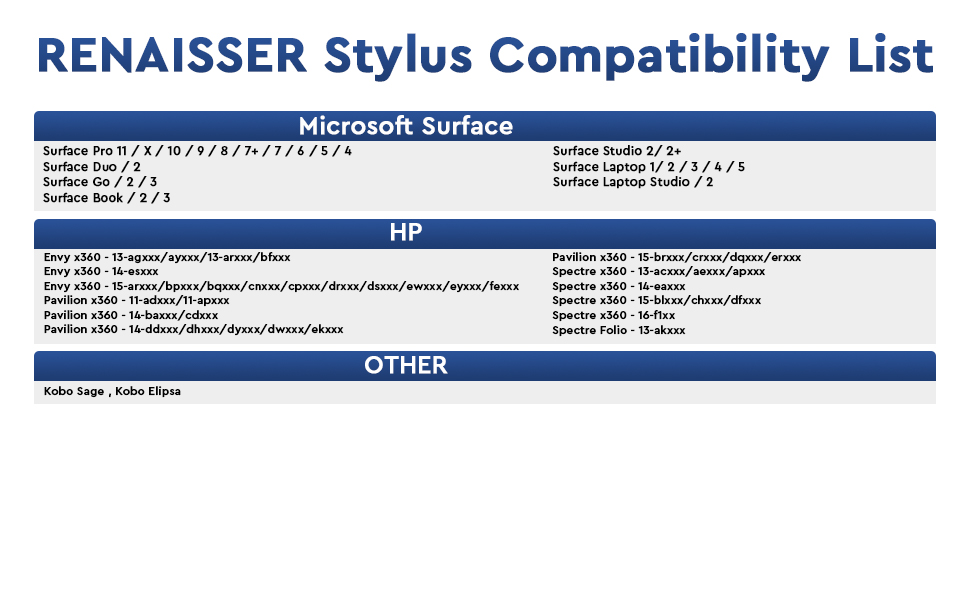
| Compatible Devices | Surface Pro 12/Pro 11/Pro 10/Pro 9/Pro 8/Pro 7+/Pro 7/Pro X/Pro 6/Pro 5/Pro 4/Pro 3, Surface Duo/Duo 2, Surface Go/Go 2/Go 3/Go 4, Surface Book/Book 2/Book 3, Surface Studio 1st Gen/2/2+, Surface Laptop 1-5, Surface Laptop Studio, Kobo Libra Colour,Kobo Sage,Kobo Elipsa, Kobo Elipsa 2E,other device with MPP(Microsoft Pen Protocol) |
| Compatible Tablet Computer Models | Microsoft Surface Go, Microsoft Surface Go 2, Microsoft Surface Go 3, Microsoft Surface Pro 4, Microsoft Surface Pro 5, Microsoft Surface Pro 6, Microsoft Surface Pro 7, Microsoft Surface Pro 7+, Microsoft Surface Pro 8, Microsoft Surface Pro 9, Microsoft Surface Pro X |
| Customer Reviews | 4.4 out of 5 stars 2,707 Reviews |
| Enclosure Material | Aluminum |
| Item Dimensions | 5.87 x 0.35 x 0.35 inches |
| Item Weight | 14 g |
| Manufacturer | RENAISSER |
| Material | Aluminum |
| Mfr Part Number | R99-8800-RB0-010 |
| Minimum Required Operating System Version | Windows 10 |
| Model Number | Raphael 520C |
| Number of Batteries | 1 Lithium Metal batteries required. (included) |
| Number of Packs | 1 |
| Pressure Sensitivity | 4096 levels |
| Unit Count | 1 Count |
| Warranty Description | 1 Year Warranty Against Manufacturer Defects |
V**S
At last an affordable, rechargeable pen
I use my Microsoft Surface to create art, and for a long time I've been using a Wacom Bamboo Surface pen. However I was getting frustrated with constantly having to replace the expensive, and difficult to find AAAA batteries. When I found this pen for sale I thought I would give it a try, and so far I've been impressed. Accuracy is every bit as precise as the Wacom. It tracks my drawing accurately, while being rechargeable by USB-C, and holds enough charge to draw for days without a recharge. Like other pens it can magnetically cling to the side of the Surface, has full pressure sensitivity, and two buttons for additional control. There are maybe two minor gripes. You do need to push a button to turn it back on. It auto sleeps after a few minutes without use. This conserves battery, but it is a new habit you'll have to develop. The other is that it feels a bit light. I know the weight of my older pen was largely due to the heavy metal battery it needed, but making the pen's case out of metal, or including a small amount of zinc weights inside might have given it a bit more heft. Again that's something I'll just have to get used to. Neither warrants less than a 5 star review however. I've included a small snippet of artwork made with it.
C**E
Impressed
I have the Surface Pro 8 (Model: 1983) - I was really happy to see this pen look the way it did in the pictures. - It came in a nice little box with 3 extra pen tips and took roughly 3 minutes to fully charge right out of the box (not sure what the battery was at when I started). - Included usb-a to usb-c is short but works. - The pen started working with my Surface Pro without doing any setup. - The magnet feature works very well, if you have a case it probably won't stick enough to use the magnets. - Seems that most apps show some type of crosshair or pinpoint on the screen when hovering so you know exactly where it will touch. (refer to picture) I am happy with this purchase and the price was much better than others, especially for what you get. I will try to update with battery life and button control when I have more time with it...
K**E
ACCURATE! pen tip to line!
Bought this pen cause for some reason my official surface pen was feeling faulty, the "ink" line was falling under the pen itself and not on the tip like it was supposed to so it was REALLY throwing my drawing off (even after calibration). Buying another 100$ pen was not an option, and the surface pen 2 doesn't seem to work as well as it should with older surface devices so i tried this one. THE GOOD! pen tip and line align perfectly! even after changing orientation. The pen is thin like a normal pencil! you'll have a more familiar and comfortable feel to it when drawing! its metal just like the surface pen! very good quality! it brings 3 hard arrow nibs (think of the apple pen) these ive been preferring over the surface one, and these arent those bad quality nibs you get when buying those off brand nib replacement that smear over your screen. OH and you can use the surface pen nibs with it! isn't that convenient?. It has strong magnets so you can place it on your surface just like the official pen! So far i haven't had to charge the battery since the first charge when it arrived. The quality, the feel and the accuracy are amazing! put a windows logo on the pen and you could've swore this was an official surface pen! THE BAD! there isint much i can say thats bad about it but there IS an annoyance. The pen will have palm rejection hiccups even when having the pen a hair off the screen, its not that frequent but it gets suuuuuuper annoying when the slight touch of your finger just moves your canvas while youre trying to make lines, really does get into your work flow. Some people mention that you have to push the button to turn it on but thats just fine, pen turns on in a second, saves battery! and this isint a problem but I WISH there was a little lid to cover the usb C port like some wireless bluetooth earphone do, battery last long we're not gonna be using that port so much, but we're gonna be handling the pen a lot, it be nice to have a way to cover it to prevent getting that port to get dirty or even damaged In short! its a great pen! i plan on buying a second one to keep as a back up! no artist should have just one pen. Only reason i dont give it 5 stars is because of the palm rejection hiccups but what can you do....
K**S
Definitely worth every penny!
I am a digital illustration artist and I use adobe photoshop to create and this stylus has been the best purchase ever! I love that you can recharge it (battery life is so long I go weeks without charging it) easy to connect to your computer it took less than a minute. The overall design is lightweight but I love that because it’s easy on my hands! 100/10 recommend (I use a HP surface pro 7)
Y**G
Great feel, easy install, nice quality
I purchased the RENAISSER Taiwan Raphael 520C Stylus Pen to use with my LG Gram Pro 16 2-in-1 (Costco version, which didn’t include a stylus). Initially, I expected to spend time configuring it since there isn’t much guidance for non-Surface devices. I was particularly concerned about setting up the Bluetooth connection, but to my surprise, it automatically connected and configured seamlessly with Windows 11. I tested it with the Wacom Bamboo Paper app preloaded on the laptop, and it worked perfectly right out of the box. The best part? It’s significantly more affordable than LG’s own stylus, which is sold separately. Overall, I’m thrilled with this purchase and highly recommend it!
S**M
Perfect for Microsoft Surface 7+
I considered this product with a couple other options including the 520 model of this same pencil. After reading the reviews I ultimately opted for the 520C model. I cannot say how happy I am with my purchase enough. It not only attaches to my Surface with ease, the charging port is indeed still accessible and the connection from the pencil to my tablet was instantaneous- as soon as I turned it on and touched the screen. I am excited for all the possibilities this pen offers at a fraction of the price of the alternatives with overall much better quality. Highly recommend.
J**R
The Best Stylus for Surface Pro
It's the best stylus for me. I have a Surface Pro 7 and previously, I had another stylus, the Metapen 2. However, I encountered many issues with that stylus. It only had one button, which was very hard to find because it wasn't raised. The tip was made of plastic, making it difficult to control when drawing a line. Additionally, the right-click would activate on its own, and the lines would have many oscillations. With the R520C, I didn't experience any of these problems. The tip is made of a very comfortable anti-slip material, it has two raised buttons, the right-click issue is gone, and the lines have minimal oscillation. Note: Oscillations with any stylus are more pronounced in earlier versions of the Surface Pro 8 (the Surface Pro 7+ also has this issue).
Y**G
Great Bang for your Buck (revised)
Bellow is my original post, I really do love this pen so much, definitely better than their older model and still a bang for your buck but only downfall, the charging port keeps shifting within the pen making it difficult to plug the charger in. I have been needing to use tweezers or sharp ends to shift the charging port back down so the charger can fit in, seems like they need to revise the issue and sort it out. Bought this for both my surface pro 7 and surface go, really enjoy this version apposed to their og style where the charger is on the top of the pen and uses the micro c plug. It writes smoothly and is comfortable to hold for long periods of time. The battery life is also amazing, I use it to take notes in class and to do hw and hardly need to charge it, when I do it fully charges in a couple of minutes. Highly recommend
م**ت
القلم ممتاز يا بنات
جدا ممتاز سواء سرعته في الكتابه او شكله ما شاء الله
E**O
Bon substitut
Impossible de retrouver mon stylet d'origine alors j'ai opté pour cette alternative. Il est léger, les mines sont interchangeables, et il a 2 fonctions ; le clic droit et la gomme. Je ne trouve pas la gomme très pratique car il faut rester appuyer sur le bouton pour ce faire mais elle a le mérite d'exister. Celui ci ne fonctionne pas avec une pile comme le stylet d'origine de chez Microsoft et ce n'est pas plus mal car la batterie ne se décharge pas aussi vite. Le câble de recharge est fourni avec. Il y a un voyant lumineux qui indique l'état de marche et il s'aimante tout aussi bien à l'écran, au niveau latéral gauche. Je n'ai jamais eu de problèmes de reconnaissance ou autre. Je recommande cette alternative sans souci !
O**K
Works with Surface Pro 8
First off, the initial product I'd received must have been a 1 in 100,000 (or more) unit missed during quality control. A standard USB-C connector could not fit into the pen's connector cut-out. Also noticed that the USB-C connector in the pen was not aligned to the cut-out. If the cut-out was a standard size, the misalignment would have prevent the connection. Notified the seller and advised to return as a defective product. A second purchase was effected and was "next-day" delivered. This works flawlessly. Felt better being more substantial compared to the SF Pro 8's slim pen. Drawing is not a primary use-case for me so did not do one-for-one comparison. For office automation with note taking and scribbling much prefer this Rena Pencil. Surface Pro 8 note - if you've upgraded from previous Surface Pro models (I did not) and used to the pen magnetic attachment to the left to the Surface Pro, it does NOT with the Surface Pro 8. The Rena Pencil will "stick" to the bottom and the right side. Both are NOT ideal as it would normally be connected to the keyboard and the power connector and USB-C connectors.
M**A
Very good
I bought it for my Microsoft surface pro 8 Very good quality
J**M
Works well
Quite stylish, extra nibs are good. used it on windows for a while. charged well. Not bad given the limitations of my windows touch screen.
Trustpilot
2 months ago
4 days ago