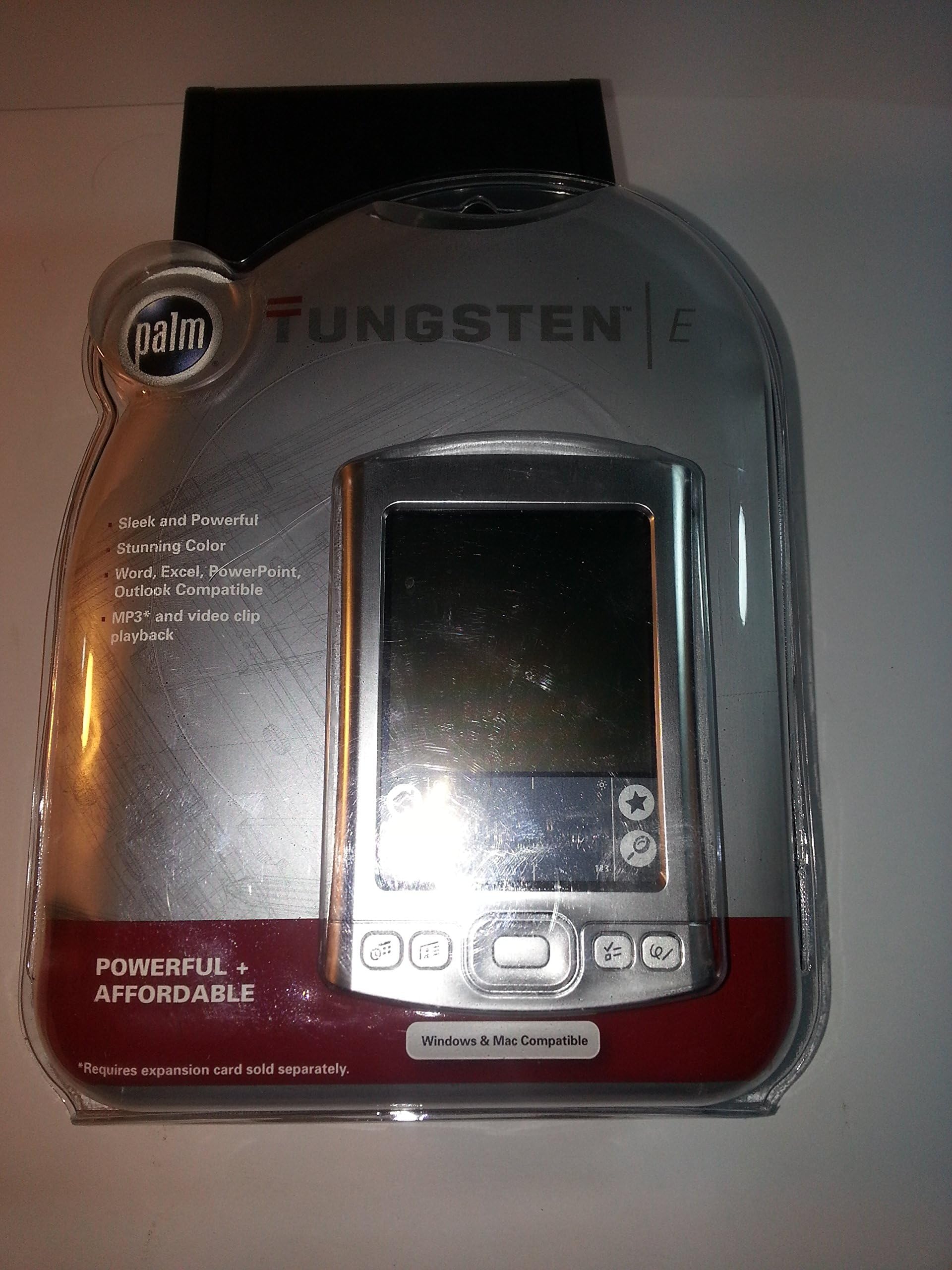


🚀 Upgrade your hustle with the PalmOne Tungsten E — where speed meets style!
The PalmOne Tungsten E Handheld is a sleek, budget-friendly PDA designed for professionals who demand speed and versatility. Featuring a powerful 126 MHz ARM processor, a crisp 320x320 color display, and 32MB of RAM with expandable storage, it supports full Microsoft Office file editing and syncing (Windows 7 32-bit only). Its integrated multimedia capabilities and enhanced personal information management apps make it a stylish, all-in-one device to keep you connected and productive on the move.
| Best Sellers Rank | #1,143,107 in Office Products ( See Top 100 in Office Products ) #302 in Handhelds & PDAs |
| Customer Reviews | 3.8 out of 5 stars 178 Reviews |
H**S
A nice touch for average Palm users
For a long time i had a M105 which I bought when they first came out. It had 8MB internal memory and a slot for an external memory card. It had a monochrome screen, was a bit thick, and used AAA batteries, but it served its purpose well for a long time. Well now i was ready to update and I wanted something reasonably priced. I always like to get my products in the middle ground. The cheap ones don't have enough for me and i end up throwing them away later, and the expensive ones have too many bells and whistles that I never use. The Zire 21 falls into the former as a budget-minded option with a monochrome screen, 8MB RAM, and no expansion slot. The Zire 71 has a color screen, 16MB of RAM, and an expansion slot. this was better, but then you pay a premium for the built-in digital camera which I would use as much as the camera on my phone... which is to say never. The PocketPCs were very pricey and since i don't run many windows apps on my Palm, I saw no reason to go the extra mile for them or the higher level Palms with bluetooth or Wi-Fi cababilities. This Tungsten E was a great balance of features at a good price point. I am always in favor of "bang for buck". First the positives: *It has 32MB RAM which if all you use this for is contacts and appointments, then it is overkil, you can get away with one of the others that have 8MB or 16MB. But I have that neat diet program, and the bible, several e-books and a few Word and Excel (read more about that below) documents and i still have plenty of room to spare. That is what i want... because I hate having to worry about removing stuff to make room and making decisions about what i really need, and what can go. I just want to throw it all on there without worrying about it. *The color screen is really nice... it has a nice resolution and contrast. all of the icons look sharp and vivid. very easy to read in either bright or dark situations. not like my old M105 which would need the backlight switched on in poor light conditions. *Size. It is very slim, especially when you use the flip cover that came with it (i now use the aluminum hard case which makes it significantly thicker). *Style. very elegant, fashionable, techy aluminum look. people will notice when you pull it out to use it, especially once the display turns on. *Fast. The processor (Texas Instruments OMAP311 126 MHz) is really fast... the screen changes instantly when i push a button (as oppsed to a slight pause on my M105). i don't know how this compares to the other Palms or PocketPCs, but for me, its pretty blazing. *rechargeable batteries aren't all that "new", but it beats having to buy batteries all the time. the recharge is fairly quick with the included power adapter, and the USB cable also gives it a trickle charge *Synching is really quick with the USB interface. I don't know if it is USB2.0, but it is significant;y faster than my old M105 Applications *the new agenda view on the calendar is GREAT. it shows you all of your appointments and tasks that are due today. now that the screen is in color, you can color-code your appointments by the category which is very helpful *in addition to the standard calendar, contacts, tasks, notepad, memos, you also get mobileDB (kinda like a poor man's MS Access), a photo viewer, movie viewer, money and expense (which i don't use, so i'm not sure if it syncs up with your MS money or Quicken on your desktop), it also has an email program which would sync with your desktop email software (outlook and such), but you would need a Wi-Fi adapter, or plug it into your phone (neither is included with this product). I don't use that either. *Documents-to-Go... this is fabulous. you can synchronize Word, Excel and Powerpoint documents from your desktop to the Palm pilot. A slight word of caution, however... if the files are uploaded into the internal RAM then the program will "convert" it into Documents-to-Go format, which as far as I can see, isn't any different, but I am editing very simple documents. If you upload them onto an external card, then it will preserve the "native" Word, Excel, Powerpoint fomat. Negatives *The only drawback that I have encountered is the lack of a cradle. As cool as it looks in your hand, it doesn't carry over when its just laying flat on your desk with cables trailing away from it. this was a major slip on Palm's part, in my opinion.
J**Z
No quality, no support, and no luck.
There is a reason why just about everybody is singling out the warranty (or lack there of) when they review the Tungsten E, they break! Total failure! But I'm one of the lucky ones. Mine lasted 8 months before it just stopped working. It won't turn on, won't reset, and won't sync back all the important information I entered into it that day. Let's not forget the less than helpful customer support! You would think they would be more helpful at $25 per call. On the plus side the "E" is nice looking but the case is so prone to marring that even the cover provided with it scratches the case. I put a piece of clear Scotch tape across the top to prevent this. It worked pretty good and didn't look too bad. Get familiar with the reset button on the back of the machine, it will become your new best friend. The "E" has no cradle to rest in while it recharges or syncs and I kind of missed that. I do love all the software that comes with it. The Palm Desktop is really nice! But I'm afraid the Minuses far out weigh the Plusses. I would recommend a better Palm or possibly a Windows based PDA.
K**M
Worthwhile upgrade
I wasn't convinced I needed to upgrade from my Visor Deluxe, but after reading some of the reviews I decided to go ahead and buy The Tungsten. I figured even if it wasn't that great at least it was smaller and had more memory than the Visor. I mean for <$200 how great could it be? I paid more for the Visor 3 years ago. The first time I turned it on and saw the display I gasped. It looked like a computer, not a PDA. The screen is really awesome. There is NO comparison between it and the Visor's. The color and contrast make it much easier to read, but that's not the only great thing about this PDA. It's fast, pretty small, stylish, and it plays MP3's. I never had an MP3 player, but now there is no need to spend $100 or more on one. The output is plenty loud, even on planes, and the sound quality is pretty good- louder than I would ever want to listen to. The SD card means you can store as many songs as your budget allows- just make sure you have a card reader since the upload time through the hotsync cable is really slow. The cable is a standard USB that fits my camera- no need to buy an extra hotsync cradle for work. Plus it will charge when it's hooked up too. The bad: The only thing I am not crazy about is the case since it tends to collect scratches. That's it- No regrets!
M**H
RENEW Electronics is great!!
I am on my third Tungsten E. It's a dinosaur, I know, but I'm used to it and it works for me. I like that my personal information is not splashed all over the Internet. When my computer died and I had to buy a new one, I got stuck with Windows 7. I couldn't get my Palm to sync. I went everywhere for help, but couldn't make it work. (Of course, PALM is no longer in business.) After a year, I gave up and went looking for a new (or used) PDA that would sync. I contacted RENEW Electronics about another model. They told me that I didn't want the new model and sent me instructions and a link to a driver that would cause my Tungsten E to sync with Windows 7. It worked! I'm back in action and the vendor refused any payment. I will buy from these people every chance I get. They are knowledgeable, honest and generous. Where do I go to rate the store?
M**E
New - Dead Battery - As Expected
You cannot buy a brand new Palm today that has a working battery. The batteries have a shelf life of only ten years and this unit was manufactured in 2005, so, I also ordered a battery for it. The battery was rated right, but, it was too thick for this unit. I will order another brand. BUT, the unit works perfectly with the back not fully tightened after I installed the battery (soldering it into place -- as is required). the battery on this unit is not a plug-in battery like the Tungsten E2, so, beware. If you do buy one of these, if you find one, it is a great Palm, one of the best ever made, but, you will need to replace the battery that is wired to the motherboard. With a new battery, you can get a week of use from this Palm before recharging. It should last at least five or six years in dily use before it will not hold a charge.
N**A
An oldie but a goodie.
First of all, this unit is out of date. Palm no longer supports the OS, and its software is not compatible with Windows 7 nor MAC. And, you can't use it to place calls nor receive Wi-Fi. If you don't keep the batteries charged, all its memory is erased, except what may be on an SD card. It was created in 2003, and shows it. If one spends a little more, they can get the Tungsten E2, whose memory is not as volatile, and can be rigged to get WiFi, but it has issues to, as to, for instance, limits in SD capacity. Having said this, I like the unit. It can play music, podcasts, audible books, videos; I can read books through its Palm Reader: I can look at, and manipulate, XL, PDF, DOCX, JPG and other MS files, be reminded of upcoming appointments and events; and keep lots of memos including shopping lists and other things I need to know, but often forget. And that is all with software that comes on its disk. By buying other Aps, I can keep up with bills that come due; study an NASV Bible, using a keyed in concordance and Greek/Hebrew Lexicon; deep track of my diet and exercise regimen, and many other things. It is a lot smaller than most tablets and readers, but has a larger screen than most phones. It can read hand-printing, so you usually do not have to type in data. It easily fits into my shirt, pants, or coat pocket, and I literally take it everywhere. And, oh yeah, if I forget to charge it, and the juice runs out, I can revive it on my computer, returning all the programming, and any data entered before the last synch, back into the machine. Likewise, if through aging or accident, it doesn't work anymore, I just go out and buy another, usually used, and with a simple synch, I have created a clone.
J**D
Piece of Junk
I read all of the reviews for the Palm Tungsten E and thought that my experience would be better. Well, it was not. The Palm worked magnificently for the first 2 or 3 days. Then a fatal error occurred and the machine could not be reset. There was nothing that I could do. All was lost. My new machine was dead, gone, no more. That was disheartening. The best part of the Palm is the software for scheduling. It is easy to use and really great. Unfortunately, the actual Palm is a piece of junk. I am going back to a pencil and paper for the scheduler. Also, the MP3 player in the palm is really substandard. Buy a real MP3 if that is what you want or if you really care what your music sounds like. The Tungsten E is jack of all and master of none when it actually works. When it does not, and most likely yours will fail too, you will want to toss it against the wall. Hopefully it fails before the anemic warranty runs out. Save yourself, DO NOT BUY THE PALM TUNGSTEN E.
C**G
Love it
When I was looking for a PDA, it came down to choosing between the Tungsten E and the Sony TJ35. They're practically identical. I went to test them out in the store and chose the Tungsten E. The main reason I chose the Tungsten E is that it doesn't need additional software to edit word documents and excel spreadsheets. I am very satisfied that I chose the Tungsten E. I was a bit worried when people said it gets scratched up by the included cover, so I put tape on the nylon stitching. Another solution is to cut a small piece of protective screen covering to cover the part that is most prone to getting scratched (the face of the palm where the logo and words are). There aren't many slim cases out there right now, but I'm probably going to get one when I find one at a reasonable price. It'd be cool if it had built in WiFi, but I think that would be of a distraction than anything else(I'm a college student). This palm is both powerful and affordable. Did I mention that Graffiti 2 is just like normal writing? Very good for new users and much easier to learn than the original Graffiti.
J**C
Qualité
Je l'utilise encore. Très bonne qualité. J'ai simplement changé la batterie.
Trustpilot
2 weeks ago
2 weeks ago