Desertcart purchases this item on your behalf and handles shipping, customs, and support to Ecuador.
✍️ Elevate your art game with precision and color that commands attention!
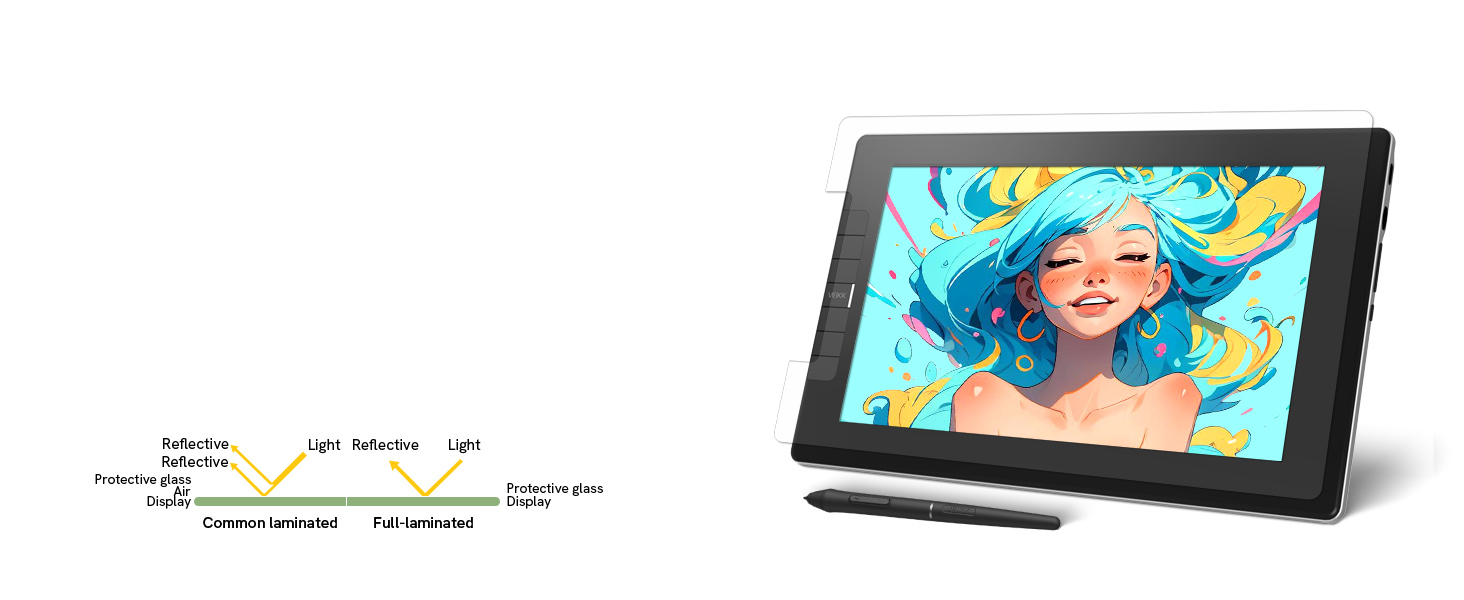
The VEIKK VK1200V2 is a professional-grade 11.6-inch full-laminated drawing tablet featuring a vibrant 120% sRGB IPS HD screen, ultra-responsive 16384-level pressure sensitivity with tilt support, and dual battery-free styluses. Compatible with Windows, Mac, and Linux, it offers customizable hotkeys and a lightweight, durable design, making it the perfect tool for artists and designers seeking precision and portability.


| ASIN | B098B6LKJS |
| Active Surface Area | 11.6 inches |
| Additional Features | 60° Tilt Support, Full Lamination AG Glass, Shortcut Key, Upgraded to 16384 Levels |
| Best Sellers Rank | #237 in Computer Graphics Tablets |
| Brand | VEIKK |
| Built-In Media | 2 x P05 Battery-free Pen, 1 USB Cable, HDMI USB-C to Pen Case, Holder (8 Nibs Included), 20 Nibs, Nib Extractor, Quick Start Guide, Drawing Glove, Cleaning Cloth |
| Color | Black |
| Compatible Devices | Desktop, Laptop |
| Connectivity Technology | HDMI , USB |
| Customer Reviews | 4.2 out of 5 stars 460 Reviews |
| Display Type | LED |
| External Testing Certification | not_applicable |
| Global Trade Identification Number | 00601707037636 |
| Item Dimensions L x W | 12.56"L |
| Item Type Name | Drawing Tablet with Screen |
| Item Weight | 807 g |
| Manufacturer | VEIKK |
| Mfr Part Number | VEIKK |
| Model Name | VK1200 V2 |
| Model Number | VK1200 |
| Native Resolution | 5080 |
| Operating System | Windows 7 or later,Mac OS 10.12 or later,Linux |
| Pressure Sensitivity | 16384 levels |
| Screen Size | 11.6 inches |
| Special Feature | 60° Tilt Support, Full Lamination AG Glass, Shortcut Key , Upgraded to 16384 Levels |
| Specific Uses For Product | Drawing |
| Target Audience | Artist |
| Warranty Description | 1 year hardware warranty and lifetime technical support |
C**.
Perfect starter tablet
My husband got this Wacom tablet for our 12-year-old daughter, and it’s been a huge hit. She’s always loved drawing, and this has been the perfect way for her to start exploring digital art. She uses it with Medibang Paint Pro on a desktop computer, and everything works seamlessly. Setup was easy—just installed the driver from the Wacom site and plugged it in via USB. The pen doesn’t need batteries, which is great, and it feels natural in her hand. The drawing area is just the right size—not too big, not too small—and very responsive to pressure. We also picked up a stand and a drawing glove to make her setup more comfortable. The stand gives her a better angle for drawing sometimes, and the glove helps her hand glide more smoothly across the tablet. She’s been sketching nonstop since she got it. It’s been amazing to watch her creativity grow with the new tools. Highly recommend this if you have a budding artist in your life—it’s a great value and a wonderful way to support their passion.
L**I
Pretty Good
It is definitely worth the amount paid. I have had issue trying to get the screen to display on my pc but it works wonders in connecting to my laptop so not too much wrong with it!
E**Y
Good to use and amazing drawing tablet
It has great pressure sensitivity the size is amazing, it's great quality, the draw ability is awesome and really easy to use.
G**N
You’re starting to animation
As a military member started a new company I love animation I love drawing for the star great product
I**E
You need a computer when using this , for the most part.
It was for my niece The only thing I didn't understand is that you had to plug it in to a computer or some device like that.
C**S
its good, but theres better out there.
When I got this tablet, I wasn't exactly disappointed, but there was a lot about it that bugged me. The screen was much smaller than I thought it would be, it wouldn't show me some of my drawing apps, and if I'm being honest, I would've been better off using an iPad. But, other than that, it also lets me draw without the screen, so I have a much bigger screen to look at (I.E., my laptop) while I draw.
A**T
It's not 100% Bad
I'm a digital artist that does drawing as a hobby and I recently just bought this Tablet since my previous tablet was dying and I wanted to test other tablets, but I would say this the Screen resolution is Decent, set up is easy, but my issue with it is1. For some reason it doesn't operate well with one of my Art programs, like the pressure sense of the tablet is non-existent. 2. The pen and cursor is slightly apart compared to my Previous Tablet I owned which was an Artist 12 XP-Pen. 3. For some reason the pen Double clicks when I only clicked once. 4. The button are nice and stiff but randomly stop responding when they are being hold down, but everything else on it is decent the body of the tablet is nice and Thick, no sharp corners, then pen feels comfortable in the hand, my only disappointment are the problems I mentioned.
A**R
What I've always wanted
I'm not a professional artist, but I've always wanted something like this. Investing in pro level stuff was always outnof reach for me, so this was a great purchase for me. It does what I need it to do.
A**Z
Tableta
Excelente tableta para dibujar y proyectar imágenes.
P**R
Perfect 11 Inch display Tab for those who are switching from regular Pen Tab
There is a few ratings & review from India ! That should not be happen. Cause product is actually good with perfect pricing. (Buy it when price is within 12k-14k). There maybe few alternative available in the online market but none of them are near in term of in hand premiumness & pricing. Driver is stable. Just make sure you install it before plug in. Also if you find any problem with dual screen setup. Just change it from your display settings before contact customer support. Pros:- 1: Reasonable Price 2: Premium Look 3: Perfect for illustrator & photoshop 4: Took less table space than Other 5: Easy to Install 6: Two Pen added inside box incase you lost/broke one (actually not necessary. Maybe they need to upgrade their Pen for better pen vs point distance instead of giving 2) Con:- 1: You have to connect it via 2 cable . One HDMI to mini-HDMI. Another Dual-USB to type C. (Single type C like Huion Kamvas 2021 not possible so make sure your laptop has a HDMI port) But you can ignore that if you compare the price. 2: Have to buy stand separately For now working experience is Smooth & Perfect. Maybe update later long term use.
R**A
Funciona perfeitamente
A mesa digitalizadora e perfeita, só a transportadora que e péssima a entrega demora muito falanque está a caminho e nunca chegava e a entregadora tem ma vontade de fazer a entrega
L**Y
جميل
اعداداته صعبه ولاتوجد له شروحات ولكنه يؤدي الغرض
E**O
Funcional, bien presentado y justo lo que esperaba
Este producto cumplió con todas mis expectativas. Desde el empaque hasta el funcionamiento, se nota atención al detalle. Me pareció práctico, bien hecho y fácil de usar. Además, la entrega fue puntual y sin contratiempos. Lo recomiendo para quienes buscan calidad sin complicaciones. Es una compra que vale la pena.
Trustpilot
1 day ago
2 days ago