Buy anything from 5,000+ international stores. One checkout price. No surprise fees. Join 2M+ shoppers on Desertcart.
Desertcart purchases this item on your behalf and handles shipping, customs, and support to Ecuador.
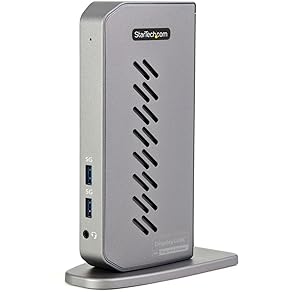
๐ Elevate Your Workspace with StarTech's Docking Station!
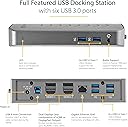
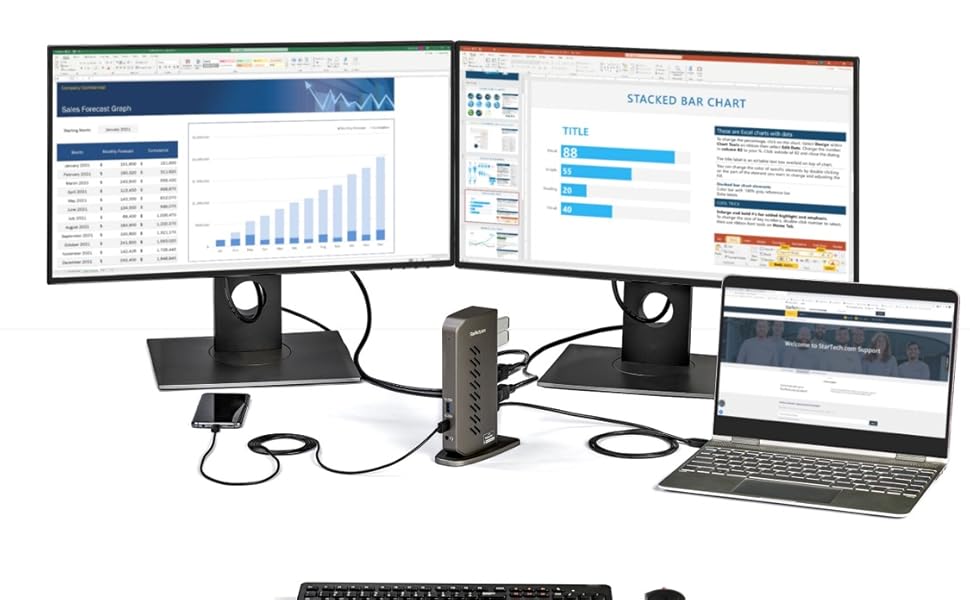
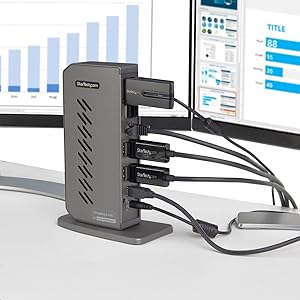
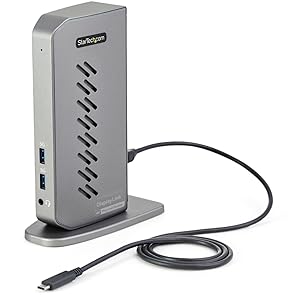
The StarTech.com USB-C USB-A Dock is a cutting-edge universal docking station designed for both USB-C and USB-A laptops. It features dual monitor support with 4K resolution at 60Hz, a 6-port USB hub, and Gigabit Ethernet connectivity, making it the perfect solution for professionals seeking to enhance their productivity and workspace efficiency.


| ASIN | B08R6936N6 |
| Best Sellers Rank | #30,387 in Electronics ( See Top 100 in Electronics ) #417 in Laptop Docking Stations |
| Brand | StarTech.com |
| Built-In Media | Docking Station |
| Color | Black & Gray |
| Compatible Devices | Apple MacBook Air M1/M2, Apple MacBook Pro 13 M1/M2, Apple MacBook Pro 14 M1 Pro/M2 Pro, Apple MacBook Pro 16 M1 Pro/M2 Pro/M1 Max/M2 Max, Apple MacBook Pro 15 2019/2018/2017/2016, Apple MacBook Pro 13 2020 Intel/M1, Apple MacBook Pro 13 2021 M1 Pro/M1 Max, Apple MacBook Air 2022 M2, Apple MacBook Pro 14 2021 M1 Pro/M1 Max, Apple MacBook Pro 16 2021 M1 Pro/M1 Max, HP Spectre x360 13-aw0000/13-df0000/13-af0000/13-ap0000/13-ba0000/14-ea0000/14-df0000/14-cd0000/14-bc0000/14-bd0000/15-df0000/15-eb0000/15-bl0000/15-ds0000/15-ch0000, HP Elite Dragonfly G2 2B5G1AV/2B5G2AV/2B5G3AV, HP Elite Dragonfly G3 3B5G1AV/3B5G2AV, HP EliteBook 830 G7 Intel/AMD, HP EliteBook 830 G8 Intel/AMD, HP EliteBook 840 G7 Intel/AMD, HP EliteBook 840 G8 Intel/AMD, HP EliteBook 850 G7 Intel/AMD, HP EliteBook 850 G8 Intel/AMD, HP Envy 13-ba0000/13-df0000/13-ap0000/14-eb0000/14-df0000/15-df0000/15-cd0000/15-bc0000, HP Envy x360 13-bd0000/13-dq0000/13-cb0000/14-bd0000/14-ce000..., Windows XP (32-bit), Vista, 7, 8, 8.1, 10, 11, macOS 10.6 - 10.12, 10.14 - 10.15, 11.0, 12.0, 13.0, 14.0, Chrome OS๏ธ v55+ Compatible Devices Apple MacBook Air M1/M2, Apple MacBook Pro 13 M1/M2, Apple MacBook Pro 14 M1 Pro/M2 Pro, Apple MacBook Pro 16 M1 Pro/M2 Pro/M1 Max/M2 Max, Apple MacBook Pro 15 2019/2018/2017/2016, Apple MacBook Pro 13 2020 Intel/M1, Apple MacBook Pro 13 2021 M1 Pro/M1 Max, Apple MacBook Air 2022 M2, Apple MacBook Pro 14 2021 M1 Pro/M1 Max, Apple MacBook Pro 16 2021 M1 Pro/M1 Max, HP Spectre x360 13-aw0000/13-df0000/13-af0000/13-ap0000/13-ba0000/14-ea0000/14-df0000/14-cd0000/14-bc0000/14-bd0000/15-df0000/15-eb0000/15-bl0000/15-ds0000/15-ch0000, HP Elite Dragonfly G2 2B5G1AV/2B5G2AV/2B5G3AV, HP Elite Dragonfly G3 3B5G1AV/3B5G2AV, HP EliteBook 830 G7 Intel/AMD, HP EliteBook 830 G8 Intel/AMD, HP EliteBook 840 G7 Intel/AMD, HP EliteBook 840 G8 Intel/AMD, HP EliteBook 850 G7 Intel/AMD, HP EliteBook 850 G8 Intel/AMD, HP Envy 13-ba0000/13-df0000/13-ap0000/14-eb0000/14-df0000/15-df0000/15-cd0000/15-bc0000, HP Envy x360 13-bd0000/13-dq0000/13-cb0000/14-bd0000/14-ce000..., Windows XP (32-bit), Vista, 7, 8, 8.1, 10, 11, macOS 10.6 - 10.12, 10.14 - 10.15, 11.0, 12.0, 13.0, 14.0, Chrome OS๏ธ v55+ See more |
| Customer Reviews | 4.2 out of 5 stars 74 Reviews |
| Global Trade Identification Number | 00065030891349 |
| Hardware Interface | DisplayPort , HDMI , USB 3.0 |
| Item Dimensions L x W x H | 5.2"L x 2.9"W x 7.4"H |
| Item Type Name | Docking Station |
| Item Weight | 0.75 Pounds |
| Manufacturer | StarTech.com |
| Mfr Part Number | DK30A2DHU |
| Model Number | DK30A2DHU |
| Number of Ports | 14 |
| Product Dimensions | 5.2"L x 2.9"W x 7.4"H |
| Smart Home Compatibility | Not Smart Home Compatible |
| Total Number of HDMI Ports | 2 |
| Total USB Ports | 7 |
| Total Usb Ports | 7 |
| UPC | 065030891349 |
| Unit Count | 1.0 Count |
| Warranty Description | 3 Year |
| Wattage | 40 |
O**R
Docky mcdockface
Serviceable universal dock. Works with both personal and work laptops. Does not charge (as expected) laptops. Have shared this with others as well.
A**R
As advertised. Recommend.
Excellent and easy to install. Only would note that the docking station is NOT powering my laptop so you need to separately power your laptop if you want it to charge.
A**X
Solid, not perfect
I bought this dock as a part of a WFH workstation build, with the intention of using every port. I intended to run 2x 4K screens at 60hz, a mouse, keyboard, external microphone, external speakers, 2x wireless charging pads, and a 4K webcam off of the dock. The screens work perfectly at 60hz / 4K resolution off of the dock, which was the primary motivation for buying it / why it gets a 4-star review. The low-throughput externals - mouse, keyboard, and charging pads - also work well. However, the mic is hit-or-miss when connected to the dock - it will sometimes randomly lag out. The webcam also does not ever work while connected to the dock - the video is incredibly laggy / basically freezes for 10+ seconds at a time. I have a wired gigabit connection from FiOS, and have 0 issue with either external when they're plugged directly into the laptop - I seem to have just run into the capacity of the dock. I can recommend this dock for the primary purpose of adding screens and a few extra USB ports. But, it isn't up to task to be the "plug-n-play / single plug" dock as advertised, and I still need to plug things directly into my laptop.
L**A
Excelente
Excelente resolviรณ perfectamente รฑas dos pantallas , extendiendo mi noteboock asรญ hasta 4 monitores. La NB, el hdmi de la misma y el display link x2 . Plus and play en mi caso
T**T
Works - FANTASTIC
This item was suggested through the HP Help portal to convert my Pavilion Laptop into a multiscreen workstation. Fast, prompt delivery. Plug and play. Was up and running with multiple work monitors in 10 minutes. Results have been fantastic. Buy it. It is a great product.
M**M
1 year and lots of issues
Had this docking station for a year and it's been in my office and suddenly the USB ports don't work, if I plug something in it keeps binging on my laptop. When I plug in elsewhere no issues so it's not the cord or connection point. It's the docking station. It's been 1 year. This should have lasted at least 3 with no issues.
E**A
Better than a video card (for us), Supports 21:9 3440x1440!
We were doing some office upgrades, and this unit saved me from having to buy video cards! Using them with a 3440x1440 21:9 curved screen, and it works great. Plug and play use. Thanks Startech!
G**K
Doesn't work well with Big Sur
This dock feel like it's constructed about average. Not especially robust, but it doesn't feel like it's falling apart either. Everyone who's raving about how well built this dock is has never used or disassembled a really high quality dock before. They should go and use/disassemble a CalDigit TS3, or Kensington Thunderbolt dock. Now those are truly well built. This StarTech is just average. The case is made from a cheap ABS plastic, is quite light (so cables will pull it around your desk), and has a few vent holes in it (necessary because without a metal case, I presume they need these to dissipate heat). The power supply is a pretty cheap feeling wall-wart, but at least it claims to be UL listed (I didn't run it through the UL database to verify, though). The case cover is held together with a couple screws (tapped directly into the ABS, without any metal thread insert) and plastic tabs (I hate plastic tabs). The PCB looks fine to me, with name-brand ICs and a layout that looks good to me. However, keep in mind I am NOT an expert in high speed PCB design, so there could be negative aspects with the trace routing that I'm not aware of. The plastic ABS case won't do much for RF shielding (unless they have some fancy metallic coating, but I don't think they do), in case you're operating in a noisy environment. I did see a couple surface mount fuses next to the power port -- if your dock dies, I would check these fuses as a first step. I am not sure what kind of protection they have on the peripheral ports, but I didn't see much. That's not surprising, as most docks don't have much protection on the ports. This is one area I have been more concerned about lately, after killing a dock due to a ground loop short with a logic analyzer (really stupid of me, I know -- everyone can be careless at times). Overall, is this StarTech durable enough for stationary desktop use? Probably. Are there much better built models on the market? Absolutely. Note that you do need to install drivers to get this working with a Mac. Windows might download and install drivers automatically, but Mac will not. I do like that they are using DisplayLink drivers, which you can download directly from DisplayLink. The company seems to update their drivers regularly. Unfortunately, I was not able to get this working on my Mac. I know the DisplayLink drivers are installed properly, because I used a Belkin DisplayLink dock on my laptop right before trying this StarTech dock. The StarTech dock was recognized by my computer, showing the correct ID in my System Report (suggested from the troubleshooting page on DisplayLink website). However, the dock just wouldn't connect my monitor to my computer. For reference, I was trying to use this with a MacBook Pro (intel chipset) running 11.2.3 and a Dell U3415W over DisplayPort. I even tried download the drivers directly from StarTech instead of DisplayLink, but with no luck getting my monitor connected. Even if I got my monitor to be recognized by the dock, though, another issue with the DisplayLink driver is the lack of clamshell mode options for recent versions of Mac. I believe DisplayLink says Mac 10.15 and up don't support clamshell mode with their drivers. I have used clamshell mode at my desk for years, and wouldn't be using this as my main dock for precisely the lack of this one feature. Overall, if you have used any StarTech products in the past, the physical construction of this dock is pretty much in line with all their other products (definitely built down to a price, but probably still adequate). The dock seems to work well on some Windows machines, but it wouldn't work on my Mac running 11.2.3
A**ใผ
ๅ ้ปใใงใใพใใ
ๆฌๅใไฝฟใใฐๅๆใซๅ ้ปใใงใใใใจใ ใจๆใ่ณผๅ ฅใใพใใใใๅ ้ปใฏใงใใพใใใงใใใ
H**R
Wonderful hub
Every connector is used since the start. Been using it for work since two years and still love it, I never had a bug with it.
J**S
Bon produit
Fonctionne tres bien
P**B
Works!
Does exactly what I need it to. No issues with connection or response times from plugged in devices. Only thing Iโd say is the build quality of the base is sub par the rubber was separating from the plastic right out the box. Not enough of a reason for me at least to go through the hassle of returning it but something for the manufacturer to look at. Other than that works great.
M**A
Alright
Overall it work pretty good but once a day my computer will say not recognized device and I have to change usb ports to get it connect again After a year and 1/2 have expire more connections issue. I think I need to replace.
Trustpilot
3 days ago
4 days ago