Desertcart purchases this item on your behalf and handles shipping, customs, and support to Ecuador.
🖤 Silent power meets sleek design—cool smarter, not louder.
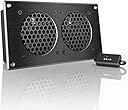
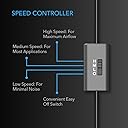
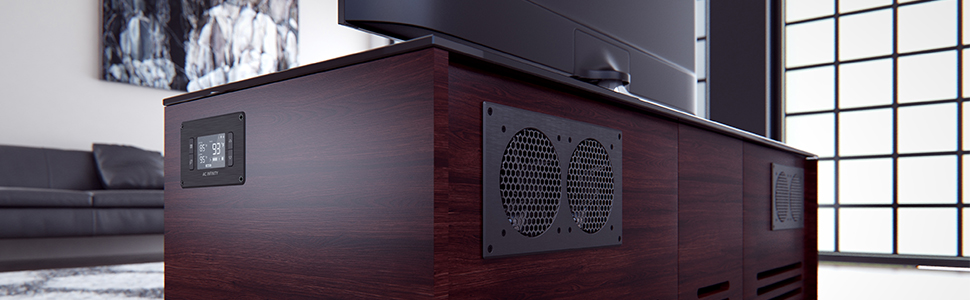
The AC Infinity AIRPLATE S5 is an 8-inch UL-certified cabinet cooling fan featuring a CNC machined aluminum frame, ultra-quiet dual ball bearings operating at just 18 dBa, and a multi-speed controller for customizable airflow up to 52 CFM. Powered via wall outlet or USB, it includes a Turbo Adapter that enhances performance by 25%, making it an ideal, stylish solution to prevent overheating in AV cabinets, gaming consoles, and desktop setups.


| ASIN | B009CNR0I6 |
| Air Flow Capacity | 52 cfm |
| Best Sellers Rank | #9 in Computer Case Fans |
| Brand | AC Infinity |
| Brand Name | AC Infinity |
| Compatible Devices | AV Cabinets, Desktop, Gaming Console, Receiver |
| Cooling Method | Air |
| Customer Reviews | 4.7 out of 5 stars 1,418 Reviews |
| Global Trade Identification Number | 00854759004105 |
| Included Components | AIRPLATE S5 |
| Item Dimensions L x W x H | 8.5"L x 1.3"W x 4.4"H |
| Item Weight | 1.5 pounds |
| Manufacturer | AC Infinity |
| Material Type | Metal |
| Maximum Rotational Speed | 2000 rpm |
| Model | AI-CFD80BA |
| Noise Level | 18 db |
| Number of Items | 1 |
| Number of Packs | 1 |
| Part Number | AI-CFD80BA |
| Power Connector Type | 2-Pin |
| Product Dimensions | 8.5"L x 1.3"W x 4.4"H |
| UPC | 854759004105 |
| Unit Count | 1 Count |
| Voltage | 240 volts |
| Warranty Description | 1 year warranty covers all defects |
| Wattage | 1.9 watts |
M**O
Using AC Infinity AIRPLATE S5 Fan In Entertainment System Cabinets
The AC Infinity AIRPLATE S5 turned out to be an easy to install and effective way to cool my expanded Home Entertainment System component cabinet. FYI, I just purchased a Yamaha RX-V679 Audio Visual Receiver for my family room and the top of the chassis was getting very hot after only a few hour's worth of use while inside the enclosed cabinet. This fan kit comes very well packaged and has excellent installation instructions that take any guess work out of the installation. The kit comes with a plastic template that you can use to make sure the location you choose will accommodate the fan housing. I taped the plastic template to the inside rear surface of my entertainment system cabinet and utilized the preexisting long horizontal cut-out that was provided for speaker and power wires and cables near the very top of the cabinet. I used a Black indelible marker to mark the inside perimeter and hole locations onto the back of my cabinet. Utilizing that existing cut-out allowed me to have a convenient place to place my Trim Router bit and start cutting the rectangular hole for the fan. After cutting the holes the fan frame was inserted and secured with the included four wood screws. After applying power to the fan and my entertainment system I found that the top surface of my Yamaha AV Receiver was no longer getting very hot at all after many hours of use. I also found that the fan speed could be set for minimum and still coll the entertainment center cabinet sufficiently. The fans are very quiet and I doubt anyone could hear them unless they had their ears right up against the cabinet door. I would recommend buying one of these for each cabinet enclosure that has a door on the front so you will prolong the life of your entertainment system electronics.
A**N
One of the Best Cooling Solutions Out There
After my Xbox One started experiencing overheating from being in my Ikea entertainment center with very little circulation, I knew I needed a cooling solution. I stumbled upon these AC Infinity’s and decided to give them a try. I bought two of these units, along with the smart controller & thermometer—one AC for cool air on the bottom, one for exhausting the air on top, and smart controller in the middle. It was a bit of a process to cut into the backplate of the entertainment stand with a drill and saw, which contributed to the complexity of install. However, It ended up working perfectly using the stencil they provide in the packaging. After hooking everything up, they circulated the air very well, keeping everything in the range of 75-85 degrees Fahrenheit even at peak gaming performance. They’re surprisingly quiet when nothing is in use, and inaudible when using the TV. Looking back on my configuration, I wish I put both ACs sucking in air, rather than one IN and one OUT. This is because after about 6-8mos, there was a considerable amount of dust buildup inside the fans and the shelves. This is a common discussion of “positive vs negative static air pressure” with PC builds. Positive pressure tends to keep cleaner internals, while negative pressure tends to suck in lots of dust over time. If I ever needed another cooling solution, I would buy these again in a heartbeat.
B**D
Great for entertainment centers.
Does a good job getting the heat out of my entertainment center and its not to loud. It has an extra usb port to plug into incase you your limited on your usb ports for devices
J**M
This is exactly what I was looking for in an inexpensive package
The PS5 Pro runs a pretty hot and mine is in a bit of an enclosed space in the entertainment center. I was getting a bit of thermal throttling. I cut a hole in the top of the entertainment center and put this in there and this little unit does a GREAT job of exhausting the hot air and getting you to round 70 in Black Ops 6 Zombies on your own (even though you're not good enough to get there). You should definitely buy this, or potentially their larger S7 version, if you have cooling issues like I used to have. The ability to plug this into the console USB port and have it fire up when you turn on your console is exactly what I wanted. I don't have any temperature issues anymore and the only thing I'd complain about is that the fans are a bit loud at full speed but you won't notice it until you put the PS5 into sleep mode and even then it's just white noise. Maybe AC Infinity and Noctua will join forces one day. This is not a sponsored review but I love AC Infinity's products. They probably have what you're looking for if you need easily controllable heating and/or cooling solutions. I have one of their grow tents with their air filtration fan system with the Controller 69, humidifier and heater for the indoor crops and I've never gotten better harvests. My home office gets cold in the winter and hot in the summer and their AirTap Register Booster fan does a great job at mitigating both scenarios.
H**I
It works and nice looking
Purchased the dual 80 model for a small cabinet where my 1050w AVR is positioned. The cabinet and AVR used to get hot at mid-high volume and I had to keep the glass door half open even though I had multiple holes drilled in the back/top (cabinet is 24x10x19 inches) siting on the floor. I was thinking of getting the 120 model given the heat generated from the AVR but then decided to go with the 80 model given the relative size of then to the cabinet height (about 10' or 25cm). The fan was shipped and received fast and the grill/cover looks great, like mentioned in many reviews, I also think the grill is safer than the other models because there no chance for even thin wires inside the cabinet to jam the fan, the nice appearance made me feel good about my purchase but I realize that the fan will not be visible except when I pull out the AVR for maintenance or when showing friends how I solved the heat problem common with AVRs sitting in a small cabinet . The fan also sounded very quite when I tested it before installation. The USB wire is long and the charger is small and nice looking (2x1.5x0.5 inches) After installing the fan, I was pleasantly surprised how it kept the cabinet cool even when I cranked the volume at high and the door was closed. The cabinet was cooler then it is when the AVR is in standby and the fan is off. I connected the fan to the USB socket available on the AVR (the AVR USB is 5v, 1amp max., the fan is 5v, 1.1w so it should not draw more than 250mAmp on average) I bought a thermal sensor but I realized I will not need it afterwards, the fan turns on/off when the receiver turns on/off. The reason I gave it 4 stars is because first, the it did not have a template to allow me to cut the back of the cabinet accordingly, I had to take measurements and make on myselft which too some time to ensure I make a clean cut. Second, the USB wire (it has two connections as shown in photos) was getting in the way when installing ( I wanted the wire to be inside the cabinet so I can plug it in the AVR and it is designed for the wires to be in the back) i solved the issue by cutting gasket from hard foam to push the fan a little outside inside the cabinet and allow me to keep the wires inside. My cabinet was almost attached to the wall (with 1.5 inch space from the wall) and could not move it easily because there are panels on top of it where the TV is installed. Finally I was able to hear the fan when the room is quite and I think that was because the air was hitting the wall and it was amplified by the panels because you can hear it when you are beside the cabinet more then from inside the cabinet. Overall I am very happy with the purchase realizing my application would had similar challenges with any other model. The fans system does an excellent job to keep the cabinet cool with very little noise and is well designed. The only thing is it lacks a template. Would also be nice to see gaskets available for raised installation.
J**S
Easy to install, very quiet.
I installed this under my desk to cool a full-AT case computer inside an enclosed box. It works great. They included in a plastic template which I used to trace the hole. I like that the template is semi-rigid so I could use painter's tape to secure it to the vertical surface and place a small bubble level on it. Far superior to a paper template (or no template at all). I used a 1/8th inch drill to mark the corners and a vibrating multi-tool to precisely cut the lines. I dry fit it first and it was very close, but it went in with a gentle tap. Then I put a thin layer of silicone calk around the hole to reduce air leakage and dampen vibration (which I later learned was unnecessary). Then I pre-drilled the holes for the screws and drove them in. A very easy installation and the unit is extremely quiet. The USB power cord is long enough to easily reach the back of the PC and has a female USB for daisy-chaining another unit if necessary. I did not install a supplemental controller since I want it to run all the time. And it looks great, like a unit that would cost twice as much. I was pleasantly surprised.
D**R
Works great!
I have a floating media center which has 3 cabinet spaces and 2 sliding doors (see photos). All the cabinet spaces have walls in between but there’s gaps in the rear walls so air and heat transfers between them. The right cabinet is just storage, no electronics. The center cabinet has a PS5 and xBox. In the left cabinet, I have my router, modem, Apple TV and a Synology NAS Diskstation for cloud storage. I know my setup is much less than ideal for electronics but it’s what I have. The sliding doors on the cabinet only allow me to have 1 area open to free air at a time. The electronics in the left cabinet are stable with the door closed, until I fire up the PS5. The PS5 would exhaust hot air into the back and the Synology Diskstation would shut down after reaching 140 degrees. After installing this fan, the temp in the left cabinet dropped to 120 degrees while running the PS5 and 110 degrees with it off. The internal temp of the PS5 also dropped 15 degrees because the fan helped draw in cold air from the front. The fan switch is a great option so you can control fan speed. It does run very quiet, less noise than the vibration noise on my Diskstation from the drives spinning. Powering options are great with the attached USB and included 110 v power outlet plug if wanted. You can plug it into a constant USB source if you want it to run non stop or you can plug it into a switched on/off source if it’s only needed when a specific device is powered on. Since I only had overheating issues when the PS5 was on, I chose to plug it into the PS5 USB port and set it up to shut off 3 hours after the PS5 powers down. Quiet, good quality, easily expandable to add more fans, powering options and fan speed control definitely make this recommended.
J**S
Quiet
I just installed this today in my desk to vent the desk cabinet my gaming computer sits in. Over 50 cfm and I can barley hear the AIRPLATE on high over the fans in my computer when it's idling. If the cabinet was open the computer would drown out the AIRPLATE completely. For reference, my computer uses all Noctua fans which are known for being some of the quietest case fans on the market. I read a review that said something like these fans can be heard in every room of a 1,500 sf home. All I have to say is either that customer received a defective unit or they are grossly exaggerating. As I type this my ear is less than 2 feet away from the AIRPLATE on high an it is barely noticeable when I'm listening for it. Any ambient noise in the room drowns it out. Installation was easy with the template included with the fan made of plastic, not a piece of folded up paper like so many other templates are. The template is so accurate I would not be surprised to find out it was stamp cut by the same machine that cuts the front plate. It comes with a single adhesive backed cable management mount and a zip tie. I had other cable management in place already so I didn't use it. I hope the design team sees this part. My only drawbacks would be due to the length of the cables it would be nice if there were more cable management mounts but not really a big deal since most people that would buy this would have their own cable management system and not use them. Second, I would suggest 2 points of improvement on the control switch. I would suggest an adhesive mount for the switch, and I would suggest that the input and output of the switch be located on the same side. Right now it is truly 'in-line', the input enters one end and the output exits the opposite end which makes nice looking cable management tough. Maybe even have the input and output on the back with cable channels going out to all for sides so the user can choose which direction the cords go (even straight through a hole drilled behind it to entirely hide the wires). Keep in mind, by drawbacks are very minor issues and are just more a suggestion to the designer to make the switch more useable. Overall, this is a great option for cabinet cooling. So far I am very happy with it!
E**D
Useful but thats it
As expected but not the best build quality
J**C
A good, reliable fan that looks great - recommended!
I installed this fan in the back of a custom made arcade cabinet which needed to be kept cool. The fan is incredibly well made and very reliable, which I guess you'd expect given the price tag. Whilst there are cheaper alternatives that would presumably be just as effective, the AC Infinity fan simply cannot be beaten on looks which give you cabinet that professional appearance - to me that was an important part of my project so I was happy to pay a premium. The fan comes with a plastic template which helps with the positioning of drill holes, which was very useful indeed. The fan runs on a 5v power supply via the attached USB cable and is happy with either a 1amp or 2amp supply. The package also contains a UK plug with a USB connection if you don't plan to power it from an existing 5v powered device.
A**R
exceptional
I bought these fans to cool my stereo cabinet, they work great. The install was easy, and was made even easier with the included plastic template. I found that the low setting is quiet enough to leave on all the time. A great solution to move air in and out of an enclosed space
A**E
Perfekt!
Wahnsinn! Die Lüfter kommen in einer sehr qualitativ hochwertigen Verpackung! Auf kleinster Stufe erfüllen sie ihren Zweck perfekt. Und leise sind sie auch!!!
A**X
Nice fit and finish
Honestly it's hard to justify the price but it's the nicest solution to the problem of active ventilation in a closed cabinet I could find. It's been running constantly for a year now and hasn't had any issues
Trustpilot
5 days ago
2 months ago