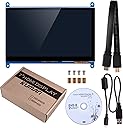
These comments pertain to the Kuman 7" LCD Monitor. I wanted to place a small monitor inside my PC case to monitor its hardware while gaming. After watching several videos and reading articles about this project, I decided that I could do it. I originally started out looking at 5" monitors but after measuring my available case space, I decided on a 7" monitor. This monitor wants an HDMI video port on your computer to provide the video data to display. It also wants a USB Type A (the large rectangle shaped that most of us are familiar with) port to provide power for the display. I used a 270 degree HDMI adapter at the monitor to keep from having to sharp bend the HDMI cable coming out of the monitor. For the USB connection, I used a vacant USB header on my motherboard (20 pin header) with a cable ending in a Type A port. The HDMI cable that I used was a 1 meter cable that I purchased separately and routed out an unused rear expansion slot. That plugs into my video card on the back of the computer. Now to the performance of the monitor! It was 100% Plug and Play for me. Turn the backlight switch on (it is marked)....plug in the USB micro cable to the marked Power port .....and plug in the HDMI cable, in my case, to the 270 degree adapter, and into the HDMI port on the monitor. Done....seriously....done. Power up your computer, the screen glows blue....says No Signal.....and waits for you to give it something to display. My Windows 10 recognized the second monitor on its own....enabled Extend (Windows key+P if you need) which allows you to drag and drop a tabbed page over to the second monitor. I opened my hardware monitoring window on the main screen and dragged it to the right and dropped it on the Kuman. Done.... no problems. The colors are saturated and wonderful. Windows automatically set its display to 1024 x 600 without me doing anything. Things to consider: I bought the Kuman display frame made for this monitor... it works perfect to hold the monitor BUT allow for the extra thickness of it if you are tight on clearances inside your case. I do NOT know if just the HDMI will power up this monitor since I used USB as listed by Kuman on their description. My USB still provides power to the monitor with the computer turned off so I also have to turn off the power switch on the power supply at the back when done for the day.