Desertcart purchases this item on your behalf and handles shipping, customs, and support to Ecuador.
🎯 Elevate your command center with HP GK320 — where precision meets style.
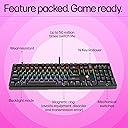
The HP GK320 is a wired full-size mechanical gaming keyboard featuring 104 keys with durable double injection keycaps and RGB backlighting. Equipped with ultra-reliable mechanical switches rated for 50 million keystrokes, it offers customizable lighting modes and a Windows lock key for uninterrupted gameplay. Designed for gamers and professionals alike, it combines robust build quality with responsive performance and a 1-year manufacturer warranty.


| ASIN | B08498H13H |
| Antenna Location | Gaming |
| Best Sellers Rank | #988 in Computers & Accessories ( See Top 100 in Computers & Accessories ) #25 in Gaming Keyboards |
| Box Contents | Keyboard |
| Brand | HP |
| Brand Name | HP |
| Button Quantity | 104 |
| Colour | Black |
| Compatible Devices | Desktop |
| Compatible Operating System Family | Windows |
| Connectivity Technology | Wired |
| Customer Reviews | 4.2 out of 5 stars 2,425 Reviews |
| Hand Orientation | Ambidextrous |
| Importer Contact Information | HP India Sales Private Limited, No. 24, Kothari Arena, Hosur Main Road, Adugodi, Bangalore, Karnataka, India, 560030 |
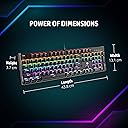
| Item Dimensions L x W x H | 43.8L x 13.1W x 3.7H Centimeters |
| Item Type Name | Keyboard |
| Item Weight Unit of Measure | 870 Grams |
| Keyboard Backlighting Color Support | RGB |
| Keyboard Description | Gaming |
| Keyboard Layout | QWERTY |
| Language | English |
| Manufacturer | Dongguan Suoai Electronics Co. Ltd., Suoai Industrial Park, Dongguan City, Guangdong, China - 523766, HP |
| Manufacturer Contact Information | Dongguan Suoai Electronics Co. Ltd., Suoai Industrial Park, Dongguan City, Guangdong, China - 523766 |
| Manufacturer Part Number | 4QN01AA |
| Model Name | HP GK320 |
| Model Number | 4QN01AA |
| Number of Items | 1 |
| Number of Keys | 104 |
| Packer Contact Information | Dongguan Suoai Electronics Co. Ltd., Suoai Industrial Park, Dongguan City, Guangdong, China - 523766 |
| Product Features | mechanical |
| Recommended Uses For Product | Gaming |
| Special Feature | mechanical |
| Style Name | Mechanical Switches |
| Switch Type | Mechanical |
| UPC | 194721902498 192545920476 |
| Unit Count | 1 Piece |
| Warranty Description | 1 year manufacturer warranty on the device from the date of purchase. In case of any technical/product related queries, please call 1800-258-7170 or 1860-258-3079 |
H**H
Value for money
Nice product…Thank you Amazon you are trusted platform
K**D
Decent but not long lasting
Product was very nice and worked fine. But I was disappointed when keys suddenly started malfunctioning today. It's been 20 months since purchase. I will buy one which will last more. This keyboard is not hot-swappable. Will try those this time.
M**N
Unleash Your Gaming Potential with HP's Mechanical Gaming Keyboard!
I recently upgraded my gaming setup with the HP Mechanical Gaming Keyboard, and I'm absolutely thrilled with the experience it offers. This keyboard has truly elevated my gaming sessions to a whole new level. First and foremost, let's talk about accuracy. This keyboard is an absolute beast when it comes to precision. Each key press feels responsive and consistent, allowing me to execute even the most complex moves with pin-point accuracy. Whether I'm in the heat of battle or executing intricate combos, the tactile feedback from this keyboard never fails to impress. But what truly sets this keyboard apart is the sound it makes when typing. If you're a fan of that classic typewriter sound, you're in for a treat. The audible click with each keystroke is not only satisfying but also incredibly immersive. It's like having a mini symphony of precision every time I type – a feature that I didn't know I needed until I experienced it. In terms of build quality, HP has truly delivered. The keyboard feels solid and well-constructed, making it a pleasure to use for extended periods. The keys have a satisfying resistance that strikes the perfect balance between comfort and control. The included wrist rest is a thoughtful addition, ensuring that marathon gaming sessions don't take a toll on my wrists. Compatibility is also worth mentioning. I've seamlessly connected this keyboard to my gaming PC, and it's worked flawlessly. The customizable RGB lighting adds a touch of personalization to my setup, and the software provided by HP makes it a breeze to tweak settings and create macros. Additionally, the keyboard's durability is impressive. It's built to withstand the demands of gaming, ensuring that it will be my loyal companion for many battles to come. The inclusion of anti-ghosting technology is a testament to HP's commitment to delivering a top-notch gaming experience. In conclusion, if you're a serious gamer looking to enhance your gameplay with a mechanical keyboard that offers remarkable accuracy, tactile satisfaction, and an incredible typewriter-like sound, the HP Mechanical Gaming Keyboard is an absolute must-have. Its precision, immersive feel, and thoughtful design make it a standout choice that has breathed new life into my gaming setup. It's a game-changer in every sense of the word.
W**Y
Best mechanical keyboard at this rate.
Loved the mechanical gaming keyboard and its sound. I have been using it for 2.5 years now.. There isn’t any problem at all. Budget friendly.
S**I
Well Done HP Mindblowing. Totally recommend this Keyboard. Value For Money Product.
I previously used the Ant Esport MK1000, and while the keyboard itself performed well, it was far from being value for money considering the features it offered. The real disappointment came with the warranty support—it was terrible. The staff were unhelpful, rude, and lethargic, taking an entire month to repair my product, and even then, the repair was poorly done. I had to escalate the issue by contacting the main manager to finally get the product replaced, which was the only positive outcome. Unfortunately, after a few months, I accidentally spilled coffee on it, causing half the keyboard to stop working—a fault that was entirely mine. Now, I’ve moved on to the HP GK320, which came highly recommended by a friend, and I must say, after using it for a week, I’m thoroughly impressed. The typing experience is a pleasure, thanks to the entire keyboard being pre-lubed, resulting in a soft key press. Though it took me a little time to adjust, it has made typing more comfortable and effortless. One minor drawback is the lack of specific key printing for functions like volume control, but compared to my previous experience, this is hardly a dealbreaker. The keyboard also comes with a 3-year warranty, and my friend had no issues with getting his replaced recently—unlike my previous ordeal with Ant Esport. This was one of the main reasons I decided to switch to the HP GK320. Advantages: The entire keyboard comes pre-lubed, enhancing the typing feel. Soft key press for a quieter, more comfortable typing experience. Effortless and comfortable typing overall. Sturdy spacebar for durability. Nice LED variety for customization. The keyboard has a permanently attached faceplate for added stability. It comes with a 3-year warranty, ensuring long-term peace of mind. Disadvantages: The soft key typing can cause minor errors until you get used to it. There’s a small amount of flex in the build. It’s a bit bulky and takes up a lot of desk space. It lacks a braided cable for durability. Overall, the HP GK320 offers fantastic value for money, especially with the included warranty and excellent customer service. A thoughtful touch is the Velcro strap for easy cable management, making it even more convenient for laptop users.
S**Y
Poor untested mechanical keyboard released for public use by HP
I bought this keyboard in Oct 2023 from amazon. It has only been used moderately for a few hours a day. Just around an year later certain keys were getting typed twice when pressed once. I used to take out the caps with the given keycap remover and reattach after pressing 10-20 times. This used to mostly solve the problem. However, problem started to recur every few months. Now, after 2.5 years, it has reached a state where a couple of keys need to be pressed very strongly to make them type. Also, they often produce 3 or so same letters for a single press. Also, the no. of keys typing double letters for a single press has increased to >~6. This has made it almost impossible to use it to write texts for work or even email. I have to constantly check for multiple typed letters in a word. This keyboard costed double of stadard membrane based keyboard, but is lasting less than half of them. I coutld not also check its warranty status, as the given serial no. is shown to be invalid by HP warranty service. Shame on HP keyboard.
V**D
A mixed buy : Design and size are good but developed problems in seven months.
I like the build quality of the keyboard. I like the compactness and the the fact the letters are visible without the rgb light. I don't like rgb much but still they are various combinations available and the small manual is quite helpful. They keys type well. It worked well for around seven months. The space bar and the two other keys, 'i' and 'a' and sometimes 'w' started acting up. A single key press registering multiple times. Service centres for peripherals is separate from that for laptops and there are only a few out there in Delhi NCR. They either don't pick up the phone or have rather poor response, so you might not have enough confidence to actually go for the repair. HP sucks and a speaker i bought from them is also not that good. That said, there were some missing screws in my keyboard. I don't know if this is a refurbished product sold as new or it's something of a manufacturing quirk/defect. Lately, my confidence in Amazon has gone down drastically. Initially i only bought books and was very late to buy electronics. And with a few poor buys, i feel it is better to just go to a store. I have not had problems with Flipkart as such but news about them having knock offs in their warehouses has dented my confidence. One can go with these platforms if they have cash to burn or need something really cheap. If you are confident in your repairing skills or know someone decent, then go for it is what i''d say. That said, for those who bought the keyboard and are facing issues, it could be due to dust lodged in the switches. So, try removing the keycaps. Then use a compressed air can or micro fibre cloth to the clean the dust. Take a cotton ball and dab it in iso propyl alcohol (99%) and press the switch. Once the switch goes in, squeeze gently to let a drop of iso propyl in, not a lot , just a drop. Repeat that with the other keys. Then use the cotton dabbed in iso propyl to clean the rest of the keyboard around the switches. Cover the keyboard with micro fibre cloth over night, to make sure that all the alcohol has evaporated completely. If you decide to clean the keycaps. Then soak it in warm soapy(dishwash) water for 30 minutes. Then rinse it off and let it air dry overnight, you don''t want even a little of it to seep into the board. The next morning, put the keycaps on and it should resolve the issue, if not, then try cleaning the switch the second time. Mine did and it is working all right now. If it is still not clear, then look for videos that demonstrate this process.
H**K
Technical Review - Keyboard for professionals HP Mechanical
I am a full finger typist. This keyboard is good for professionals who know typing and have a job where they need to spend hours typing. This is good keyboard in economy range. The other option in amazon is TVS Gold mechanical. Blue switch based HP keyboards are less rugged as compared to red switch based TVS keyboards. I prefer a single color backlit keyboard instead of multi color. Overall a good buy. Packaging good. Delivery super fast. Thanks to seller Appario Retail and amazon. Function keys of HP GK320 Mechanical keyboard. FN + 8 - Switches on back light of some keys. FN + 9 - Switch off back light. FN + 0 - Switch off back light. FN + ESC - Switch on back light. FN + UP Arrow key - Increase the brightness of back light. FN + DOWN Arrow key - Decrease the brightness of back light. FN + 1 - Switches on back light of some keys. FN + 2 - Switches on back light of some keys. FN + 3 - Switches on back light of some keys. FN + 4 - Switches on back light of some keys. FN + 5 - Switches on back light of some keys. FN + 6 - Switches on back light of some keys. FN + 7 - Switches on back light of some keys. FN + INS Key - Changes back light pattern of all keys. FN + Home Key - Changes back light pattern of all keys. FN + Page Up Key - Changes back light pattern of all keys. FN + Del Key - Changes back light pattern of all keys. FN + End Key - Changes back light pattern of all keys. FN + Page Down Key - Changes back light pattern of all keys. FN + Down Arrow Key - Reduces back light brightness. FN + UP Arrow Key - Increase back light brightness.
Trustpilot
1 day ago
5 days ago