🚀 Elevate Your Content Game with Canon EOS M50 Mark II – Where Vision Meets Precision!
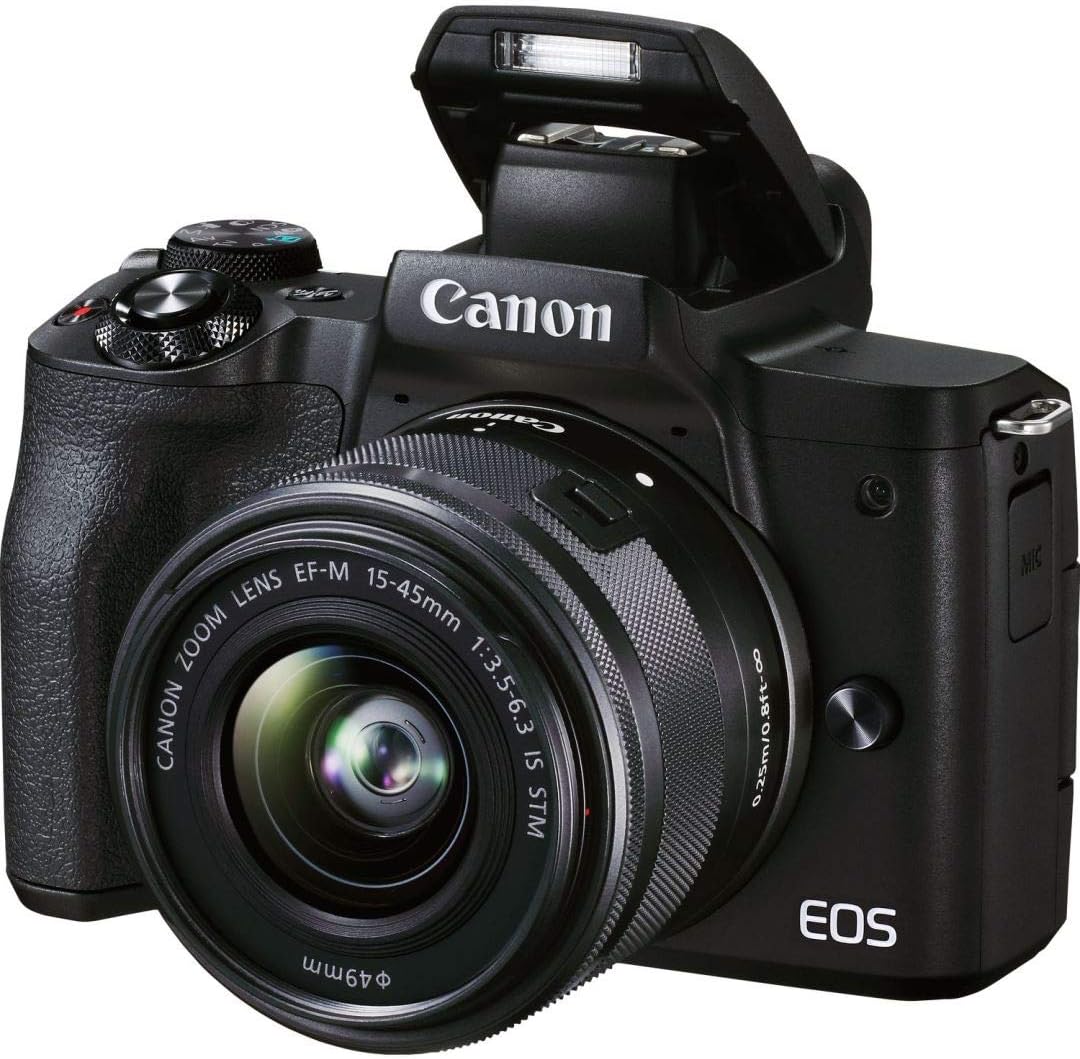
The Canon EOS M50 Mark II + EF-M 15-45mm IS STM Kit Black is a powerhouse mirrorless camera designed for content creators and professionals alike. Featuring a 24.1MP APS-C CMOS sensor, DIGIC 8 processor, and advanced Dual Pixel CMOS autofocus with Eye Detection, it delivers stunning stills and smooth 4K UHD video at 24p plus HD 120p slow motion. Its vari-angle touchscreen enhances vlogging and creative framing, while built-in Wi-Fi, Bluetooth, and clean HDMI output enable seamless live streaming and webcam functionality. Compact yet versatile, this kit is the ultimate all-in-one tool for capturing and sharing your vision with unmatched clarity and style.


| ASIN | B08KSKV35C |
| Age Range Description | Adult |
| Aperture modes | Available |
| Are Batteries Included | Yes |
| Aspect Ratio | 3:2 |
| Auto Focus Technology | Contrast Detection |
| Autofocus | Yes |
| Autofocus Points | 143 |
| Best Sellers Rank | #105,836 in Electronics ( See Top 100 in Electronics ) #116 in DSLR Cameras |
| Bit Depth | 14 Bit |
| Brand | Canon |
| Built-In Media | Camera Body & Lens |
| Camera Flash | Hotshoe |
| Camera Lens | EF-M 15-45mm f/3.5-6.3 IS STM |
| Color | Black |
| Compatible Devices | Smartphones, Tablets, Computers |
| Compatible Mountings | Canon EF-M, Canon EF-S, Canon EF |
| Connectivity Technology | HDMI |
| Continuous Shooting | 120 FPS |
| Crop Mode | APS-C |
| Customer Reviews | 4.7 out of 5 stars 2,141 Reviews |
| Digital Scene Transition | zoom |
| Digital-Still | Yes |
| Display Fixture Type | Articulating |
| Display Resolution Maximum | 6000 x 4000 |
| Display Type | LCD |
| Dots Per Screen | 1040000 |
| Effective Still Resolution | 24.1 MP |
| Expanded ISO Minimum | 100 |
| Exposure Control | Manual |
| File Format | JPEG, Raw |
| Flash Memory Bus Interface Type | SD High Speed (SDHS) |
| Flash Memory Speed Class | U1 |
| Flash Memory Type | Single Slot: SD/SDHC/SDXC (UHS-I) |
| Flash Memory UHS Speed Class | U3 |
| Flash Memory Video Speed Class | V30 |
| Flash Modes | eTTL |
| Flash Sync Speed | 1/200 Second |
| Focal Length Description | 55 to 200mm (35mm Equivalent Focal Length: 88 to 320mm) |
| Focus Features | Continuous-Servo AF (C), Manual Focus (M), Single-Servo AF (S) |
| Focus Mode | Continuous-Servo AF (AF-C), Manual Focus (MF), Single-Servo AF (AF-S) |
| Focus Type | Continuous-Servo AF, Manual Focus, Single-Servo AF |
| Form Factor | Mirrorless |
| Global Trade Identification Number | 00013803335477 |
| Hardware Interface | 802.11 b/g |
| Has Color Screen | Yes |
| Image Capture Type | Stills & Video |
| Image Stabilization | Digital |
| Image stabilization | Digital |
| Item Weight | 351 Grams |
| JPEG Quality Level | Basic, Fine, Normal |
| Lens Construction | 10 Elements in 9 Groups |
| Lens Type | Zoom |
| Manufacturer | Canon USA |
| Maximum Aperture | 3.5 f |
| Maximum Focal Length | 72 Millimeters |
| Maximum Image Size | 24.1 MP |
| Maximum Shutter Speed | 1/4000 s |
| Memory Slots Available | 1 |
| Metering Methods | Center-Weighted Average, Evaluative, Partial, Spot |
| Minimum Focal Length | 24 Millimeters |
| Minimum Shutter Speed | 30 Seconds |
| Model Name | Canon EOS M50 Mark II + EF-M 15-45mm IS STM Kit Black |
| Model Number | 4728C006 |
| Model Series | EOS M |
| Movie Mode | Yes |
| Night vision | No |
| Number of Diaphragm Blades | 7 |
| Photo Filter Size | 49 Millimeters |
| Photo Filter Thread Size | 49 Millimeters |
| Photo Sensor Resolution | 24.1 MP |
| Photo Sensor Size | APS-C |
| Photo Sensor Technology | CMOS |
| Real Angle Of View | 84 Degrees |
| Recording Capacity | 30 Minutes |
| Remote Included | No |
| Screen Size | 3 Inches |
| Self Timer | 10 Seconds |
| Sensor Type | CMOS |
| Series Number | 50 |
| Shooting Modes | Single shooting, Continuous shooting (High-speed continuous shooting, low-speed continuous shooting) |
| Skill Level | Professional |
| Special Feature | Brightness Control |
| Specific Uses For Product | Photography, Videography |
| Supported File Format | JPEG, Raw |
| Supported Image Format | JPEG, RAW |
| Total Still Resolution | 24.1 MP |
| Total USB 2.0 Ports | 1 |
| Total USB Ports | 1 |
| Total Video Out Ports | 1 |
| Touch Screen Type | Capacitive |
| UPC | 013803335477 |
| Unit Count | 1.0 Count |
| Video Output | Micro-HDMI |
| Video Resolution | 4K UHD 2160p |
| Viewfinder | Electronic |
| Viewfinder Magnification | 1.0x |
| Warranty Description | 1 year manufacturer |
| White Balance Settings | Auto, Cloudy, Color Temperature, Custom, Daylight, Flash torch, Fluorescent, Shade, Tungsten |
| Wireless Technology | Bluetooth, Wi-Fi |
| Write Speed | up to 104 MB/s |
| Zoom | Smooth Zoom |
A**N
An Unbeatable All-in-One Package for Content Creators!
The Canon EOS M50 Mark II + EF-M 15-45mm IS STM Kit Black is nothing short of a game-changer for content creators, and it truly deserves every one of its 5 stars. Let's start with the quality. The EOS M50 Mark II delivers stunning image and video quality, consistently capturing sharp, vibrant, and lifelike moments. Whether I'm taking photos or shooting videos, the results are always top-notch. The lens included in this kit is versatile and complements the camera beautifully, offering crisp images with its STM technology. The compact size of this camera is another standout feature. It's incredibly portable, making it ideal for on-the-go shooting. Whether I'm traveling or simply shooting around town, I love how it doesn't weigh me down. It's the perfect companion for all my adventures. One of the most impressive features for content creators is the flip-out touchscreen. Being able to see myself while recording is a game-changer. It not only ensures that I'm perfectly framed in every shot but also makes vlogging and self-recording a breeze. It's like having a personal cinematographer with me at all times. The user-friendly interface and intuitive controls make it easy for beginners to get started, while offering advanced settings for more experienced photographers. It strikes the perfect balance between simplicity and customization. In conclusion, the Canon EOS M50 Mark II + EF-M 15-45mm IS STM Kit Black is an unbeatable all-in-one package for content creators. It combines excellent quality, compact size, and the convenience of a flip-out touchscreen in a way that's hard to beat. Whether you're a seasoned photographer or just starting your content creation journey, this camera will exceed your expectations. I can't recommend it enough; it's an easy 5-star rating!
H**Y
Ignore claims this camera doesn't have clean HDMI output
I read through the reviews a bit, and the amount of people leaving 1 star reviews because the camera is above their skill level is amusing, and suggesting this camera is bad. It's user error, 100%, this camera works excellent in OBS with clean HDMI. There's a really simple solution, read the manual. 1) yes, dummy batteries work, the rubber latch is also the door. Just lift it up instead of sliding it and the plug lines up, it's literally got a full image diagram on how to do this. 2) no, it doesn't charge by USB, it's a professional camera, not a webcam. Buy a few batteries if you need to use it away from a power source with the dummy battery. That's why they sell multiple battery slot chargers, that's what professional photographers do with professional cameras. 3) the software autosyncs to your computer and phone... If you read the manual, it tells you how step by step. In fact, you can choose between Bluetooth, wifi, or both. Buy an SD card with a minimum 170mbps, Sandisk makes a bunch of them. I got the 170mbps 256gb, works great, and I can record over 4 hours of 4k footage to it. I've literally never bought a professional camera before, so I did what any noob should, I read the manual and did research for about 2 weeks before choosing one and voila, now I know terminology, functions, settings, and can use the camera for streaming, photography, videos, OBS via HD60, etc... If it's a bad review because of functions, it's very likely they didn't read the manual. Took me 3 hours to go through everything, and now I can operate the camera in a ton of different lighting conditions, environments, video use, streaming, whatever. There's a term in tech, PEBKAM. It translates to 'Problem exists between keyboard and mouse'. Ultimately, it means the user is the problem, not the tech. I saw a bunch of 1 star reviews with a significant amount of upvotes, so these bad reviews are a problem. It's not the camera, the people who left the review didn't read how to use the camera. It's a shame, there's a lot of people that will overlook this beast of a camera just because someone that didn't read left a review. You read this, so kudos to you, you're better off than over 300 people that actually believed and found the 1 star reviews helpful. This is an excellent camera for OBS if you use a capture card; I'm using the HD60 flawlessly, clean hdmi and all. While you can use USB, don't. It's just a feature they added for convenience, it's not going to be great quality on a USB connection. Get a capture card if you want to use this as a webcam. It's a professional camera that has the added convenience of allowing a USB connection, not the other way around. I highly recommend this camera; for the price point, you get a ton of features most other cameras don't have. If you are a camera noob like me, just read the manual, and use a search engine to look up terminology you don't understand. Within a few hours, you'll be able to use the camera to it's fullest extent; there's a learning curve, but also worth the time invested in studying. I'm getting excellent results, setting the correct ISO, using the proper lighting, etc. If you are going for a blurry background with a focus on yourself, you might need a different lens. Don't get me wrong; this lens can do it a bit, probably enough for most people, but not okay if your subject is not very far away from the background to blur. If you don't know how to do this, search about aperture. Buy the camera with the default lens kit first, you'll likely buy the wrong thing if you don't understand the camera, lighting requirements, distance from camera/background. Read the manual, and look up all the terminology you don't understand first. Distance from background and lighting type makes a massive difference in which lens will be the correct to buy if you want an extremely blurry background with clear subject focus. Is this camera for an amateur? No, not really. They did a great job explaining everything in their manual, and I got some additional help from YouTube, but here we are 24 hours after I opened the box, and now I'm pretty good at navigating it. I know what to look for in the settings for various lighting and distance scenarios because I read the manual.
K**B
Great beginner camera, easy to use and takes great pictures.
I’m a new photographer and this was perfect for me to play with settings as well as different environments and gain a new passion. I got this camera in April 2023 and it is currently June 2023 and I’ve made lots of progress already! It’s been a really good camera for me to get and figure out what I want to take pictures of. I ride dirt bikes and I love the outdoors so naturally I wanted to test the camera in those environments. The picture quality is amazing compared to your typical mobile phone. With the kit lens and a tripod you can take stunning long exposure Astro photography photos. It took a few tries to figure out the settings to use but once I did, the results were awesome. The auto focus on this camera is pretty good. It tracks your subject really well for the most part unless you’re in the trees and have stuff in the way before your subject enters the frame. Even though it struggles with that, it’s not an unusual thing for a camera to struggle with. Other than that, it’s great with action shots. I have tested the video out a little bit and same thing, it’s really impressive coming off of mobile phones. It tracks the subject very well and the picture quality is very good. I don’t have any major complaints about the camera, everything feels really solid. The menu definitely has a learning curve if you’re not familiar with cameras but that is to be expected. Overall it’s been an awesome camera and I get excited to use it every time I get to.
G**R
My Trusted Camra
Honestly 10/10 camra I love it use a ef adapter on it or a prime lens man this camra will take you far i promise you that camra quality is good and its light weght is amazing autofocus is awesome just trust me just do it
C**Y
Great Starter Camera
This is the first digital camera we have purchased, and are far from professional photographers(I.e. we do not have a need USB charging which appears to be a complaint). It is fairly easy to use once you get the hang of the controls. The Cannon app allows the camera to send images directly to our IPhones, or shoot remotely so that is always a plus. The attached image was a simple point and shoot of the dog and the moon through my cheap telescope. 6 Month Update: Absolutely no issues, we have snapped thousands of photos and are getting pretty good at photography now. It is still such a great buy, go ahead and buy if you are on the fence. 1 Year In: Added a snap of the Geminids Meteor Shower on Orion’s Belt last night. A long way to go, but slowly becoming competent in Astrophotography with this camera. I would like to branch out with some new lenses this next year. We have been able to document our little boy’s first year of life with this camera, so the investment has been worth every penny. 1 1/2 Years: Added the EF-M 22mm f2 lens to up my astrophotography game with this camera and the results are brilliant. It also works as a street prime as well. Camera is still functioning flawlessly. Added a shot of the Milky Way I took last night. Purchased a Sigma 30mm f1.4 lens for beach photography and ended up shooting the Milky Way all night instead. Highly recommend that lens for the EF-M platform because it is pretty much a do-it-all lens. 2 Years In: Still absolutely no issues. The Sigma 30mm f1.4 lens pretty much has found a permanent place on this camera after 6 months of shooting with it. Adding the best Milky Way photo I have to date using the Sigma captured at St. George Island, FL.
A**R
Awesome camera! it takes very pristine sharp photos
I bought this camera, went on a trip, took pictures, sold the camera, and now (3 years later) I want to buy the camera again! It's that good. This camera packs a lot for the price, it's not high end, but you can definitely take amazing pristine-detailed sharp pictures (just look at the photos I took! and I was just fooling around). Best pictures I've taken were with this camera. Only downside is that It used to cost $550, price has gone up by half (reason why only 4 stars). But this is an excelent camera!
J**N
Worth The Price
If you have the money I would highly recommend purchasing this camera. I bought it in black but now that I think of it maybe white would be unique as most cameras and lenses are black. I love this camera. It takes amazing pictures and if you’re someone who is new to cameras or is upgrading from point-and-shoot cameras then this is for you. The camera itself tells you about the features every time you switch the toggle so if you are unsure of which setting to use it will give you a brief description of what each function before you choose. It is lightweight so it can be carried around with ease. It comes with a shoulder strap and it has a built in flash. To get the the flash just lift it up and voila. The viewfinder is also versatile and came be rotated in any direction. I will insert pics of what I have taken the aforementioned functionalities. Also you can use the canon app to transfer pics from the camera straight to your phone. The pic of the flower I didn’t transfer as yet but I promise it looks waaaaaaay more vibrant in person.
J**Y
Exactly what I needed!
I have toyed with the idea of a buying a camera for a long time, but I had a hard time justifying the purchase given how expensive they tend to be. I also worried a lot about the fact that I have absolutely zero background in photography other than the occasional photo taken with my iPhone. The Canon EOS M50 Mark II was a camera that came recommended by many people online as a camera that is great for both photos and videos. I plan on using this to take pictures for social media as well as (maybe) a means for recording videos as well. So far, I have been extremely happy with both the quality of the photos and the user-friendliness of the device. I've mostly been using the automatic setting, but I have played around a bit with the other modes as well, particularly for night photography. The process of taking photos and transferring them to your devices (be it mobile or computer) was simple, allowing me to do any editing as needed. There are also many features (including filters) available via the camera itself if you're unfamiliar with third-party editing software. The camera and lens are lightweight and a good size for portability. I had no problem carrying it with me when traveling.
Trustpilot
2 weeks ago
2 weeks ago