Buy anything from 5,000+ international stores. One checkout price. No surprise fees. Join 2M+ shoppers on Desertcart.
Desertcart purchases this item on your behalf and handles shipping, customs, and support to Ecuador.
๐ Future-Proof Your Internet โ Speed, Savings & Stability in One!
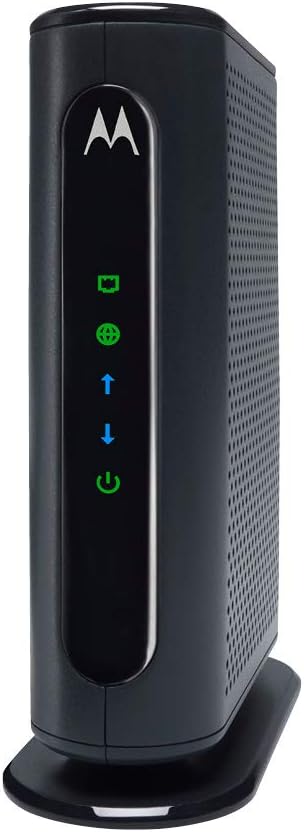
The MOTOROLA MB7420 is a DOCSIS 3.0 cable modem delivering up to 686 Mbps with 16 downstream and 4 upstream bonded channels. Certified by major ISPs like Comcast XFINITY and Spectrum, it offers reliable, high-speed internet connectivity through a single Gigabit Ethernet port. Designed for easy setup and long-term durability, it includes surge protection and a 2-year warranty, making it a smart investment that saves rental fees and future-proofs your home or office network.


| ASIN | B01A1E6BA2 |
| Best Sellers Rank | #12,141 in Computers & Accessories ( See Top 100 in Computers & Accessories ) #54 in Computer Networking Modems |
| Brand | Motorola |
| Built-In Media | Cable Modem^Power Cube^Ethernet Cable^Velcro Cable Organizer^Coax Connection Tool^Quick Start Flyer |
| Color | Black |
| Compatible Devices | Personal Computer |
| Connectivity Technology | Ethernet |
| Customer Reviews | 4.4 out of 5 stars 6,859 Reviews |
| Data Transfer Rate | 686 Megabits Per Second |
| Global Trade Identification Number | 00855631006019 |
| Internet Service Provider | xfinity;spectrum;cox;optimum |
| Internet service provider | xfinity;spectrum;cox;optimum |
| Item Dimensions L x W x H | 4.9"L x 2"W x 6.1"H |
| Item Type Name | Cable Modem |
| Item Weight | 9.3 Ounces |
| Manufacturer | MTRLC LLC |
| Maximum Downstream Data Transfer Rate | 686 Megabits Per Second |
| Maximum Upstream Data Transfer Rate | 120 Megabits Per Second |
| Mfr Part Number | MB7420-10 |
| Model Number | MB7420-10 |
| Modem Type | Cable |
| Number of Ethernet Ports | 1 |
| Number of Ports | 4 |
| Product Dimensions | 4.9"L x 2"W x 6.1"H |
| UPC | 855631006019 |
| Unit Count | 1.0 Count |
| Warranty Description | 2 year manufacturer |
R**5
Motorola 16x4 Cable Modem, Model MB7420 - Great Modem Easy Install
The modem works as advertised and I had no issues with getting it provisioned from TWC. It took all of ten minutes from unboxing, disconnecting the old modem connecting this one and having it provisioned. I called the technical support as I was unboxing and disconnecting and it was simple and painless to get the new modem on line. No initial difference in speed but none was expected. Only difference seems to be during peak times I now seem to get my full rated speed and no evening slowdowns. Time will tell if this will continue as it is up to the bandwidth the cable company provides. I upgraded from an older version of this modem. My cable provider will be increasing speed shortly so I wanted to be prepared. The previous one would have been able to handle the upgraded speed but based on reviews this seemed like it would give me an advantage as is has more channels available to get the maximum speed. Anyone on my "node" who has an older modem or probably the one from the cable company is not going to have as many channels available to I should get better performance. This should "future proof" me for at least the next five years. It is a good investment considering it will pay for itself in 9 months. I had my current modem for 5+ years and no problems. I will sell it at a garage sale and make some of my initial investment back on that too.
P**P
Fast, Good, AND Cheap -- how often does THAT happen?
Pros: Fast, Works without a hitch, Pays for itself in 9 months Cons: The diagnostics page could be formatted better I purchased this when I upgraded my TWC service. I am subscribed to the TWC 50/5 "Ultimate" package and I'm getting 124/6 so no complaints there. The only annoyance was dealing with TWC support for activation. I use TWC's phone service, so I kept the old TWC modem for the phone. So of course they kept activating and deactivating the wrong modem at first, but I stayed on the line until they sorted it out. Since then (just over two weeks) the modem has been up nonstop with zero errors, zero outages, etc. 16 down channels and 4 up channels all bonded, I'm amazed I can get this level of service out here in the sticks (Hudson Valley NY). One fun fact about TWC -- if you use their modem for phone only, they won't charge you for it. So when I brought in this modem and relegated the old one to phone only use, they let me keep it but stopped charging me $10/month. Good deal. The only possible complaint I have about this modem is that the web page is a little basic. It shows what you need to know, signal strengths etc, but the formatting on the log entries isn't great and some entries get truncated. It's a minor thing but it's the only downside I could really think of so I figured I'd mention it. The way this thing performs I wouldn't trade it over that. Overall, highly recommended. Performs flawlessly, works beautifully with my TP-Link C7 router, gives me rock-solid stable service faster than I am paying for.
P**.
Heat and Power Measurements
This review is being written the same day I got the modem, so don't rely on it for long term impressions. The setup process went fine and the modem works correctly. I'm getting the speeds that I pay for, same as what I had previously. I purchased the modem because my provider is in the process of upgrading their network, and when the upgrades are complete I'll need a 16 channel modem to remain on my current plan with the new speeds they'll offer. I wanted to write this review to provide some useful data for anyone else considering this model, because it's something I wish I could have found documented for newer modems before I purchased it. First is the heat produced by the device. I've attached a photo taken with a thermal camera, showing the modem after being in use for 2 hours. It reads 111 degrees Fahrenheit at the hottest point. (Approx. 44 degrees Celcius) This means that the modem is warm to the touch, but not hot. I also measured the idle power consumption of the modem using a kill-a-watt device. This is with the modem connected to the network and some devices connected via a router having some connections open, but no active downloads or streaming occurring. Idle power consumption averaged at 7.7 Watts. I like the modem itself, although I'm not sure at this point if I'm going to keep it. Compared to my previous modem, (SB6141) both the power consumption (5.9W vs 7.7W) and heat output (98F vs 111F) are higher. On the plus side, it offers twice as many channels and twice the maximum speed. Considering the performance bump, the difference between the two devices likely means the MB7420 is actually better from a performance per watt perspective. If you need the kind of speed this modem is capable of, it seems like a very good option.
R**N
Great model, has worked without issues ever since I got it.
I'm not an IT expert or computer specialist, so I won't get into the technical details of this modem, but what I can tell you is I've been using it for about 4 months now and it's performed perfectly. I have Comcast Xfinity Internet service with a 150mbps plan. This modem gives me consistent speeds all day long, and has never failed. Setting it up was easy, just plug it in, go to Comcast's web site and register it as a new device and I was up and running in about 10 minutes. I use it with a Luma Whole Home WiFi System (3 Pack - White) - Replaces WiFi Extenders and Routers, Works with Alexa, Simultaneous Dual Band 2.4/5GHz, Parental Controls/Security, Gigabit Speed, WPA/WPA2 Encryption and together they are giving me solid Internet throughout the house. If you're considering buying your own model, definitely do. The rental fees Internet providers charge are a total rip off. Within a year you'll had paid for this device and then you're off the hook for the rest of your life!
B**D
So far so good
I wanted to avoid the $10 monthly fee Time Warner was charging me for a long obsolete modem; also I "upgraded" my speed - mostly for uploading - so I needed a new modem. Seeing that they themselves use Motorola I figured this would be a safe bet to actually work with their "service". Ist - of all. It works, it's small simple and light. It has 5 lights on the front and the two arrows indicate either the speed by color or the full number of all channels being used I can't remember which and I'm not going to look it up but they ought to both be blue and solid. 2nd - I live in a low population area so Time Warner charges the same prices they charge for geometrically faster service they have available in Metro areas than they're willing to go for here. So I'm using the 2nd fastest speeds they allow non business peasant schmucks like me to have. 3rd - I don't have TV in this building but intend to get another one of these for where I do. There the service is the fastest for non business schmucks and the service for internet HDTV via their internet is iffy at best; but here again - and as most of you know - all of these companies are involved in monopoly behavior that used to be illegal but was made legal under the RayGun regime - and please note got progressively worse under the Democratics (his former Party) - so it's difficult to tell if and when problems occur whether it's them or the service and naturally they can conveniently blame each other. I think the price is based on the $10 fee so whether it pays for itself in 5 years depends on whether it lasts that long or whether Time Warner Allows it to last that long. As far as certifying or as they say "activating" this with them goes. I had no problem - which was truly amazing. For most things they go into hard sell mode but apparently in regard to modems they don't seem to mind whether you have you own. Only time will tell what that's about.
M**1
Good replacement modem
My old modem, an Arris, was starting to give off a slight burning smell. It was seven years old, so it seemed like a good idea to replace it before it caused more problems. It was also slowing, but it could have been the ISP or router. This modem had good enough specs for my 50mb service. It has outperformed my old modem, even though the old one had similar performance on speed tests. Even though this is not formally faster, it works better. Pages load faster and streaming is smoother. It's a good upgrade. The lights are also more subdued than the old Arris modem, which was too bright. EDIT: Although I was happy with the modem' s performance, I was not happy with the strong odor emitted by the modem once it operated for a few hours and heated up. I thought at first it was part of the normal off-gassing process, but it was much stronger than that and didn't improve after a few days of use. It gave me a bad headache anytime I was close to it, and the smell carried for several feet. If you have any chemical or fragrance sensitivities, you might want to choose another modem.
D**.
AVOID THIS MODEL, TOXIC CHEMICAL SMELL
This modem installs easy and works average. But, there were instances of the signal dropping. For example, playing music with my Alexa cube via wifi and the song stops and minutes later starts a new song. Or my youtube tv signal hanging up. I returned this modem, (the real big reason is outlined below) and installed an ARRIS 6183. This same drop out pattern did not happen with the ARRIS, so I rule out the internet provider or local conditons and put the blame on the modem. But, there is more bad news... Out of the box there was an unusual smell coming from the unit. At first I felt it was just the usual new electronics smell. But after installing it and having it heat up and run for several days, the toixc smell coming off of it only got worse to the point of filling up the room and affecting me physically. Since it was a PRIME purchase, the Amazon return and refund was fast and efficient. There are a lot of positive reviews for this modem. Maybe this was an isolated instance, but I highly doubt it. I worked in the computer industry for over 20 years and this is not a one off thing. They are likely making these very cheaply with a different vendor or location now and maybe using components that are questionable in terms of volatile organic compunds (VOCs). The fact that Best Buy does not offer these new anymore and only "refurbished" is telling in itself. I would avoid this model like the plague. Better yet just go with the ARRIS line. I have used them before with no issues and that is why I returned to it again. I got a new pc and printer at the same time, and they were odorless. There is no reason to put up with toixc smelling electronics anymore. The ARRIS 6183 has the equivalent performance as this unit for a few dollars more and is working without drop outs and no odor whatsoever.
L**S
It works exactly as expected
Simple, no frills or thrills. This is a straight forward cable modem. Cox requires the customer to call and provide the MAC address and S/N to activate. So the installation instructions are plug in the power cord, connect Cox cable, connect network cable, call Cox, twiddle your thumb for 20 - 40 minutes, cross your figures that the Cox customer support person is not incompetent and that you will not be transferred to tech support and repeat the wait and prayers. When done, read your Cox bill carefully and hope that you do not need to call Cox billing and repeat the wait and the prayers to remove the rental fee. No, my prayers were not answered. Yes, I had to go through all of that. But at least, Cox staff were polite. It met my expectations because the price and the capabilities are OK. I did not need a $10 after tax modem/router combination unit rental. I live in a high local communications tax area and I own 3 routers. I also, Like to be a free bird. I did not want to invest in a cable modem/router unit. If Cox ticks me off, I want to switch to DSL or MiFi without too much to lose. It is not the latest technology in the market, but Cox service does not exceed the speed capability of this unit, and I do not foresee me purchasing the top Broadband speed to read my email or occasional video clip.
Trustpilot
2 months ago
2 weeks ago