


🖨️ Organize smarter, print faster, and label like a pro with NIIMBOT D11!
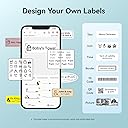
The NIIMBOT D11 Label Maker is a sleek, portable thermal printer designed for professionals and home organizers alike. Featuring wireless Bluetooth connectivity, a rechargeable battery lasting up to 2 months, and a fast 60 pages per minute print speed, it delivers crisp, BPA-free labels including texts, barcodes, and QR codes. Its compact design and versatile app templates empower users to create custom labels effortlessly, making it an essential tool for efficient, stylish organization.






| ASIN | B088JTD1PZ |
| Additional Printer Functions | Print Only |
| B&W Pages per Minute | 60 ppm |
| Best Sellers Rank | #73,803 in Office Products ( See Top 100 in Office Products ) #166 in Desktop Label Printers |
| Brand | NIIMBOT |
| Built-In Media | Labels |
| Color | Blue |
| Color Depth | 1 bpp |
| Compatible Devices | Smartphones |
| Connectivity Technology | Bluetooth |
| Control Method | Voice |
| Controller Type | iOS |
| Customer Reviews | 4.5 out of 5 stars 4,541 Reviews |
| Dual-sided printing | No |
| Duplex | Manual |
| Hardware Interface | USB |
| Is Electric | Yes |
| Item Dimensions D x W x H | 1.6"D x 2"W x 4"H |
| Item Type Name | Multifunction Printer |
| Item Weight | 360 Grams |
| Manufacturer | NIIMBOT |
| Maximum Copy Resolution Black and White | 203 dpi |
| Maximum Copy Resolution Color | 203 dpi |
| Maximum Copy Speed Black and White | 60 ppm |
| Maximum Media Size | 3 x 5 inch |
| Maximum Print Resolution Black and White | 203 dpi |
| Maximum print Resolution Color | 203 dpi |
| Model Name | D11 |
| Model Number | D11 |
| Model Series | D110 |
| Number of Trays | 1 |
| Other Special Features of the Product | Portable |
| Paper Size | 0.5*1.6 Inches |
| Print media | Labels |
| Printer Connectivity Type | Bluetooth |
| Printer Output Type | Monochrome |
| Printer Type | Thermal |
| Printing Technology | Thermal |
| Processor Count | 1 |
| Resolution | 203 x 203 dpi |
| Scanner Type | Portable |
| Series Number | 11 |
| Special Feature | Portable |
| Specific Uses For Product | print labels |
| Total USB 2.0 Ports | 1 |
| Total Usb Ports | 1 |
| UPC | 303276842245 |
| Unit Count | 1.0 Count |
| Warranty Description | 12 months warranty |
| Warranty Type | limited warranty |
| Wattage | 1200 milliamp_hours |
C**H
Did not expect this to be such high quality.
Your looking at it, and you see its less than 30 bucks. Then you see there is a discount on top of that. You are like, mehh how good could this really be. I was not expecting the build quality to be this good for this price. Very solid heavy feeling printer that works out of the box. Loading the paper takes a little practice because it wants to un-spool when you put it in, but it does not take long to figure out how to load it without issue. The Application is really good. It is a bit tiny on phones but its very simple to use once you get familiar with it. This thing prints super fast, as you would expect with a thermal printer this size. The quality of the prints is good and it spits them out pretty quick. You just tear it off and peel and stick. I don't know about the battery life yet as I have not used it that much. The only thing I don't like is that fact the subscription for additional features is very expensive. You don't need all of that for standard stuff. If you want to really knock it up a notch you can spend money on all the additional fonts and stuff. the problem is its subscription and for the price you could just get the prints don't professionally. Other than that I love it, probably one of the bust buys of this year for me.
F**1
Labels in a flash
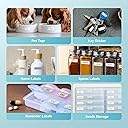
I love this little printer. It is great for all my labeling needs at work as well as at home. The labels are small enough for my medication dispenser, as well as the tabs that go into my notebooks at work. Printing fonts are large, and the pics come out very clear. Easy to use and not difficult to connect to my phone, and not to forget to mention, it fits neatly into my work bag. I highly recommend for parents who need to label or professionals who need a label in a flash.
M**E
Great purchase
Very easy to set up and start using. Great product
A**Y
Simple, easy to use label maker
This is a fun, easy to use tool that can add value and joy to your life. Ease of use: Excellent Printing ability: Excellent. Labels print quickly. Size: Excellent. Size of an iPhone 8, only thicker. Refills: Easy to purchase on Amazon (search for "label maker tape"; one roll is approx. $12 and you can even buy clear ones* or a roll with cute animal backgrounds**.) Ink toner: Don't need to buy any. This label maker uses thermal printing. You only have to buy refill tape rolls. This only prints black and white. No color. Charging: Easy. Charges using an included USB cable. Holds a charge for a long time. Turns off by itself. It sings a little song when you turn it on and when it turns off (no joke, it really does). App: Not perfect. It was easy to download the app onto my phone and to have the app connect to the label maker using Bluetooth. I did not have to register and create an account to use the app. But, without registering for an account, you cannot save labels. If you close the app or let a lot of time lapse, your label will be deleted and you have to retype the label. When I was really annoyed by having to repeatedly type the same label, I tried to create an account even though I read reviews that highlighted potential privacy concerns. But, registration requires a verification code and Nimbot would email me the verification code after 10 minutes and by then, my registration would have timed out. I am unable to create an account even if I wanted to. Using the App: Good, not excellent. The instruction guide that comes with the label maker is vague so you have to play around with the app on your own. The app opens up and is able to automatically detect the type of label maker tape that is loaded (e.g., size, shape) which is great. You then double click on the label in the app to start typing. The text box is usually bigger than the label, so I always have to adjust the sizing and location of the text box. It gets annoying. I wish that by default, the text box would appear centered and sized to fit the label. Usefulness: Very useful. I created labels for all of my hanging file folders. I find folders more quickly. I can read the labels a lot faster when the font is typed out compared to handwritten labels. I also bought the label maker to trivia night and had fun printing out labels with our team's name (A Long Hard Day at the Dildo Factory) to put on our answer sheets. Conclusion: Overall, I am very happy with this label maker and have found it to be extremely useful. I highly recommend this label maker for someone who wants a simple, easy to use, and inexpensive label maker. *https://www.amazon.com/Address-Waterproof-Sticker-Supplies-NIIMBOT/dp/B0956SCWTV/ref=sr_1_6?crid=3KM7Z6F04WM96&keywords=niimbot%2Blabels&qid=1656791005&sprefix=nimbot%2Blabel%2Caps%2C75&sr=8-6&th=1 **https://www.amazon.com/Address-Waterproof-Sticker-Supplies-NIIMBOT/dp/B0956NG1FD/ref=sr_1_6?crid=3KM7Z6F04WM96&keywords=niimbot%2Blabels&qid=1656791005&sprefix=nimbot%2Blabel%2Caps%2C75&sr=8-6&th=1 How to add emojis: Open app, open a template, double tap on the text box as if you are going to start typing. Don't type and press OK. A menu will appear. Press "Element" on the top row, left hand side. A menu will appear. Swipe left to see more options. Press "Material" and you will see a menu of emojis. To type text, press "Element" again. Swipe left and press on "Text". A text box will appear. Press twice on the text box and you will be able to edit the text box.
P**U
Convenient!
I'm not super tech savvy but I figured out how to use the label printer. You connect to the printer with your phone's Bluetooth then use their app to make your labels. There are plenty of free templates, and more if you pay a fee. You can save templates, adjust the size to some degree, change the font, add small designs, etc. Simple! It's small and easy to carry around. It prints fast. The printer came charged. It has a USB cable to connect to charge. I believe it's a micro USB cable.
C**E
A rockstar label maker! Easy to use and didn't make me set up an account
This is a rockstar label maker and I'll tell you why. First of all I want to be printing labels within 5 minutes max of opening the box. I bought a similarly priced label maker from another manufacturer and the user interface was so horrendous I couldn't even print labels consistently after about 10 minutes, it was so frustrating. I printed one label with the other manufacturer but couldn't figure out how to just edit the text I was printing and simply print a second label. That should not be rocket science. And that other manufacturer made me create account with them immediately so my password was "F... O.." I've never done that before and hope to never do that again but I was so irritated they made me create an account right away and give them my email address. There should be no reason I need to create an account and give them my personal information just to print bloody labels. This manufacturer, NIIMBOT, made it super easy. They actually had a little instruction booklet which the other manufacturer did not (I'm old school, give me a booklet). In fact the other manufacturer wanted me to scan their QR code which is another red flag f.o. to me. But NIIMBOT assured me right away I did not have to create account with them to create standard labels which is all I wanted to do!! Thank you, NIIMBOT! In lickety split I got all my seeds labeled. Here is a photo with the standard setting and all I did was make it 14 point. Simple labels should be straightforward and I shouldn't need to give you my email address or cell phone or anything personal information to print simple labels. NIIMBOT allows it. And it went lickety split. Well done!
D**Y
Still working 4 years later! No issues, gets the job done but fyi the labels are pretty small
Still working 4 years later! I use it all the time. I wish that I bought one the prints larger labels but considering it prints the size it’s intended to and I’ve had no issues, I can’t complain. Prints very quick, connectivity is never an issue, light weight and ease to carry around in my pocket as I’m organizing. Love the different of font options. Just be cognizant of what size labels you’re wanting before purchase. I use transparent and white labels and both print clearly.
T**R
Portable, Rechargeable, and Easy to Use
⭐️⭐️⭐️⭐️⭐️ The NIIMBOT D11 is a game-changer for home and office organization. Setup was quick—just connect it to your phone, choose a template, and start printing. The app has plenty of design options, and the labels come out clear and professional. I love that it’s lightweight, portable, and USB rechargeable, so no constant battery changes. Great for labeling files, storage bins, cables, and even kitchen containers. Super easy to use and very practical!
V**V
Brilliant little machine
Easy to set up, does exactly what I want it to do.
D**E
Essential for business travelers
It is so easy to use, lightweight and compact, prints very clearly. Great product
F**.
Ottimo prodotto per etichette
Questa marca è una garanzia. Il collegamento bluetooth con l'app è intuitivo e affidabile. Le funzioni (app) sono svariate e con un po di fantasia è possibile comporre etichette di ogni tipo. Prodotto ben fatto e affidabile. Consigliato
M**L
Etiquetadora
Práctica e intuitiva
J**S
Very useful
The NIIMBOT Label Maker Machine D11 is a compact and user-friendly device that's perfect for organizing everything from pantry jars to office supplies. The labels print quickly and look neat, and the companion app makes customization easy with various fonts and icons. However, the app can occasionally feel a bit clunky, and pairing via Bluetooth sometimes takes a couple of tries. Once connected, though, it works smoothly. Overall, it’s a handy tool for light labeling tasks.
Trustpilot
1 month ago
2 weeks ago