Desertcart purchases this item on your behalf and handles shipping, customs, and support to Ecuador.
💡 Light up smarter, live cooler — your home’s new brain.
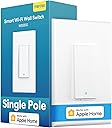
The meross Smart Light Switch MSS510 is a single-pole, 2.4GHz Wi-Fi-enabled switch compatible with Apple HomeKit, Alexa, Google Assistant, and SmartThings. It supports voice and remote control, scheduling, and timer functions, fitting standard Decora faceplates with a quick installation under 15 minutes. Designed for energy efficiency and seamless smart home integration, it requires a neutral wire and offers secure AWS data transmission, making it a reliable upgrade for modern connected homes.


| Actuator Type | Push Button |
| Asin | B087P3DM42 |
| Best Sellers Rank | #38,260 in Tools & Home Improvement (See Top 100 in Tools & Home Improvement) #159 in Electrical Light Switches |
| Brand Name | meross |
| Circuit Type | 1-way |
| Color | White |
| Compatible Devices | Apple HomeKit, Amazon Alexa, Google Assistant, SmartThings |
| Connectivity Protocol | IEEE 802.11 b/g/n, 2.4GHz. |
| Connector Type | Clamp |
| Contact Material | Copper |
| Contact Type | Normally Open |
| Control Method | Voice |
| Controller Type | Amazon Alexa,Google Assistant,SmartThings,Remote Control |
| Current Rating | 4 A |
| Customer Reviews | 4.4 4.4 out of 5 stars (2,321) 4.4 out of 5 stars |
| Included Components | 1 x Quick Installation Guide |
| International Protection Rating | IP00 |
| Item Dimensions | 4.7 x 2.8 x 1.5 inches |
| Item Weight | 83 g |
| Manufacturer | meross |
| Material Type | Plastic |
| Model | MSS510 |
| Mounting Type | Wall Mount |
| Number Of Items | 1 |
| Number Of Positions | 1 |
| Operating Voltage | 120 volts |
| Operation Mode | ON-OFF-ON |
| Part Number | MSS510 |
| Specification Met | Fcc, Ic, Etl |
| Switch Type | Single Pole Light Switch |
| Terminal | Spst |
| Unit Count | 1 Count |
| Upc | 600358067832 |
| Upper Temperature Rating | 40 °C |
| Warranty Description | 2 Year Manufacturer |
| Wattage | 400 watts |
User
Easy to install smart switch with great functionality
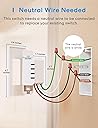
This is a great smart switch with stable WiFi connection that works with Apple Home, Google Home, Alexa and even IFTTT. Meross has been making great smart products for some time now (I own 7 Meross products including 6 smart products, and happy with all of them) but recently they have started adding Apple Home compatibility to the new products, which works great! I needed two smart switches, and installed them without problems. If you have basic electrical circuit knowledge, there should not be any problems installing these switches. However, as is mentioned in the product name, NEUTRAL WIRE IS REQUIRED for installing these switches.Another thing that Meross have improved a lot lately is compatibility with mesh routers. While connecting to the network it is advisable to turn off the 5GHz band in the router. Once connected, the band can be turned on again, and the connection works without issues. If connected with 5GHz band on, the switch may have occasional disconnection. Full marks to Meross for handling Mesh routers in a decent way. Not all smart products do that.As seen in the attached pictures, the product comes with the screws and nuts required for connection. They have decent lengths of wire which connects to the home electrical lines without issues. My only nit-pick is that each switch comes with individual wall plate. As seen in the pictures, I have two of them, and therefore cannot use the supplied wall plates. Had to purchase one separately and unfortunately the colors do not match with the switches. Wish Meross had a 2 switch set with a double switch wall plate. Wishful thinking :)As the pictures show, that they have a nice green glow. The glow can be set up to be on when the switch is on (indicating it is on) or when it is off (can be used in dark areas to see the switch) which is really useful. The switch has a nice feel when clicked, but they are rarely used that way. I have set up my porch lights with these switches to turn on automatically at sun down and turn off at 10:00 pm through Apple Home, and rarely turn them on or off manually. IFTTT can also be used.Overall I am extremely happy with this switch and other Meross products I have. Will purchase more products in future.FULL DISCLOSURE: I received one of these switches free of cost for reviewing. However, I purchased a second one without any reimbursement, simply because I was very happy with the product.
User
Nice looking and Works with Apple HomeKit
In the interest of full disclosure, Meross provided a free switch for me to test and review for them. Their program does not require the review be in their favor, so I am free to post whatever I want.That said, I truly have no complaints with this device. It installed easily, as long as the installer isn’t afraid to work with electrical wiring, and setup was easy.Meross has been my smarthome brand of choice lately, due to their stuff just working really well, the simple and fast firmware updates, their great customer support, and how easy it is to work with their app. So, when Meross reached out, asking me to test their new switch, I jumped on the offer.Frankly, aside from adding support for Apple HomeKit, this switch looks and feels exactly the same as their non-Apple enabled switch. I was glad to see this. Another brand I previously had been using, changed the look of their switches with each new model. So I was happy to see that Meross maintained a consistent look.A new “screwless” switch plate was included in the box, but I was installing this into an existing two switch location. While I was at it, I replaced the second switch (powering a ceiling fan) so that it matched, and used a double gang switch to separate the fan and lighting circuits.Like most smarthome switches on the market, this one does require a neutral wire. While I didn’t have any neutral wires readily available in the junction box, I did have one passing through to an electrical outlet nearby. So I just had to pull that neutral back from the outlet, and then add a new 3’ long wire to replace what I’d pulled out. Added 5 minutes to the installation.As soon as I powered up the new Meross smart switch, it was ready for setup. I opened the Meross app, clicked the “+” sign in the upper right, and selected the type of device I was installing. It sent me to my WiFi config page so I could connect to the AdHoc wireless SSID from the switch. As soon as I connected to the switch, I was prompted with a pop up informing me this switch was Apple HomeKit enabled and asking if I would like to add it to HomeKit as part of the process. It then opened the Apple Home app for me and HomeKit setup was all of 60 seconds. I then switched back to the Meross app and completed the setup in there. As soon as I was finished, I got a notification from my Amazon Alexa app that it had already discovered the new switch and could now control it for me. This was so much easier and wrinkle free than the previous manufacturer I used to use.I’ve included a couple photos showing the original switches, the inside of the junction box, where you can see the neutral passing through in the back right corner, and how it all looked once I was finished. It’s a nice clean look.As for performance, it’s working flawlessly, and instantaneously, using Alexa, the Apple Home app, and the Meross app. I’m really happy with this switch.
User
Great product and reliable
I love these switches and have quite a few around the house. Perfect integration with Apple HomeKit and Alexa. Easy to install and setup.
User
Updated: Got it to work eventually
I ordered this for its Homekit capabilities, but I was never able to get it to connect properly.The light switch itself was functional, and it showed up in the "Meross" app so the wifi antenna seemed to work fine. But I never got it to connect to Homekit.I did extensive troubleshooting and scoured the internet for help. Customer service was atrocious–they only responded with form answers and completely ignored the details of my emails.I have several other Homekit devices and they work just fine and were easy to set up. Skip this one.---Update: Several months later, I now have this device working better. It seemed to be some kind of combination of upgrading the firmware on this device, and also the firmware on my router, and moving my HomePod from my 5ghz band to the 2.4ghz one. Or maybe it was switching the "channel" on my router's settings? Who really knows.I'm still not thrilled with the customer service from this company, but there are A LOT of factors involved with these Homekit devices working or not working. If you're willing to work at it, it is possible to get these and other devices from this company up and running. Maybe it's just that the nature of HomeKit is that a lot of trial and error is needed.
User
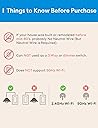
The router needs to be on 2.4 GHz during setup. A workaround is required for the Nest router.
I have a lot of these light switches around my house. They work great, but they can be a little tricky to set up. This is because they only work on 2.4 GHz. My router will not let me manually switch it over to 2.4 GHz. It switches automatically, so I cannot set up any new switches using my Nest router. I found a workaround. My old router is capable of using only 2.4 GHz. I keep this router around specifically for when I need to set up new devices. I disconnect my Nest router and hook up my other one using the exact same SSID and password. This way, I can set up the switches using 2.4 GHz. The switches only care that the password and SSID are the same. They don’t know that I’m using a different router when I put the Nest back as my main WiFi.
User
Best smart switch
Installing was super easy with the marked wire leads and connected instantly. Easily linked up to all of my smartphone services with no issues.
User
Serious Issue? My experience with these value switches.
I have installed several of these in my home to replace my GE Smart switches as I wanted to switch over to Homekit. I was excited about the price and ease of installation. Everything worked fine for about 2 days and then each one of them randomly started locking up. Meaning they not only stopped responding to Homekit, but wouldn’t respond to physical input either. Some of them stuck in the on position and some are stuck off. The only way to get them working again is to turn off/on the breaker. I made sure the firmware was updated, the wiring is correct (Line In is powering them all the time, neutral wire is connected, ground is wired in and Line Out is connected). They all just keep locking up randomly every few days. It doesn’t make since that they get to where the manual light switch itself quits working until power is completely removed and restored to each one. It would be bad enough if they dropped off Homekit, but not working as a manual switch is very bad and potentially dangerous depending on what they are switching. In contrast, my Leviton and GE switches have run for years without any issues. I really wanted these to work as the price point for a Homekit compatible switch is excellent. I really can’t figure out all of the positive reviews unless they have had a recent manufacturing issue causing this, but 7 out of 7 devices having issues is enough evidence for me. I even reinstalled one of my previous smart switches back in the same location and it works perfectly. I have lots of experience with smart home installation and configuration as well as electrical work so I am convinced these devices have a serious issue at least the ones sold at this time.
User
Works so much better than smart bulbs!
I have been replacing my light switches with these Meross smart Wi-fi wall switches. I got a few to try them out and see how well they work as a replacement for my smart bulbs. The smart bulbs (3 different brands, including the supposed expensive good brand) would keep loosing connection. They would be unresponsive more often than not. I was getting so tired of Siri "not hearing back from the device" so I decided to make the switch to smart switches, and boy am I ever glad I did. No more problems with loosing connection since I started using these! Also, some really cool features are as follows:If you are replacing a 3-way switch setup, you only need to replace one of the switches if you use these smart switches. You can set up an automation to make it so that the lights switch off automatically after a set amount of time, or you can make it so that whole groups of lights come on if you switch on one etc. You can use this functionality to effectively make unrelated lights work kind of like they are part of a 3-way light switch. Maybe best of all is there is no longer a problem if somebody switches off the light switch (unlike the dumb smart bulbs that get completely screwed up if somebody accidentally forgets and turns off the switch). I also like how I can decide on a per-switch basis, if I want the little indicator light to work as a night light, a power indicator, or to just stay off (this functionality is accomplished via the Meross app, and that's about all I have used their app for so far, it's easy to add your switches to the Meross app if you have finished setting them up in homekit first). So far I have found these switches to be very reliable. Setup can be done completely through homekit and it works pretty seamlessly. Out of 12 switches so far (both 3-way and single pole) I have only had one that had any hiccups while trying to set it up, and after resetting the device, setup went smoothly on the second try. Please note, these switches require the neutral wire, so they won't work if your house doesn't have neutral wires in the switch boxes.On a side note, I noticed that amazon "clip to save" coupons pop up every day or so with these, so don't buy them all at once. Buy them one set per day so you can keep getting that coupon each time!
User
Fácil de conectar
Funciona bien, estable
User
Five Years of Meross — Still My Smart Home Go-To
We currently have 13 Meross products throughout our home, including smart switches and smart plugs (both indoor and outdoor). We’ve been using them since 2020, and they’ve proven themselves over time.We bought this particular Meross Smart Switch for $25.99 in October 2025, just noting that for price tracking down the road.As clearly stated in the product description — you need a neutral wire for installation. Don’t buy this if your switch box doesn’t have one. That’s not a defect; that’s just how smart switches like this one are designed to function.Connectivity has been rock solid. The oldest Meross device we own is five years old now and still running perfectly. The only time we’ve had issues is when our internet connection itself acts up, not the switch.Response time is nearly instant — whether you’re using the Meross app or Google Home voice commands, there’s almost no lag.If you’re installing multiple Meross products, I highly recommend naming them in your modem as you go. It’s not required, but it helps keep track of what’s connected where.You can also set up routines to automatically turn lights on or off at specific times or after certain durations. We even use “away” routines to simulate someone being home when we’re not — a simple but effective security touch.Meross integrates seamlessly with Google Home. Voice commands work great — you can turn lights on or off, set timers, or even create fun routines. For example, you could link a dimmer switch to a “Movie Time” or “Sexy Time” command that dims the lights and starts music. Or, more practically, connect your bathroom fan and light to a smart switch so they always run together (and your kids can’t “forget” to turn the fan on when showering).One thing to note: these switches are a little deep, which can make installation tight in single-gang boxes. It’s doable, but plan ahead.Finally, these switches only connect to 2.4 GHz Wi-Fi. Most modern routers handle that automatically, but if you’re having trouble connecting, check your router’s settings. You might be able to assign specific devices to the 2.4 GHz band or create a separate smart-device network for smoother setup.Overall, Meross continues to impress me year after year — reliable connectivity, fast response, solid construction, and easy app integration.TL;DR:We’ve used Meross products since 2020 — 13 and counting — and they’ve been rock solid. The smart switches are quick to respond, easy to install (as long as you have a neutral wire), and integrate flawlessly with Google Home. Slightly deep design and 2.4 GHz Wi-Fi only, but otherwise perfect. Reliable, affordable, and well worth it.
User
EXCELLENT price for a great HomeKit accessory
I'm so grateful that I stumbled upon Meross devices. I'm fully into the smart home world, and very invested in Homekit. As such, the lack of Homekit enabled accessories on Amazon has been striking.Unfortunately, I live in an apartment and I'm therefore stuck in some cases with built-in fluorescent tube lighting, so no Phillips Hue lights in those cases. The Meross Homekit Smart Light Switches have been my saviour. I won't say that installing them was SUPER easy, but that's likely due to poor electrical work in my apartment building, using tiny electrical boxes and too much wire to make stuffing the switches back into the box easy work. That being said, the instructions from Meross were clear, and having never done any electrical work before, I was able to replace the standard switches with the Smart switches in 20-30 mins. JUST MAKE SURE YOU TURN OFF POWER FROM YOUR ELECTRICAL BOX FIRST. I did that by turning on the lights I wanted to switch out, then flipping the electrical box switches labelled as "lights" until the one I was switching turned off.Installing in Homekit was generally pretty easy. After turning the power back on and testing the light manually to make sure it worked, I connected to my 2.5 Ghz wifi, went to the Apple Home app and selected "add accessory". I've not yet been able to make the Homekit sticker scan, but that's not an issue as there is an option in Homekit to manually enter the sticker numbers. After about a minute of connecting, voila! You select which room the switch is in and name it and you're done!So far after about a month of using it, I haven't encountered any issues, glitches, or disconnections, despite having to restart the router multiple times (thanks Rogers.....Canadians will understand what I mean....)This switch is a button, which takes a little getting used to, but is minor. Essentially what it means is that there is no "up" or "down" on the switch; you just click the bottom every time and it turns the lights off or on. Or, of course, you can tell Siri to do it.
User
Un buen interruptor, pero..
Al instalarlo si no cuentas con conocimiento en instalaciones eléctricas puede que se te dificulte un poco colocarlo, de igual manera la aplicación (Meross) que te solicita el manual que instales te ayuda a realizar la conexión (también buscando un video en YouTube). De iguala manera, si no te sientes con confianza es mejor que hables a alguien con conocimientos para evitar que te pase algo.Una vez instalada, el resto es fácil e intuitivo.
User
Bonito
Me costó mucho sincronizar ya que no estaba el código QR y tuve que hacerlo manual y entrar a la App para hacerlo y no como otros de los productos que si lo puedo hacer directo con Apple Home
Trustpilot
5 days ago
2 weeks ago