We remain fully operational. Our teams are working around the clock to ensure your deliveries continue safely.

DOWNLOAD THE APP


Customer Services
Copyright © 2025 Desertcart Holdings Limited
DOWNLOAD THE APP






📸 Capture the moment, even from afar—because every shot counts!
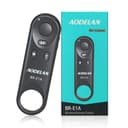
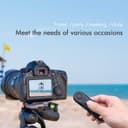
The AODELAN BR-E1A Wireless Remote Control is a compact, lightweight shutter release designed for Canon cameras, offering up to 10 meters of wireless range. It supports instant and delayed photo capture as well as video recording, and is compatible with Canon’s Power Zoom Adapter for remote zoom control. Perfect for professionals and enthusiasts seeking stable, hands-free shooting with a broad range of Canon EOS R, Rebel, and PowerShot models.


| ASIN | B07KGC258H |
| Battery Types | Lithium |
| Best Sellers Rank | 5 in Camera Remote Controls |
| Brand Name | AODELAN |
| Button Quantity | 1 |
| Colour | for Canon |
| Compatible Devices | Canon R3, RP, EOS R, R5, R6, R7, R10, 6D Mark II, 77D, 800D, T8i, 200D, 200D 250D, 850D, MS 50, M50, M50 M200, PowerShot SX70 HS, 90D, M6 G7 X III, G5 II |
| Controller Type | Button Control |
| Country of Origin | China |
| Customer Reviews | 4.2 4.2 out of 5 stars (693) |
| Item Dimensions L x W x H | 9.2L x 2.7W x 1.3H centimetres |
| Item Weight | 13.6 Grams |
| Manufacturer | AODELAN |
| Manufacturer Part Number | Remote control - 1 |
| Maximum Number of Supported Devices | 1 |
| Maximum Range | 10 Metres |
| Model Name | BR-E1A |
| Model Number | For Canon |
| Network Connectivity Technology | Wireless |
| Number of Batteries | 1 CR2 batteries required. (included) |
| Product Features | Wireless |
| UPC | 653846094247 |
| Unit Count | 1.0 Count |
R**N
works well with a canon 6d mkii
seems really good, I've paired it with my Canon 6d Mark ii and its working fine. seems to be sturdy enough.
A**N
Useful Gadget To Have
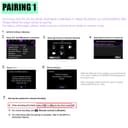
A useful and inexpensive addition to any camera bag. Pairing to my Canon R6 mk2 took a matter of seconds. Pairing is done pressing both the T and W buttons together. These buttons are slightly misleading and are used to control the telephoto function but requires a controller which is sold separately. I have not found this to be a hindrance.
E**L
Works as advertised
It work seamlessly with the Canon EOS M50 Mk2
C**K
does the job
easy to connect, almost no delay in taking the picture.
B**E
Super easy to use
Super easy to pair with the machine in this case it was the R6 easy to use and every time I used it it always worked without problems
B**Y
This broke
I really like this product, and for about 9 months it worked perfectly. However it just stopped working, my camera won't pick it up and I can't use it. I've had to order another one as I've got a shoot tomorrow and I have no time to research another one but it looks like I have no options to contact seller and return this one so i've now paid double for it.
P**N
remote
works as it should with my r6 at half the price of the canon remote
R**E
Trigger magic
This was so cheap, that I thought it had to be rubbish, I was wrong it's well made and the best trigger I have ever used.
F**O
Perfettamente funzionante piccolo è leggero
6**S
Très facile d'établir la connexion avec le boîtier, (Canon EOS 6D Mark II), après il ne faut pas oublier dans les paramètres du boîtier de revenir sur la connexion télécommande si on est parti entre deux sur la connexion avec un smartphone par exemple. Mais une fois que c'est initialisé, l'appareil reconnaît systématiquement la télécommande. La qualité est parfaite, le rapport qui a été pris par rapport à la commande d'origine canon est très bien ! Achat validé.
B**.
Camera remote works very well in picture mode on my R5C, but not in video mode. However, I knew that was the case before I bought it so no problem. I think it works in both modes in the cameras, R5C is the odd system.
P**A
Lo uso para mi Canon M50 Mark II y funciona excelente. La primera vez que se usa, ya enlazado, activa perfectamente la grabación de video pero la de foto no, pero gracias a otra reseña que por aquí leí me di cuenta qué hay que poner la cámara en “espera de tiempo de dos segundos” es decir el relojito para que la cámara espere unos segundos antes de sacar la foto, en dos segundos y ya!! saca la foto con el control remoto. El enlace es muy fácil poniendo la cámara en modo enlace y seleccionar “control remoto” y en el control remoto oprimir simultáneamente los botones W y T hasta que parpadé el foquito rojo, seguir instrucciones de pantalla y ya!! muy recomendable!!
W**L
Zeer subtiel kleine afstandsbediening. Het vergeet niet dat op de camera de stand 'delayed + remote' geactiveerd moet worden!
Trustpilot
1 month ago
3 weeks ago