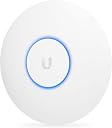
🚀 Elevate your Wi-Fi game with UniFi AC Lite — where speed meets style!
The Ubiquiti UniFi AP-AC Lite is a dual-band wireless access point delivering up to 867 Mbps on 5 GHz and 300 Mbps on 2.4 GHz, secured by WPA2 protocols. Designed for moderate coverage areas, it features a sleek white design, remote management via UniFi OS, and a gigabit LAN port, making it ideal for professionals seeking reliable, high-speed Wi-Fi in home or office environments.
| ASIN | B015PR20GY |
| Antenna Location | Home |
| Antenna Type | Fixed |
| Best Sellers Rank | #900 in Computer Networking Wireless Access Points |
| Brand | Ubiquiti Networks |
| Built-In Media | Part |
| Color | White |
| Compatible Devices | Laptop |
| Connectivity Protocol | Wi-Fi |
| Connectivity Technology | Wi-Fi |
| Control Method | Remote |
| Controller Type | Software |
| Coverage | Moderate |
| Customer Reviews | 4.7 out of 5 stars 2,656 Reviews |
| Data Transfer Rate | 48 gigabits_per_second |
| Frequency | 5 GHz |
| Frequency Band Class | Dual-Band |
| Global Trade Identification Number | 00810354022012 |
| Item Type Name | Ubiquiti UniFi AC Lite AP Wi-Fi 802.22 |
| Item Weight | 6 ounces |
| LAN Port Bandwidth | 1000 Mbps |
| Manufacturer | Ubiquiti |
| Maximum Upstream Data Transfer Rate | 1000 megabits_per_second |
| Mfr Part Number | UAP-AC-LITE |
| Model Name | UAP-AC-LITE |
| Model Number | UAP-AC-LITE |
| Number of Antennas | 2 |
| Number of Items | 1 |
| Number of Ports | 1 |
| Operating System | UniFi OS |
| Other Special Features of the Product | Manual |
| Router Network Type | wireless |
| Security Protocol | WPA-PSK, WPA2 |
| Special Feature | Manual |
| UPC | 810354022012 |
| Unit Count | 1 Count |
| Voltage | 24 volts |
| Warranty Description | Year |
| Wi-Fi Generation | Wi-Fi 5 |
| Wireless Communication Standard | 802.11a/b/g/n/ac |
| Wireless Compability | 802.11a/b/g/n/ac |
A**R
Cannot say enough great things about these WAPs!
There are not enough good things I can say about these access points. It deserves more than 5 stars. I chose this AP over the Pro primarily due to the price. I would consider the Pro you need to insert the WAP along an existing network run or need a network run near where the WAP terminates. Otherwise, the performance of the 2x2 radio on the AP is more than sufficient for most installations where cost and a working WiFi network are the primary concern. I started with this access point about 3 years ago by installing 2 of these in my home. I went from a two mid-level TP-Link router/APs configured to be used as APs and I had nothing but issues for years, to using two of these APs with zero since switching. The only reason I ever have to power cycle these APs is to install a firmware update, or the power went out for an extended period of time. They are that rock solid / reliable / stable. At a previous job, after an unnecessary amount of pleading with my manager, I was permitted to install 3 of these APs in the office. We went from having constant issues with the WiFi and poor coverage, to no reported issues. For a side job, I installed 3 of these for a business that was very dependent on WiFi for the 30+ wireless devices they used for their operations throughout the day. The issues they had previously had with their 3 home-grade router/wireless devices went away overnight, dramatically simplified their network setup, and they have been very happy for 2+ years with no WiFi issues! Detecting a pattern yet? These WAPs are nothing short of amazing. They cost as much as a decent mid-level router/wireless device, but offer better coverage and many more features over a standard router/wireless combo. All without having to hack and install open source firmware. Ubiquiti regularly release firmware updates to improve performance, stability, and address security vulnerabilities. All firmware updates are provided free of charge, and do not require a monthly/yearly subscription like many vendors are doing these days. They also support their devices with firmware updates for many years. Even their "legacy" products still have current firmware updates as of March 2021. It's refreshing to see a company support their products, and in turn their customers, for many years without gouging them for support or forcing obsolescence by abandoning the software on perfectly good hardware. When the AP is installed on the ceiling or a wall, it looks like nothing more than another smoke detector if the status LED is turned off in the management settings, though I like to leave the status light on in most cases to know if the access point is powered on and working. I have also seen some "installations" where the AP is setting on a shelf, but this doesn't seem to affect performance much if at all. If there is a "con" to the UniFi line of products, it is that there is a bit of a learning curve to figure out how to install and use the UniFi management portal software and configure the devices, but any network or systems administrator shouldn't have too much trouble getting everything up and running in a matter of an hour or two at most. It is best to install the software on a server that is always on. You may also consider installing the controller on a Raspberry Pi, or you can use the Cloud Key as the controller. Though the controller is not necessary to use the WAPs after they are configured, it is advisable to keep the controller running to quickly make configuration changes, and you get a large amount of visibility into the connected devices, signal levels, data sent/received and also provides logs that can be used to troubleshoot issues. I continue to preach the greatness of these access points, and all of Ubiquiti's products really, to anybody that will listen. The price to performance ratio is out of this world in my opinion, and you can easily spend 4 to 10 times the money on the big guys' equipment, and get very little more to show for the money besides the name, and maybe a few specialty features which all home and almost all small/medium business just don't need.
B**E
Adopt New Ubiquity UniFi Wireless Access Point Pro AC (Unifi AC Pro Lite) to AWS Controller. Range is around 400 FT on the 5Ghz
UPDATE 1/19/2016 - I now have 10 of these in a AWS Controller: How-To: Adopt New Ubiquity UniFi Wireless Access Point Pro AC (Unifi AC Pro Lite) to AWS Controller Easy- With DNS Server. - Set a CNAME Record to point "unifi" to AWS External Static IP. - Wait for replication / reboot switch if needed. OR Hardware: Switch - Generic auto DHCP / Unmanaged. - Connect to Internet Computer - Connect to Switch POE / LAN Injector - Connect One to Switch other to Device - Plug in power cord. Software: Download "Putty" from Internet on Computer - http://www.chiark.greenend.org.uk/~sgtatham/putty/download.html (putty.exe) is what I used. aka PuTTY SETUP: Run the exe - Choose SSH Download the Ubituiti Device Discovery Tool: https://chrome.google.com/webstore/detail/ubiquiti-device-discovery/hmpigflbjeapnknladcfphgkemopofig?hl=en - This is a Chrome Extension - You will need Chrome installed on your PC. Run the tool - It will scan and give you an SSH Address for your device. Mine Changed from the default 192.168.1.20 to 192.168.0.115 Enter the IP listed in putty - The username and password defaults are ubnt / ubnt -NOTE: You may need to install a local controller on your system - Adopt and Upgrade the Firmware depending on the default that is installed on your device before this if below does not work. It connects Enter: syswrapper.sh restore-default Your Device will reboot and PuTTY will lose it's connection Close the PuTTY Window and Re-open PuTTY and Reconnect - Be sure to click the SSH box in PuTTY. Login with ubnt/ubnt Next you want to connect to the mca client Type: mca-cli It will return : "Unifi#" Now issue the set-inform command with the IP address of your Unifi controller. XXX.XXX.XXX.XXX is examle of your controller IP (Example: 53.3.12.123) - for AWS use your Enternal Static IP. set-inform http://XXX.XXX.XXX.XXX:8080/inform The AP should connect to the controller within a few seconds and you are set. If not power off and on the AP. If not Restart you local system that had the AWS used to upgrade firmware - to turn off controller on that system. If it still does not show in AWS controller: Pin Pick the Reset button on the device. Restart PuTTY - and login to device like before - ubnt / ubnt type: info This will return the device information and config. Check the set-form address If incorrect - re-do the set inform command. set-inform http://XXX.XXX.XXX.XXX:8080/inform At this point check your AWS controller - Make sure the refresh is set to 15 seconds at the top of the page. You should see the device pop up in there. Perfect. Range is around 400 FT on the 5Ghz. Keep in mind most of the computers and laptops and cell phones still need the 20 Mhz band. The setup was a pain at first, tried setting up and finding the IP. These devices come in DHCP mode, however you can not configure them from the DHCP address. So if your using a 192.168.0.0/24 address you will have issues - however, I found that connecting it to a 192.168.1.1 DHCP network I could configure it just fine. (Using the USG from ubiquiti) Also these do not like to communicate (for setup) through pretty much any router I tried. I didn't have a edgerouter from ubiquiti, i feel if i did maybe it would have had less of a hard time setting these up. Directly connecting into the USG solved a lot of the configuration issues, just a pain that the device needs you to disconnect your network and directly connect the LAN from a USG to set these up, inside an environment that doesn't run 192.168.1.0/24 Once you get the AWS Cloud Controller to see these, it's really easy to configure and move sites. I'll most likely buy these again, just now that I know what to do it shouldn't take so long. FYI: A Local Controller(4.6.7) had no problem picking these up with DHCP - but we use AWS Controller. Firewall port 10001 needs to be open to configure via unifi discovery tool. (Chrome Required) LINK HERE: https://chrome.google.com/webstore/detail/ubiquiti-device-discovery/hmpigflbjeapnknladcfphgkemopofig?hl=en The default IP for SSH is 192.168.1.20 If you can't get the IP to load, you need to change around how the device is connected to the internet. - Your Router is blocking something. - Directly connect it to your USG.
N**K
Great for upgraded home WiFi
I got two of these to upgrade my home WiFi. One is upstairs at one side of the house, and one is downstairs at the other side of the house. So far they've been amazing at getting signal everywhere and giving me super fast WiFi throughout. I installed the controller software on an old spare Raspberry Pi and that's been working beautifully to manage the two APs and collect data about the connected clients. I'm a network engineer for Cisco stuff by trade so set-up for me on these was a breeze, but for a typical home user this will be a bit more complicated than you're used to. However, if you're looking to truly maximize your wifi performance or cover a large area then these are just fantastic. Our internet speeds from Spectrum are advertised as a 400mbps download and I can walk anywhere in my house and get 450+ mbps on a speed test over WiFi with my iPhone. Ubiquiti says that you can ceiling or wall mount these, however I'd strongly recommend that you ceiling mount them so that the AP is horizontal and not vertical due to the signal spread pattern that these produce. You'll get better speed and coverage with these mounted up on the ceiling than you will with them on the wall. Also, the mounting brackets for these aren't designed super well. They will be flat against the ceiling once mounted and make it hard to actually attach the AP. I solved this by picking up some 3mm nylon spacers from the hardware store and putting those behind the screw holes before screwing the bracket into the ceiling. This gave me just a little bit of clearance from the AP to the ceiling drywall and made it much easier to get the AP on and off. Overall I'm super happy with these. I can walk anywhere in the house and my stuff just seamlessly roams from AP to AP with zero lag and zero loss of data. Perfect for us!
K**E
Ubiquiti ends my adventure searching for solution to my wireless problems... but no 802.3af? Really?
This is a great device! I can't say enough good things about Ubiquiti products, call me a fanboy if you want but I also want to state this loud and clear for anybody looking at improving their wireless coverage/strength/speed: BUY AN UBIQUITI ACCESS POINT NOW! I've been on a crazy adventure searching for a way to improve my wireless coverage in my houses/apartments over the past number of years (it's been so long I really don't remember when I started using wireless). I tried everything including but not limited to: Buying dozens of "extenders/repeaters" ranging from $15 to $100 dollars each and placing them in different rooms. Buying two $150 routers running DD-WRT with one as a repeater/extender. Buying a $200 "small business" router with multiple antennas claiming "enterprise-like" wireless. NONE OF THEM WORKED! NOT EVEN A LITTLE! Fast forward to the purchase of my first Ubiquiti UniFi access point and within minutes of unboxing it I had the wireless up and running, low and behold my wireless problems were instantly fixed! Some people have complained about the price of Ubiquiti products but after they added up all of those $15 "repeaters", the new router, and the $20 antennas boosters for their new router they've already spent more than the Ubiquiti access point. Performance and coverage-wise it's amazing. Covers my ~1100 sqft. house and the driveway and backyard while being mounted in a utility closet with cement walls which is impressive. Performance is great and maxes out all of my 802.11n and 802.11ac devices although it's worth mentioning my devices aren't top of the line either, I'm going to buy a more expensive but higher rated 802.11ac PCIe card to see if I can improve wireless performance over the ~90Mbps I'm seeing on my $35 card (200-300Mbps when in the same room as this access point). The SNMP support is also really nice (although it's only v1), I have all of my APs monitored by Observium so I can pull up historical data on the network traffic as well as the CPU and RAM usage. The UniFi Controller software is the icing on the cake. I installed the software on a small ARM device (ODroid C1) so it's operating 24x7 and always accessible. It sucks that some of the neat features require the UniFi Gateway but as a home user it's great and does what I need it to. My only (and biggest) complaint is the lack of 802.3af support. All of my other network devices support 802.3af POE except my Ubiquiti access points. I'm going to replace this Lite version with the Pro just so I can plug it into my POE switch like my IP cameras. I would have marked off one star for this, but they include the POE injector for it so nobody will be stuck with the wrong POE injector or switch when they buy this (unlike the UniFi In Wall APs).
M**N
Hard to believe how powerful it is
This solved a problem for me. I live in an older home here in south Louisiana. The builder "hardened" it against hurricanes by sheathing all interior walls with plywood on both sides. That's great for quiet and strength. Not so much for running cable drops and less so for wifi. Worse, I'm too far from anything for cable / dsl / whatever, so I receive my internet connection through my company's service, which is repeated by microwave on its way to a remote building we support. I have a yagi antenna hooked to a Linksys WRT54G router to receive signal from the repeater. That may not be much, using a G router, but the max I can receive is 25 Mbps, so this is plenty and that router is a tank. It's also already in place, and wired to my Tivo Bolt and Yamaha AVR through a switch, and also to my home network via some TP-Link home powerline adapters (which I highly recommend). Anyway, the house is big and has a hallway bisecting it that is about 35 feet long. So I put this Unifi in the hall ceiling, ran an RG6 drop to the Linksys, and configured it. It took longer to run the cable than to configure, once I downloaded the firmware upgrade and the installation software. The product didn't ship with software but Ubiquiti updates a LOT (a good thing if you ask me), so I'm sure I'd have had to update anyway. The Unifi-installer is about 160 megs, and the firmware was small enough to not matter. A word here: it will require Java to run the installer, so you may want to be sure you have it on your PC before you start. At least, that's the case with Windows 7 64 bit OS. So this is running in my house as of this morning and it's blasting 15 Mbps around the entire house. Yes, yes, I know. Blasting? That's not even LTE speeds but for me, having survived a meager existence, eking out about 1/3 that most days and in the back of the house, nothing, this is a major improvement. It is the difference between streaming Netflix and Prime and NOT streaming in my bedroom. Setting aside speed for a moment and considering signal strength, it is nothing short of amazing. This product is sending a signal the same strength throughout this house - regardless of how many walls it has to penetrate. This means that in a 3,000 square foot, 5 bedroom house, I only need this one device in my hall, where before I was juggling a couple of "legacy" routers and dealing with all kinds of downtime and latency issues. So to the hardware and so on. This is a small device, about 7 inches in diameter and very discreet in a matte finish. It is mounted on either ceiling or wall, and there is the hardware to allow for either. Mounting is a snap. Four screws and drill a hole for your cable. Once it's mounted and cable inserted, it's hooked on the other end to your POE adapter and in my case, router. When it is seeing the network, there is a blue ring about 3" in diameter in center of the device. It's a status indicator and a nifty night light for my hall too. Sorry to gush but this is a really good product. It's not for a person who wants plug and play. You have to poke around under the hood a bit but if you are willing to do that, you'll find this to be an excellent product.
S**O
Died after 8 years, amazing low latency wifi
Pros: It is one of the best Wifi Access points I have ever owned. 8 years ago this was 5 stars. After 8 years working it died on me, considering its age it still held its value and worked 24/7 for 8 years until it failed. Even without Wifi6 it had excellent connection quality, no buffer bloat, unrivaled low latency connections. Cons: Its a bit cumbersome to setup this requires the Unifi Controller now Unifi Server, it may be great for an org managing multiple access points but for SOHO its overkill. TL;DR if you want great network products and are obsessively checking ping and packets, ubiquity is for you.
N**M
Excellent AP suitable for a single unit application in a domestic environment - Competence needed but not a PhD!
Environment: Installed to replace the wireless component of a D-link wireless router. Domestic, cat5e to all rooms, 200/200 connection. I needed to move the router back to the utility/services cupboard, where all the electrics, phone, internet, cable TV, patch panel, etc are sited, but too much electrical noise there for wireless.AP. Also D-Link wireless performance not optimal (single stream only). This AP chosen after reading reviews. Plan: move D-Link to utility cupboard as a wired router only, and provide wireless AP from a remote location within the apartment. Competencies: Non pro, but long time fiddler with all things computing, so a reasonable basic grounding. Preparation: pending delivery (Amazon Global, 10 days), read various articles and post (including the many helpful ones on Amazon), downloaded latest management software and installed on main PC ready to go. Suitable cat5e/6 cales to hand as well as a replacement mains cord with European pins. Ensure Java installed (was already for another app). Ensure home network arrangement is working properly including DHCP Installation: I initially did this all on my desk next to my main computer so everything was to hand. then....... The current software (5.0.7) is intuitive and logical. Its a change from the usual configuration of using the appliances own inbuilt web server, Ubiquity uses Java run through your usual web browser (Chrome). In sequence, plug in the passive POE adaptor provided, attach "LAN" port to network, "POE" port to cable to the access point (AP). The AP takes about 20 seconds to start up and acquire an IP address (indicator light solid green). Fire up Ubiquity software, after a short while it shows as ready and invites you to press the launch browser button which starts up the full graphical interface, immediately saw my one AP and invited enrolment into the management software. From that point on it was simply a case of going through the various options tab. Outcome: within 30 minutes of opening the box, I has the AP working on 2G (N) and 5G (N&AC), and all the various iPads, iPhones etc in the home were logged in securely. I had enabled and then disabled a guest network to try (it works). Then turned off WiFi on the D-Link. A single button click also updated the AP's firmware to the latest release, Painless! Relocation: once everything was working, all disconnected, router and AP placed in proper position and all plugged back in and worked perfectly. Performance: 160sqm apartment, AP in a ceiling central location (currently just lying free within the suspended ceiling, will mount later properly). Speed check on 5g gave speeds IRO 150mb bidirectional dropping the 80 in the peripheral rooms (all on recent spec Ipads/Iphones). The furthest N only laptop (150mb) gave speeds of 45mb. Conclusion: with a degree of competence, not network engineering qualification, this kit can be installed easily and intuitively. Whilst the Ubiquity environment can extend to thousands of AP's and other appliances, this depth of scale-ability should not inhibit you from using on a very small (ok minuscule) scale. Now I have to decide if I want (certainly don't need) to get the Ubiquity Lite router!
B**T
Works great at home, but this is an enterprise-grade solution so this is not as easy to set up as consumer-grade solutions
I've used previous Unifi models in the past and am very happy with the UAP-AC-LITE model so far. Setup is easy, though it does require some technical know-how to get running. Compared to some other enterprise solutions, this is a total breeze to set up, and at its price point it is unique in that you do not need a dedicated controller service or appliance running 24/7 for these to function. Do note that you need to install the Unifi Controller for initial configuration (though I've not explored the phone app or cloud offerings yet, which I have heard may alleviate this requirement). To those having issues with the setup, or to those who find it unacceptable that you need to install the controller software on your computer to configure these, please remember that this is an enterprise-grade networking solution, so basic IT knowledge and at least a minor presence of controller software is to be expected. The setup process has gotten easier since I first used Unifi access points in 2014/2015, but those without networking or basic IT knowledge may struggle to configure these without assistance. Do remember that there is a knowledge-base that has solid solutions for common setup. They do have forums for support, and also live chat which is available from the Unifi Controller (the software you install to configure your Wi-Fi networks and adopt access points from). Some tips to newcomers who are having difficulties configuring these access points, or managing them after they have been set up: 1. Make sure TCP port 8080 is open on the system you install the Unifi Controller on. Allows the access points to communicate with the controller service. If you plan on running the controller service 24/7, you should also open UDP port 3478 for functionality requiring the STUN protocol. 2. Configure the system running Unifi Controller with a static IP, or reserve a DHCP address for that system. Guarantees that the access points can communicate with the service even after the system disconnects and reconnects to the network as the IP will be the same. 3. You may need to manually set the inform URL on the access point if discovery doesn't initially work. This process is meant for layer-3 adoption, but also works should the access point not show up in the Unifi Controller when attempting to adopt. The full process is here, in their knowledge-base: https://help.ubnt.com/hc/en-us/articles/204909754-UniFi-Device-Adoption-Methods-for-Remote-UniFi-Controllers#ssh 4. If you run into trouble, there is a link to the Live Chat in the Unifi Controller dashboard. At this time of writing, it is the chat bubble button in the bottom left when you log into the the Unifi Controller any time after the initial configuration. Note that you do NOT need to add your access points right away if you have trouble adopting them. They could offer some better quick setup tips for less knowledgeable folks, but as this is marketed to businesses and not so much at home users, I am not deducting any star for this. Any IT professional and most power users should be able to get these set up with relative ease.
E**S
Excelente Access Point
Ojo, solo es access point, requieres conservar tu router e instalar un software controlador en tu pc o mac para poder configurarlo. Ya tengo un par de estos ( uno en casa y otro en la oficina ). Excelente cobertura, 2.4 y 5 Ghz ( 5 Ghz es ideal para áreas muy saturadas aunque la cobertura es menor). Muy flexible, se pueden configurar varias redes alambicaras que serán servidas por el acces point. POE ( trae un inyector POE en la caja ) por lo que lo puedes ubicar a donde sea que llegue un cable ethernet.
D**N
Excelente
Aparelho supriu e bem a minha necessidade. Me surpreendeu!!! Vale a pena!
E**S
produit remarquable, efficace et bien conçu !
Cet équipement ne peut fonctionner seul, il a besoin d'un controleur (matériel ou logiciel) pour être configuré initialement. Certaines fonctions comme l'identification au portail nécessite également l'usage du controleur. Les dernières versions intègrent la compatibilité avec la norme PoE standard ce qui fait que nous ne sommes plus contraint à utiliser l'adaptateur passif fourni initialement par Ubiquiti pour faire fonctionner la borne. Les deux sont permis ! Entre la qualité de conception (matériel et logiciel), les fonctionnalités, le prix … les solutions unifi sont de très loin les plus adaptées pour étendre des réseaux wifi à moindre cout sans, concession sur la qualité … Ce n'est pas le best du best mais le rapport qualité / prix / fonctions reste imbattable ! Du super matos !
G**K
Good Choice for SOHOs
Good product. Controller web interface is nice. Lot of options. Firmware upgrades are easy. Passive POE is support is an added benefit. Only thing I have not checked is the availability of ubiquity service centres in India, Bengaluru.
G**O
Internet
Jetzt auch gutes Internet im oberen Stockwerk, schnell montiert!
Trustpilot
2 weeks ago
3 weeks ago