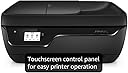
🖨️ Print smart, stay connected, and never miss a beat!
The HP OfficeJet 3830 is a compact all-in-one wireless inkjet printer designed for home and small office use. It offers fast printing speeds (20 ppm B&W, 16 ppm color), seamless mobile printing via HP ePrint and AirPrint, and a 35-page automatic document feeder for efficient multitasking. With a responsive touchscreen, optional quiet mode, and HP Instant Ink subscription compatibility, it ensures hassle-free, high-quality printing while saving space and reducing downtime.


| ASIN | B013SKI4EM |
| Additional Printer Functions | Copy |
| B&W Pages per Minute | 20 pages_per_minute |
| Best Sellers Rank | #172,092 in Office Products ( See Top 100 in Office Products ) #75 in Desktop Photo Printers |
| Brand | HP |
| Built-In Media | HP 63 Setup Black Ink Cartridge (~165 pages) HP 63 Setup Tri-color Ink Cartridge (tri-color composite yield ~100 pages), HP OfficeJet 3830 All-in-One Printer, Power Cord, Regulatory flyer, Setup poster |
| Color | Black |
| Color Pages per Minute | 16 pages_per_minute |
| Compatible Devices | Smartphones |
| Connectivity Technology | USB, Wi-Fi |
| Control Method | Voice |
| Controller Type | Amazon Alexa, Vera |
| Customer Reviews | 4.3 out of 5 stars 32,838 Reviews |
| Display Type | LCD |
| Duplex | Manual |
| Global Trade Identification Number | 00889296063285 |
| Hardware Interface | USB 2.0 |
| Ink Color | Color |
| Item Dimensions D x W x H | 14.33"D x 17.72"W x 8.54"H |
| Item Type Name | All-in-One Wireless Printer |
| Item Weight | 12.4 pounds |
| Manufacturer | HP |
| Maximum Copy Resolution Black and White | 600 dpi |
| Maximum Copy Resolution Color | 4800 x 1200 dpi |
| Maximum Copy Speed Black and White | 20 pages_per_minute |
| Maximum Media Size | 8.5 x 14 inch |
| Maximum Print Resolution Black and White | 600 dpi |
| Maximum Sheet Capacity | 250 |
| Maximum print Resolution Color | 4800 x 1200 dpi |
| Model Name | K7V40A#B1H |
| Model Number | 3830 |
| Model Series | OfficeJet |
| Number of Trays | 1 |
| Other Special Features of the Product | Auto Document Feeder, Cloud Print Enabled, Energy Star, HP Instant Ink Eligible, Network-Ready, Optional HP High-Yield Cartridges, Touch Screen |
| Output sheet capacity | 250 |
| Paper Size | 3 x 5 to 8.5 x 14, Letter, Legal, Envelope |
| Print media | Card stock, Envelopes, Glossy photo paper, High-resolution paper, Labels, Paper (plain) |
| Printer Connectivity Type | USB, Wi-Fi |
| Printer Output Type | Color |
| Printer Type | Inkjet |
| Printing Technology | Inkjet |
| Processor Count | 1 |
| Resolution | 600 x 600 |
| Scanner Type | Flatbed |
| Special Feature | Auto Document Feeder, Cloud Print Enabled, Energy Star, HP Instant Ink Eligible, Network-Ready, Optional HP High-Yield Cartridges, Touch Screen Special Feature Auto Document Feeder, Cloud Print Enabled, Energy Star, HP Instant Ink Eligible, Network-Ready, Optional HP High-Yield Cartridges, Touch Screen See more |
| Specific Uses For Product | Home/Office |
| Total USB 2.0 Ports | 1 |
| Total Usb Ports | 1 |
| UPC | 889296063285 |
| Unit Count | 27.2 Ounce |
| Warranty Description | One-year limited hardware warranty; 24-hour, 7 days a week limited support |
| Warranty Type | limited warranty |
| Wattage | 10 watts |
M**E
Great Printer for the price
I just received my printer today, so I am hoping to update this in a few weeks after I've used it for awhile. For now I am going to focus on the packaging, startup, setup, print quality, and durability. I want to take a quick moment to state the fact that HP took the effort to make packaging a breeze! I opened the tape up on the box and the first thing I see it the printer on it side in a bag surrounded by the nice sturdy styrofoam. Now normally when anything is surrounded by styrofoam of any sorts, its a big pain to get it out of the box by yourself. Well HP took the time and thought of the consumer! The plastic bag they wrapped the printer in had handles on it so I was easily able to lift the printer out of the box by myself. After unpackaging the printer the directions of first initial setup was printed very clearly. There are no words printed on setup page, but the pictures are pretty detailed in my opinion so there shouldn't be too much of an issue. I took the tape off and followed the instructions of setup and it took me about 5 min to set everything up. (Connect to my wifi, print the alignment page, scan for the first time etc). (The hardest part for me was inserting the black ink cartridge which was my own fault because I didn't have the right angle at first.) I want to point out I only gave durability 3 stars because the whole body is made of plastic. I know most printers are made of plastic nowadays, but to me this is less durable plastic and honestly if it gets tossed around quite a bit I'm not so sure it would last not that you should be tossing your printer around in the first place haha. Connecting to my wifi was a breeze. After printing the test pages and whatnot the final set was to visit a web site and download drivers which I'm not a novice to. HP wanted me to download their app for Windows 10, but decided not to because I can print from any program itself and not have any extra software. I have not tried printing from my smartphone yet (android) but when I do I plan on updating this review. I have printed a few pages, scanned, and even printed photos on photo paper (4 x 6) and everything has turned out great. I only have changed one setting and that is to print at max DPI so I get the best pictures. I also want to add that the printer comes with ink. Not too much, but enough that you might be able to print about 15-20 text pages. I've printed 2 4 x 6 photos as well as a few text documents and I still have ink in the original cartridges. The printer touch screen is very responsive and not laggy like some are. Overall, this is a great printer for the price. I feel that whoever is reading this will make a great decision and buy this printer. EDIT 1: Mobile printing was a breeze. I have a Samsung Galaxy S7 Edge which I connected to the same WIFI as the printer, found a document that I wanted to print , selected the printer on my phone which showed up immediately and printed. My phone showed a message stating that it may take a few seconds before it would start printing because the document had to go through a server first but this was not the case. I selected print and it started printing right away. The quality was just as good as if I printed it off of a PC too.
E**W
Goodbye Canon...HP is Simple, intuitive, and frustration-free!
Short version: If you want a reasonably priced, reliable printer that is simple to install and easy to use, this HP Officejet 3830 is a great choice. Set-up: The set up takes less than 15 minutes to complete, and it instantly works with all your devices on the same wifi network. There's no need to download a particular app (though it offers a good one if you like that sort of thing), nor does it require any special set up with your computer. Use: This printer is self-explanatory and intuitive. The touch screen isn't very large, but it's much more responsive than the one on my old HP Envy 100, so it's actually an improvement for me. If you can use a regular sized touchscreen smartphone, you can use this with no problem. Ink: After comparing the various manufacturers' ink cartridge options for ink jet printers, I've found them all to be comparably priced, but I prefer HP, because (1) it requires only two cartridges (black & color), whereas other printers often require one black and three or more color cartridges*; and (2) the HP Instant Ink program (which is optional) is cheaper and extremely convenient. *I know some people have complained about the single color cartridges, preferring to use individual colors to conserve ink. My response to that complaint is twofold. First, in my experience, when one color is out, the other colors are close behind, so the convenience of the combined cartridges is worth it. Second, any ink waste that results from the combined color cartridges is minimal compared to the "waste" generated from separate color cartridges. With combined color cartridges, there is one cartridge, one sealed package, one paper insert and one outer box. With individual color cartridges, there are three (or more) plastic cartridges, three sealed packages, three paper inserts and three outer boxes. That's a lot of unnecessary waste! Other issues: The only other concern that's been raised in the Amazon reviews is the paper feeder. Apparently a few people have complained that it grabs several pages at once, causing paper waste and jams. I've noticed that sometimes the paper doesn't fully load into the feeder, and when that happens, it can cause this problem. The paper feeder itself is a bit awkward. Still, as long as I make sure the paper is properly and fully loaded, I don't have this problem. All things considered, this is a fairly minor problem with an otherwise excellent printer. Long Version - HP v Canon: I literally gave away my brand new Canon MG7520 printer and replaced it with this HP Officejet 3830, and I couldn't be happier. After my trusty old HP Envy 100 took a spill off my desk and shattered, I researched printers online to select its replacement. I've always had HPs at home and work, but I wanted to find the best value regardless of brand. Although the expert and consumer reviews were generally all over the place, with printers receiving 4.8 stars on one website and 2.4 stars on another, I noticed that on most sites the Canon printers were rated the highest of all the major brands. Based on that research, I bought a Canon MG7520 on sale at Best Buy. Though I'm no computer expert, I have set up a number of similar printers for myself and my family members, and based on my experience, I knew it shouldn't take more than about 15 minutes to connect my new Canon printer. Over one month and countless wasted hours trying to get that thing to work, I finally packed it up and donated it to Goodwill (the Best Buy return period had long since expired, and I didn't want to waste any more of my time, even just trying to sell it on Craigslist). During that month of fruitless efforts to get the Canon printer to print something other than the Printer Connection Settings sheet, I tried everything to get it to work with any of my devices. I used the included installation disk; I downloaded the drives and software from the website; I manually installed the drivers; I followed the instructions in the box and the (different) instructions online; and I even talked to Canon customer support several times. Nothing worked. After waving the white flag, I bought this HP Officejet 3830 from Amazon. Two days later (thank you Prime!), it arrived. Ten minutes, 47 seconds later, it was printing from my desktop, laptop, phone and tablet. I never even had to look at the instructions. HP install: Plug in, enter wifi password, insert paper, print. Canon install: Plug in, choose LAN connection type, enter wifi password, download app, change LAN connection type to "offline" set up, register printer, change LAN again, select online options, try to connect, if connection fails even when connected, try to decipher cryptic installation instructions, start all over, etc etc. You get the idea. Does Canon print better photos? I wouldn't know, but I've heard it does. If you're buying a printer primarily for photo printing, perhaps Canon is the way to go. But if you need a printer for everyday, household/small business printing needs, I highly recommend HP, and in particular I recommend the HP Officejet 3830. It's easy and it works. Oh, and the photos look just fine.
A**A
Not as bad as reviews said...
First I saw a video that this printer was one of the top printers to have, so I was so confused by all the bad reviews, the low Consumer Report score, and was very weary to buy. However, after setting it up and trying it out I could see some flaws, but not enough or bad enough for the smashing of the printer because of the frustration. So far, I am happy with my purchase. My review is based on direct hookup to desktop computer. All Wi-Fi and wireless options turned off. PROS: - It prints so fast, compared to my HP Officejet 5610 All-In-one. I am in awe. - The scanning is semi-fast and easy to use. Make sure you choose pdf or jpg when you save or you will be redoing all the work. **First three pictures and the fifth picture are Scans** - Faxing is fast compared to my old HP All-In-One; however, there are some problems, but I found tricks and I learned some things to make it easier, so not bad. I will share those below. Beware you will go through paper if you don't load scrap paper or turn off fax notifications. - Pictures are better than my old HP. No lines or streaks. **Third picture is print and scan with sample ink. Fifth picture is printer with new ink cartridges I purchased** - The printer input, output tray, and fax input tray can be concealed to make more compact and sleek design. Otherwise, the real depth of the HP All-in-one is 24 inches. **See picture six** CONS: - The paper holder will only hold up to about 20 pages to be safe, so there are no paper jams. It is a pain to constantly have to reload. - Can't fax more than 5-6 pages at a time. I tried 19 pages and it stopped after page 6, some kind of error kept happening. So once I stuck to 6 pages or less at a time things went smoothly. - Having to check and change printing properties, every time you print. My old HP automatically did that for me, so I was surprised this newer version was different; unless I still haven’t figured that part out. Not sure. - The scanner is semi-fast; however, you really don't use the screen on the HP. You use the app on computer to run the scanner. - The screen is too small and scrolling is very hard to do, when trying to read things. I think setup is the hardest and most tedious part, but once you are past that, things become easier. Though screen is still too small; I am consistently touching the wrong numbers when faxing and having to start all over or backup. I think a pen for the screen would be nice; they could have it attached right below the screen, or on the front of lid. I will have to try the eraser end of a pencil. - Sample ink cartridges that come with the printer, just throw them away. **See first and third picture, examples** Just put in new ink cartridges to begin with, not the samples they supply. I kept trying to print color pages and even the print quality diagnostic failed every time with the samples. The Magenta never appeared, see pictures attached. I was about to send printer back because my friend said don’t open the new ink if the printer doesn’t work, but low and behold, I opened the new ink cartridges I actually purchased and everything works fine. Glad I decided to give them a try. Still need to adjust color/tone/strength levels when printing pictures or color. - The size is not what it says on site. It is actually 24” deep with all trays left open/expanded to use. **See Picture six, 24" deep.** - Ink is light when printing certain things, so if you decide to buy this printer beware that you may need to change the level of color you want to print, so you get the correct color/tone/strength. Some pictures are even darker. **See Pictures four and five** TRICKS I LEARNED TO MAKE THINGS WORK SMOOTHLY: - Load no more than 20-25 pages in the input tray for printing at a time. - Only fax up to 6 pages at a time. - When faxing, always always fax in color. There will be a screen that pops up saying that company/number doesn’t accept colored faxes, do you wish to continue, just click yes/okay. This is the only way I have been able to get faxes to work. Once I figured it out, things run smoothly. - Start off with new ink cartridges, not the samples they include. It will save you from screaming. Still need to adjust color/tone/strength levels when printing pictures or color. **See pictures one and three, they are from sample cartridges. Picture two and five are from new ink cartridges I bought.** Pictures: #1- Printed with sample included with printer. Scanned by scanner. #2- Printed with new ink cartridges I bought. Scanned by scanner. #3- Printed with sample included with printer. Scanned by scanner. #4- Is what picture #3 is supposed to look like. Uploaded from computer. #5- Printed with new ink cartridges I bought. Scanned by scanner. #6- Is what printer fully opened to operate looks like.
D**.
This printer has been a great printer for 7 years
Just got this printer, but so far it's worked beautifully. I had an old HP K80 deskjet that was probably 10+ years old. It was still working well on my old Windows 7 laptop, but wouldn't work properly on my Windows 10 laptop. I guess I can't blame HP for not providing updated drivers for a printer that's over a decade old. Setup was simple. I didn't use the included software CD. I just hit the wifi button on the printer's touch screen and typed in the wifi password. It connected and went through the setup process of installing the ink cartridges and printing/scanning the test page. The Windows 10 laptop had no problem finding the new printer and automatically installed the drivers. My Windows 7 laptop also connected wirelessly to the printer without any problems. It's as close to plug-and-play as you could get with a printer. I tested it out by printing out a 30-page document, and then copying that same document with the copy function. It worked flawlessly. I obviously can't speak to the reliability over the long term as I just received this a couple days ago, but so far I am very happy with my purchase. For $40, it would be hard to beat this printer. The only negative is the cost of the replacement cartridges, but that's pretty much the same with any inkjet printer. I've also read reviews saying this printer is slow, but compared to my old printer it is much faster, so I have no complaints. UPDATE (6/1/18): I really love this printer. So far it has done everything I have wanted it to without any hassle. It not only prints well from my laptops, but I have it printing from my smartphone with the HP app. UPDATE (2/13/19): I've had this printer about a year and am still loving it. I've printed wirelessly from both Windows computers and Android phones without any problems. I've also copied, scanned, faxed without any problems. I see a lot of other reviews saying that they lose WiFi connection, but I've never had that happen. Maybe it's because my printer sits right next to the wireless router, but I've never had it disconnect from my wireless network. I've also never had any paper jams or refusals to print like others have. I guess I just got a good unit. All I can suggest is that if you get a unit that has problems, return it within the return window, but if you get a good unit then you should be good to go. UPDATE (4/5/25): This printer is still going strong. I will say that the HP Instant Ink subscription has gotten more expensive over the years. When I first signed up it was $2.99/month for 50 pages. HP has since raised the price to $3.99 and then again to $4.99. If they raise the price again I will probably cancel the Instant Ink service and go back to buying cartridges, as the value of the Instant Ink service will no longer be there for me compared to just buying the cartridges. I will say that the Instant Ink cartridges are much better than the ones you can buy, as they contain a lot more ink.
T**Y
Great
I read a lot of reviews and want to clear up some things. The biggest complaint I saw in the reviews is paper jams and HP Instant Ink. Both of these are not an issue if you do the setup correctly. First, the HP instant ink service is 100% optional. Some say they were forced into it. But I find this nothing shy of user error. I did the setup and downloaded all HP printer software and never did it force me into the service. Furthermore, it simply asked if I wanted to sign up for it with the ability to say no and have it never come up again. The software does have a tab for the HP instant ink but it never comes up on its own. Only if you open it. I think the people complaining about it are the same people that just randomly clicked through the installation and didn't bother to attempt to setup the printer to their liking. Now on to paper jams. I bought a stack of cheap Walmart paper and it has yet to jam at all. I've printed 10 to 20+ consecutive documents for classes and work and have not had the printer jam since buying it. The printer feeds the paper in great and consistently. An issue I noticed with my old hp printer was that it would try to grab paper, would fail, then would go on full over drive mode to try to grab the paper. Only to have one little feed wheel grab it at full speed while the other lacked behind and then the paper is sideways. This printer is much better at grabbing it. Only takes a second and its always an even feed. Through the 15 pages of consecutive notes I printed today, the printer never seemed to have troubles grabbing it. All of the pages were fed in, and pushed out quickly without any delays. Its a very tight system. The timing seems to be down and the printer overall feels accurate and precise. This printer isn't amazingly fast. It takes time to print pages full of text and don't get me started on large photos or drawings with complex lines; it can struggle to keep up. However, its definitely good for my uses and does as intended without issues. If you simply need a printer for light/moderate use. This is it. If you need a better more professional printer, the OfficeJet 9015 is what I use at work and it runs laps around print times vs the 3830. Capable of printing 100+ pages at a time it is the better option for teaching or other document intensive work. Ink might be an issue for some, understandably, at HP prices ink is not cheap. However, do what I do and buy re-manufactured Ink from a third party. Its about $80 for a full set of color and black of 63xl cartridges from HP where re-manufactured ones costs about $30 for the same XL cartridges. This is because HP sells printers at a loss and make their money buy selling ink. By cutting out HP from the INK buying process you are paying for what the ink actually costs rather than what the ink costs plus HP's OEM fee and make-up fee for the fact they lost 100% to 200% on the printer itself. Overall this printer is great. And if you buy the re-manufactured ink like I do it makes this printer one good deal.
H**G
Good None-In-One machine
I hooked up my new HP3830 printer with no issues in about 20 minutes, including unpacking, connecting phone lines (for the FAX) and downloading/installing the HP Software. I successfully entered WiFi Network parameters into the machine and got the expected "Connected" indication from the printer, including the MAC and IP addresses. Perfect. The initial printer test page printed fine, a little light for my tastes but since I enrolled in the HP free Tier ($0.00 per month for 10 pages) and the plan bills by the page, not by the actual ink used, I knew that I would be able to set the print quality to High in the software so I didn't worry about the somewhat faint test page. Turns out I should've worried- that installation-day internally-generated Printer Test Page was the last page I saw from the printer for weeks. After the Test Page, I tried to print a page from my computer. "Unable to connect to printer," my computer whined, even though the device showed up with no error marks in Devices and Printers, and I was able to confirm that all drivers and software "helpers" were correctly installed according to Programs and Features. Thus began my 25-day saga, a real battle to get any support whatsoever from HP. The included "HP Printer Doctor" and "HP Scan Doctor" are useless- they take 5 minutes or more to run, at the end of which they report that I need to reboot (losing the webpage for which I was trying to scan in my eyeglasses prescription) but when I reboot it's as though I had never used the HP "Doctor." I had to start all over, trying to print a "Test Page" and then launching the "Doctor," LOOP, LOOP, LOOP. Then, for 3 miraculous days last week, the printer spontaneously "found itself" and was suddenly able to print, right out of the blue! Mirabile Dictu! I thought my troubles were over and celebrated with a carbonated malt and hops beverage. But nope. As quickly (and stealthily) as it had spontaneously begun to work, it stopped working again and returned to its previous life of full dysfunctionality: "Unable to connect to printer." I am unable to speak, cancer having taken my vocal cords 10 years ago, so phone help is not an option for me. The HP "Virtual Agent" chat AI has to be the lamest attempt at Help I have ever encountered- after I carefully selected in all of the little dropdown boxes to classify my problem, which was basically "I can't print or scan" and "I have already run the Print Doctor and it didn't help," the Virtual Agent suggested that I reinstall drivers, which the Printer Doctor does by default, and restart my machine, which the Print Doctor invariably gets down to after failing to fix anything. Simply ludicrous. At the end, I was surprised that it didn't tell me to reinstall Windows. There is no email address for HP Support, nor is there any official HP troubleshooting/help website, just a "community forum," which contains lots of perplexed people exactly like me making uninformed guesses about other people's issues, most of which they obviously have not even read and/or comprehended. So tonight, after another fruitless attempt at scanning my Ophthalmologist prescription up to Warby-Parker, I ran the Scan Doctor one final time in desperation- as usual, it failed to do or suggest anything useful, so I threw in the towel and obtained a return authorization from Amazon with 4 days to spare, boxed up the big black brick masquerading as a computer peripheral device, and I will drop it off at the nearby UPS contract location tomorrow. Oh, and for those of you reading this who may now be stroking your beards knowingly, chuckling and saying "poor little Douggie doesn't even know how to set up a printer," I'm a retired applications developer with several Microsoft certifications and am fairly handy with Windows machines. I had no issues whatsoever with my Epson WF2540, which I set up and connected easily with all the same steps as the HP I'm returning- the Epson performed faithfully and trouble-free for several years, which is a pretty long time for a $150 peripheral. I only replaced it because I literally wore out the print heads. TL; DR: Pick another brand. Although their hardware is generally good, HP is clearly not interested in producing quality user-facing software, nor any actual online support whatsoever. Caveat Emptor.
N**C
Read here about the ink sub! It's not that bad!
I know this should be a review about the printer, but I see a lot of the reviewers here are not happy with the subscription based ink plan that can be added as an OPTION with this printer. I'll start off with the printer. The printer is great, quiet, prints rather quickly and has all the functions we need. For an all in one, the price point is really good in my opinion. We mainly ordered this for our kid's school projects. Other than that, we don't print too much. For the ink. I let the reviews here start to cloud my judgment even before the printer was delivered. Didn't realize the ink sub was even a thing till I started seeing all the 1 star reviews on it. Then I got the printer and saw that I can print 15 pages a moth for free when I sign up for the ink sub. Then the next plan up is 2.99 for 100 pages a month. In my household, I wont get close to 100 pages. I may be ok with just the 15 pages a month. And you know whats cool? I can upgrade to the 2.99 plan at anytime in a month or downgrade at any time... So if I need 16 pages or 99, I'll up it to 2.99 for that month and then downgrade it. When my ink gets low, HP ships me more ink despite which plan I have, even on the free plan. I'm really sold on this and don't understanding why people are hating on this. When I go and buy ink for my inkjet printer, I spend at least $30-40 on new cartridges. Most of the time my inkjet cartridges would dry up because I wasn't printing enough, but now I can just print out a couple of pages every month just because and it doesn't cost me anything... Overall I am very happy with this and love the ink subscription. Maybe not perfect for all, but really think about how much you spend on new ink every time you go to the store... Is it more than $35.88 for the black and color? Oh and you can even print photos, the ink sub doesn't care... They just count per page printed. One more thing to note that seemed to be pointed out as a negative. The printer must be connected to the iternet for the ink sub to work... Sounds like there are people out there that had a problem for this. For our haoushold, our printer is connected to our network so we can magically print to it without connecting to the USB port... Pretty cool huh? And you know what else you get when the printer is on your wifi or connected to the network? It gets internet! Cool stuff right? No extra steps to connect it to the mystical internet. If you are concerned about security, put it on your guest network. Most wifi routers have them today. Hope all this info helps.
J**N
Amazing
Amazing all in one printer. Have owned the same one for over six yrs now and the speed of printing n print quality is amazing.
V**I
This printer is amazing! Thank You!
wow i’m speechless how easy it is to set up and install! i installed it on my mac super easy! and then on my iphone it’s with the app and that makes it even more easier! i feel like this printer is worth not less than 500$ it got everything all in one! 👏 and printing quality is perfect this was the best purchase of the year on amazon for me so far
P**E
Très bon achat
Superbe imprimante, je ne suis pas du tout déçu. Je recommande vivement pour ceux qui cherche une imprimante qui ne bug pas toujours avec le sans fil!
B**A
No problems
It is as described. No problems with it.
C**A
Easy to set up!
I was surprised by how easy it is to setup. Everything worked well, I tried printing from my laptop and then tried using my cellphone too. I also asked somebody to send a document using its own email address and it worked too. I still haven’t decided whether to subscribe to “instant ink”, I believe I have 7 days to decide so I cannot comment on that yet.
L**N
Value for money
Very good buy. Works really well for the price. The wifi direct feature comes in very handy. Good quality printing. HP never disappoints.
Trustpilot
1 month ago
2 months ago