🎮 Elevate your game audio—hear every detail, own every moment.
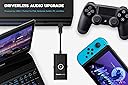
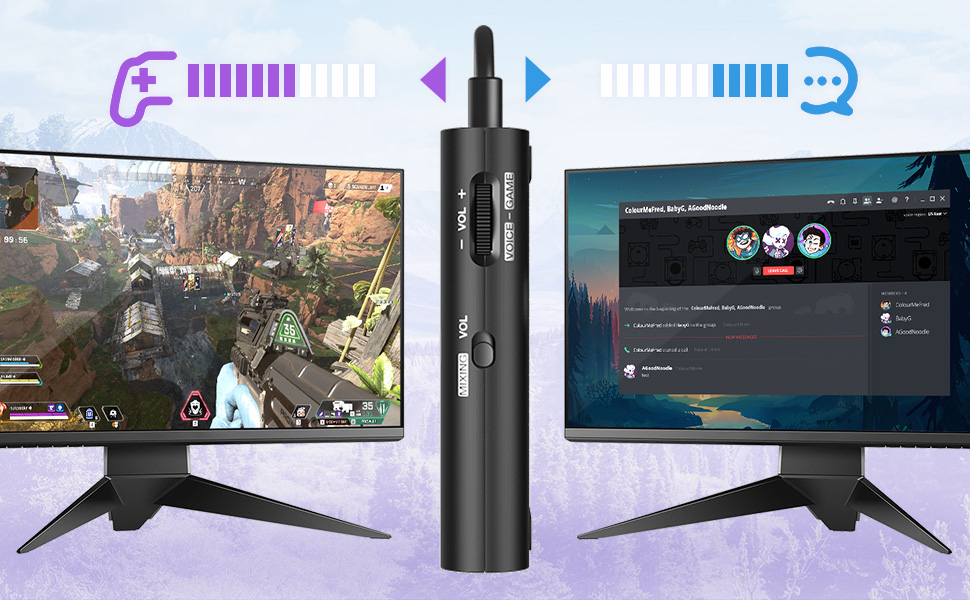
The Creative Sound Blaster G3 is a portable, driverless USB-C DAC amp designed for PS5, PS4, Nintendo Switch, PC, and Mac. It delivers premium 96kHz high-resolution audio with a 120dB signal-to-noise ratio, featuring exclusive GameVoice Mix for real-time game/chat balance, customizable EQ presets including a Footsteps Enhancer, and one-handed physical controls. Perfect for gamers and professionals seeking crystal-clear sound and communication without complicated setups.


| ASIN | B081ZN9K2M |
| Audio Output Mode | Surround |
| Best Sellers Rank | #27,123 in Video Games ( See Top 100 in Video Games ) #3,329 in PlayStation 4 Games, Consoles & Accessories #5,089 in Nintendo Switch Consoles, Games & Accessories |
| Brand | Creative |
| Built-In Media | Item |
| Compatible Devices | Personal Computer, Gaming Console, Smartphone, Tablet |
| Customer Reviews | 4.2 out of 5 stars 615 Reviews |
| Hardware Connectivity | USB |
| Hardware Interface | USB |
| Hardware Platform | Headphones, nintendo switch, playstation 4 |
| Item Dimensions L x W x H | 5.51"L x 5.12"W x 0.98"H |
| Item Weight | 100 g |
| Manufacturer | Creative Labs |
| Maximum Sample Rate | 96 KHz |
| Mfr Part Number | SB1830 |
| Model Name | Sound Blaster G3 |
| Model Number | [SB-G3] |
| Platform | Nintendo Switch, PlayStation 4, Windows |
| Signal-to-Noise Ratio | 120 db |
| Surround Sound Channel Configuration | 5 1 |
| UPC | 054651192966 |
B**K
Solved my high-pitched background noise problem in Zoom recordings
This small, simple-to-use device solved for me what I thought had turned into an intractable problem. Each time I wanted to record a Zoom video on my Windows 10 machine; the audio in the recorded file manifested a high-pitched background noise. I searched the Internet, but none of the suggested tweaks to the Windows or Zoom settings worked. Then I stumbled upon a suggestion to try a predecessor to this product. So, I gave this newer model a try. And it worked---flawlessly. I'm quite happy with the result. I now have it connected to my computer even during live Zoom calls. I simply connect my headset to it, instead of directly to my computer's audio jack. You can control the microphone level on the device. For me this product has been effective and quite simple to use.
A**R
Ps4
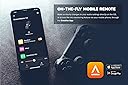
Headsets as u know on when used on ps4 seem to be less powerful and quieter than on other systems. Wanted something that would help with the volume. Was very skeptical about purchasing the sound blaster. With just plug and play the sound was better and a little louder. At this point i kinda felt I wasted money. Was hoping that I would be blown away with just plugging it in. Last option was to try it with the app. I downloaded the app, updated firmware and tuned it with equalizer and increased amp power. This was the game changer. The volume was way more than enough and the sound quality was awesome. Not all headsets are the same with some being base heavy or too much treble or just flat sounding. Through the app I was able to adjust the sound on my headsets for games, music, and movies. Only problem I did rung into was some echoing on my headsets with detachable mics and only way I was able to fix that was lower mic volume on sound blaster. Don't know if thats an issue but no biggie. Overall Im happy with the purchase and I can highly recommend this for ps4 users who are want better sound and volume from headsets.
C**.
G3 Works great with PS5 - with one issue
I have been using the G3 on PS5 paired with a Sennheiser HD 560S + V-MODA BoomPro mic and the results have exceeded my expectations for the price. The sound quality is outstanding and the mic comes across crystal clear. The only issue, and the reason I deduct 1 star, is that the audio volume and GameVoice Mix settings reset every single time I turn off the PS5. The volume resets to 24% and the GameVoice mix resets to seemingly 100% voice and 0% game. At first I thought it was a defective unit since no audio was coming through the headsets despite the PS5 detecting the G3, but I realized all that was happening was the volume in the app and the mix was resetting. This issue persists after multiple factory resets and firmware redownloads, so every time I power on the PS5 the first thing I have to do is open the Creative app on my phone, increase the volume from 24% to 100%, and reset the GameVoice mix. I admit, it is a hassle, but it has become part of my routine and the sound quality from the G3 makes the small inconvenience worth it. Once that issue is fixed I would change the review to 5 stars.
C**.
Great upgrade or replacement
The 3.5mm jacks on my motherboard's rear and front panel connectors died. I bought the G3 as an interim fix until I upgrade my computer later this year. I am quite impressed with the feature set of the G3, especially with what the Sound Blaster Command software. Sound quality is objectively better than my onboard sound card ever was. Over discord, my friends say my mic is much clearer than in the past two years. The G3 also allows different sound outputs on the same output. For example, you can set Discord sound on one channel and game/system sound on the other for the same output. If you like to stream and don't want Discord sound, you can use these separate channels in OBS/streaming software such that you turn off Discord sound. You could also turn down game sound if you want voice chat to come over more clear on your stream. This is probably one of the best features of the G3, second only to the mic clarity settings you get in Sound Blaster Command. I would highly recommend the G3 for anyone who needs an inexpensive, feature rich replacement to their onboard sound card. I can also see the G3 being great for people who use any laptop with USB-C ports (even though there is a USB A 3.0 adapter included), or people who just want better sound for their laptop.
B**8
Less buggy than G1 with Windows 11
Sound is OK for what it is and at it’s price point. I actually thought the older G1 sounded slightly better overall, but it became buggy after I upgraded from Windows 10 to 11. The driver package and software for the G3 seems more stable. No real issues thus far. Moved the G1 over to another PC still using Windows 10.
M**C
Works like a charm
I've been using this for mixing my Mac audio with my Switch 2 and it's absolutely great. Great for watching Youtube and playing games.
H**O
This is good for the speaker/headset only. Not for microphone.
Buying this soundcard for my online meeting. First time I tried this on my macbook pro, the microphone sound quality is so horrible. But after several hours of testing, it becomes good. Don’t really know why. The mobile app (Sound Blaster Command) works perfect. But the desktop app always get failed to install on my macbook. The equalizer only work for the output (headset or speaker), so can’t be used to tune the sound (adding more bass/treble) for the voice from microphone
K**C
Terrible Sound Quality for Music
For many years I used the $49 USB plug and play Soundblaster by this company, which unfortunately they discontinued. I used it to listen to music with my audiotechnica M30x headphones and music sounded great, with great, full and crisp sounds and great base. After they discontinued it, I bought two of the new plug and plays and now the G3. All absolutely terrible for listening to music. In fact I get a better sound by just plugging in my headphones and listening to music on my android phone. The sound, aver after tinkering with the settings, is muffled, the bass almost non existent, lots of distortion and popping after a while too. Not sure if it is better for gaming, but if you were looking to use this as an external soundcard for music, forget it. It actually makes the music worse. I am in mexico at the moment and its too complicated to return it, so it will be going in the trash. Complete waste of money.
W**.
Extremely Versatile
tl;dr I can use this with like over half of all the devices in my household and that's incredible; that alone is worth a recommendation. I've never used a DAC before so I can't say if this sounds better or worse than other comparable DAC's, but it still utterly crushes what any onboard audio is capable of. The gaming features are something you should only consider as an extra bonus. This is the first DAC I've ever used, so I'm not really familiar with how much better or worse this is in terms of sound quality relative to other DAC's. I've been using them with my four-year-old V-Moda Crossfade M-100's though, and it blows my mind that this entire time I wasn't even hearing them at their full potential. Regardless of how much better or worse this DAC is compared to others, it will IMMEDIATELY blow any onboard audio out of the water, guaranteed. Anyhow, since I can't give an authoritative opinion on the sound quality relative to other DAC's, I'm gonna recommend this DAC on its sheer versatility alone--on top of the mic in port meaning that your mic will also sound better, it has optical audio in (with an included TOSLINK to 3.5mm adapter and USB-C to full-size USB adapter), allowing you to use it with any console that has a TOSLINK port at the back--I was even able to use it with my PS3 this way. Its de facto use of USB-C means I can also use it with my laptop (which otherwise has terrible onboard audio and won't recognize my mic if I plug my headset into its headphone jack), my phone, and my Nintendo Switch (both docked and in handheld mode). The gaming features are pretty much an afterthought to me however--the footsteps enhancer seems to work, but it severely washes out anything other than said footsteps, which makes it irritating to use for extended periods. I have similar feelings towards the mixer dial; it works, but honestly I just wanted this for the boost in audio quality and not for the extra gamer-y stuff. If you're a super competitive gamer looking for an extra edge, this might help, but I honestly can't say that alone makes it worthwhile--unless you're also looking to improve your listening experience in general. In any case, if you're looking for a DAC, and have multiple devices in your household that you want to use it with--particularly any game consoles--this is easily the best choice by far. Its immense versatility alone has me sold.
N**R
عن الصوت
الصوت بالبداية اعتقدت انه مافيه فرق بستخدامه او بعدم استخدام المضخم للصوت لكن عرفت السبب وكان جميل جدا جودة الصوت ما تغيرت ولا كان فيه ازعاج لكن الصوت كان افضل من ناحية انه اعلى لكن الصوت نفس الصوت ومن ناحية المقاطع او الاصوات بعضها ما تكون ظاهرة بعد الاستعمال تظهر بشيئ بسيط منتج ممتاز جدا التوصيل كان اسرع من الوقت المقدر
D**L
useful
It makes my cheap headphones work as a PRO. Comes with an app to tweak sound.
H**A
Excellent
Excellent
G**R
Provides Sidetone for any headset with 3.5mm jack
I bought this sound blaster G3 because I wanted a sidetone in the headsets when I take office calls. Jabra headsets usually has built-in sidetone functionality. However they are insanely expensive. You can enable the sidetone with Creative’s mobile phone app, and also you can adjust the level. With sidetone enabled I tend to speak slow and low. Otherwise with no sidetone, I used to talk with loud voice in meetings and get tired by end of the day. So this is a good one for work from home option.
Trustpilot
2 weeks ago
3 weeks ago