

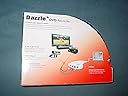
Dazzle DVD Recorder (Old Version)
Product ID: 17678134
⚡Low-latency video/audio transfer
🎮Console gameplay capture
💽DVD burning hardware
Desertcart purchases this item on your behalf and handles shipping, customs, and support to Ecuador.
💿 Capture, edit, and burn your memories—because your stories deserve the spotlight!
The Dazzle DVD Recorder is a compact video capture device designed to transfer analog video sources, such as VHS or gaming consoles, directly to DVD. It supports low-latency video and audio capture, offers compatibility with 64-bit Windows systems via updated drivers, and includes user-friendly software for basic video editing and DVD burning. Ideal for professionals and enthusiasts looking to preserve or share their video content with a straightforward, portable solution.
| Best Sellers Rank | #684,899 in Electronics ( See Top 100 in Electronics ) #130 in DVD Recorders |
| Customer Reviews | 3.5 out of 5 stars 113 Reviews |
D**H
Before you buy, you might read this...
After debating about a way to transfer VHS video to DVD, I thought I would take the less expensive (read:cheap) way out. My mistake. Don't make it yourself. The minimum hardware requirements are deceiving. You really need at least a 2GHz or faster processor and basically no other sound or video devices attached. Upon loading the software, I received the message that the audio driver did not load correctly and that I might have problems when running the program. That was putting it mildly. The program started to run, but showed no video and when the record button was clicked, the message "burn error" displayed. After several attempts at correcting the problem, it was time to explore the forum at Pinnacle software's site. Finding an identical problem on the forum with no response was foreboding of what was ahead. I called technical support and spoke with an outsourced representative who, after 30 minutes had me try everything I had already tried and then told me they would have to escalate this to level 2 support. Level 2 doesn't use the telephone so I would wait for an email message. Fortunately, that message only took 12 hours to receive. It started with the message: "What seems to be the problem?" However, it did suggest a 17 step fix for the problem I was having. After 16 of the 17 steps the error message came up again and the program did not work. Long story short. After two more email messages, I received the message: "Thank you for contacting Pinnacle Support. We appreciate you emailing us. If you have the same problem feel free to reply to this email." which, I believe is their way of saying 'we can't fix your problem'. At this point, the solution was clear: return for refund. I have seen several people who have had this product work fine for them, but I would recommend that you consider very carefully your system requirements before you purchase this device. Or check the forum at Pinnacle software to read what users are saying (or having problems with). My solution ended up being the Sandisk V-Mate recorder: SanDisk SDMV1-R V-Mate Video Memory Card Recorder which does not require a computer at all to record the video/audio and thereby removes the incompatibility factor.
E**S
Finally!
I tried and failed with two other devices before I found this one. The Dazzle DVC 100 was easy to set up and use even on my fickle 64-bit Windows Vista laptop. Pinnacle's website offers updated drivers on its site ([...] so even though it's described as working only on 32-bit Vista, I had no trouble whatsoever setting it up after installing the 64-bit driver. The device itself is light and not too big, and sports a conveniently long cable. I use it for playing video game consoles using my laptop monitor as the display, with which I've experienced overall good sound quality and no lag whatsoever. Though I was unable to find a full-screen preview option in the included software (which seems simple to use), I ultimately found that Ulead VideoStudio SE (from an EasyCAP's included software) did the trick after allowing audio in through the device. I'm sure many such programs, including free ones, could easily do an audio-enabled, full-screen preview (without recording) like this so you can just play the game on the laptop monitor. I haven't tried attaching a camera, but I can vouch that it works well with a PS2!
P**S
Dazzle DVD Recorder
This seemed like the perfect device to convert my old VHS tapes to DVD. The software installed quickly and the device was recognized by the Windows XP Professional SP3 operating system. The software seemed to be working great, writing the DVD directly without having to save and convert files. Then, nearly at the end of the process, a write error locked up the record process. Upon closing a dialog box popped up indicating a "Runtime Error" due to the program asking to close "in an unusual way", but no other specifics. I attempted to contact AVID Customer Service several times. I was unable to get through on any of several attempts. Google searches led me nowhere. Bottom line is that the Pinnacle software does not function reliably. Pinnacle (Dazzle/AVID) customer service is non-existent.
J**S
Terrible!
Purchased the item to get our VHS tapes onto DVDs using camcorder and computer. AFter three weeks of messing around with it, getting more memory for my computer and talking to tech support at company I still am unable to get it to work. It seemed so simple, and it is easy to install and use, however after burning to DVD parts of the video are dropped but the audio is fine. No one can seem to tell me how to fix this at Pinnacle (manufacturer of product). I'm about to give up all together.
D**N
Good product. Works well.
Good product. I was able to transfer my miniDV tapes straight to DVD. It was a little learning curve involved, but it is very straight forward process. I would disagree with other reviewers that the files need to be copied first to the hard drive. This product is not designed for that. Yes, you technically can do that, but it will not look like one nice mpeg file. You will end up with 5 to 6 .vod files (1GB each) that somehow you would have to stich together if you want to view it as one movie. Also when saving to the hard drive you can not name those files as you like. You can only indicate the output folder. Only after you get those files on your computer you may rename them as you like. Also there will be bunch of other files (associated with your video) saved in that folder that ended up getting created during saving. So the best way is to transfer your video straight to DVD and then if you want to create a mpeg , divx or other format file on your computer, you can rip this DVD. There are a lot of programs that you can use for it, including some very nice free programs that you can find on internet. One thing that I did not like so far is that there is no way to stop the transfer of the video to DVD and then start it again. Once you stop recording, the DVD is automatically gets finalized. So you have to make sure that the source of your video is edited before you transfer it to DVD. Overall, I'm satisfied with this product. I did not experience any problems during installation or during actual transfer of the file. I use Vista 32bit on my computer with 3GB RAM and dual core 1.9 processor. The program did not take a lot of resources and I was able to browse internet while my video was transferred on the background. The output file was a good quality. When I viewed it on my 52inch Plasma TV, it looked pretty decent. At least I can say that the video did not become worse during transfer. (but it did not become much better either) you will pretty much get the quality as of the original tape.
Z**Z
A headache
I knew going in that this isn't a plug-and-play product, as Pinnacle claims. What I didn't know was that Pinnacle doesn't provide any set-up support, refuses to address the tiny output image and poor quality issues, and finding help on youtube, as suggested in many reviews, will only work if you're trying to record from a video game platform. Since I wanted this to record old VHS to digital files I could import to DVD (or not, at my discretion), the hundreds of video tutorials I found on youtube were little help. In total, I wasted over 5 hours sifting through search results trying to find help. Searching forums and tutorial sites was also unhelpful; most were written for users who are familiar with advanced audio/video set-up. Many suggested purchasing expensive additional equipment and then skipped over "basic" steps I needed, such as which cable gets plugged into which female port. Ultimately, my local Radio Shack was able to guide me through the set-up process and tell me what cables I needed based on my particular VCR. They were familiar enough with the Dazzle capture card to guide me through after I showed them a high-resolution picture of the back of my VCR. Sadly, I have quite a few extra cables I will probably never need because I bought them on the suggestion of other reviews here or the tutorials I watched on youtube. My advice for anyone trying to use this with a component other than a video game system is to buy just the Dazzle and then show a picture of the back of your component (VCR, DVD player, etc.) to the knowledgeable folks at Radio Shack and they'll sell you exactly what you need and nothing you don't. This product would not be worth the time, money, and energy I have poured into it if I were trying to convert anything other than VHS format home movies to make a DVD for my parents' 50th wedding anniversary. It has been a huge headache and if I ever had to purchase equipment to convert VHS to DVD again, I would find another product from different manufacturer.
S**P
Decisions, decisions.
So many reviews for devices like this are full of complaints regarding the output quality, both video and audio. I started reviewing the cheaper devices and tried to spend my way out of the bad reviews but I never could. Devices priced from 20 to 120 all carried the same complaints in one form or another. Poor quality output, jagged edges, dropped frames, audio getting out of sync with the video. I was so confused that in the end I finally threw up my hands and ordered the Dazzle. With a few caveats, I'm glad I did. If you care to use the information, this is what I learned: S-video cable input is needed if you intend to view the output in more than a small computer window. Don't even think you will be happy with TV sized results using only AV cables. The output is best directed to a hard drive folder and then burned to DVD later. I import the result into a video editor (ULead) and trim and edit as needed. Your tapes are probably like mine and have have multiple unrelated events that should not be on the same DVD. Don't mess with the computer while copying. I turned off screen savers and updates to prevent disruption. My machine is a single core Pentium 4, 2.8Ghz , with only 512MB ram, USB2, running Windows XP service pack 3.
A**Y
Worthless to Me
I have 25 hours of of VHS home videos (going back to 1982) to transfer to DVD. Because of the low price, I thought the (Pinnacle) Dazzle DVD Recorder (DVC-101 USB video capture device) was worth a try. I was wrong. Even though I exceeded all minimum system requirements, multiple attempts using different recordable DVDs, different VCRs, and different DVD players; all resulted in an unusable DVD. Each resulting DVD would play well for a few seconds and then start "stuttering"--that is, it would alternately freeze for a moment, play for a moment, and so on. To its credit, the DVDs were of high video quality--at the highest quality setting for recording, the DVDs looked as good as the original VHS. I did not try lower quality recording, and I did not have S-video outputs on my VCRs, so I don't know if that could resolve my problems. Incidentally, the resulting DVDs are in VOB format, which is not recognized by Windows Media Player or any of the other players on my computer. Pinnacle strongly recommends using reusable DVD-RWs to start. I'd recommend that too, so you won't get too upset about wasting a lot of recordable DVDs. If you have a better technical understanding of DVD recording than I do, then maybe you can get this product to work. You can find the technical specifications on the Pinnacle website. I paid $35 through Amazon.
Trustpilot
2 months ago
5 days ago