


Desertcart purchases this item on your behalf and handles shipping, customs, and support to Ecuador.
🎯 Level up your legacy gaming with zero lag and next-gen visuals!
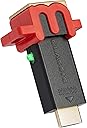
The Marseille mClassic OG is a plug-and-play HDMI graphics processor that enhances image quality up to 1440p/60Hz with zero lag. Compatible with a wide range of consoles from Nintendo Switch to retro systems like N64 and SNES, it offers three modes to optimize visuals for widescreen and classic 4:3 displays. Powered via USB, it restores your TV’s Game Mode image quality without compromising responsiveness, making it the ultimate upgrade for serious gamers seeking crisp, smooth gameplay across generations.


| ASIN | B07X6KDQ98 |
| Best Sellers Rank | #4,249 in Video Games ( See Top 100 in Video Games ) #39 in Nintendo Switch Cables & Adapters |
| Brand | Marseille |
| Built-In Media | Product Instruction |
| Color | Black |
| Compatible Devices | Various game consoles including Nintendo Switch, Super Nintendo, SEGA Genesis, PlayStation, and more |
| Connector Type | HDMI |
| Current Rating | 1 A |
| Customer Reviews | 4.2 4.2 out of 5 stars (4,090) |
| Finish | Hdmi |
| Global Trade Identification Number | 00864601000162 |
| Input Voltage | 5 volts |
| Item Dimensions | 6 x 4.5 x 2 inches |
| Item Type Name | Plug |
| Item Weight | 28 g |
| Manufacturer | Marseille |
| Mfr Part Number | MC9007-A |
| Model Number | MC9007-A |
| Number of Items | 1 |
| Number of Ports | 2 |
| Package Quantity | 1 |
| Power Plug Type | No Plug |
| Specific Uses For Product | Video Game Console |
| UPC | 864601000162 |
| Unit Count | 1 Count |
| Warranty Description | Limited Warranty |
| Warranty Type | Lifetime |
G**R
Impressive, probably gonna pick up another to connect to a splitter.
So this thing is designed to increase visual detail by interpreting frame data from your devices and adding to it. It also has a free anti-aliasing level given to anything passing through it (smoothing edges that have stair-stepping/jaggies/aliasing). Wow. I tried this thing out on all my 1080p and sub 1080p consoles, it really makes the content look much better on my TVs. The device only forces whatever native output resolution your TV tells it to (a 4k that doesn't natively support 1440p will only tell the device to go to 1080p). My smaller 1360X768 tv forces that instead of taking a 1080p image and downscaling it like it does with a PS4 signal. Your mileage may vary if your monitor or TV can force resolutions. Nonetheless, it's going to be whatever your TV natively supports that is 1440p or below that will be your maximum output. That said, I am very happy with this device. On my Switch, the upscaling of sub 1080p content and even 1080p content looks wonderful with the built in anti-aliasing making things look so much cleaner that I was able to boost the TV's sharpness of the image without getting visual noise (aka much better visual experience). This led to better visual clarity because the image was allowed to be less soft without becoming noisy or aliased. My 360 and PS3 that are hooked up to that smaller TV I mentioned look amazing even with the meagre "pixel boost". Heck even the PSTV I have hooked up to my 4k display looks so much better. Muramasa Rebirth and Killzone Mercenary have never looked this good. This is a good device for hardware of older resolution levels. Your returns diminish with higher resolution devices (I don't think an pass of extra anti-aliasing is worth the money on near 4K resolutions) but the sizeable visual upgrades (especially if you are a multi-console owner still plugging through old libraries) are well worth it. If you can get a low latency splitter, it spreads the love across any devices inputting without the need to buy individually for each device which is a nicety I wasn't expecting. I recommend it but make sure you understand what you are getting out of it and whether your usage scenario makes sense. Edit 09/10/22 - The photos I sent are pretty jumbled up so I am resubmitting them in a order that has the mclassic smoothed one first and the native image second. Keep in mind these are taken on a 4K tv where the image is outputting at 1080p with an anti-aliasing pass. Games with lower native resolution have a more perceivable difference and a 1440p monitor will get better results (have one on the way so I may repost thereafter). I am going to point out areas to look at to see the perceivable smoothness difference or sharper detail for those maybe not seeing the benefit. On BoTW Link: Observe the handle of the weapon over his right shoulder as well his bracer on his right arm where the transition between the pixels on link and the background are smoother. Also the texture detail on his shirt, the sheikah slate and other items has a clearer definition between colors and sharper edges. Super Kirby Clash Mage Kirby: Check out the area where Kirby's head reaches the hat or the lines of the star on the hat. The orb in his staff also has far less issues with the edges stairstepping. Though the textures are minimalist there is cleaner lines again on color changes on the hat or in the staff orb. Smash Bros Link: The Sheikah slate handle is remarkably smoother in image 05 (Mclassic) vs 06 (native). In images 07 and 08 notice how much more "serration" exists on Link's ear in 08 vs the 07 with Mclassic) These are a handful examples on my current setup, may update further. Edit 07/23/2023 Having used this for close to a year. I really appreciate what it does. Partciularly now that I have a 1440p monitor I use, this makes my Switch and Xbox 360 games look much, MUCH smoother with that 1440p upscale and anti-aliasing. I jump between these consoles and my PS5 and Series X and this has made the visual difference feel so much less jarring. 720p on Xbox 360 has been OK but now going back and playing Resident Evil titles for achievements on that console, it feels smooth, clean and very easy on the eyes. Switch gets a more minor upgrade but playing Tears of the Kingdom I have felt less impact from the dynamic resolution compared to friends of mine. What you get out of this requires a lot of understanding of the tech around it. 1080p and lower consoles benefit and if you have a monitor or TV with 1440p it will make an even bigger difference. Still highly recommend!
S**R
A VERSATILE GRAPHICS SOLUTION BUT DON'T BUY IF YOU'RE ONLY USING FOR SWITCH
First off, I'd like to point out two important factors when using this with the Nintendo Switch. I see a lot of complaints about the Switch specifically in the reviews section. 1) You can get 1080P graphics refinement with any tv & hdmi cord. 2) If you want to get the Switch picture to boost to Full 4k your TV has to be 2K & 4K compatible. 2A) You also need an HDMI Cord that supports 4K output. (I personally recommend Rocketfish HDMI Cords) As far as performance, on the Nintendo Switch & PS4, I would rate it a 6/10. It does some nice overall smoothing out of the picture, gets rid of some jaggies & makes everything pop a little bit more. If you can output @ 4K that is the best way to utilize this device on the Switch/PS4 and it will provide a small but welcomed improvements to the Switch/PS4 picture. But DO NOT BUY this if you are only using it for the Switch or PS4, it's not worth it. It's value is in it's versatility & what it does with retro games. The PS4 & Xbox One are pretty much the same as Switch, minimal improvements, but welcomed improvements. It smooths out jaggies & makes everything pop a little more. Like I said, the value in this product is in it's versatility, It's super easy to switch it from console to console and if you retro game this graphics card is a must! Where the M-Classic really shines is on retro consoles. I'm currently using this graphics card on a PS3, Xbox 360, an Original Xbox and I would give the M-Classic a 9/10 when used on these retro consoles. It does some really impressive enhancing and graphics smoothing on the Retro Consoles, it's very noticeable right from the get go. Notes on PS3 & Xbox 360 With the PS3 & Xbox 360 I just plug n play with these two consoles. Important thing to know here is that a lot of games on these two consoles only output @ 720P. So, it's better to go into your menu settings & switch your Output to 720P rather than 1080P & let the M-Classic do it's job from there & upgrade the 720P resolution to 1080P. According to Marseilles, this would be the correct way to maximize the picture. If you do come across a 1080 game, you can simply switch the resolution setting & the M-Classic will do it's part to upgrade the picture. NOTE: You do NOT need to use Retro Mode (Green Light) on the 360 & PS3, regular processing mode (Blue Light) is all that's needed on these. Notes on Original Xbox Any console older than the 360 or PS3 you'll want to use in Retro Mode. The Original Xbox games were mostly in 420P with some being 720P so again you'll want to switch your settings to 420P for games that output @ that resolution & let the M-Classic upgrade the visuals from the games original desired output. Xbox does have 720P & 1080I options, but you never need to select 1080I with the M-Classic, that will only impede it's ability to do what it's supposed to. You only need to select 720 if the game supports that output. SIDENOTE: Experimenting with some other picture resolution techniques, I found that the HD Pound Cable for the Original Xbox works really well in combination with the M-Classic. I've been using this combo on the Original Xbox & it has been very impressive visually. Anyway, that's my review and input on this product. I think it's an awesome if you are an avid gamer & have multiple consoles that could benefit from it's features. It's super easy to use, switching consoles is a breeze so the versatility is amazing. If you're only buying it for one console like the Switch, I would probably say it's not worth 100 dollars just for the Switch benefits. However, if you have a house full of consoles & retro consoles like me, this graphics card is a must have.
T**W
Excellent in very specific use cases! (retro/sixth gen)
I picked this up specifically for use with my GameCube and my Dreamcast. These are the two retro consoles I've invested the most in, and I wanted to be able to play them on my primary television (4K TCL 6 Series). First the bad, this thing should really be able to detect resolution signals sent by consoles and reflect that on the display without me having to know what the console is putting out and manually swap a switch to the appropriate aspect ratio. Specifically with the GameCube this is an issue because it's pretty scattershot the games that support a widescreen resolution and those that are 4:3. This isn't a deal breaker, but seems like a weird thing to put on the user. I'm thankful at least the mClassic handles this with a "retro mode" switch where the mCable just forced everything to 16:9. It's also important to mention that this only works with a progressive scan signal. This really boxes in what this device is good for because if you go too far back, suddenly this thing can't work with what it's getting (sorry PS2), and if you go too far forward you're just not seeing a noticeable improvement. I tried this on my Xbox 360, first with a 360 game and then with an original Xbox game running in backwards compatibility. With both games I saw no noticeable improvement. This was done on a secondary 1080p television, so it's possible have better results on my 4K tv. For me, this is fine, this isn't what I bought this product for, but for the price tag I was hopeful I'd see more benefit than I did on the 360 even in 1080. The real reason I bought this thing was to sharpen older consoles that aren't putting out any sort of modern HD signal. First I tested this with my GameCube. It's worth noting that you'll need some sort of HDMI solution here as these older consoles output with component at best. For the GameCube I have Retro-Bit's Prism HD (which I'd also recommend). I have to say, there's a noticeable jump in sharpness, specifically with its antialiasing. The big thing to note here though, and this is going back to the way this thing only takes a progressive scan signal, most GameCube games do not output progressive scan. You can find a list of the games that do (just Google "progressive scan GameCube games"), but you'll also need a GameCube with the ability to output that signal, so a model with component out or a modded console. In my case, I'd modded my GameCube with a GC Loader, and using Swiss (the software for that mod) you can force any game to output a progressive scan signal. This is all a very complicated way of saying, the audience to get anything out of this device is exceedingly small. With all that done, the new image was great. I noticed specific improvements in games like Zelda Wind Waker and Skies of Arcadia, where the animated art style lent itself well to sharper lines and more saturated colors. It was less noticeable in Need for Speed Hot Pursuit 2, but still a step up. For the Dreamcast, the setup is a bit easier, but still requires an HDMI converter. I went with the Gekko from Beharbros (strong recommendation on that as well). The Dreamcast catalogue actually had a much larger support of progressive scan via its VGA support. With the Gekko, you don't need a specific sku of Dreamcast nor any hardware mods, you can simply plug in the Gekko and the mClassic and you can play pretty much any Dreamcast game (with the exception of the 50 or so that outright do not support VGA) with all the benefits of the mClassic on a modern television. With that setup, I'm seeing Dreamcast games the best I've ever seen them by a fairly wide margin. They're sharp. I could hardly believe I was looking at 480p gameplay. One more thing—with my TCL 6-Series I had a strange issue with screen tearing on GameCube games. I've seen plenty of folks talking about issues like this on various hardware plugged into this make and model of television, and nobody has had a solution. To my disbelief, the mClassic actually fixes this issue between my television and GameCube. I'm assuming the GameCube outputs a framerate that disagrees with my television, and the mClassic is doing something passively to correct this, thus remedying the egregious screen tearing. This is just another weird very specific use for this device that validates its value, on the remote chance it applies to you. That's where I'm left with this thing. For me, it's wonderful. But I've also spent the last year researching and acquiring specific hardware and software to make the best retro console experience for myself. Make sure you know what you're getting before you buy this thing, because if you aren't set up for it, it's an expensive piece of plastic. If you are set up for it, you're going to get the most out of your consoles. Note: If I get some time I might try to get some direct capture of games and upload that to this review.
D**Y
AMAZING!!! You'll Never Play Retro Without It!
I struggle to find the right words to start this review, so let me offer one word: AMAZING. Every single console and game showed improvements provided I had system settings correct (ex: Hold B to trigger Progressive Scan mode for GameCube with proper HDMI converter) and I was in 4:3 mode if the game did not have 16:9 mode. I bought this little miracle device to upscale our retro consoles, and our Nintendo Switches. I have tested it out on an LG QLED 4K, TCL QLED 6 Series 4K, and TCL 5 Series 4K with the following consoles with such outstanding results that I refuse to play without it now: - PS2 with Intek component cable + component to HDMI converter, Gran Turismo 4 set to 16:9 and 1080i. Rough edges noticeably smoother, text WAY more readable, overall very smooth for PS2. - Original big Xbox + component cable + component to HDMI converter. Tested out playing NCAA Football, Top Spin, and Halo.HUGE difference on the games that support 480p and yes, even 720p like The Warriors. - GameCube + Carby HDMI converter, every game that will play in 480p/progressive scan mode. Where do I begin? F-Zero GX in 16:9 Progressive Scan is BLISS. Every progressive scan title looks incredible, but some literally rival Wii and even Wii U. Zelda: Twilight Princess looks every bit as sharp on GC as the Wii version here. Soul Calibur 2 looks INCREDIBLE. I own the now $300+ Genuine Nintendo component cable, so I know how good the games could look at the former best that GC could offer. M Classic takes it to another level. - Xbox 360S + stock HDMI. Forza 3 literally never looked smoother. With the Xbox settings on 1080p the M Classic literally tripped the DOLBY VISION notification on my TCL 5 series (but not on the LG QLED) which is pure insanity. - N64 + Hyperkin HDMI cable. Yes, I said N64. I only played Dr. Mario 64, and Perfect Dark (with RAM jumper pack) and while the difference is minimal, there's definitely a difference. It's still polygonal N64, but it does still smooth the jagged edges. - Wii/Wii U + stock HDMI. Again, nothing short of awesome on literally every single game played. Even the retro titles like ExciteBike 64 look insanely smooth, especially for their era. Flagship titles like Mario Kart 8 and Smash Bros. Brawl look every bit as good as Switch counterparts. Nintendo Switch + stock HDMI. There's definitely a noticeable smoothing of edges, but the difference is not as pronounced for Switch when compared to the older legacy consoles. Don't get me wrong - I still won't play Switch without it if possible, but it's not the same "hoooly CRAP!" effect on the older stuff. Ultimately I'd say if you're into "retro" gaming with any consoles that don't do 4K HDR, then the M Classic is NECESSARY. Just be absolutely sure you've got a good HDMI converter for your legacy consoles first. Last Pro Tip: Plug all your consoles into a high quality HDMI splitter, then plug the M Classic into the single out of that splitter. Congrats! You've just multiplied your M Classic across every console! I recently did this after worrying about the repeated unplugging/plugging into every console every time I changed consoles. The splitter hasn't reduced the M Classic's effectiveness!
C**Y
It definitely works, but I have some nitpicks
The mClassic does exactly what it says it will do. I'll just get that out of the way upfront. It helps cleanup the stair-step jaggies on sharp edges that you will more easily see with lower resolution images on bigger displays. In general, the image it produces looks cleaner and higher res. I do have a few nitpicks with the device though. Keep in mind this is coming from the perspective of someone mostly using the mClassic with the Nintendo Switch. If you're a big retro gamer and are using it for any consoles from the N64 to the Wii/360/PS3 era, rest assured that the good far outweighs the bad and it is definitely worth it. Ok, so my little nitpick is that it doesn't just boost the resolution and smooth jagged edges. Doing some comparisons in my Switch screenshot gallery it also slightly boosted contrast. That is not necessarily a bad thing. I mean, better contrast and color is what newer displays with HDR support is all about right? Well the problem is that the mClassic does not magically add HDR so some of this contrast comes from dark colors getting crushed. The clearest examples were in Xenoblade Chronicles and Super Mario Galaxy screenshots I had taken where some dark bluish purple nebulae almost completely disappeared into the black of a starfield with the mClassic. In most cases I feel like the boosted contrast is actually a good thing. Some games, like Breath of the Wild and Smash Bros, feel just a tad washed out to me personally. If you're in an area that is very dark or playing a game that is darker in general though, like Dark Souls for instance, you will lose out on some shadow detail, color, and clarity. My shorter, but perhaps more important, nitpick is that the mClassic causes a small, occasional flicker on our Samsung TV. Reading through some Reddit posts and a few other things it sounds like this is more of a Samsung problem so while I don't blame Marseille for it, you might need to consider your TV brand and see if it plays nice with devices like this. For me it's a little annoyance, but some TV models seem to have more serious issues getting a signal with it. Nitpicks aside though? It works as promised. It isn't perfect but for most use cases it does improve the image and I didn't notice any added lag. Should you buy it? That depends on your use case. If you're big into retro gaming, absolutely! I hardly mentioned retro stuff here because there isn't much need to. Consoles that ran at 480i/p in particular look way better. If you are just getting the mClassic solely for the "Switch Pro" experience though, I wouldn't buy it at $100. Picture improvement is there, but unless you're a hardcore videophile or you sit pretty close to a big display it isn't enough to justify the price. Buy it on sale. I am taking off one star for the performance/value. I took off another for a bad customer experience I'm willing to give the benefit of the doubt because of the crazy holiday period but didn't touch on here.
A**R
Not magic, but definitely nice!
This isn't a device thats going to magically generate pixels, so dont go into it thinking that. Instead, you'll see a moderate improvement to visual noise. Essentially, the mClassic is smoothing the image slightly. I would say it softens it roughly 10-15%, but what you get in return is more pleasant image to look at it. This device isnt magic, its not going to absolutely revolutionize how old games look, but it does improve your perception of the image. I would only recommend this for people who enjoy and are sensitive to subtle changes.
J**D
Didn't work or didn't improve the image with my devices.
I tried to use it with Virtual Wii (the Wii console inside the Wii U) and to play Mario Kart Wii. To start on a positive note, I experienced thin, flickering lines on the screen and distorted audio. However, plugging the micro USB into a USB-to-plug adapter, then into a wall outlet or surge protector (as opposed to plugging it into one of the Wii U's USB-A ports), helped with the audio and flickering. Otherwise, the device did nothing for the image. I was required to set the Wii U to 720p or 1080p. If I set the Wii U resolution to 480p, the image would drop in and out for several seconds at a time. Even with settings that did not drop in and out, the image did not improve. I have a 4K monitor and an 8K HDMI cable. Both work excellently with other devices. I tried multiple AI models that I have subscriptions to - they ran me around in circles doing the same stuff to troubleshoot, but it comes down to the fact that the device just really doesn't do anything, or it's not compatible with my monitor, MSI - QD-OLED 4k (UHD) 240Hz model: MAG 321UPXB QD-OLED. If there is some unique way to set this up, I did not find it. I'm not an electrical engineer or a hardware/software engineer. If there was some better way to get this to actually do something, it should be included in the instruction pamphlet. Hope other people have better results.
A**.
Believe the hype.
I was very, very skeptical about this product as it seemed to be too good to be true - being able to give older consoles a new life with an updated resolution, antialiasing, depth of field, etc. A new “graphics card” for your old (and current) consoles. I’ve been using it for about two weeks now and I have to say it works exactly as advertised. My Samsung 4K TV supports 1440p and this little gadget upscales anything I throw at it to that resolution. The aliasing (jaggies) on PS3 and 360 games disappear when using this which was one of the main draws for me as aliasing sucks as a general rule. Upscaled to 1440p with antialiasing and other bells and whistles it makes games on my PS3 and 360 look like they’re running on a mid-tier PC. Not only is the aliasing essentially gone but it sharpens all of the textures, provides a nice depth of field effect when appropriate and just generally cleans up and makes everything look better. Now it’s not going to turn your PS3 into a PS4 but the changes are very noticeable. I performed testing using the jaggiest, most aliased games I could think of - Fallout 3 and New Vegas on PS3/360 and this eliminates it all. I was in a bit of a state of shock the first time I booted it up as I was not expecting such a drastic difference. I should mention that I also tested this out on my PSVR1 which also helped tremendously with aliasing and kept everything nice, tight and smooth. Games like Walking Dead: Saints & Sinners look a lot more crisp and clean and it helped me stay immersed in the experience that much more. Now keep in mind when reading that my TV supports 1440p which helps make the massive difference. I’m sure there’s improvement when upscaled to 1080p but it may not be as dramatic. That said if you’re wanting to give your old consoles some new lease on life and a shot in the arm you could do much worse than the mClassic. P.S. - You can also run an HDMI splitter to hook up multiple consoles at once to each take advantage of the mClassic. I got a “3 in 1 out” 4K/60Hz for $15 on Amazon and it was worth every penny.
O**A
No espera menos
Lo compre pensando en mi viejo Xbox 360 y el resultado me dejĂł muy satisfecho (mi consola está en su resoluciĂłn nativa de 720p), mejoro bastante los dientes de sierra en juegos donde el atialising es malo o no hay, aunque mi televisor 4k no soporta los 1440p el rescalado 1080p es muy bueno. TambiĂ©n decidĂ usarlo en mi PS2 (en los pocos juegos que tengo con escaneo progresivo) y resulta me dejĂł sorprendido además lo usĂ© en mis viejos juegos de Xbox clásico (atreves de retrocompatibilidad de mi 360) se ve mejor resultado que en los mismos juegos del 360 XD yo dirĂa que las consolas de 6° generaciĂłn les va a caer muy bien e igual para las 7° generaciĂłn ( siempre cuando esten en su resoluciĂłn nativa de 720p). Y por Ăşltimo mi nintendo switch el resultado ess ehh bueno bastante aceptable si hay una mejora considerable y se nota a simple vista. PD: está reseña la hago despuĂ©s de 2 meses 1/2 de uso, espero que les sirva.
V**O
Esperienza con Raspberry pi 4
Ho voluto sperimentare l’accoppiata pi 4 con l’emulazione psp. Parto subito col dire che mostri avranno notato la necessità di impostare una risoluzione 2x nelle impostazioni dell’emulatore PPSSPP per rendere la grafica più accattivante e comunque godibile su schermi da 15 pollici in su. Così facendo però, spesso si hanno cali di frame nelle fasi più frenetiche dei giochi, rendendo frustante il tutto. Ebbene la mia idea era quella di utilizzare l’emulatore con risoluzione 1x accoppiandolo con Mclassic. L’esperimento è riuscito pienamente: Mclassic permette di recuperare quando di perso si avrebbe nel passaggio da una risoluzione 2x ad una 1x…in più si ha un carico minore sulla cpu e gpu del raspberry con azzeramento dei cali di frame di cui parlavo prima. Pienamente soddisfatto. (Consiglio di impostare come risoluzione di uscita dal pi 4 la 480p, ci penserà Mclassic a fare il resto). Analoga prova fatta con l’emulazione dreamcast: anche qui si ha possibilitá di ridurre il carico su raspberry, potendo ridurre la risoluzione in uscita. Risultati di tutto rispetto….chiaramente con effetto uaaaoooo ridotto rispetto a psp ma comunque rispettabilissimo. Mi riservo di fare prove con n64
R**T
A solid graphical upgrade.
I recently bought a PS3 slim to play some older and exclusive games that simply aren't available on other consoles. However after playing for a few minutes I was disgusted at how truly awful the graphics are. I read about the MClassic and watched some YouTube videos so decided to give it a try and I have to say I’m quite Impressed. While playing GTA IV, a roughly 640p native game I noticed an immediate improvement to AA (Anti-Aliasing) and also an overall improvement in the picture detail as the MClassic upscales games from 720p or lower to 1080p. It can upscale to 1440p but my TV isn’t compatible. I seen a slight improvement to draw distance and sharpness but definitely not as much as my Sony TV’s “Reality creation” feature. When both the MClassic and the Sony TV’s super sampling work together you get a truly amazing picture. I recommend if you can run both the MClassic and some of your TV’s picture quality features then you absolutely should, but only if you can run this while in game mode. If your TV doesn’t have any options while in game mode then the MClassic on its own will still do a lot of the heavy lifting and will improve contrast, AA and upscaling, which is ideal. Remember to set your console to match that specific games resolution, so for example if your game runs at 720p, which almost all PS3 games do, then go into the PlayStation display settings and untick the 1080p and 1080i. This is so the PlayStation doesn’t use its own awful upscaling and instead it lets the MClassic do all the work. People online also said to change the option of RGB to limited, but I found no real difference between limited or full however you may see something different on your display. In terms of price it is an expensive product but if you are planning on playing an older console for a considerable amount of time then I would say it’s worth it and also your eyes will really thank you. If you’re simply dipping your toe in with the older consoles and only want to play a single game for a brief time, then maybe this isn’t for you as the enhancements can vary from game to game and you wouldn’t truly get the full benefit from the MClassic. One thing that’s slightly disappointing is the fact you have to power up the device instead of just running it via the HDMI port. This is of course necessary but it does leave a red wire sticking out the front of your console, at least for the PS3 Slim, which only has 2 USB’s on the front. As someone who hates wires sticking out this just isn’t ideal, but for me a worth while trade off for the picture quality it provides. You can put the usb into a compatible plug however I didn’t test this as I don’t have spare slot available. I did however try to put the usb into another console to power it that way and hide the wire but it simply wouldn’t work. The TV displayed a no signal, but when I put the USB back into the PS3 it instantly displayed on screen. Overall a solid improvement that excels in AA and upscaling to make your picture much more detailed and nicer on the eye. The draw distance and sharpness aren’t as impressive as an expensive TV’s super sampling tech, but if you can combine both then you will get a truly beautiful, clear and graphically enhanced image that makes its a joy to go back to older consoles and experience games at their absolute best.
W**M
Didnt work well
I think it needs something called EDID emulator to work and im not sure about that.
M**1
Viel Qualität gut wenig Geld
Der upscaler ist ein Game changer! Man sollte beachten das das volle Potential bei einer Wii/wii u/xbox360 und ps3 entfaltet wird! Auf bei Switch Games die unter 720p laufen sieht man deutlich einen unterschied! Man sollte die Konsolen allerdings auf 720p stellen und dann den upscaler auf 1080p hochskalieren lassen da dieser besser ist als der Konsolen interne. Die "Treppen" verschwinden zwar nicht ganz aber werden bis zu 70-80% geglättet (man sollte sich im Klaren sein das dies kein wunderadapter ist). Wenn man bis aufs endlevel gehen will dann kombiniert man noch den 4K gamer Pro hinzu + im Sony tv Motion Flow auf Maximum stellen für 60fps (die Funktion haben auch die neueren LG und Samsung TVs aber bei denen heißt es anders) und die Wii u games sehen wie ps5 spiele aus (Zelda TP HD 4K60, was atemberaubend aussieht, vergleichbar mit einer vhs Kassette und einer Blue ray disc) Selbst die ps4 Spiele auf der ps5 und xsx Games kriegen dadurch nochmal ein grafischen boost! Man sollte auch die TV bildeinstellungen dementsprechend einstellen so das man das Maximum rausholt! Jann ich nur weiterempfehlen wer gamecube/wii(u)/360 und ps3 und einige Switch Games gerne auf modernen 4K TVs nochmal neu erleben möchte denn genau da entfaltet sich der upscaler und zeigt seine stärke. Da ist man mit 200€uronen maximal bedient und muss sich dann nicht sowas wie den retrotink4k für 800€ holen welcher überteuert ist um im Endeffekt das gleiche macht mit ein paar Schnickschnack features welche zu vergleichen sind wie mit einem autositz…stellt man den 1x ein, fummelt man da auch nicht mehr rum. Einfach nur Stunning Modus 1 (grüne Leuchte) sollte dementsprechend eingeschaltet sein und beim 4K gamer Pro Modus 2
Trustpilot
5 days ago
1 month ago