Buy anything from 5,000+ international stores. One checkout price. No surprise fees. Join 2M+ shoppers on Desertcart.
Desertcart purchases this item on your behalf and handles shipping, customs, and support to Ecuador.
🚀 Elevate your office game with speed, smarts, and seamless mobile power!
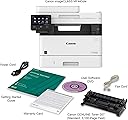
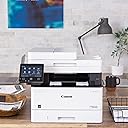
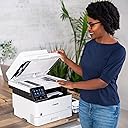
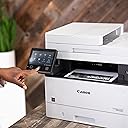
The Canon imageCLASS MF445dw is a high-performance monochrome laser all-in-one designed for busy professionals and SMBs. Featuring a 5" color touchscreen, ultra-fast 40 ppm print speed, duplex scanning with OCR, and versatile mobile connectivity including Wi-Fi Direct, it delivers reliable, cost-efficient printing with advanced security and a 3-year warranty—making it the ultimate productivity hub for modern workspaces.


| ASIN | B07WVF56VB |
| Additional Printer Functions | All In One |
| B&W Pages per Minute | 40 ppm |
| Best Sellers Rank | #171,872 in Office Products ( See Top 100 in Office Products ) #178 in Laser Computer Printers |
| Brand | Canon |
| Built-In Media | imageCLASS MF445dw - All in One, Wireless, Mobile Ready Laser Printer |
| Color | White |
| Color Pages per Minute | 40 |
| Compatible Devices | Printer |
| Connectivity Technology | Networkable , USB, Wireless |
| Control Method | Touch |
| Controller Type | Amazon Alexa, Vera |
| Customer Reviews | 4.3 out of 5 stars 841 Reviews |
| Dual-sided printing | Yes |
| Duplex | Automatic |
| Global Trade Identification Number | 00013803314236 |
| Hardware Interface | Ethernet, USB |
| Ink Color | Black |
| Item Dimensions D x W x H | 17.8"D x 18.3"W x 15.4"H |
| Item Type Name | Laser Printer |
| Item Weight | 35.7 Pounds |
| Manufacturer | Canon |
| Maximum Copy Resolution Black and White | 600 dpi |
| Maximum Copy Resolution Color | 600 dpi |
| Maximum Copy Speed Black and White | 40 ppm |
| Maximum Media Size | 8.5 x 14 inch |
| Maximum Print Resolution Black and White | 600 dpi |
| Maximum Sheet Capacity | 900 |
| Maximum print Resolution Color | 600 x 600 dpi |
| Model Name | MF445dw |
| Model Number | MF445dw |
| Model Series | MF445 |
| Number of Trays | 1 |
| Other Special Features of the Product | Touch Screen |
| Paper Size | 4.1 x 5.8, 8.5 x 14, 3 x 5 |
| Print media | Paper (plain) |
| Printer Connectivity Type | Networkable, USB, Wireless |
| Printer Output Type | Monochrome |
| Printer Type | Laser |
| Printing Technology | Laser |
| Processor Count | 1 |
| Resolution | 600 x 600 |
| Scanner Type | Sheetfed |
| Special Feature | Touch Screen |
| Total USB 2.0 Ports | 1 |
| Total Usb Ports | 1 |
| UPC | 013803314236 |
| Unit Count | 1.0 Count |
| Warranty Description | 3 Year Limited Warranty |
| Warranty Type | limited warranty |
| Wattage | 1350 watts |
N**A
Perhaps the best monochrome machine. Ever.
It has 3 years warranty. The cartridge that is included is not some "starter" type. It's full-featured, 3100 pages cartridge. So it's like at least 2 extra cartridges is included in the price if you compare with any of the competitors. It's unbelievably fast. It has duplex multi page scanning - it's when you give it stack of paper - it automatically scans both sides of each page and nicely places it into a PDF file, for example. It's silent in the sleep mode, unlike many HP competitors that have high-pitched noise while in the sleep mode. This printer is too good to be true. In fact, it's so good, that you'll get greedy. You would whine that "if only it could print in color". (and then your life-time quest of finding a perfect printer will be over). When I compared the true black document printed on this printer and on a very good inkjet (with print price per page about 10x) - I didn't know which one is better and at some point I confused the two copies. I couldn't figure out what printer printed what copy. And then... the greed. When you print PDFs, some of the colors are not pure black. Meaning your prints will be somewhat "pixelated". However, it gets perhaps much better if you play with the "quality" settings. It's capable of 1200 dpi, but then it has some modes like "photo" or "publication" or "high-definition text" - you need to play with those. This is in NO WAY "the fault" of the printer!!! You are buying monochrome. This is the nature of it. The toner is black or no black. There is no even gradation of the gray. Meaning that even gray has to be simulated from the black or absence of black. It has to be said that inkjets prints are also pixelated. But perhaps because pure black is also pixelated - you care less about the not pure black ones. Laser printer gives you so much sharpness for the pure blacks that you start noticing pixelation on the not pure black colors.
A**R
Highly customizable, very nice !
I am using this printer for basic home needs. Basic printing a few times a month, but also scanning all my incoming paper documents to archive them and go paperless, so I scan almost daily : invoices, IRS documents, pay stubs, contracts, everything. This is the cheapest printer I could find with a duplex single-pass scanner, so I went ahead and ordered it. I am impressed by this printer because it comes with 2 features I did not expect : - Internal OCR capability. When it scans to PDF, it can make them searchable, which is awesome. - Customizable interface with a LOT of options (but you have to be tech-savvy). I customized the front screen to add 4 quick-scan buttons. When I press one of them, it scans with the proper settings, and the scanned PDF lands directly on my computer (I used FTP but you can use Windows file sharing too, SMB). This is really convenient ! I just put the documents in the ADF, press the correct button, and it's done. I then just have to rename the file and file it on my storage. The attached photo shows my customized home screen. The printing works well and does duplex too, which is a must have to save paper and trees. Very happy with this purchase !
J**C
Great Printer - But a Word of WARNING
Print quality is wonderful, it does everything I need. Out of the box, scan to pc, copy, print, etc, all work very easily. However, a word of caution. I am a well-compensated systems engineer by trade. I definitely know IT/networking, systems administration, and even some code. However, it even took me an hour to get this darn thing to scan to an email using encrypted SMTP given it didn't like my email provider's (Optimum/Altice) TLS certificate for SMTP. So, I wasted nearly 45 minutes trying to interpret error codes and troubleshooting that after spending about 15 minutes finding the settings pages I needed in the first place to start even putting the config in correctly. (IE: Why did the documentation point me first to this useless/terrible legacy website that you can't even access in the UI without directly navigating by URL, when I should have gone to other pages? Then, why is the smtp port number on a different page than the email stuff? Also goodness gracious, this is some serious granular control over permitted PKI Algorithms for TLS on this other page, etc). FYI, SSL/TLS does work for encrypted smtp on this device, just not for optimum.net email for some reason. I was able to get outlook.com email working instead using an app password as for them, I am set up with 2FA. I think it may have something to do with optimum demanding the use of specific ciphers with their certificate and not using STARTTLS, but I could be wrong--I didn't troubleshoot further and just decided to use a different email for SMTP. In summary, the web (they call it "remote") UI is very unintuitive and closely related options are unfortunately in menus scattered throughout the machine in very different places. The documentation is also scattered everywhere. If you plan on doing anything other than the basics, you're going to want to know your stuff like I do or get their tech support. Otherwise, this thing is feature packed, and in my opinion, more so than a comparable Brother printer. This one is far sleeker and more modern looking too than a comparable brother, plus it's really quiet :D.
R**N
Excellent networking, easy setup
Needing a new network AIO device to replace an aged Canon MF6560 AIO I decided to purchase this new MF445dw. What a great decision it was! After connecting this machine to my system including wired network connection, a few minutes are necessary to install the drivers, restart the computer to finalize driver installation, then a few more minutes to run through the setup screens on the printer itself to set time date, etc. and you are happily using the device. I will caution that during the on device screen setup if you do not want to use the automatic supply ordering feature make sure you answer NO to that prompt! I can see where some may miss this or say YES when they really did not want to. I have thus far used most of the features of the device. Print, Fax, Scan, and Copy all work great! The Scan feature is really slick. Having the ability via a scanner driver installed during setup to use the scan function over a wired network connection is very nice and works flawlessly! I have occasion to do this quite often to create pdf documents and it works slick! I think you will find this device much to your liking, and Canon does make the best AIO on the market in the consumer space!
A**R
Significant Improvement!
I have purchased at least a dozen of the ImageClass printers over the years for my business. There has been a very slow evolution in the last decade or so. They always have been great in that they will print a page within about 10 seconds of sending the file, but they have always been at about the same speed. Until this one. This one cost just a bit more than the others, but boy is it worth it. Print speed is about 50% faster, and scanning speed is at least that much faster - probably more. The interface is much better with commonly used functions on the home screen (like printing two pages to one side of one page, which I do). I think the only thing I find annoying is that with the touch screen, you have to be careful your finger is not moving at all, or it registers it as a slide instead of a press. Pretty minor stuff. Oh, and another big thing. Because there are no copycat toner makers for this machine yet, the cost of a cartridge is MUCH more expensive than the knock-offs I always bought for the lesser ImageClasses.
J**N
Great Printer but scanner gets paper off
This is an awesome printer reliable and sharp printing. I love it. My only issue with it is when scanning from the feeder, like a lot of printers, it scans the page off center. If you're working from home and have the printer set as a network printer and have a VPN to the office. Make sure you have someone who understands the way to configure it. My support people and I have had a devil of a time getting it working. The software will install but it won't connect. So be warned.
S**R
User Interface Design by Rube Goldberg and implemented by Escher
Could they have found a more retarded way to design this thing? Holy *** **** this is so insanely complicated to do the most basic of tasks. I have been using various brands of multi-function network printers for decades at home and never in my life could I have envisioned something taking so much *** **** effort to configure this thing. And who the heck logs into a printer to configure it with a user number and a four digit PIN?! I know, I'm a home user and don't need the absurd complexities of this. As an office worker (I'm an electrical engineer and computer guy) I would just walk past this thing and find another printer in the office to use because I have far less time to do a simple task while working than I do at home. Everytime I print the printer beeps telling me to select the only printer paper tray I have available before it will print. I have selected Auto and Tray 1 in the printer config in print dialog and every bleeping time I have to select it on the printer. Every morning the printer won't print. The only way to get it to print is to uninstall and reinstall it from the OS. I have confirmed the IP address is not changing over night. There is absolutely no excuse for how awful this thing is. It's like Rube Goldberg designed it and Escher implemented it. UPDATE OMG do I truly hate this printer. It is beyond stupid. Every time I print I have to go to the printer and select the only tray available on the touch screen before it will print. Because the print isn't certain I actually want to use the only paper available. This thing is complete garbage. And every time I do anything with it, it has to print a transaction log. This thing is so wasteful, time consuming, and stupid I'm going to throw it out and get a printer from a company that actually knows how to make a printer that.. I dunno.. prints?
M**N
Very pleased with purchase
I purchased this printer after reading many reviews on other brands. Taking into consideration complaints that users has on those other brands I chose the printer from Cannon. Setup is fast, actually took longer to remove tape from printer than printing my first page which worked from all 4 of my windows computers and 3 of 4 of my iOS phones wirelessly. For some reason in sleep mode one of my phones will not recognize the printer if in sleep mode and I must manually wake up printer first. I do not believe this is a printer issue based on the fact that my other 3 phones can recognize the printer and print from sleep mode just fine. One thing to note however, to scan you must download the scanner driver from Cannon site. I chose to download from site after reading other reviewers comments across other brands about never using the included CD. The only issue I have is I can not scan and email directly. I get a message that IR is not setup. I believe I have setup correctly but cannot get this option to work. For now I scan to a computer or to a memory stick which is fast and easy. My suggestion is if you are looking for a Laser printer this is the one to buy. I have never owned any Cannon products and am very happy with this purchase after using it now for a month.
E**.
MF445dw - Not function as advertised
According to the Product Desc - Fast, Single-Pass Duplex Scanning The imageCLASS MF445dw leverages a single-pass document feeder for two-sided scanning at up to 70 images per minute (ipm) in black and white or up to 26 ipm in color. Scanned files can be converted into multiple file formats, including Hi-Compression PDF and Searchable PDF (OCR). So far, not able to perform 2 sided scanning as adverstised. Tried scanning thru feeder but only 1 side is scanned. This setting is missing on the MF Scan Utility. Installed both versions (one from CD, and the latest v12.02 from Canon) but no success. One star for now. Will review it again if this get resolved. Might have buy something else if this does not get resolved. Update to 5 stars. Contact Canon support - they were able to provide the correct driver and software. After reinstall the new driver and Scan Utility. The 2-sided scanning feature is available. Everything is working as expected now!
M**E
Estas impresoras siempre me han sido muy útiles.
Me gustó mucho el servicio pero no me gustó que me hicieron cargos extras por la diferencia de país y que nadie me haya advertido...
J**R
EXTRAORDINARIA MULTIFUNCIONAL CANON
PRODUCTO EXTRAORDINARIO, SUPERA POR MUCHO LA EXPECTATIVA. LES RECOMIENDO AMPLIAMENTE ESTE PRODUCTO DE EXCELENTE CALIDAD Y EXTRAORDINARIO FUNCIONAMIENTO ADEMAS DE QUE ES PRACTICAMENTE AUTO-CONFIGURABLE.
T**N
Fast, good quality, excellent value.
This printer is probably a little more than I need, but the price was right for me. The built in apps can be helpful, eg scanning something and being able to email it to yourself. The settings were a little tricky, but I’m enjoying this feature. I saw some me the screen being unresponsive. Compared to smart phone, for sure, but it’s easy enough to type in emails. The screen is larger and far more responsive than the 7 year old unit this is replacing. I didn’t know I could print on both sides until I saw the setting show up in the print menu. This is another great feature.
G**S
Pas bruillante
Imprimante très efficace mais pas très facile à configurer
Trustpilot
1 month ago
3 days ago